
Vacmaster VP200
VacMaster VP200 Chamber Vacuum Sealer Instruction Manual
Model: VP200
Brand: Vacmaster
1. Introduction
This instruction manual provides comprehensive guidance for the safe and efficient operation, maintenance, and troubleshooting of your VacMaster VP200 Chamber Vacuum Sealer. Please read this manual thoroughly before using the appliance to ensure optimal performance and longevity.
The VacMaster VP200 is an oil-less chamber vacuum sealer designed for professional and home use, offering superior vacuum packaging for various food items, liquids, and even for marinating.
2. Important Safety Instructions
When using electrical appliances, basic safety precautions should always be followed, including the following:
- Read all instructions before operating the appliance.
- Do not immerse the appliance, cord, or plug in water or other liquids.
- Close supervision is necessary when any appliance is used by or near children.
- Unplug from outlet when not in use and before cleaning. Allow to cool before putting on or taking off parts.
- Do not operate any appliance with a damaged cord or plug, or after the appliance malfunctions or has been damaged in any manner.
- The use of accessory attachments not recommended by the manufacturer may cause hazards.
- Do not use outdoors.
- Do not let the cord hang over the edge of a table or counter, or touch hot surfaces.
- Do not place on or near a hot gas or electric burner, or in a heated oven.
- Always attach plug to appliance first, then plug cord into the wall outlet. To disconnect, turn any control to "off", then remove plug from wall outlet.
- Use this appliance only for its intended use.
- Ensure the lid is properly closed and latched before starting any operation.
- Do not attempt to open the lid during a vacuum cycle.
3. Product Components
Familiarize yourself with the main parts of your VacMaster VP200 Chamber Vacuum Sealer:
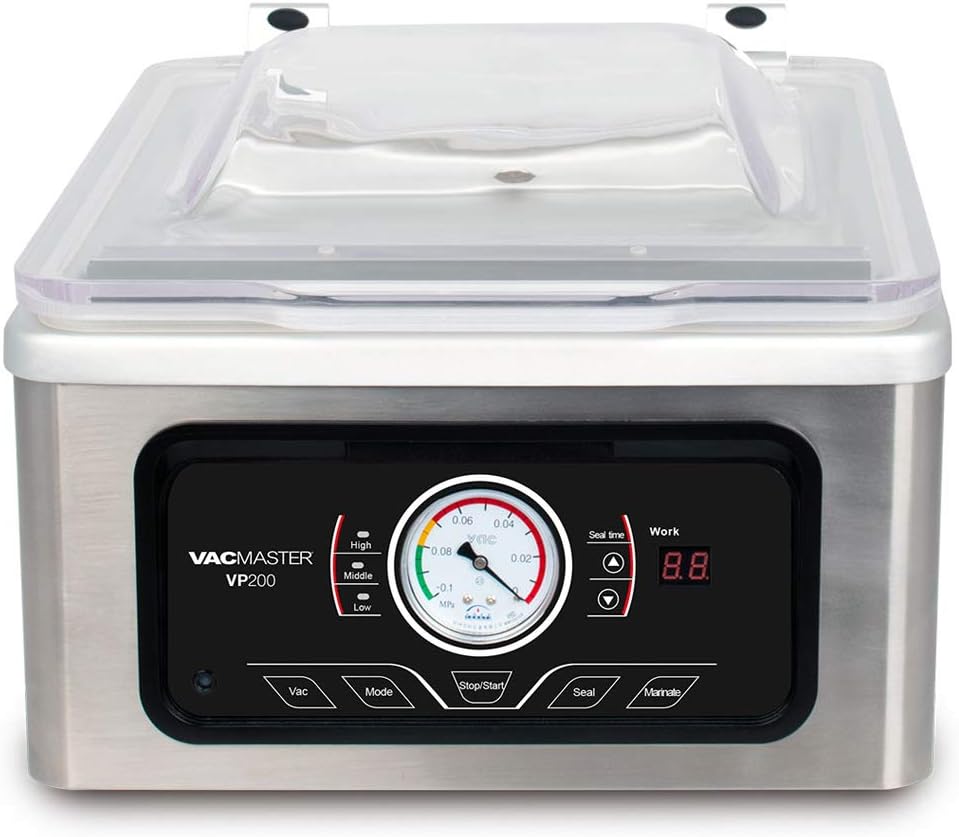
Figure 3.1: Front view of the VacMaster VP200 Chamber Vacuum Sealer with the lid closed, showing the control panel and vacuum gauge.

Figure 3.2: Front view of the VacMaster VP200 Chamber Vacuum Sealer with the lid open, revealing the vacuum chamber and seal bar.

Figure 3.3: The VacMaster VP200 Chamber Vacuum Sealer connected to an external vacuum canister, demonstrating its versatility for various container types.
- Lid: Transparent lid for viewing the vacuum process.
- Vacuum Chamber: The area where the bag is placed for vacuuming.
- Seal Bar: Heats to create a strong, airtight seal on the bag.
- Control Panel: Contains buttons and display for operation.
- Vacuum Gauge: Displays the vacuum level during operation.
- External Vacuum Port: For use with external vacuum canisters (as shown in Figure 3.3).
4. Initial Setup
- Unpacking: Carefully remove the vacuum sealer from its packaging. Retain packaging for future storage or shipping.
- Placement: Place the unit on a stable, flat, and dry surface. Ensure there is adequate space around the unit for ventilation.
- Power Connection: Plug the power cord into a grounded electrical outlet. Ensure the voltage matches the specifications of the unit (110 watts, 120V AC).
- Initial Cleaning: Before first use, wipe down the vacuum chamber and seal bar with a damp cloth and mild soap. Dry thoroughly.
5. Operating Instructions
5.1. Basic Vacuum & Seal Operation
- Prepare the Bag: Use only VacMaster chamber vacuum bags or other high-quality chamber-specific bags. Ensure the bag is large enough for the contents and allows at least 2-3 inches of space above the food for sealing.
- Place Item in Bag: Place the food item into the vacuum bag. For liquids or moist foods, ensure the top of the bag is clean and dry to allow for a proper seal.
- Position Bag in Chamber: Lay the open end of the bag flat across the seal bar, ensuring it is smooth and free of wrinkles. The contents of the bag should be entirely within the vacuum chamber.
- Close Lid: Firmly close the lid until it latches securely.
- Select Vacuum Level (Mode Button):
- Press the Mode button to cycle through vacuum levels: High, Middle, Low. Select the appropriate level based on the food item's fragility.
- The vacuum gauge will indicate the current vacuum pressure.
- Adjust Seal Time (Seal Time Display):
- The "Seal Time" display shows the duration the seal bar will heat. Adjust this based on bag thickness. Thicker bags require longer seal times.
- Use the Up and Down arrows next to the "Seal Time" display to adjust.
- Start Cycle: Press the Stop/Start button to begin the vacuum and seal cycle. The unit will automatically vacuum the air from the chamber, then seal the bag, and finally release the vacuum.
- Open Lid: Once the cycle is complete and the vacuum has released (indicated by the gauge returning to zero), open the lid and remove the sealed bag.
5.2. Marinating Function
The VP200 can also be used for rapid marinating:
- Place food and marinade into a chamber vacuum bag.
- Position the bag in the chamber as described in step 5.1.3.
- Close the lid securely.
- Press the Marinate button. The unit will cycle through vacuum and release phases multiple times to infuse the marinade into the food.
- Once the cycle is complete, open the lid and remove the marinated food.
5.3. External Canister Vacuuming
To use with an external canister (as shown in Figure 3.3):
- Connect one end of the accessory hose to the external vacuum port on the VP200 and the other end to your VacMaster-compatible vacuum canister.
- Ensure the canister lid is properly sealed.
- Press the Vac button. The unit will pull a vacuum on the canister.
- Once the desired vacuum level is reached, press Stop/Start or disconnect the hose.
6. Care and Maintenance
Proper maintenance ensures the longevity and optimal performance of your VacMaster VP200.
- Cleaning the Chamber: After each use, especially when sealing moist foods, wipe the vacuum chamber with a damp cloth and mild, non-abrasive detergent. Dry thoroughly. Do not use harsh chemicals or abrasive cleaners.
- Cleaning the Seal Bar: Gently wipe the seal bar and the Teflon strip with a damp cloth. Ensure no food particles or moisture are present on the sealing area, as this can affect the seal quality.
- Gasket Care: The rubber gasket around the rim of the chamber creates the vacuum seal. Inspect it regularly for cracks, tears, or debris. Clean it with a damp cloth. If damaged, it may need replacement.
- Oil-less Pump: The VacMaster VP200 features an oil-less pump, meaning it does not require oil changes or regular pump maintenance associated with oil-based vacuum pumps. This simplifies upkeep significantly.
- Storage: Store the unit in a clean, dry place. It is recommended to leave the lid slightly ajar when not in use to prevent compression of the gasket and allow air circulation.
7. Troubleshooting Guide
Refer to this section for common issues and their solutions.
| Problem | Possible Cause | Solution |
|---|---|---|
| Unit does not power on. | Not plugged in; power outlet issue; fuse blown. | Ensure unit is securely plugged into a working outlet. Check circuit breaker or fuse. |
| Bag does not vacuum properly. | Lid not closed securely; bag not flat on seal bar; bag has a hole; gasket dirty or damaged. | Ensure lid is latched. Smooth bag on seal bar. Check bag for leaks. Clean or replace gasket. |
| Bag does not seal. | Seal bar dirty/wet; seal time too short/long; bag material incompatible; Teflon strip damaged. | Clean seal bar and ensure it's dry. Adjust seal time. Use proper chamber bags. Inspect and replace Teflon strip if necessary. |
| Vacuum gauge not moving. | Lid not sealed; pump issue. | Ensure lid is firmly closed. If problem persists, contact customer support. |
8. Product Specifications
| Feature | Detail |
|---|---|
| Model Number | VP200 |
| Brand | Vacmaster |
| Power Source | Corded Electric |
| Wattage | 110 watts |
| Item Weight | 27.5 pounds |
| Package Dimensions | 21.4 x 18.4 x 14.5 inches |
| Color | Black, Silver |
| Pump Type | Oil-less Dry Pump |
9. Warranty and Customer Support
For detailed warranty information, product registration, or technical support, please visit the official VacMaster website or contact their customer service department. Keep your purchase receipt as proof of purchase for warranty claims.
Vacmaster Official Website: www.vacmasterfresh.com
For service or parts, please contact VacMaster customer support directly.
Related documentsVP200

Ask a question about this manual
Ask about setup, troubleshooting, compatibility, parts, safety, or missing instructions. Manuals+ will review the question and use this page’s manual context to help answer it.