
Shark AV1002AE
Shark IQ Robot Vacuum AV1002AE User Manual
Model: AV1002AE
Product Overview
The Shark IQ Robot Vacuum AV1002AE with XL Self-Empty Base is designed to provide an effortless and thorough cleaning experience. This advanced robotic vacuum features intelligent navigation, a self-cleaning brushroll, and a self-emptying base that can hold dirt and debris for up to 30 days, minimizing the need for frequent manual emptying. It is suitable for various floor types, including carpets and hard floors, and can be controlled via a mobile application or voice commands.

The Shark IQ Robot Vacuum AV1002AE, its XL Self-Empty Base, and a smartphone displaying the SharkClean app interface.
Key Features
- XL Self-Empty Base: The robot automatically empties its dustbin into the bagless base after each cleaning session, storing up to 30 days of dirt and debris. This feature significantly reduces the frequency of manual emptying.
- Self-Cleaning Brushroll: Designed to actively remove hair wrap, this brushroll ensures consistent performance and reduces the need for manual hair removal from the brush.
- IQ Navigation: The robot methodically cleans row by row, ensuring complete coverage of your home, room to room.
- Total Home Mapping + Room Select: The robot maps your home, allowing you to select specific rooms for immediate cleaning via the app.
- Recharge & Resume: If the battery runs low during a cleaning cycle, the robot returns to its base to recharge and then resumes cleaning exactly where it left off.
- Powerful Pickup on All Floors: The multi-surface brushroll effectively pulls in dirt, debris, and pet hair from both carpets and hard floors.
- App/Voice Control: Easily start, schedule, or customize cleaning sessions using the SharkClean app, Amazon Alexa, or Google Assistant.

The robot vacuum automatically emptying collected debris into its XL Self-Empty Base.
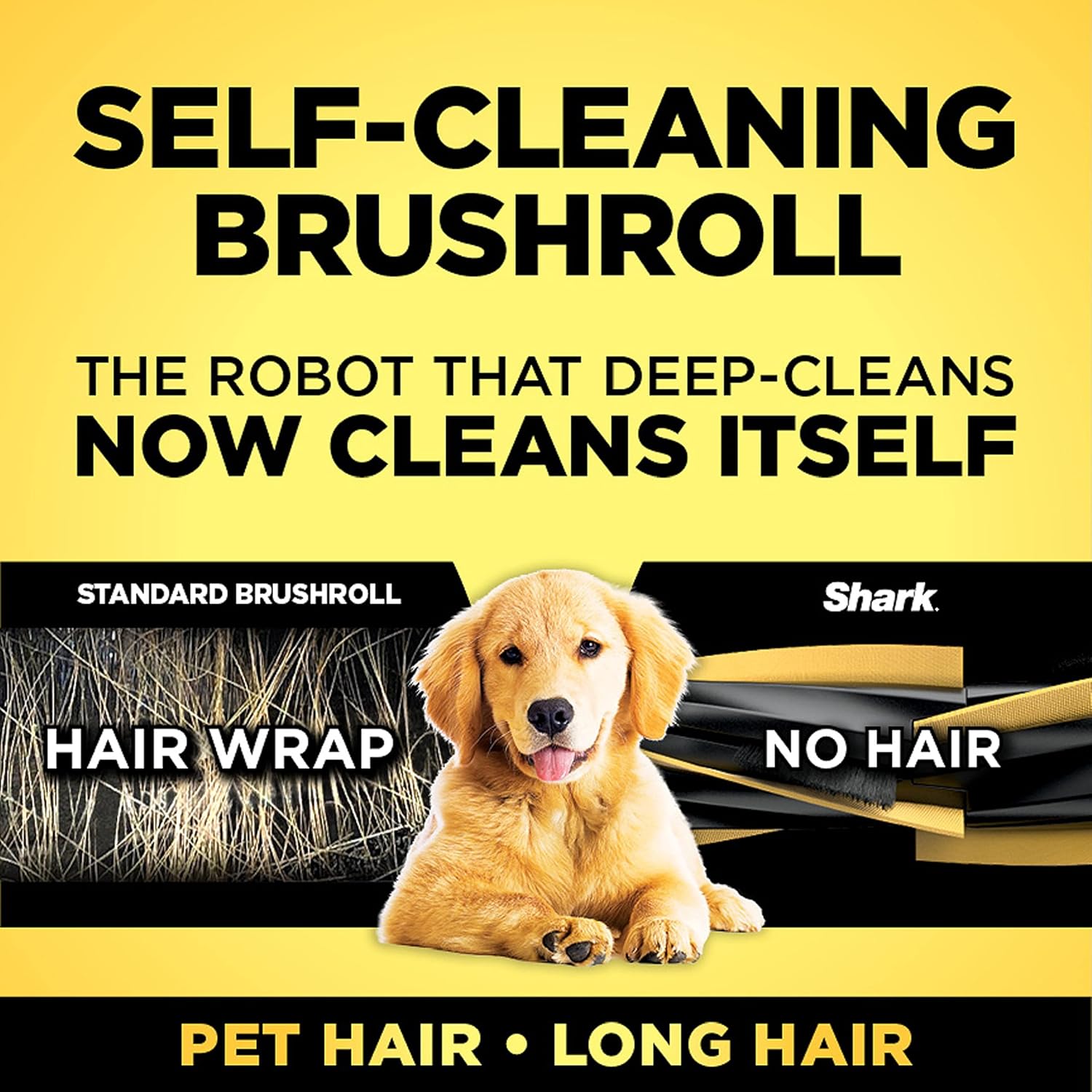
Visual comparison illustrating how the self-cleaning brushroll prevents hair from wrapping around it, unlike standard brushrolls.
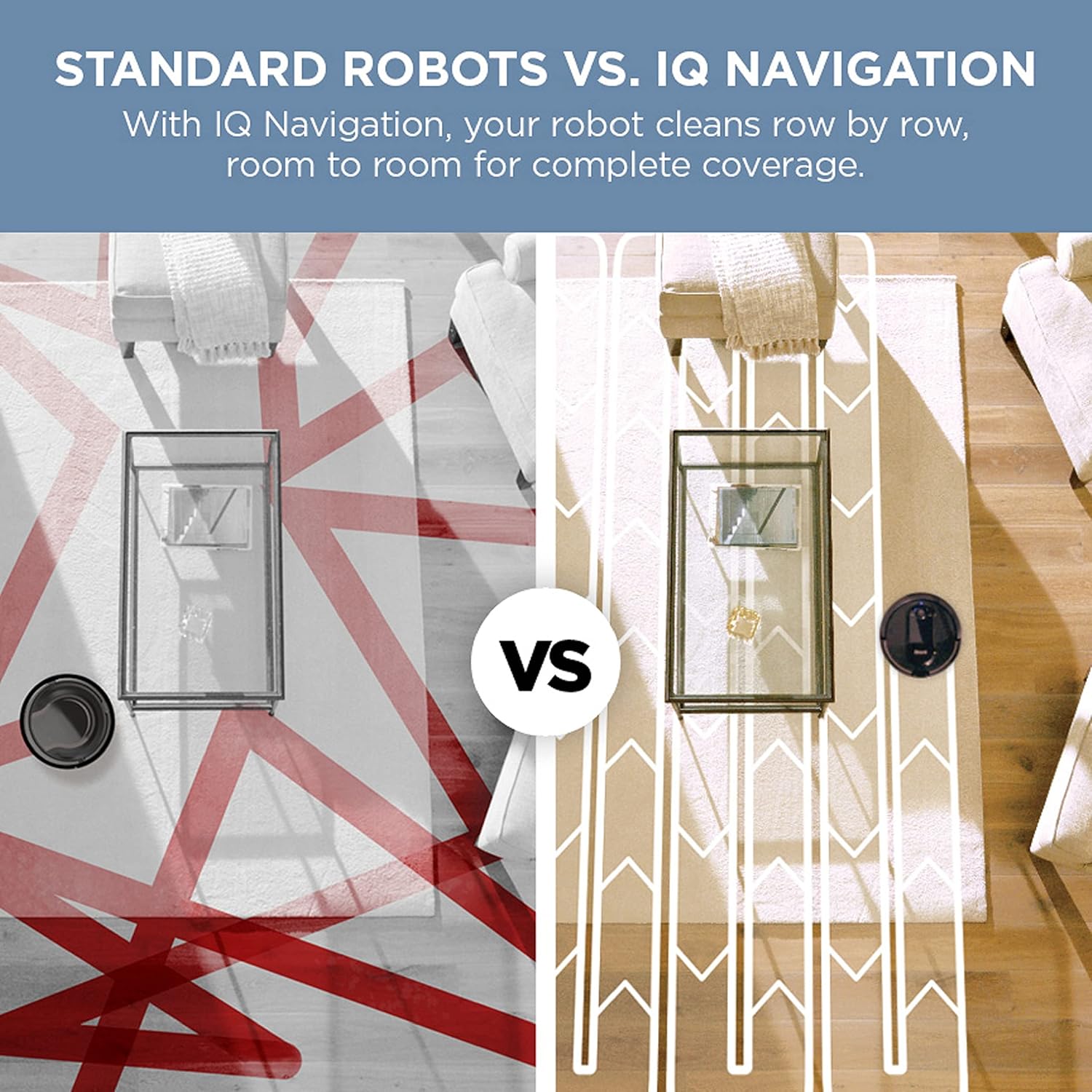
A visual representation of the systematic, row-by-row cleaning path enabled by IQ Navigation, contrasted with a less efficient, random path.

An illustration demonstrating the robot's ability to map your home and allow for selection of specific areas to clean.

The robot vacuum returning to its charging base, illustrating the recharge and resume functionality.

The robot vacuum demonstrating its ability to pick up various types of debris on both carpeted and hard floor surfaces.

The SharkClean app interface on a smartphone, highlighting its compatibility with Google Assistant and Amazon Alexa for convenient control.
What's Included
Your Shark IQ Robot Vacuum AV1002AE package includes the following components:
- Shark IQ Robot Vacuum
- XL Self-Empty Base
- (2) Side Brushes
- (1) High-Efficiency Filter
- BotBoundary Strips (for creating no-go zones)
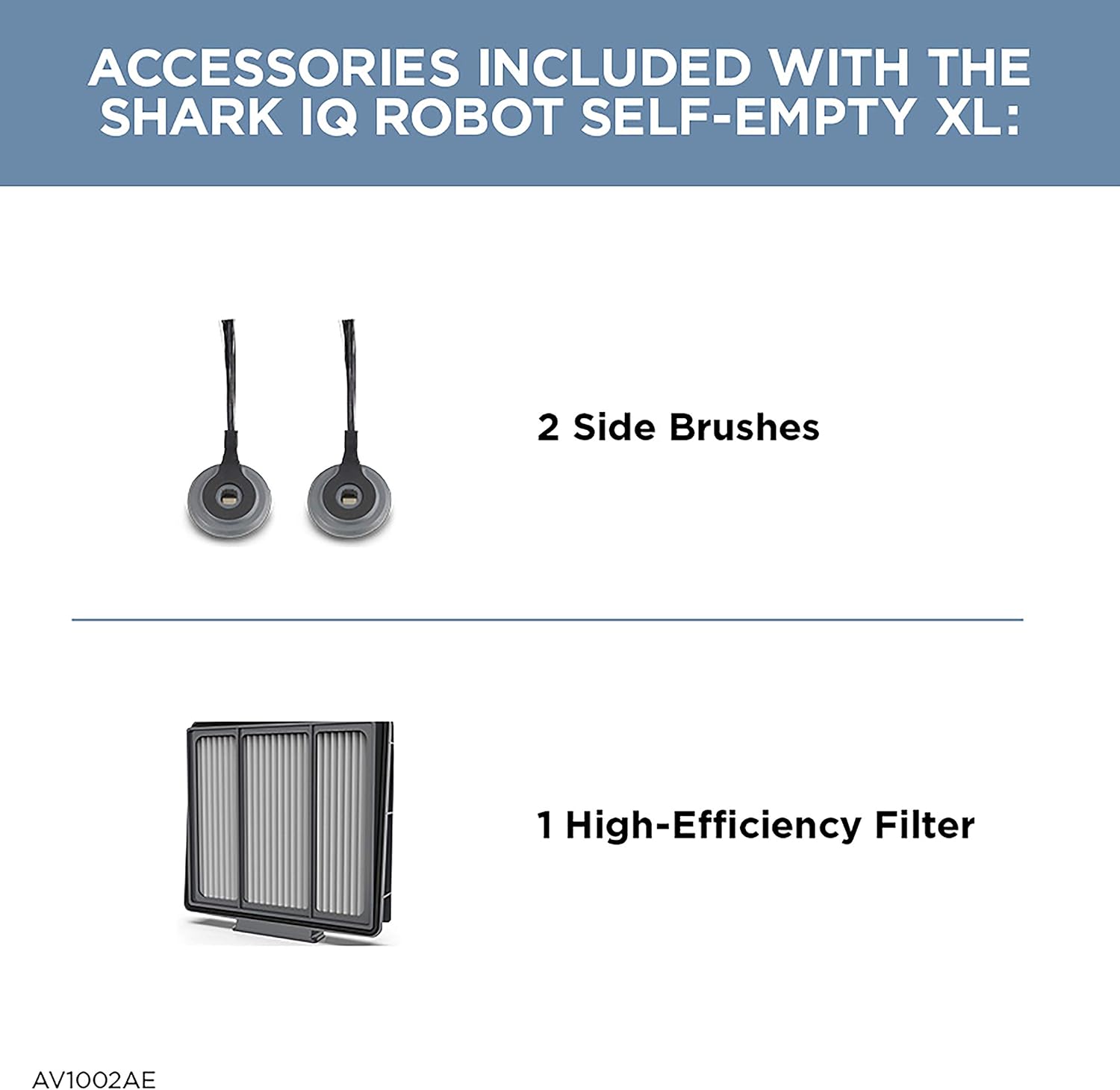
Included accessories: two side brushes and one high-efficiency filter.

Diagram illustrating the main components of the Shark IQ Robot and its Self-Empty Base, including the XL Self-Empty Base, Powerful Vacuum Suction, IQ Navigation, Self-Cleaning Brushroll, and SharkClean App compatibility.
Setup Guide
- Unpack the Robot: Carefully remove all components from the packaging. Remove any protective film or packing materials from the robot and the self-empty base.
- Place the Self-Empty Base: Choose a permanent location for the self-empty base. It should be placed against a wall in an area with a strong Wi-Fi signal, free from obstacles for at least 3 feet on either side and 5 feet in front. Ensure the base is on a level surface.
- Connect Power: Plug the power cord of the self-empty base into a wall outlet. The power indicator light on the base will illuminate.
- Install Side Brushes: Snap the two side brushes onto the square pegs on the bottom of the robot until they click into place.
- Charge the Robot: Place the robot onto the self-empty base. Ensure the charging contacts on the robot align with those on the base. The robot will begin charging automatically. Allow the robot to fully charge before its first use (approximately 6 hours). The battery indicator lights on the robot will show charging status.
- Download the SharkClean App: Download the SharkClean app from the App Store (iOS) or Google Play Store (Android).
- Connect to Wi-Fi: Follow the in-app instructions to connect your robot to your home Wi-Fi network. This step is crucial for accessing smart features like mapping, scheduling, and remote control.
- Install BotBoundary Strips (Optional): Use the included BotBoundary strips to create no-go zones for your robot, preventing it from entering specific areas or getting stuck. Cut the strips to the desired length and place them flat on the floor.
Operating Instructions
First Clean and Mapping
For the robot to effectively map your home, ensure all doors are open and clear any small obstacles from the floor. Initiate the first cleaning cycle via the SharkClean app or by pressing the 'Clean' button on the robot. The robot will explore and map your home during this initial run.
Starting a Cleaning Cycle
- Using the App: Open the SharkClean app, select your robot, and tap 'Clean' to start a full home clean. You can also schedule future cleanings or select specific rooms to clean.
- Using the Robot Buttons: Press the 'Clean' button on the robot to start a full home clean. Press it again to pause, and a third time to send the robot back to its base.
- Voice Control: If connected to Amazon Alexa or Google Assistant, use voice commands such as "Alexa, tell Shark to start cleaning" or "Hey Google, ask Shark to clean my living room."
Scheduling Cleanings
The SharkClean app allows you to set up recurring cleaning schedules. You can choose specific days and times for the robot to automatically start cleaning. This feature ensures your floors are consistently maintained without manual intervention.
Spot Cleaning
For targeted cleaning of a small area, manually place the robot over the desired spot and press the 'Spot Clean' button (if available on your model or via app). The robot will clean in a concentrated spiral pattern.
Maintenance
Regular maintenance is essential to keep your Shark IQ Robot Vacuum operating at peak performance. Always turn off the robot and disconnect the self-empty base from power before performing any maintenance.
Emptying the Self-Empty Base
The self-empty base is designed to hold debris for up to 30 days. When the dustbin in the base is full, the app will notify you. To empty:
- Lift the lid of the self-empty base.
- Remove the dustbin.
- Empty the contents into a trash can.
- Replace the dustbin and close the lid securely.
Cleaning the Robot Dustbin and Filter
Although the robot self-empties, it's recommended to periodically check and clean the robot's internal dustbin and filter.
- Press the dustbin release button and slide out the dustbin from the robot.
- Open the dustbin and empty debris.
- Remove the filter from the dustbin. Tap off loose dirt. The filter can be rinsed with water; ensure it is completely dry before reinserting.
- Wipe the inside of the dustbin with a dry cloth.
- Reinsert the filter and close the dustbin, then slide it back into the robot.
Cleaning the Brushroll
While the brushroll is self-cleaning, long hair or pet fur may occasionally wrap around it. Inspect the brushroll regularly.
- Open the brushroll access door on the bottom of the robot.
- Lift out the brushroll.
- Use scissors to carefully cut away any hair or debris wrapped around the brushroll.
- Clean any debris from the brushroll bearings.
- Reinsert the brushroll and close the access door.
Cleaning Side Brushes
Check side brushes for wear or debris. If bent or damaged, they can be replaced. Remove any hair or debris wrapped around them.
Cleaning Sensors and Charging Pads
Wipe the cliff sensors, bumper sensors, and charging pads on both the robot and the base with a clean, dry cloth. This ensures proper navigation and charging.
Troubleshooting
| Problem | Possible Cause | Solution |
|---|---|---|
| Robot not charging | Robot not properly docked; charging contacts dirty; power cord unplugged. | Ensure robot is fully seated on base. Clean charging contacts on robot and base with a dry cloth. Check power cord connection. |
| Robot gets stuck frequently | Obstacles on floor; cliff sensors dirty; robot stuck on high-pile carpet/rugs. | Clear floor of loose cables, small objects. Clean cliff sensors. Use BotBoundary strips for problem areas or remove problematic rugs. |
| Poor cleaning performance | Dustbin full; filter clogged; brushroll tangled; side brushes worn. | Empty robot dustbin and self-empty base. Clean/replace filter. Clean brushroll and side brushes. |
| Robot not connecting to Wi-Fi | Incorrect Wi-Fi password; weak signal; router issues. | Double-check password. Move base closer to router. Restart router and robot. Ensure 2.4GHz network is used. |
| Self-empty base not emptying robot | Base dustbin full; blockage in base or robot emptying port. | Empty the self-empty base dustbin. Check for and clear any blockages in the suction path of the base or the robot's emptying port. |
Specifications
| Feature | Detail |
|---|---|
| Brand | Shark |
| Model Name | IQ Robot Vacuum AV1002AE with XL Self-Empty Base |
| Model Number | AV1002AE |
| Special Feature | Bagless |
| Product Dimensions | 12.9"L x 12.6"W x 3.5"H |
| Included Components | (1) BotBoundary Strips, (1) Self-empty base, (1) Shark IQ Robot, Filter, Side Brush |
| Filter Type | HEPA |
| Voltage | 120 Volts (AC) |
| Capacity (Dustbin) | 0.17 Quarts |
| Power Source | Battery Powered |
| Control Method | Voice, App |
| Compatible Devices | Amazon Echo, Smartphones, Tablets |
| Form Factor | Robotic |
| Item Weight | 5.87 pounds |
| Assembly Required | Yes |
| Specific Use | Carpet, Dual Action, Hard Floor |
Warranty and Support
The Shark IQ Robot Vacuum AV1002AE comes with a 1-year limited warranty from the date of purchase. This warranty covers defects in material and workmanship under normal household use.
For warranty claims, technical support, or to purchase replacement parts, please contact Shark customer service. Refer to the official Shark website or the contact information provided in your product packaging for the most up-to-date support details.
It is recommended to register your product online to facilitate warranty service and receive important product updates.
Ask a question about this manual
Ask about setup, troubleshooting, compatibility, parts, safety, or missing instructions. Manuals+ will review the question and use this page’s manual context to help answer it.