
Introduction
Welcome to the user manual for your new KIDdesigns LOL SURPRISE Sing Along Karaoke BoomBox for Kids. This manual provides important information on how to set up, operate, and maintain your device. Please read it thoroughly before use to ensure proper functionality and safety.
The LOL SURPRISE Sing Along Karaoke BoomBox is designed to provide hours of musical fun for children. It features built-in music, LED flashing lights, and a working microphone, allowing kids to sing along to their favorite tunes or connect an external MP3 player for more song options. Its portable and durable design makes it suitable for both indoor and outdoor use.
Safety Information
Please observe the following safety precautions to prevent injury or damage to the device:
- WARNING: Not suitable for children under 3 years due to small parts that may present a choking hazard.
- Always supervise young children during use.
- Do not expose the device to water or excessive moisture.
- Do not attempt to disassemble or modify the device.
- Use only the specified battery type (3 "AA" batteries). Ensure correct polarity when inserting batteries.
- Remove batteries if the device will not be used for an extended period.
- Keep the device away from heat sources and direct sunlight.
Package Contents
Please check the package to ensure all items are present:
- LOL SURPRISE Sing Along Karaoke BoomBox Unit
- Microphone
- User Manual (this document)
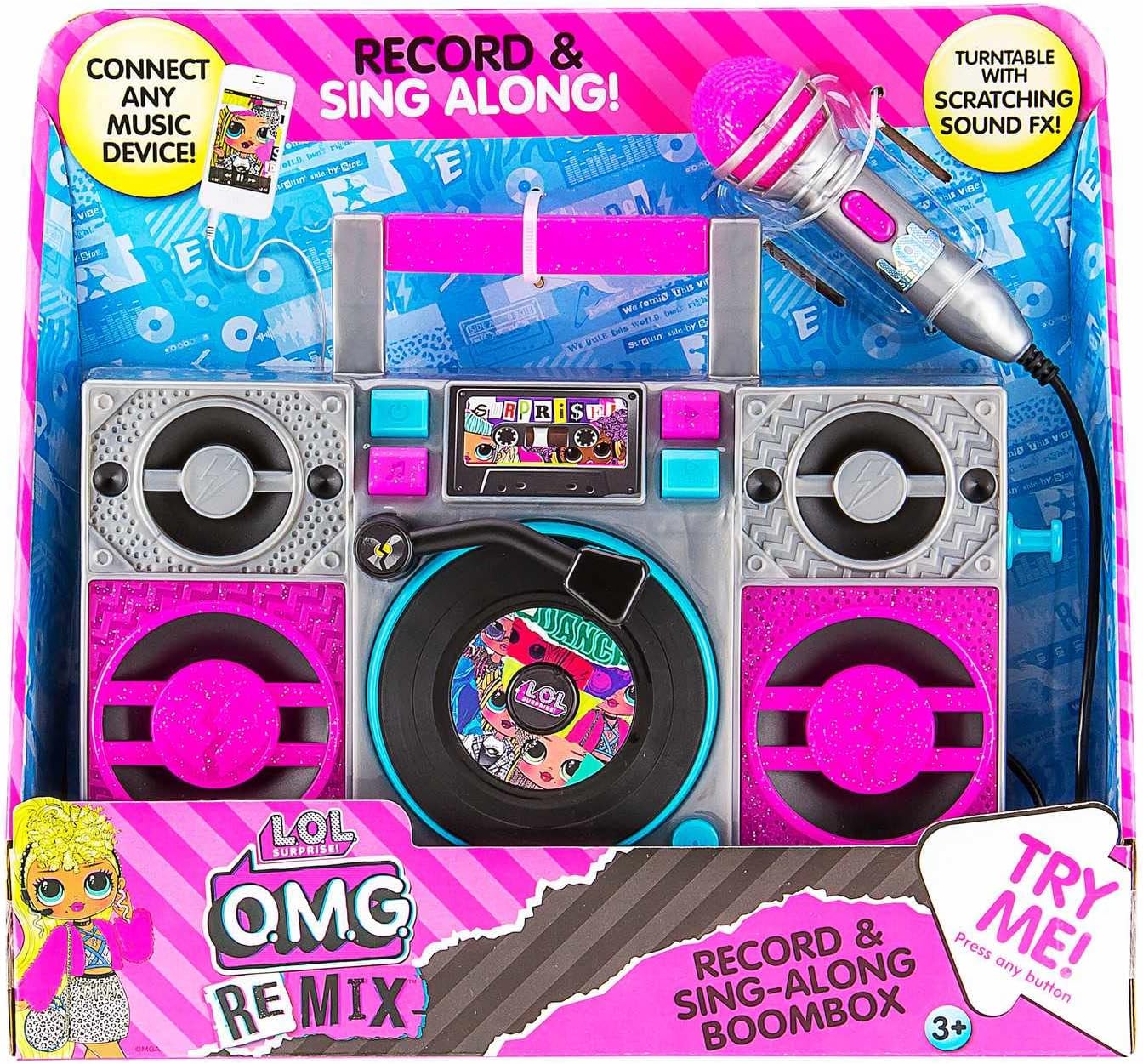
Image: The LOL SURPRISE Karaoke BoomBox as it appears in its retail packaging, highlighting its key features and included microphone.
Product Overview
Familiarize yourself with the different parts of your Karaoke BoomBox.

Image: Front view of the Karaoke BoomBox, illustrating its various components including speakers, central controls, and the attached microphone.
- Handle: For easy portability.
- Speakers: Output audio.
- Control Panel/Display: For selecting modes and viewing status.
- Turntable (Decorative): Features scratching sound effects.
- Microphone Input: Connect the included microphone here.
- Microphone: For singing along.
- Auxiliary Input: Connect external audio devices (e.g., MP3 player, smartphone).
- Battery Compartment: Located on the back/bottom of the unit.
Setup
1. Battery Installation
The Karaoke BoomBox requires 3 "AA" batteries (not included).
- Locate the battery compartment on the back or bottom of the unit.
- Using a Phillips head screwdriver, unscrew the battery compartment cover.
- Insert 3 "AA" batteries, ensuring the correct polarity (+/-) as indicated inside the compartment.
- Replace the battery compartment cover and secure it with the screw.
2. Microphone Connection
Connect the included microphone to the microphone input jack on the unit.
Operating Instructions
Powering On/Off
- To turn the unit ON, locate the Power button (usually on the front panel) and press it.
- To turn the unit OFF, press the Power button again.
Playing Built-in Music
- Once powered on, the unit may automatically start playing built-in music.
- Use the control buttons (e.g., Play/Pause, Next, Previous) on the front panel to navigate through the built-in songs.
Connecting an External Audio Device (MP3 Player/Smartphone)
You can connect your own music device to sing along to your favorite songs.

Image: The Karaoke BoomBox, showing the auxiliary input for connecting external audio devices like MP3 players or smartphones.
- Ensure the Karaoke BoomBox is powered on.
- Connect one end of a 3.5mm audio cable (not included) to the Auxiliary Input jack on the BoomBox.
- Connect the other end of the audio cable to the headphone jack or audio output of your MP3 player, smartphone, or other audio device.
- Start playing music on your connected device. The audio will now play through the BoomBox speakers.
- Adjust the volume on both your connected device and the BoomBox for optimal sound.
Using the Microphone
- Once the microphone is connected, simply speak or sing into it. Your voice will be amplified through the BoomBox speakers.
- Adjust the microphone volume if available on the unit, or control the overall volume.
LED Flashing Lights
The unit features built-in LED flashing lights that activate during operation, adding to the karaoke experience.
Turntable Scratching Sound Effects
The decorative turntable on the front of the unit can be manually spun to produce fun scratching sound effects.
Maintenance
- Cleaning: Wipe the unit with a soft, dry cloth. Do not use abrasive cleaners or solvents.
- Storage: Store the unit in a cool, dry place away from direct sunlight when not in use.
- Battery Care: Remove batteries if the unit will not be used for an extended period to prevent battery leakage.
Troubleshooting
| Problem | Possible Cause | Solution |
|---|---|---|
| Unit does not turn on. | Batteries are dead or incorrectly inserted. | Replace with new "AA" batteries, ensuring correct polarity. |
| No sound from speakers. | Volume is too low; external device not connected properly or volume too low. | Increase volume on the BoomBox and/or the connected external device. Ensure audio cable is fully inserted. |
| Microphone not working. | Microphone not fully plugged in. | Ensure the microphone cable is securely plugged into the microphone input jack. |
| Distorted sound. | Volume too high; low batteries. | Lower the volume. Replace batteries if they are low. |
Specifications
- Model: LOL SURPRISE Sing Along Karaoke BoomBox
- Brand: EKIDS
- Dimensions (L x W x H): 30.48 x 8.74 x 27.94 cm (12 x 3.44 x 11 inches)
- Weight: 750 grams (1.65 lbs)
- Recommended Age: 3 years and up
- Power Source: Battery Powered
- Batteries Required: 3 x "AA" (not included)
- Connectivity: Auxiliary Input (3.5mm)
- Number of Speakers: 1
- Voltage: 4.5 Volts
- UPC: 092298950778
- Components Included: Karaoke BoomBox, Microphone
Warranty and Support
This product is manufactured by eKids. For warranty information or technical support, please refer to the contact information provided on the product packaging or visit the official eKids website. Keep your purchase receipt as proof of purchase for any warranty claims.
For further assistance, you may visit the EKIDS Brand Store on Amazon.