
1. Introduction
Welcome to the user manual for your new Hisense 55" 4K UHD Roku TV, model 55R6000GM. This television combines stunning 4K Ultra High Definition visuals with the intuitive Roku operating system, offering a seamless entertainment experience. This manual provides essential information for setting up, operating, maintaining, and troubleshooting your TV to ensure optimal performance and enjoyment.
2. Setup
2.1 What's in the Box
- Hisense 55" 4K UHD Roku TV
- Remote Control
- User Manual
- TV Stands (2) and Screws
- Power Cord
2.2 Attaching the TV Stands
Carefully place your TV face-down on a soft, clean surface to prevent damage. Align each stand with the corresponding screw holes on the bottom of the TV. Secure the stands using the provided screws. Ensure the stands are firmly attached before placing the TV upright.

The Hisense 55R6000GM 4K UHD Roku TV, showcasing its display and attached stand feet, ready for placement on a media console.
2.3 Powering On and First-Time Setup
Connect the power cord to the TV and a power outlet. Press the power button on the remote control. Follow the on-screen instructions to complete the initial setup, including language selection, network connection, and Roku account linking.
3. Operating Your Roku TV
3.1 Roku TV Operating System
The Roku TV OS provides a simple, customizable home screen where you can access streaming channels, live TV, and connected devices. Navigate using the remote control's directional pad.
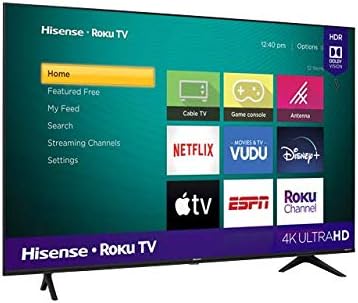
A view of the Hisense Roku TV's home screen, displaying popular streaming applications like Netflix, Prime Video, and Disney+, along with various input options.
3.2 Voice Control
Utilize the voice control feature on your remote to search for content, launch apps, change inputs, and control playback. Simply press the microphone button on your remote and speak your command clearly.
3.3 Remote Control Functions
The included remote control offers intuitive navigation and quick access to essential functions and popular streaming services.

The compact remote control for the Hisense Roku TV, featuring dedicated buttons for popular streaming services and essential navigation.
4. Key Features
4.1 4K Ultra HD and Motion Rate 120
Experience stunning clarity with 4K Ultra HD resolution, offering over four times the pixels of Full HD. Motion Rate 120 technology ensures smooth, fluid motion for fast-paced action scenes, sports, and gaming.

The Hisense 55R6000GM TV screen showcasing a vibrant, high-resolution 4K image, demonstrating its visual capabilities.
4.2 HDR Dolby Vision and HDR10
With HDR Dolby Vision and HDR10 support, your TV delivers enhanced contrast, brighter highlights, and a wider range of colors, bringing content to life with incredible realism.
4.3 DTS Studio Sound
DTS Studio Sound creates virtual surround sound for a clear and immersive audio experience, complementing the stunning visuals.
4.4 Bezel-less Design
The television features an elegant, bezel-less design that maximizes screen space, providing a more immersive viewing experience and a sleek aesthetic.

A close-up of the Hisense 55R6000GM TV's display, emphasizing its modern, thin-bezel design for an immersive viewing experience.
5. Connectivity
5.1 Available Ports
Your Hisense Roku TV offers a variety of ports for connecting external devices:
- HDMI Inputs (x3): For connecting Blu-ray players, game consoles, soundbars, and other HDMI-enabled devices.
- USB Port (x1): For connecting USB storage devices to play media files.
- LAN (Ethernet) Port: For a wired internet connection.
- Wireless Connectivity: Built-in Wi-Fi for internet access and screen mirroring (Roku).
- Audio Input/Output: Various audio options including Bluetooth.
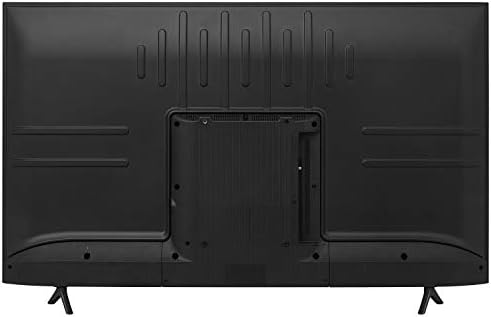
The back panel of the Hisense 55R6000GM TV, illustrating the arrangement of its HDMI, USB, and other connectivity ports for external devices.
5.2 Wi-Fi and Bluetooth Connectivity
Connect your TV to your home network wirelessly via Wi-Fi for streaming content. Bluetooth connectivity allows you to pair compatible audio devices.
6. Technical Specifications
| Feature | Specification |
|---|---|
| Screen Size | 55 Inches |
| Resolution | 4K Ultra HD (3840 x 2160) |
| Refresh Rate | 60 Hz (Motion Rate 120) |
| Display Technology | LED |
| HDR Support | HDR Dolby Vision, HDR10 |
| Operating System | ROKU TV |
| Audio Technology | DTS Studio Sound |
| Connectivity | 3x HDMI, 1x USB, LAN, Wi-Fi, Bluetooth |
| Dimensions (DxWxH) | 22.6 x 123 x 180.9 cm (with stand) |
| Weight | 12.6 Kilograms |
| Model Year | 2020 |
Note: Dimensions are approximate and may vary slightly.
7. Care and Maintenance
To ensure the longevity and optimal performance of your Hisense TV, follow these care guidelines:
- Cleaning the Screen: Gently wipe the screen with a soft, dry microfiber cloth. For stubborn marks, slightly dampen the cloth with water or a screen-cleaning solution specifically designed for electronics. Avoid harsh chemicals or abrasive materials.
- Cleaning the Body: Use a soft, dry cloth to clean the TV's frame and back panel.
- Ventilation: Ensure adequate airflow around the TV. Do not block ventilation openings.
- Power: Unplug the TV from the power outlet during lightning storms or when it will be left unattended for long periods.
- Placement: Avoid placing the TV in direct sunlight, near heat sources, or in areas with high humidity.
8. Troubleshooting
If you encounter issues with your TV, refer to the following common troubleshooting steps:
- No Power: Check if the power cord is securely connected to both the TV and the power outlet. Ensure the outlet is functional.
- No Picture/Sound: Verify that the correct input source is selected. Check all cable connections (HDMI, etc.) for looseness.
- Remote Not Working: Replace the remote control batteries. Ensure there are no obstructions between the remote and the TV's IR sensor.
- Network Connection Issues: Restart your router and modem. Go to the TV's network settings to reconnect to Wi-Fi or check the wired connection.
- Picture Quality Issues: Adjust picture settings (brightness, contrast, color) in the TV menu. Ensure the content source is high quality.
For more detailed troubleshooting or persistent issues, consult the full user manual or contact Hisense customer support.
9. Warranty Information and Support
Your Hisense 55" 4K UHD Roku TV 55R6000GM comes with a standard manufacturer's warranty.
- Warranty Period: 12 months directly with the manufacturer.
- Warranty Coverage: Covers defects in materials and workmanship under normal use. Specific terms and conditions apply.
- Customer Support: For warranty claims, technical assistance, or service inquiries, please refer to the contact information provided in your product's packaging or visit the official Hisense website.
Please retain your proof of purchase for warranty purposes.