
Introduction
This manual provides comprehensive instructions for the LAMPAOUS Smart Cabinet Lights, Model YF-P-CA-04. These LED light bars are designed for under-cabinet lighting, offering adjustable white light from warm to cool tones, dimming capabilities, and smart control options via voice assistants and a smartphone application. Please read this manual thoroughly before installation and operation to ensure proper use and longevity of the product.
Package Contents
Verify that all components listed below are included in your package:
- LED light bars (6 units)
- Smart control box (1 unit)
- UL listed power supply (1 unit)
- Extension cords (various lengths)
- Installation accessories (adhesive tape, cord fasteners, spring clips, screws)

Image: Overview of all included components, such as LED light bars, smart control box, power supply, extension cords, and various mounting accessories.
Safety Information
Please observe the following safety precautions:
- This product is designed for indoor use only. Do not expose to water or high humidity.
- Ensure the power supply is connected to a compatible electrical outlet (120V AC).
- Do not attempt to modify or disassemble the light bars or power supply.
- Keep the product away from heat sources and direct sunlight.
- Disconnect power before cleaning or performing any maintenance.
Installation Guide
Mounting Options
The light bars can be mounted using either the provided 3M adhesive tape or screws. Choose the method best suited for your surface and desired permanence.
Step-by-Step Installation
- Plan Layout: Determine the desired placement for each light bar and the smart control box. Ensure the power supply can reach an outlet.
- Clean Surface: Thoroughly clean and dry the mounting surface to ensure optimal adhesion for the adhesive tape or secure screw placement.
- Connect Light Bars: Connect the LED light bars to each other and to the smart control box using the provided connectors and extension cords. Ensure connections are secure.
- Mount Light Bars:
- Adhesive Tape: Peel the backing from the 3M adhesive tape and firmly press each light bar onto the desired surface for at least 30 seconds.
- Screws/Clips: Use the provided screws and spring clips to secure the light bars. Pre-drill pilot holes if necessary.
- Mount Control Box: Secure the smart control box in an accessible location using adhesive tape or screws.
- Manage Cables: Use the included cord fasteners and cable clips to organize and secure all cables for a neat installation.
- Connect Power: Plug the UL listed power supply into the smart control box, then plug the power supply into a wall outlet.
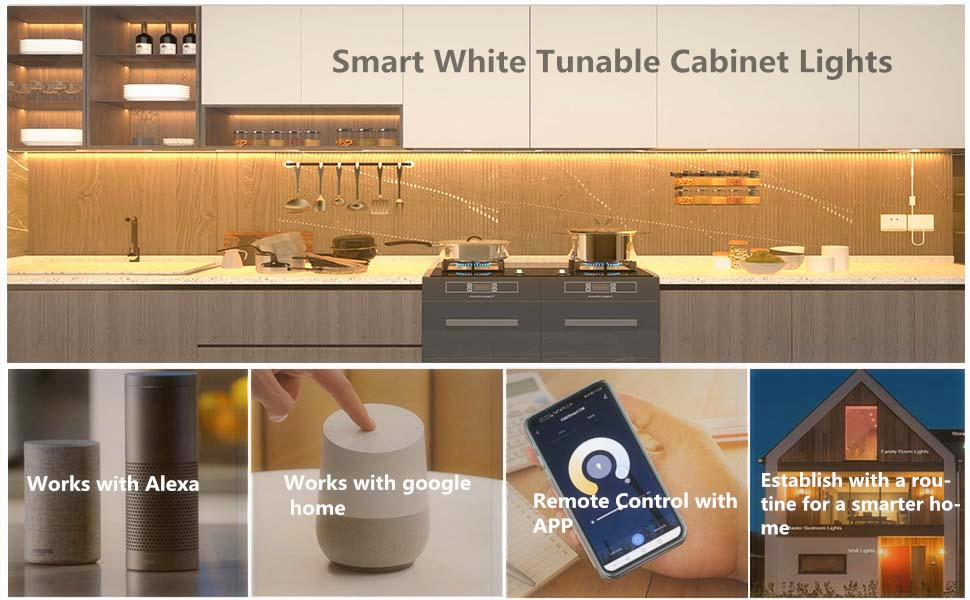
Image: Wiring diagram illustrating how to connect multiple light bars and the control unit.

Image: Example of installed light bars providing illumination under kitchen cabinets.
Operation
Power On/Off and Dimming
Once installed and powered, the lights can be turned on or off and dimmed using the physical switch on the control box or through the smart control features.
Smart Control Features
The LAMPAOUS Smart Cabinet Lights are compatible with various smart home systems, offering flexible control options:
- Voice Control: Compatible with Alexa, Echo, and Google Assistant. Use voice commands to turn lights on/off, adjust brightness, and change color temperature.
- Smartphone App Control: Use the Smart Life App to control your lights from anywhere. The app allows for easy dimming, switching, and advanced settings.
Video: Demonstration of the Smart CW White Tunable (2700K to 6500K) Cabinet Lights in operation, showcasing color temperature adjustment and smart features.

Image: Voice control in a kitchen setting, demonstrating interaction with Alexa to manage lighting.

Image: Smartphone app remote control, showing how to adjust lights from any location.
White Tunable & Stepless Dimming
Adjust the light color temperature from 2700K (warm white) to 6500K (cool white) to suit different moods or tasks. The brightness can be smoothly dimmed from 10% to 100% without flickering or buzzing, providing versatile illumination for any occasion.

Image: Visual representation of the full range white color adjustability, from warm to cool white.
Timer Function
Utilize the timer function through the smartphone app to set schedules for automatically turning the strip lights on or off. This feature allows for automated lighting routines, such as a wake-up light or ensuring lights are off at bedtime.

Image: Timer setting in a bedroom, showing lights turning on/off according to a schedule.
Customized Scenes
Create and save personalized lighting scenes within the smartphone app to match different activities or moods. This allows for quick activation of preferred light settings.

Image: Examples of customized lighting scenes for various home areas.
Maintenance
The LAMPAOUS Smart Cabinet Lights require minimal maintenance. Follow these guidelines:
- Cleaning: Gently wipe the light bars with a soft, dry cloth. Do not use abrasive cleaners or solvents. Ensure the power is disconnected before cleaning.
- Storage: If storing the lights for an extended period, disconnect them from power and store in a cool, dry place.
Troubleshooting Common Issues
If you encounter problems with your LAMPAOUS Smart Cabinet Lights, refer to the following common issues and solutions:
- Lights not turning on:
- Check if the power supply is securely plugged into both the control box and the wall outlet.
- Ensure the physical switch on the control box is in the 'On' position.
- Verify that all light bar connections are firm.
- Lights flickering or inconsistent:
- Check all connections between light bars and the control box for looseness.
- Ensure the power supply is stable and not overloaded.
- Cannot connect to Wi-Fi or app:
- Ensure your Wi-Fi network is 2.4GHz. The lights may not support 5GHz networks.
- Verify that your Wi-Fi signal is strong in the installation area.
- Restart your Wi-Fi router and the smart control box.
- Follow the app's pairing instructions carefully, including any reset procedures for the control box.
- Voice control not responding:
- Ensure your smart assistant (Alexa, Google Assistant) is properly linked to the Smart Life App.
- Check if your smart assistant device is online and functioning correctly.
- Verify the device names in the Smart Life App match the names you are using for voice commands.
Product Specifications

Image: Key lighting facts and energy information for the LED light bars.
| Feature | Specification |
|---|---|
| Brand | LAMPAOUS |
| Model Number | YF-P-CA-04 |
| Power Source | Corded Electric |
| Wattage | 24 Watts (total for 6 light bars) |
| Brightness | 1920 Lumens (total) |
| Light Color | Tunable White (2700K Warm White to 6500K Cool White) |
| Control Method | Voice (Alexa, Google Assistant), App Control |
| Connectivity Protocol | Bluetooth, Wi-Fi |
| Mounting Type | 3M Adhesive Tape or Screw |
| Indoor/Outdoor Usage | Indoor Only |
| Material | Aluminum, Plastic |
| Number of Light Sources | 180 LEDs |
| Voltage | 120 volts_of_alternating_current |
Warranty and Support
LAMPAOUS products are manufactured with quality and reliability in mind. For specific warranty details and support, please refer to the warranty card included with your product or visit the official LAMPAOUS website. For technical assistance or inquiries, please contact LAMPAOUS customer service.


