
Introduction
Thank you for choosing the HOMCOM Electric Lift Recliner Chair. This manual provides essential information for the safe and efficient use of your new chair. Please read all instructions carefully before assembly and operation. Keep this manual for future reference.
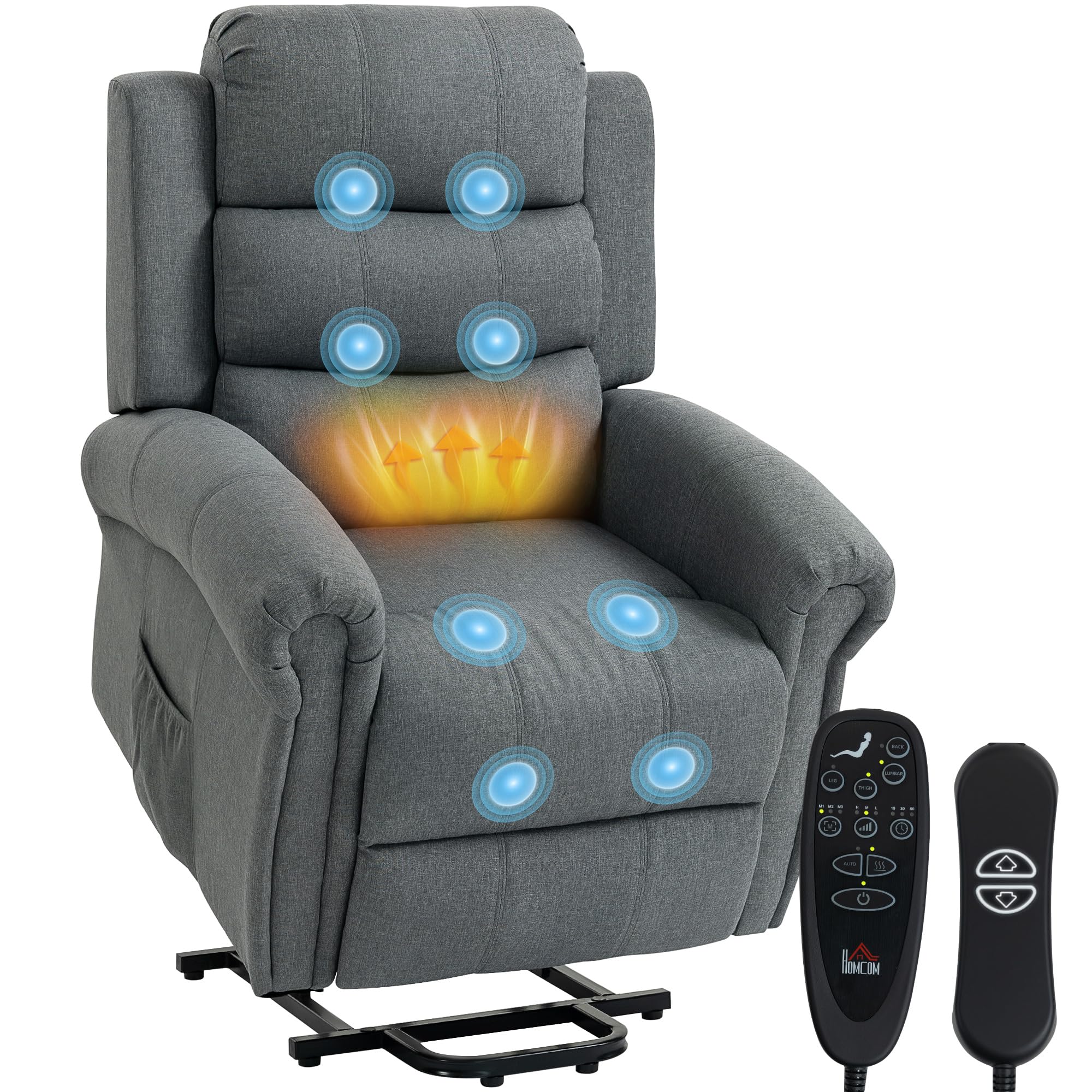
Figure 1: HOMCOM Electric Lift Recliner Chair in a living room setting.
Important Safety Instructions
To reduce the risk of electric shock, fire, injury to persons, or damage to the chair, please follow these basic safety precautions:
- Read all instructions: Before using the electric lift recliner, read all instructions carefully.
- Electrical Safety: Ensure the power cord is not pinched or damaged. Do not operate the chair if the cord or plug is damaged. Connect to a properly grounded outlet only.
- Weight Capacity: Do not exceed the maximum recommended load of 150 kg (330 lbs).
- Children and Pets: Keep children and pets away from the chair, especially when it is in motion. Do not allow them to play on or around the chair.
- Clear Surroundings: Ensure there is adequate space around the chair for safe operation of the lift and recline functions. Keep hands and feet clear of moving parts.
- Stable Surface: Place the chair on a flat, stable surface. Avoid placing it on uneven floors or thick carpets that might obstruct the lift mechanism.
- Unplug When Not in Use: Always unplug the chair from the power outlet before cleaning, maintenance, or if it will be unused for an extended period.
- Avoid Liquids: Do not spill liquids on the chair or its electrical components.
- Medical Conditions: Consult a physician before using the massage and heating functions if you have any medical conditions, especially heart conditions, pacemakers, or are pregnant.
Product Components
The HOMCOM Electric Lift Recliner Chair typically includes the following components:
- Backrest
- Armrests
- Seat Base with Footrest and Lift Mechanism
- Remote Control
- Power Adapter and Cable
- Assembly Hardware (screws, bolts, etc.)
Assembly Instructions
Assembly is required for this chair. Please follow these general steps. Specific details may vary, refer to the included assembly diagram if available.
- Unpack Components: Carefully remove all parts from the packaging. Place them on a soft, clean surface to prevent scratches.
- Attach Backrest: Align the metal brackets on the backrest with the corresponding slots on the seat base. Slide the backrest down until it locks securely into place.
- Connect Armrests: If separate, attach the armrests to the sides of the seat base using the provided hardware. Ensure they are firmly secured.
- Connect Electrical Cables: Locate the electrical cables extending from the backrest and seat base. Connect them according to the labels. Connect the remote control cable to the designated port.
- Connect Power Adapter: Plug the power adapter into the chair's power input, then plug the adapter into a grounded wall outlet.
- Test Functions: Before use, test all functions (lift, recline, massage, heat) using the remote control to ensure proper assembly and operation.

Figure 2: The chair demonstrating its lift and recline capabilities.
Operating Instructions
The HOMCOM Electric Lift Recliner Chair is operated using a wired remote control. Familiarize yourself with the remote's buttons for optimal use.
Power Lift Function
The power lift function assists users in standing up from the chair. Press and hold the UP button on the remote control. The chair will slowly tilt forward and lift, helping you to a standing position. Release the button to stop at any desired height.
Reclining Function
To recline the chair, press and hold the DOWN button on the remote control. The backrest will recline, and the footrest will extend simultaneously. Release the button to stop at your preferred reclining angle. To return to an upright position, press the UP button.

Figure 3: Demonstrating the chair's lift and recline positions.
Massage and Heating Functions
The chair features 8 massage points and a lumbar heating function. Use the remote control to activate and customize these features:
- Massage Zones: Select specific massage zones (back, lumbar, thighs, legs) using the corresponding buttons on the remote.
- Massage Modes: Choose from multiple massage modes (e.g., pulse, press, wave, auto) to suit your preference.
- Intensity: Adjust the massage intensity (low, medium, high) as desired.
- Heating: Activate the lumbar heating function by pressing the heat button. The heat will provide soothing warmth to your lower back.
- Timer: Set a timer for the massage and heating functions (e.g., 15, 30, 60 minutes) to automatically turn off.

Figure 4: Remote control and massage/heating zones.
USB Charging Port
The chair includes a USB port for convenient charging of your electronic devices. Locate the USB port, typically on the side of the chair or remote control, and plug in your device's charging cable.
Side Pocket
A practical side pocket is integrated into the chair for storing the remote control, magazines, or other small items within easy reach.

Figure 5: Detailed views of the headrest, armrests, USB port, and side pocket.
Product Functionality Video
Video 1: This video demonstrates the various functions of the HOMCOM Electric Lift Recliner Chair, including its reclining, lifting, and massage capabilities, showcasing ease of use and comfort.
Maintenance and Care
Proper care will extend the life and appearance of your recliner chair.
- Cleaning: For the linen fabric upholstery, spot clean only. Use a mild detergent and a damp cloth to gently blot stains. Do not rub vigorously. Allow to air dry completely.
- Avoid Harsh Chemicals: Do not use abrasive cleaners, solvents, or strong chemicals, as these can damage the fabric and finish.
- Regular Inspection: Periodically check all electrical connections and hardware to ensure they are secure. Tighten any loose screws or bolts.
- Protect from Sunlight: Avoid prolonged exposure to direct sunlight to prevent fading of the fabric.
- Keep Dry: Protect the chair from moisture and humidity.
Troubleshooting
If you encounter any issues with your HOMCOM Electric Lift Recliner Chair, refer to the following common problems and solutions:
- Chair Not Responding:
- Check if the power cord is securely plugged into both the chair and the wall outlet.
- Ensure the wall outlet is functional by plugging in another appliance.
- Verify that all electrical connections between the chair components are properly connected.
- Massage/Heating Not Working:
- Ensure the chair is powered on.
- Check the remote control cable connection.
- Confirm that the specific massage or heating function is selected on the remote.
- Unusual Noises:
- Minor noises during operation are normal. If loud or grinding noises occur, discontinue use and check for any obstructions in the mechanism.
- Ensure all assembly hardware is tightened.
- Chair Movement is Jerky or Slow:
- Ensure the chair is not overloaded beyond its maximum weight capacity.
- Check for any obstructions under or around the chair's mechanism.
If the problem persists after attempting these solutions, please contact HOMCOM customer support.
Specifications
Below are the technical specifications for the HOMCOM Electric Lift Recliner Chair, Model 700-095V92GY:
| Feature | Detail |
|---|---|
| Model Number | 700-095V92GY |
| Brand | HOMCOM |
| Color | Grey Linen Fabric |
| Material | Wood, Linen Fabric, Metal Frame, Foam Filling |
| Product Dimensions (L x W x H) | 87.5 x 87 x 108 cm (34.4 x 34.2 x 42.5 inches) |
| Item Weight | 46.5 kg (102.5 lbs) |
| Maximum Recommended Load | 150 kg (330 lbs) |
| Special Features | Heated, Reclining Backrest, Electric Lift, Massage, USB Ports, Footrest |
| Assembly Required | Yes |
| Care Instructions | Spot clean |
| Recommended Uses | Mobility Aid, Relaxation |
| Seat Height | 50 cm (19.7 inches) |
| Seat Depth | 55 cm (21.7 inches) |

Figure 6: Detailed dimensions of the recliner chair.
Warranty and Support
For warranty information, specific product support, or to report any issues not covered in this manual, please contact HOMCOM customer service directly. Keep your purchase receipt and model number (700-095V92GY) handy when contacting support.