Introduction
This instruction manual provides essential information for the safe and effective installation, operation, and maintenance of your Technical Precision replacement light bulb, model A4428RTL-AZ-8UL5-3. This bulb is designed as a direct replacement for EDENPURE A4428/RTL systems. Please read this manual thoroughly before use and retain it for future reference.
Safety Information
Always observe the following safety precautions to prevent injury or damage:
- Power Disconnection: Always ensure the power supply to the fixture is turned OFF and disconnected before installing, removing, or servicing the light bulb. Failure to do so can result in electric shock.
- Cooling Period: Allow the existing bulb to cool completely before attempting to remove it. Light bulbs can reach high temperatures during operation and cause severe burns.
- Handle with Care: Avoid touching the glass portion of the new bulb directly with bare hands. Oils from your skin can create hot spots, leading to premature bulb failure. Use a clean cloth or gloves when handling.
- Proper Disposal: Dispose of old or broken bulbs according to local regulations. Halogen bulbs may contain small amounts of hazardous materials.
- Voltage Compatibility: Ensure the voltage of your fixture matches the bulb's voltage (114 Volts). Using an incompatible voltage can damage the bulb or the fixture.
- Wattage Compatibility: Do not exceed the maximum wattage rating of your fixture. This bulb is rated at 500 Watts.
Package Contents
Your package should contain the following items:
- 3 x Technical Precision Replacement Light Bulbs (Model: A4428RTL-AZ-8UL5-3)
Setup and Installation
Follow these steps to safely install your new replacement light bulb:
- Turn Off Power: Locate the power switch or circuit breaker controlling the light fixture and turn it OFF. Confirm that the power is off before proceeding.
- Allow Cooling: If replacing an existing bulb, allow sufficient time for the old bulb to cool down completely.
- Remove Old Bulb: Carefully remove the old bulb from its socket. Note the orientation and connection type for proper replacement.
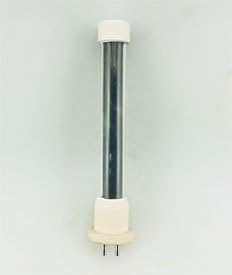
- Prepare New Bulb: Using a clean cloth or gloves, carefully remove the new Technical Precision light bulb from its packaging. Do not touch the glass envelope with bare hands.
- Install New Bulb: Insert the pins of the new bulb into the corresponding slots in the fixture's socket. Apply gentle, even pressure until the bulb is securely seated. Ensure a firm connection.
- Restore Power: Once the bulb is securely installed, restore power to the fixture by turning on the switch or circuit breaker.
- Test Operation: Verify that the new bulb illuminates correctly.
Operating Instructions
The Technical Precision replacement light bulb operates in conjunction with your existing EDENPURE A4428/RTL system. Once installed, the bulb will function when power is supplied to the fixture.
- Power On/Off: Use the standard power switch or control mechanism of your EDENPURE A4428/RTL system to turn the light bulb on or off.
- Warm-up Time: Halogen bulbs typically reach full brightness almost instantly.
- Heat Generation: Be aware that halogen bulbs generate significant heat during operation. Ensure adequate ventilation around the fixture and avoid placing flammable materials near the bulb.
Maintenance
Minimal maintenance is required for this light bulb. Adhere to the following guidelines:
- Cleaning: If the bulb requires cleaning, ensure the power is OFF and the bulb is completely cool. Gently wipe the glass with a clean, dry, lint-free cloth. Avoid using liquid cleaners, which can leave residues that may cause hot spots.
- Inspection: Periodically inspect the bulb for any signs of damage, such as cracks or discoloration. If damage is observed, replace the bulb immediately.
Troubleshooting
If you encounter issues with your replacement light bulb, consider the following:
- Bulb Does Not Light Up:
- Check if the power supply to the fixture is ON.
- Ensure the bulb is securely seated in the socket.
- Verify that the circuit breaker has not tripped.
- Inspect the bulb for any visible damage (e.g., broken filament). If damaged, replace the bulb.
- Bulb Flickers:
- Check for a loose connection in the socket.
- Ensure the fixture's voltage is stable and compatible.
- Short Bulb Lifespan:
- Ensure the bulb was handled with a clean cloth or gloves during installation to avoid skin oils on the glass.
- Verify that the fixture provides adequate ventilation to prevent overheating.
- Confirm that the operating voltage is within the bulb's specifications.
Specifications
| Brand | Technical Precision |
| Model Name | A4428RTL-AZ-8UL5-3 |
| Replacement For | EDENPURE A4428/RTL |
| Wattage | 500 Watts |
| Voltage | 114 Volts |
| Unit Count | 3.0 Count (3 bulbs per pack) |
| Material | Copper (for internal components/contacts) |
| ASIN | B08C398FC9 |
Warranty and Support
This product is a replacement part manufactured by Technical Precision. For any questions regarding product performance, installation, or potential warranty claims, please contact Technical Precision directly through their official support channels. Specific warranty details may vary and are typically provided by the manufacturer at the time of purchase or on their official website.
For further assistance, you may visit the Technical Precision Store on Amazon.


