
Sami LD1111B
Sami LD1111B Digital Thermometer Hygrometer User Manual
Model: LD1111B
1. Introduction
This manual provides detailed instructions for the proper use and maintenance of your Sami LD1111B Digital Thermometer Hygrometer. Please read this manual thoroughly before operating the device to ensure optimal performance and longevity.

Figure 1: Sami LD1111B Digital Thermometer Hygrometer. This image displays the front view of the device, showing its digital screen with temperature (27.6°C) and humidity (56% RH) readings, along with a comfort level indicator and a C/F button at the bottom.
2. Key Features
- Digital display for temperature and humidity.
- Comfort level indicator.
- Temperature unit selection (°C/°F).
- Compact and portable design.
- Suitable for tabletop placement.
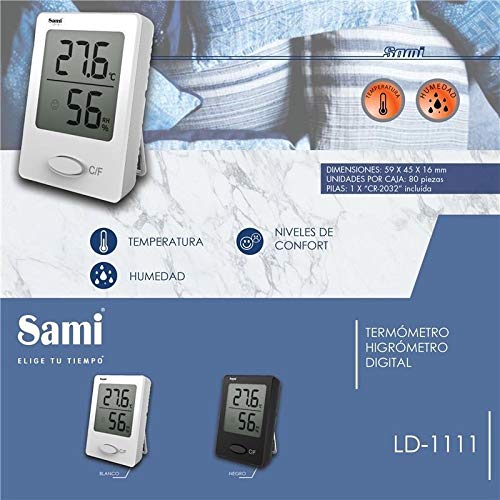
Figure 2: Sami LD1111B Digital Thermometer Hygrometer highlighting key features and dimensions. This image shows the device with annotations pointing to temperature, humidity, and comfort levels. It also provides dimensions (59 x 45 x 16 mm) and battery information (1 x CR-2032 included).
3. Setup and Installation
3.1. Battery Installation
- Locate the battery compartment on the back of the device.
- Open the battery compartment cover.
- Insert one CR-2032 battery, ensuring the correct polarity (+/-).
- Close the battery compartment cover securely.
3.2. Placement
Place the Sami LD1111B on a flat, stable surface. For accurate readings, avoid placing the device near heat sources, direct sunlight, or areas with high airflow (e.g., near air conditioning vents).
4. Operating Instructions
4.1. Power On/Off
The device automatically powers on once the battery is installed. There is no manual power on/off button. To turn off, remove the battery.
4.2. Display Readings
The large digital display shows the current temperature and relative humidity simultaneously.
- Temperature: Displayed in degrees Celsius (°C) or Fahrenheit (°F).
- Humidity: Displayed as a percentage of relative humidity (RH%).
- Comfort Level Indicator: A facial icon indicates the current comfort level based on temperature and humidity.
4.3. Changing Temperature Unit (°C/°F)
Press the "C/F" button located on the front of the device to switch between Celsius and Fahrenheit temperature units.
5. Maintenance
5.1. Cleaning
Wipe the device with a soft, dry cloth. Do not use abrasive cleaners or immerse the device in water.
5.2. Battery Replacement
When the display becomes dim or inaccurate, replace the CR-2032 battery following the instructions in Section 3.1.
6. Troubleshooting
| Problem | Possible Cause | Solution |
|---|---|---|
| No display or dim display | Low or dead battery; incorrect battery installation. | Replace the CR-2032 battery; ensure correct polarity. |
| Inaccurate readings | Device placed in an unsuitable environment (e.g., direct sunlight, near heat source, high airflow). | Relocate the device to a stable environment away from extreme conditions. Allow time for readings to stabilize. |
| Comfort level indicator not changing | Temperature and humidity conditions are stable within a specific comfort range. | This is normal operation. The indicator will change as conditions fluctuate outside the current comfort range. |
7. Specifications
- Model: LD1111B
- Brand: Sami
- Mounting Type: Tabletop
- Color: White
- Power Source: 1 x CR-2032 battery (included)
- Dimensions: 59 x 45 x 16 mm (approx. 2.32 x 1.77 x 0.63 inches)
- Weight: Approximately 1 kg (package weight, device weight is significantly less)
- ASIN: B08C2JQQKG
8. Warranty and Support
For warranty information and technical support, please refer to the documentation provided with your purchase or contact Sami customer service through their official website. Keep your proof of purchase for warranty claims.
Ask a question about this manual
Ask about setup, troubleshooting, compatibility, parts, safety, or missing instructions. Manuals+ will review the question and use this page’s manual context to help answer it.