
Mesko MS-3160
Mesko Precision Kitchen Scale MS-3160 User Manual
Model: MS-3160
1. Introduction
Thank you for choosing the Mesko Precision Kitchen Scale MS-3160. This digital scale is designed for accurate weighing of various items, offering high precision for both kitchen use and other applications requiring fine measurements. Please read this manual carefully before use to ensure proper operation and to maximize the lifespan of your device.
2. Safety Instructions
- Do not overload the scale beyond its maximum capacity of 500 grams. Overloading can damage the sensor.
- Keep the scale away from water and moisture. It is not waterproof.
- Avoid extreme temperatures and sudden temperature changes.
- Do not drop or subject the scale to strong impacts.
- Clean the scale with a soft, damp cloth. Do not use abrasive cleaners or immerse in water.
- Store the scale in a clean, dry place when not in use.
- Keep out of reach of children.
3. Package Contents
- Mesko Precision Kitchen Scale MS-3160
- User Manual
Note: Batteries are typically not included and must be purchased separately.
4. Product Overview
Familiarize yourself with the components of your Mesko Precision Kitchen Scale.
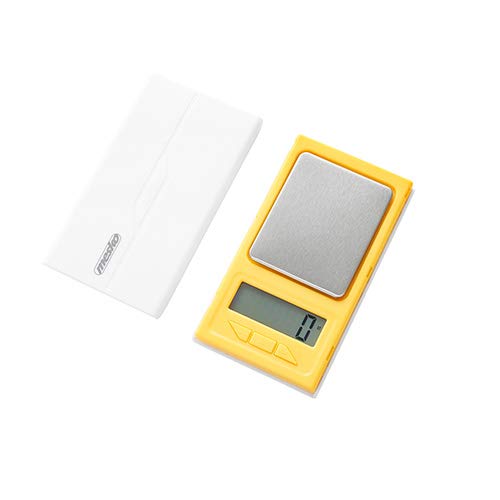
Figure 1: Mesko Precision Kitchen Scale MS-3160 with a gold ring on the weighing platform, displaying '1.2'.

Figure 2: Close-up of the LCD display showing '1.2 ct', indicating 1.2 carats.
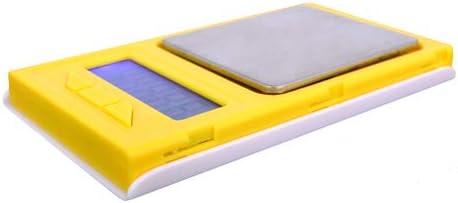
Figure 3: Side view of the Mesko MS-3160 scale, illustrating its compact and lightweight design.
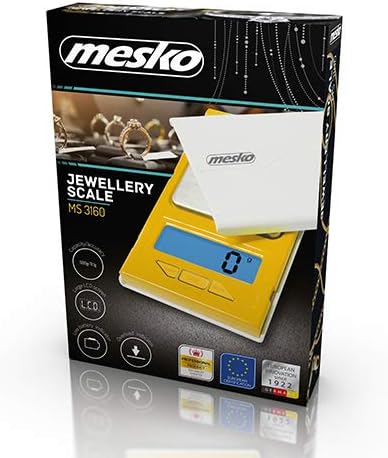
Figure 4: Product packaging for the Mesko MS-3160, highlighting its features as a jewelry scale.
5. Setup
5.1 Battery Installation
- Locate the battery compartment on the underside of the scale.
- Open the battery compartment cover.
- Insert the required batteries (e.g., AAA, specific type not provided in data, assume common type) according to the polarity indicators (+/-).
- Close the battery compartment cover securely.
5.2 Initial Placement
- Place the scale on a hard, flat, and stable surface to ensure accurate readings.
- Avoid placing the scale near sources of vibration, drafts, or extreme temperature fluctuations.
6. Operating Instructions
6.1 Turning On/Off
- To turn on the scale, press the [ON/OFF] button. The display will show '0.0' or '0.00' when ready.
- To turn off the scale, press and hold the [ON/OFF] button for a few seconds, or it will automatically shut off after a period of inactivity (auto-off function).
6.2 Changing Weight Units
- With the scale on and displaying '0.0', press the [UNIT] button to cycle through the available weight units: grams (g), carats (ct), pennyweights (dwt), troy ounces (ozt), ounces (oz), and grains (gn).
- Select the desired unit before placing items on the platform.
6.3 Tare Function
The tare function allows you to subtract the weight of a container, so you only measure the contents.
- Place an empty container on the weighing platform. The display will show its weight.
- Press the [TARE] button. The display will reset to '0.0'.
- Add the items you wish to weigh into the container. The display will show the net weight of the items.
- To clear the tare, remove all items from the platform and press [TARE] again, or turn the scale off and on.
6.4 Weighing Items
- Turn on the scale and ensure it displays '0.0' in your desired unit.
- Carefully place the item(s) to be weighed onto the center of the weighing platform.
- Wait for the display to stabilize. The stable weight will be shown.
6.5 Hold Function (Delay Function)
This function allows the display to hold the weight reading even after the item is removed, useful for unstable items or when the display is hard to read during weighing.
- While weighing an item, if the scale has a hold function, it may activate automatically or require a button press (refer to specific button labels on your device if available).
- The display will typically show a 'HOLD' indicator or similar icon.
7. Maintenance
7.1 Cleaning
- Wipe the scale surface with a soft, slightly damp cloth.
- Do not use chemical cleaning agents, abrasive materials, or immerse the scale in water.
- Ensure the scale is completely dry before storage or next use.
7.2 Storage
- Store the scale in a cool, dry place, away from direct sunlight and extreme temperatures.
- If the scale will not be used for an extended period, remove the batteries to prevent leakage and potential damage.
8. Troubleshooting
If you encounter issues with your scale, refer to the following common problems and solutions:
| Problem | Possible Cause | Solution |
|---|---|---|
| Display shows 'Lo' | Low battery power. | Replace the batteries with new ones. |
| Display shows 'O-Ld' or 'EEEE' | Overload. The item on the platform exceeds the maximum capacity. | Remove the item immediately. Do not exceed 500 grams. |
| Inaccurate readings | Unstable surface, drafts, or scale not tared correctly. | Place the scale on a flat, stable surface. Avoid drafts. Perform tare function before weighing. |
| Scale does not turn on | Batteries incorrectly installed or depleted. | Check battery polarity. Replace batteries if necessary. |
9. Specifications
| Feature | Detail |
|---|---|
| Brand | Mesko |
| Model Number | MS-3160 (Internal: 49132374) |
| Maximum Capacity | 500 Grams |
| Accuracy | 0.1 Grams |
| Weight Units | g / ct / dwt / ozt / oz / gn |
| Display Type | LCD |
| Special Features | Tare Function, Hold Function, Overload Indicator, Lightweight |
| Material | Plastic |
| Color | Yellow |
| Product Dimensions | 16 x 11 x 3 cm |
| Product Weight | 110 g |
10. Warranty and Support
Mesko products are designed for reliability and performance. For information regarding warranty coverage, technical support, or service, please refer to the warranty card included with your purchase or visit the official Mesko website. Please retain your proof of purchase for any warranty claims.
Related documentsMS-3160


Ask a question about this manual
Ask about setup, troubleshooting, compatibility, parts, safety, or missing instructions. Manuals+ will review the question and use this page’s manual context to help answer it.