
Product Overview
The ORIVISION UCH602 Video Capture Card is a compact device designed for capturing HDMI video and audio signals. It supports a maximum input resolution of 4K and outputs at a maximum resolution of 1080P. This device facilitates live streaming, broadcasting, and video conferencing by allowing connection of various HDMI sources, such as DSLR cameras, camcorders, game consoles (PS3/PS4/Xbox One/Switch), and other HDMI devices, to a PC or Mac.

Image: The ORIVISION UCH602 Video Capture Card, a small black rectangular device with HDMI input and USB output ports.
Key Features:
- Full HD 1080P Output: Supports input resolutions up to 4K and outputs at a maximum resolution of 1080P.
- Wide Compatibility: Compatible with most acquisition software, including VLC, OBS, and Amcap. Supports Windows, Android, and MacOS operating systems.
- Plug and Play: Requires no driver installation for operation, offering ease of use for quick setup and immediate recording or streaming.
- Real-Time Feedback: Enables real-time monitoring and production within preferred software tools.
- HDMI Loop Out: Features an HDMI loop out port for simultaneous display on a monitor while capturing.
Setup Instructions
Follow these steps to set up your ORIVISION UCH602 Video Capture Card:
- Connect HDMI Source: Connect your HDMI source device (e.g., game console, camera, camcorder) to the "Input" port of the capture card using an HDMI cable.
- Connect to Computer: Connect the USB 2.0 output of the capture card to a USB port on your computer (PC or Mac) using the provided USB cable.
- Connect HDMI Loop Out (Optional): If you wish to monitor your video feed on a separate display, connect an HDMI cable from the "Output" port of the capture card to your monitor.
- Power Connection (Optional): For stable operation, especially with certain devices or extended use, connect the DC/5V port to a 5V power source using the micro USB cable.
- Software Setup: Open your preferred video acquisition software (e.g., OBS Studio, VLC, Amcap) on your computer. Select the ORIVISION UCH602 as your video input device within the software settings.

Image: A diagram illustrating the connection setup for the video capture card, showing HDMI input from various sources, USB 2.0 connection to PC/laptop/phone, and HDMI loop out to a display.
Operating Instructions
The UCH602 is designed for plug-and-play operation, requiring no driver installation on most Windows, Android, and MacOS systems. Once connected, your computer should recognize the device as a webcam or video input source.
- Software Selection: Launch your chosen video capture or streaming software (e.g., OBS Studio, VLC, Amcap).
- Device Selection: In the software's settings or source selection menu, choose "USB Video" or "ORIVISION UCH602" as your video input device.
- Audio Configuration: Ensure the correct audio input is selected within your software. The capture card typically provides audio alongside the video signal.
- Resolution and Frame Rate: Configure your desired output resolution (up to 1080P) and frame rate (up to 60fps under optimal PC conditions) within the software.
- Start Streaming/Recording: Begin your live stream, broadcast, or recording session through your software.
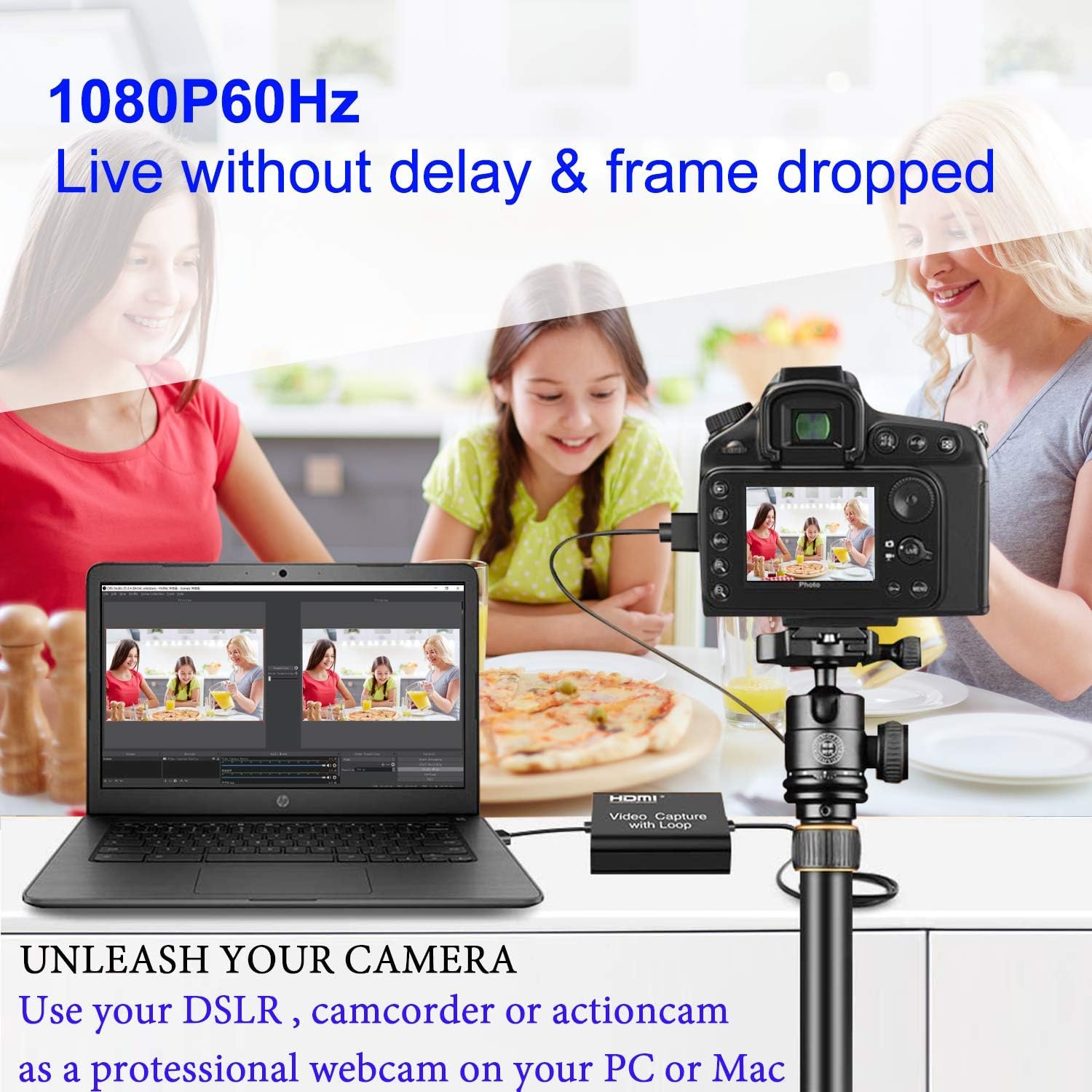
Image: A DSLR camera connected to a laptop via the ORIVISION UCH602 Video Capture Card, demonstrating its use for live video feeds.
Maintenance
To ensure the longevity and optimal performance of your ORIVISION UCH602 Video Capture Card, consider the following maintenance tips:
- Storage: Store the device in a cool, dry place away from direct sunlight and extreme temperatures.
- Cleaning: Use a soft, dry cloth to clean the exterior of the device. Avoid using liquid cleaners or abrasive materials.
- Handling: Handle the capture card and its cables with care to prevent damage to ports or internal components. Avoid bending cables sharply.
- Ventilation: Ensure the device has adequate ventilation during operation to prevent overheating.
Troubleshooting
If you encounter issues with your ORIVISION UCH602 Video Capture Card, refer to the following common problems and solutions:
- No Video/Audio Output:
- Ensure all HDMI and USB cables are securely connected.
- Verify that the capture card is selected as the input device in your software.
- Check the resolution and refresh rate settings of your source device; ensure they are compatible with the capture card's capabilities (max 4K input, max 1080P output).
- Try connecting the optional 5V power supply to the DC/5V port for stable power.
- FPS Cannot Reach 60fps:
While the device generally supports 30fps, it can reach a maximum of 60fps under specific PC circumstances. Please verify your computer's hardware configuration:
- CPU: PC i5-3400 or above; Notebook i7-3537U 2.0GHZ or above.
- Graphics Card: PC NVIDIA GT630 or above; Notebook NVIDIA GT735M or above.
- RAM: 4G RAM.
If your system meets these requirements and you still experience issues, ensure your software settings are correctly configured for 60fps output.
- Software Not Recognizing Device:
- Try restarting your computer and the capture software.
- Ensure your operating system is up to date.
- Test with different USB ports on your computer.
Specifications
Detailed specifications for the ORIVISION UCH602 Video Capture Card:

Image: A table detailing the technical specifications of the capture card, including resolution, video format, audio format, and dimensions.
| Feature | Detail |
|---|---|
| Brand | ORIVISION |
| Model | UCH602 Video Capture Card with Loop Out |
| Item Model Number | HDMI video capture with loop |
| Hardware Interface | USB |
| Max Input Resolution | 4K |
| Max Output Resolution | 1080P |
| Supported Video Format | 8/10/12bit Deep color, YUV/JPEG |
| Supported Audio Format | L-PCM |
| Input Cable Distance | ≤15m, AWG26 HDMI standard cable |
| Max Working Current | 0.7A/5VDC |
| Operating Temperature | -10 to +55°C |
| Dimensions (L x W x H) | 2.32 x 2.2 x 0.74 inches (59 x 56 x 19 mm) |
| Item Weight | 2.39 ounces (52g) |
| Hardware Platform | Mac PC |
| Operating System Support | Windows, Android, MacOS |
| Recommended Uses | Video Recording |
What's in the Box
The ORIVISION UCH602 Video Capture Card package includes:
- 1 x UCH602 Video Capture Card
- 1 x User Manual
- 1 x USB Cable (Male to Male)
- 1 x Micro USB Cable (for power)

Image: The contents of the product package, including the capture card, user manual, and connecting cables.
Warranty and Support
ORIVISION is committed to providing quality products and customer satisfaction. For any questions regarding setup, operation, or troubleshooting, please contact our support team. We are dedicated to offering assistance to the best of our ability.
While this model is suitable for general use, for professional or high-quality needs, consider ORIVISION Model No. ZY-UCH201.
For detailed warranty information, please refer to the official ORIVISION website or contact customer service directly.

