1. Introduction
This manual provides detailed instructions for the assembly, operation, and maintenance of your HOMCOM Computer Desk Model 836-212V80. Please read all instructions carefully before beginning assembly and retain this manual for future reference. This computer desk is designed to provide an efficient workspace with ample storage, including shelves, a sliding keyboard tray, a drawer, a file cabinet, and a CPU shelf.
2. Safety Information
- Read all instructions before assembly and use.
- Keep all packaging materials away from children.
- Assemble the desk on a soft, clean surface to prevent scratches.
- It is recommended that two people assemble this product for safety and ease.
- Ensure all fasteners are securely tightened before use. Periodically check and re-tighten as necessary.
- Do not exceed the maximum weight capacities: 55 lbs (Desktop), 11 lbs (Shelf).
- Do not stand or sit on the desk.
- Keep liquids away from electronic equipment placed on the desk.
3. Package Contents
Verify that all components are present before beginning assembly. Each part is typically labeled with a letter for easy identification. If any parts are missing or damaged, contact customer support.
- Desk Panels (various sizes for desktop, shelves, sides, back)
- Sliding Keyboard Tray
- Drawer Components and Rails
- File Cabinet Door and Hinges
- Hardware Pack (screws, bolts, dowels, cam locks, etc.)
- Assembly Tool (screwdriver)
4. Assembly and Setup
Assembly typically takes approximately 3 hours with two people. Following the step-by-step instructions provided in the separate assembly guide is crucial. Using a power screwdriver can expedite the process, but exercise caution to avoid overtightening screws.
4.1 Overview of Components and Dimensions

Figure 1: Overall dimensions of the computer desk.
Familiarize yourself with the desk's overall structure and dimensions before starting. This desk features a main desktop, an elevated monitor shelf, side shelving units, a sliding keyboard tray, a drawer, a file cabinet, and a dedicated CPU shelf.
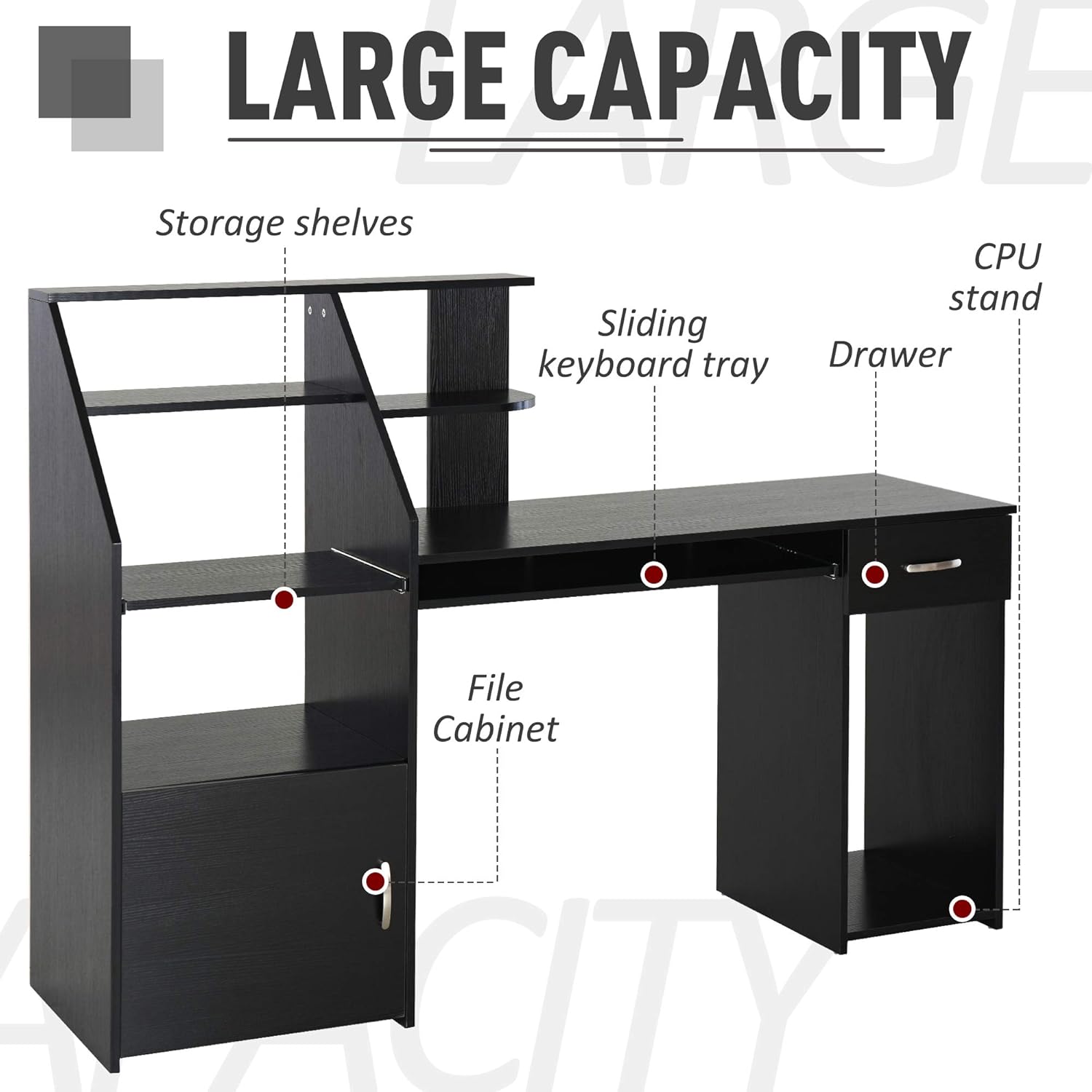
Figure 2: Overview of the desk's large capacity storage features.
4.2 Assembly Steps
- Unpack and Identify: Carefully unpack all components and lay them out. Match each part to the corresponding letter in the assembly guide.
- Assemble Base Structures: Begin by assembling the main side panels and the desktop support structures as per the guide.
- Install Shelves: Attach the various storage shelves, ensuring they are level and secure.
- Mount Sliding Components: Install the rails for the sliding keyboard tray and the sliding shelf.
- Assemble Drawer and Cabinet: Construct the drawer and attach its rails. Install the file cabinet door with its hinges.
- Final Assembly: Connect all major sections of the desk. Ensure all screws and fasteners are tightened.
5. Operating Instructions
The HOMCOM Computer Desk is designed for versatile use in a home office or gaming setup. Its various compartments offer organized storage for your equipment and supplies.
5.1 Sliding Keyboard Tray

Figure 3: The sliding keyboard tray provides ergonomic access to your keyboard.
The keyboard tray is located directly under the main desktop. Gently pull the tray forward to extend it for use. Push it back to store it neatly under the desk when not in use, freeing up desktop space.
5.2 Sliding Shelf

Figure 4: The sliding shelf allows easy access to peripherals like scanners or printers.
A dedicated sliding shelf is provided for easy access to peripherals such as a scanner or printer. Pull the shelf outwards when needed and push it back to keep your workspace tidy.
5.3 CPU Shelf

Figure 5: The CPU shelf keeps your computer tower off the floor and organized.
The open CPU shelf is located on the right side of the desk, providing a designated space for your computer tower, keeping it off the floor and allowing for better airflow.
5.4 Drawer and File Cabinet

Figure 6: The file cabinet offers enclosed storage for documents and supplies.
Utilize the drawer for small office supplies and the file cabinet for documents or larger items. Ensure the drawer slides smoothly and the cabinet door closes properly.
5.5 Storage Shelves
The various open shelves provide space for books, decorative items, or additional office supplies. Arrange items to maintain balance and avoid overloading any single shelf.
6. Maintenance
- Cleaning: Wipe the desk surface with a soft, damp cloth. Avoid abrasive cleaners or harsh chemicals that could damage the wood grain finish.
- Dusting: Regularly dust the desk to prevent buildup.
- Fasteners: Periodically check all screws and bolts to ensure they remain tight. Re-tighten if any looseness is detected to maintain stability.
- Spills: Clean up spills immediately to prevent staining or damage to the engineered wood material.
7. Troubleshooting
- Desk is Wobbly: Ensure all assembly screws and fasteners are fully tightened. Check that the desk is on a level surface.
- Drawer/Shelf Not Sliding Smoothly: Inspect the rails for any obstructions or misalignment. Ensure the rails were installed correctly during assembly.
- Parts Do Not Fit: Double-check the assembly guide to ensure you are using the correct parts for each step and that they are oriented correctly. Do not force parts together.
- Missing Hardware: Refer to the package contents list. If hardware is missing, contact HOMCOM customer support.
8. Specifications
| Feature | Specification |
|---|---|
| Model Number | 836-212V80 |
| Brand | HOMCOM |
| Material | Engineered Wood (MDF) |
| Color | Black Wood Grain |
| Overall Dimensions | 63.5" L x 18" W x 46" H (161.29 x 45.72 x 116.84 cm) |
| Desktop Dimensions | 44" L x 18" W x 30" H |
| Over Desktop Two Shelves | 14.25" L x 7.75" W x 7.5" H |
| Sliding Keyboard Dimensions | 29.5" L x 11.75" W |
| Drawer Inner Dimensions | 9.5" W x 11.75" D x 3.25" H |
| CPU Shelf Dimensions | 11.75" W x 17" D x 22" H |
| Top Shelf Dimensions | 33.5" L x 4.75" W |
| Left Shelves Dimensions (Bottom to Top) | 18"L x 8.75"W x 6.25"H, 17.25"L x 13"W x 10"H |
| Max Load (Desktop) | 55 lbs (25 kg) |
| Max Load (Shelf) | 11 lbs (5 kg) |
| Item Weight | 94.6 lbs (42.91 kg) |
9. Warranty and Support
For warranty information, missing parts, or technical support, please contact HOMCOM customer service directly. Refer to your purchase documentation for specific contact details and warranty terms.