
1. Product Overview
The One Fire Baby Night Light Star Projector is a versatile device designed to create a soothing and engaging environment for children. It features multiple projection films, Bluetooth music connectivity, 360-degree rotation, and convenient remote control operation. This manual provides detailed instructions for safe and effective use of your projector.
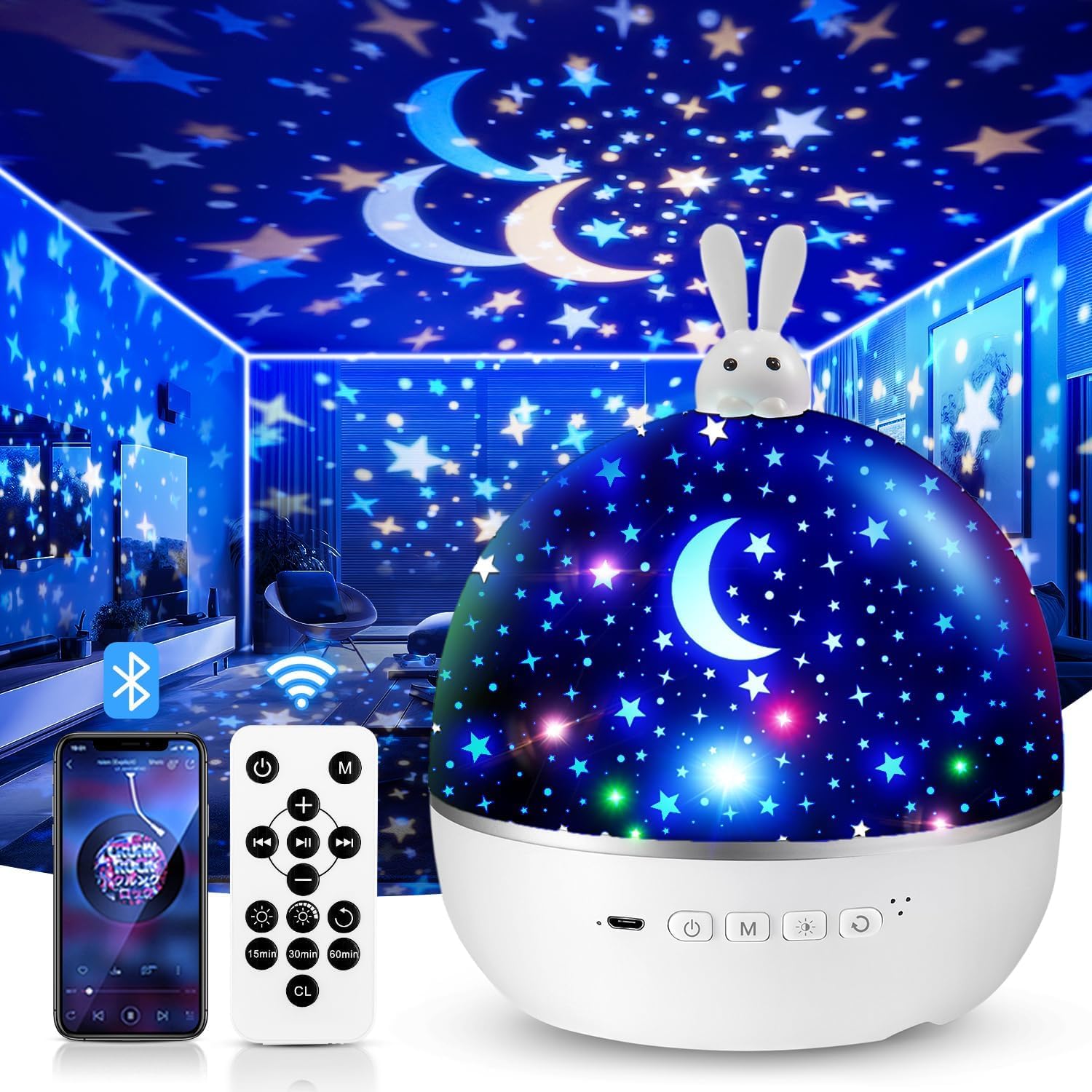
Image 1.1: The One Fire Baby Night Light Star Projector, featuring a rabbit design on top.
2. Safety Instructions
- Keep the device away from water and moisture.
- Do not disassemble or attempt to repair the device yourself. Contact customer support if issues arise.
- Use only the provided USB cable for charging.
- Ensure the device is placed on a stable, flat surface.
- Avoid direct eye exposure to the LED light source.
- This product is not a toy. Adult supervision is recommended when used by children.
3. Package Contents
Please check the package for the following items:
- One Fire Baby Night Light Star Projector Unit
- USB Type-C Charging Cable
- Remote Control
- Projection Films (Quantity: 15 sets, including various themes)
- User Manual
4. Product Features
- Safe LED Light Source: Provides a soft, gentle glow suitable for children's eyes.
- Multiple Projection Films: Includes 15 diverse film themes for varied visual experiences.
- Colorful Lighting Effects: Offers 96 modes with various color combinations (red, yellow, green, etc.).
- 360° Rotation: Projects dynamic, moving patterns on walls and ceilings.
- Bluetooth Music Speaker: Connects wirelessly to play lullabies or other audio.
- Remote Control: Manages power, light colors, brightness, rotation, music, and timer settings.
- Auto-Off Timer: Programmable for 15, 30, or 60 minutes.
- USB Rechargeable: Convenient Type-C USB charging.
- Dual Functionality: Functions as a star projector or a standard night light by removing the projection cover.

Image 4.1: Overview of the 15 colorful projection films included with the night light, categorized into Bedtime Stories, Puzzle Education, and Festival Gifts.
5. Setup
5.1 Charging the Device
- Connect the provided USB Type-C cable to the charging port on the projector.
- Plug the other end of the USB cable into a compatible USB power adapter (5V) or a computer USB port.
- The charging indicator light will illuminate. Once fully charged, the indicator may change color or turn off.
5.2 Installing/Changing Projection Films
The projector comes with various film themes. Follow these steps to install or change them:
- Gently remove the top dome cover of the projector.
- Locate the inner transparent cylinder where the film is placed.
- Carefully unroll your desired film and insert it into the cylinder, ensuring it fits snugly. The images on the film should face outwards.
- Replace the top dome cover, aligning it correctly.

Image 5.1: A child interacting with the One Fire Night Light, illustrating its use in a bedroom setting. The top dome cover is visible.
6. Operating Instructions
6.1 Power On/Off
- Press the power button on the projector or the remote control to turn the device on/off.
6.2 Projection Mode
- Ensure a projection film is installed and the top dome cover is in place for optimal projection.
- Use the light mode button on the projector or remote to cycle through different color combinations.
6.3 Night Light Mode
- To use as a standard night light, remove the inner projection film cylinder and ensure the top dome cover is in place. The device will emit a soft, diffused light.
6.4 Rotation Function
- Press the rotation button on the projector or remote control to activate or deactivate the 360-degree rotation feature.

Image 6.1: The night light projecting an ocean theme with 360-degree silent rotation, creating an immersive experience in a child's room.
7. Remote Control Functions
The remote control allows convenient operation from a distance. Ensure the remote has working batteries (1 Lithium-ion battery required, not included).

Image 7.1: A hand holding the remote control, demonstrating its use to adjust settings like timer and brightness for the night light.
| Button | Function |
|---|---|
| Power On/Off | Turns the projector on or off. |
| Light Mode | Cycles through different light colors and effects. |
| Brightness | Adjusts between 3 brightness levels (100%, 60%, 30%). |
| Rotation | Activates or deactivates 360-degree rotation. |
| Music Play/Pause | Plays or pauses Bluetooth-connected music. |
| Previous/Next Track | Skips to the previous or next song. |
| Volume Up/Down | Adjusts the music volume. |
| Timer (15/30/60 min) | Sets the automatic shut-off timer for 15, 30, or 60 minutes. |
8. Bluetooth Pairing
To play music through the projector's built-in speaker, follow these steps to pair your device:
- Ensure the projector is powered on.
- Activate Bluetooth on your smartphone or other audio device.
- Search for available Bluetooth devices. The projector will appear as "WH-E01".
- Select "WH-E01" to pair. A confirmation sound may play from the projector once connected.
- You can now play music from your device, controlling playback and volume via your device or the projector's remote control.

Image 8.1: A child sleeping peacefully with the night light projecting unicorn images, while a smartphone displays music playback, illustrating the Bluetooth music feature.
9. Maintenance
- Cleaning: Use a soft, dry cloth to wipe the surface of the projector. Do not use abrasive cleaners or solvents.
- Film Care: Handle projection films carefully to avoid scratches or damage. Store them in a clean, dry place.
- Storage: When not in use for extended periods, store the projector in a cool, dry place, away from direct sunlight.
10. Troubleshooting
| Problem | Possible Cause | Solution |
|---|---|---|
| Projector does not turn on. | Low battery or no power. | Charge the device using the USB Type-C cable. Ensure the power adapter is working. |
| Projection is blurry or unclear. | Film not installed correctly or top cover is dirty. | Ensure the film is properly seated in the inner cylinder. Clean the top dome cover and lens with a soft cloth. Adjust the distance to the projection surface. |
| Bluetooth not connecting. | Projector not in pairing mode, or device too far. | Ensure the projector is on. Turn off and on Bluetooth on your device. Move your device closer to the projector. Check if another device is already connected. |
| Remote control not working. | Dead battery or obstruction. | Replace the remote control battery (1 Lithium-ion). Ensure there is no obstruction between the remote and the projector. |
| Rotation function is not working. | Rotation feature is off. | Press the rotation button on the projector or remote control to activate it. |
11. Specifications
| Feature | Detail |
|---|---|
| Model Number | GJWH102236w5 |
| Dimensions (L x W x H) | 13.69 x 13.69 x 16.51 cm |
| Weight | 530 grams |
| Material | Acrylonitrile Butadiene Styrene (ABS) |
| Power Input | 5 Volts |
| Rated Power | 4.2 Watts |
| Light Source | LED (4 bulbs) |
| Luminous Flux | 6 lumens |
| Battery Type | 1 Lithium-ion (required, not included) |
| Connectivity | USB Type-C, Bluetooth (WH-E01) |
| Special Features | Rechargeable, Remote Control, Auto-Off Timer (15/30/60 min), 360° Rotation |
12. Warranty and Support
One Fire offers a 30-day refund policy and a 12-month warranty for this product. If you encounter any issues or have questions regarding your One Fire Baby Night Light Star Projector, please contact our customer support team.
Customer Support:
- For assistance, please refer to the contact information provided on the product packaging or the official One Fire website.
- When contacting support, please have your model number (GJWH102236w5) and purchase details ready.

