Important Safety Instructions
When using electrical appliances, basic safety precautions should always be followed, including the following:
- Read all instructions before operating the toaster.
- Do not touch hot surfaces. Use handles or knobs.
- To protect against electrical shock, do not immerse cord, plug, or toaster in water or other liquid.
- Close supervision is necessary when any appliance is used by or near children.
- Unplug from outlet when not in use and before cleaning. Allow to cool before putting on or taking off parts.
- Do not operate any appliance with a damaged cord or plug, or after the appliance malfunctions or has been dropped or damaged in any manner.
- Do not use outdoors.
- Do not let cord hang over edge of table or counter, or touch hot surfaces.
- Do not place on or near a hot gas or electric burner, or in a heated oven.
- Do not use appliance for other than intended use.
- Oversize foods, metal foil packages, or utensils must not be inserted in a toaster as they may create a fire or risk of electric shock.
- A fire may occur if toasters are covered or touching flammable material, including curtains, draperies, walls, and the like, when in operation.
- Do not attempt to dislodge food when toaster is plugged into electrical outlet.
- To disconnect, press the CANCEL button, then remove plug from wall outlet.
- Do not operate your appliance in an appliance garage or under a wall cabinet.
Product Overview
The Cuisinart Custom Select 4-Slice Toaster offers versatile toasting options with independent controls for each pair of slots. Its brushed stainless steel finish provides a modern aesthetic for any kitchen.
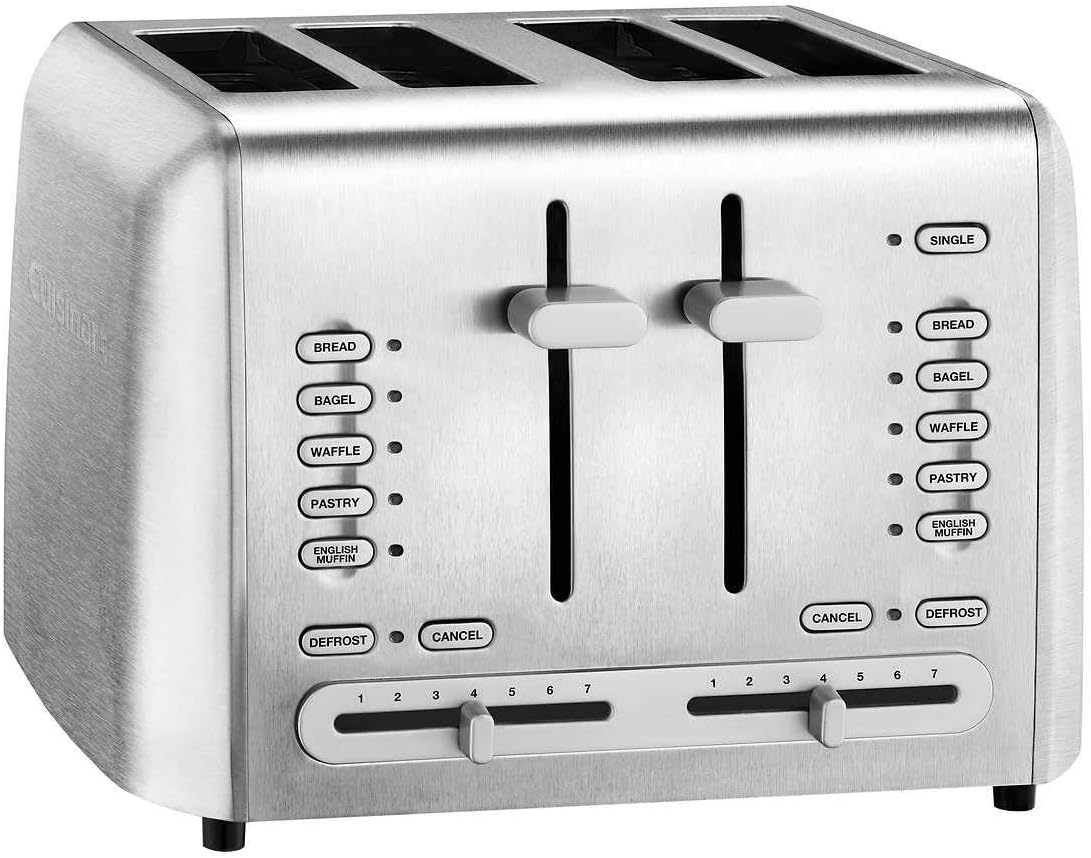
Image: Front view of the Cuisinart Custom Select 4-Slice Toaster, showcasing its four slots and control panels on each side.

Image: Close-up of the toaster's control panel, showing the bread type buttons, shade selectors, and lever.

Image: The toaster with its dimensions labeled: 10.9"D x 11.02"W x 7.76"H.
Setup
- Unpacking: Carefully remove the toaster from its packaging. Remove any packing materials, labels, or stickers.
- Placement: Place the toaster on a clean, dry, flat, heat-resistant surface. Ensure there is adequate ventilation around the toaster.
- Power Connection: Plug the power cord into a standard 220V electrical outlet.
- First Use: Before toasting any food, operate the toaster once or twice without food to burn off any manufacturing residues. This may produce a slight odor, which is normal.
Operating Instructions
The Cuisinart Custom Select 4-Slice Toaster features independent controls for each pair of slots, allowing for customized toasting.
Controls and Functions
- Dual Control Panels: Two independent control panels allow simultaneous toasting of different items or different shade settings.
- Shade Control Dials: Each side has a dial with 7 settings (1-7) to select the desired toast shade, from light to dark.
- Bread Type Buttons: Dedicated buttons for BREAD, BAGEL, WAFFLE, PASTRY, and ENGLISH MUFFIN optimize toasting for specific food types.
- DEFROST Button: Activates a longer toasting cycle to defrost and then toast frozen items.
- CANCEL Button: Stops the toasting cycle and raises the carriage.
- SINGLE Button: On the right side, this button allows toasting of a single slice of bread in the rightmost slot, optimizing energy use.
- High-Lift Carriage: The toast lever lifts the toasted items higher for easy removal.
Toasting Process
- Insert Food: Place up to two slices of bread or other items into the slots on one side. For bagels, ensure the cut side faces inward as indicated by the bagel icon.
- Select Shade: Turn the shade control dial to your preferred setting (1 for lightest, 7 for darkest).
- Select Bread Type (Optional): Press the appropriate button (e.g., BAGEL, WAFFLE) if toasting a specific item. The selected button will illuminate.
- Start Toasting: Press the toast lever down until it locks into place. The toaster will begin toasting.
- Cancel: To stop toasting at any time, press the CANCEL button.
Watch this video for a closer look at the toaster's controls and operation:
Video: A detailed look at the Cuisinart 4-Slice Toaster, demonstrating its various settings and the operation of the toast levers.
Another video demonstrating the specialized settings:
Video: Review highlighting the Cuisinart toaster's ability to toast bread, bagels, and English muffins with specialized settings.
Maintenance
Cleaning the Crumb Trays
The toaster is equipped with two removable crumb trays for easy cleaning. Regular cleaning prevents crumb buildup and reduces the risk of fire.
- Unplug: Always unplug the toaster from the electrical outlet and allow it to cool completely before cleaning.
- Remove Trays: Pull out the crumb trays located at the bottom rear of the toaster.
- Empty: Shake out crumbs into a waste bin.
- Wipe: Wipe the trays with a damp cloth and dry thoroughly.
- Replace: Slide the crumb trays back into the toaster until they click into place.
This video demonstrates how to access and clean the crumb trays:
Video: A review of the Cuisinart 4-slice toaster, including a demonstration of the removable crumb trays for easy cleaning.
Exterior Cleaning
- Wipe the exterior with a damp cloth. Avoid abrasive cleaners or metal scouring pads.
- Ensure the toaster is completely dry before plugging it back in.
Troubleshooting
| Problem | Possible Cause | Solution |
|---|---|---|
| Toaster does not turn on. | Not plugged in or power outage. | Ensure the toaster is securely plugged into a working outlet. Check circuit breaker. |
| Food is not toasting evenly. | Uneven thickness of food or crumb buildup. | Ensure food is evenly sliced. Clean crumb trays regularly. |
| Smoke coming from toaster. | Food lodged in slots or excessive crumb buildup. | Immediately press CANCEL and unplug. Allow to cool, then carefully remove food or clean crumb trays. |
| Toast lever does not stay down. | Toaster is not plugged in or not receiving power. | Ensure the toaster is plugged in and the outlet is functional. |
Specifications
- Brand: Cuisinart
- Model: RBT-1300PC
- Product Dimensions: 10.9"D x 11.02"W x 7.76"H
- Wattage: 850 watts
- Number of Slices: 4
- Voltage: 220 Volts
- Number of Settings: 7 (Shade Control)
- Special Feature: High Lift Carriage
- Finish Type: Brushed Stainless Steel
- Item Weight: 7.63 pounds
Warranty and Support
For warranty information or product support, please refer to the warranty card included with your purchase or visit the official Cuisinart website. Keep your purchase receipt as proof of purchase for warranty claims.
Protection Plans:
- 3-Year Protection Plan: Available for purchase.
- 4-Year Protection Plan: Available for purchase.
- Complete Protect: Monthly plan covering eligible past and future purchases.


