
Proscenic A8
Contents
Proscenic A8 Air Purifier User Manual
Model: A8
Brand: Proscenic
1. Introduction
The Proscenic A8 Air Purifier is designed to improve indoor air quality by effectively removing various airborne pollutants. Featuring advanced filtration technology and smart control options, it provides a cleaner and healthier environment for your home or office.

Figure 1: Proscenic A8 Air Purifier and its smartphone app control.
2. Product Features
- High-Efficiency Air Purification: Utilizes UPV 1.0 purification technology with a CADR (Clean Air Delivery Rate) of 220 m³/h, capable of purifying rooms up to 430 sq. ft. and circulating air over 3 times per hour.
- Advanced 4-Stage Filtration System: Equipped with a Pre-filter, Nano Filter, Activated Carbon Filter, and H13 True HEPA filter to capture fine particles, allergens, smoke, and odors.
- Smart Control: Monitor and control the air purifier remotely using the Proscenic App (supports 2.4GHz Wi-Fi).
- Air Quality Sensor: Built-in sensor detects real-time air quality and indicates it with different colored lights (Green: Good, Yellow: Bad, Red: Very Bad).
- Timer and Schedule Functions: Customize operation times and fan speeds via the app.
- No Ozone Emission: Designed to be 100% ozone-free, ensuring safety for all users, including children and individuals with asthma.
- Automatic Mode: Automatically adjusts fan speed based on real-time air quality detection for optimal purification and quiet operation.
- Ultra-Quiet Sleeping Mode: Operates at a minimum of 24dB for undisturbed sleep.

Figure 2: Four-stage filtration system.

Figure 3: Effective filtration against various pollutants.
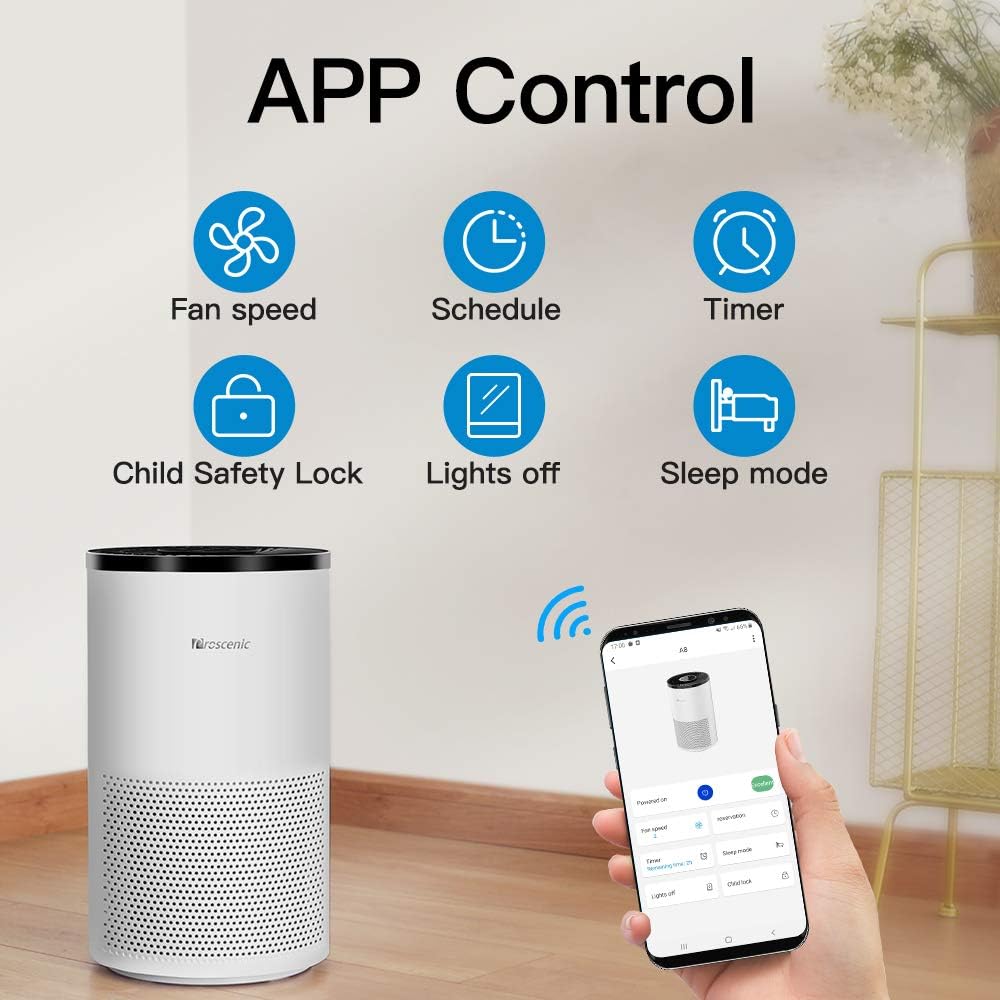
Figure 4: Ultra-Quiet Sleeping Mode noise level.
3. Setup
- Unpack the Unit: Carefully remove the air purifier from its packaging.
- Remove Filter Packaging: Before first use, open the bottom cover of the air purifier and remove any plastic packaging from the filter. Reinsert the filter and close the cover securely.
- Placement: Place the air purifier on a flat, stable surface, ensuring adequate space around it for optimal airflow (at least 12 inches from walls or furniture).
- Power Connection: Plug the power cord into a standard electrical outlet.
- App Connection (Optional):
- Download the "Proscenic" app from your smartphone's app store.
- Register or log in to your account.
- Follow the in-app instructions to connect your A8 Air Purifier to your home Wi-Fi network. Ensure your Wi-Fi is 2.4GHz, as the app only supports this frequency.
4. Operating Instructions
4.1. Touch Screen Control
The Proscenic A8 features an intuitive touch screen control panel on its top surface.

Figure 5: Touch screen control panel.
- Power Button: Press to turn the unit On or Off.
- Fan Speed/Mode: Cycle through different fan speeds (low, medium, high) or select Automatic mode.
- Timer: Set a timer for the unit to operate for a specific duration.
- Child Lock: Activate to prevent accidental changes to settings.
- Filter Reset: Press and hold to reset the filter life indicator after replacing the filter.
4.2. Air Quality Indicator Lights
The air purifier provides real-time air quality feedback through a color-coded light ring at its base.

Figure 6: Air Quality Indicator Lights.
- Green Light: Indicates good air quality.
- Yellow Light: Indicates bad air quality.
- Red Light: Indicates very bad air quality.
4.3. App Control
The Proscenic App offers comprehensive control and monitoring features.

Figure 7: Proscenic App Control Interface.
- Fan Speed Adjustment: Precisely control fan speed.
- Scheduling: Set custom schedules for the purifier to turn on/off or change modes automatically.
- Timer: Set a countdown timer for operation.
- Child Safety Lock: Activate or deactivate the child lock feature.
- Lights Off: Turn off the indicator lights for undisturbed sleep.
- Sleep Mode: Activate the ultra-quiet sleep mode.
- Voice Control: Compatible with Amazon Alexa and Google Assistant for hands-free operation.
5. Maintenance
5.1. Filter Replacement
The filter should be replaced approximately every 6-8 months, depending on usage and air quality. The unit will indicate when a filter replacement is due.
- Turn off and unplug the air purifier.
- Carefully turn the unit upside down.
- Twist the base cover counter-clockwise to unlock and remove it.
- Remove the old filter.
- Insert the new filter, ensuring it is properly seated.
- Replace the base cover and twist clockwise to lock it.
- Plug in the unit and power it on. Press and hold the filter reset button on the control panel (or use the app) until the indicator light resets.
Only use genuine Proscenic replacement filters to ensure optimal performance and maintain warranty validity.
5.2. Cleaning the Unit
Regular cleaning helps maintain the efficiency and lifespan of your air purifier.
- Unplug the unit before cleaning.
- Wipe the exterior of the unit with a soft, dry cloth.
- Do not use abrasive cleaners or solvents.
- The pre-filter can be gently vacuumed to remove larger dust particles between replacements.
6. Troubleshooting
| Problem | Possible Cause | Solution |
|---|---|---|
| Unit does not turn on. | Not plugged in; power outage; filter not installed correctly. | Ensure power cord is securely plugged in. Check power supply. Verify filter is installed correctly and base cover is locked. |
| Poor air purification performance. | Filter is dirty or expired; unit placement is obstructed. | Replace the filter. Ensure the unit is placed in an open area with clear airflow. |
| Air quality indicator always red/yellow. | High level of pollutants in the air; sensor is dirty. | Allow the unit to run longer in Automatic mode. Clean the air quality sensor (refer to detailed manual for sensor location). |
| Cannot connect to Wi-Fi/App. | Incorrect Wi-Fi password; 5GHz Wi-Fi network; router issues. | Double-check Wi-Fi password. Ensure you are connecting to a 2.4GHz Wi-Fi network. Restart your router and the air purifier. |
| Unusual noise. | Obstruction in fan; unit not on a stable surface. | Turn off and unplug the unit. Check for any foreign objects. Place the unit on a flat, stable surface. |
If the problem persists after attempting these solutions, please contact Proscenic customer support.
7. Specifications
| Feature | Detail |
|---|---|
| Brand | Proscenic |
| Model Number | A8 |
| Color | Milky |
| Floor Area Coverage | Up to 430 Square Feet |
| CADR (Clean Air Delivery Rate) | 220 m³/h (Dust/Pollen/Smoke) |
| Noise Level | 24 dB (minimum) |
| Controller Type | Amazon Alexa, Vera, Proscenic App |
| Product Dimensions | 9.45 x 16.54 x 9.45 inches |
| Item Weight | 8.8 pounds |
| Filter Type | 4-Stage Filtration (Pre-filter, Nano Filter, Activated Carbon Filter, H13 True HEPA filter) |
8. Warranty and Support
For warranty information and customer support, please refer to the official Proscenic website or the contact details provided in your purchase documentation. You can also find additional resources, including a detailed User Manual, at the following link:
Documents and downloads
Ask a question about this manual
Ask about setup, troubleshooting, compatibility, parts, safety, or missing instructions. Manuals+ will review the question and use this page’s manual context to help answer it.