1. Introduction
The SingMasters Party Box P50 is a portable karaoke machine and speaker system designed for entertainment. It features Bluetooth connectivity, dual wireless microphones, LED disco lights, and multiple input options, making it suitable for various indoor and outdoor events. This manual provides detailed instructions for setting up, operating, and maintaining your Party Box P50 to ensure optimal performance and longevity.
2. Safety Information
Please read all safety instructions carefully before using the device. Keep this manual for future reference.
- Electrical Safety: Do not expose the unit to rain or moisture to prevent fire or electric shock. Ensure the power adapter is compatible with your local power supply.
- Ventilation: Do not block any ventilation openings. Maintain adequate space around the unit for proper airflow.
- Heat: Keep the unit away from heat sources such as radiators, heat registers, stoves, or other apparatus that produce heat.
- Water and Moisture: Do not use the unit near water, such as bathtubs, washbowls, kitchen sinks, laundry tubs, swimming pools, or in a wet basement.
- Cleaning: Unplug the unit from the power source before cleaning. Use a dry cloth for cleaning.
- Batteries: Dispose of used batteries according to local regulations. Do not expose batteries to excessive heat.
- Servicing: Do not attempt to service the unit yourself. Refer all servicing to qualified service personnel.
3. Package Contents
Verify that all items are present in the package:
- SingMasters Party Box P50 Karaoke Machine
- 2 x Wireless Microphones
- Remote Control
- Charging Cable
- User Manual (this document)
4. Product Overview
Familiarize yourself with the main components and controls of your Party Box P50.

Figure 4.1: SingMasters Party Box P50, showing the main unit, two wireless microphones, and the remote control.
4.1. Control Panel (Top View)

Figure 4.2: Detailed view of the Party Box P50's top control panel.
- USB Port: For USB flash drives.
- TF Card Slot: For Micro SD/TF cards.
- AUX Input: 3.5mm jack for external audio devices.
- MIC IN: 6.35mm jack for wired microphone (if desired).
- DC IN: Power input for charging.
- OFF/ON Switch: Main power switch.
- VOLUME Knob: Adjusts master volume.
- REC Button: Initiates recording (requires USB/TF storage).
- REPEAT Button: Repeats current track or playlist.
- LED Button: Toggles or changes LED light modes.
- MENU Button: Accesses menu options.
- MODE Button: Switches between input modes (Bluetooth, FM, AUX, USB/TF).
- Playback Controls: Previous Track, Play/Pause, Next Track.
4.2. Multiple Input Modes
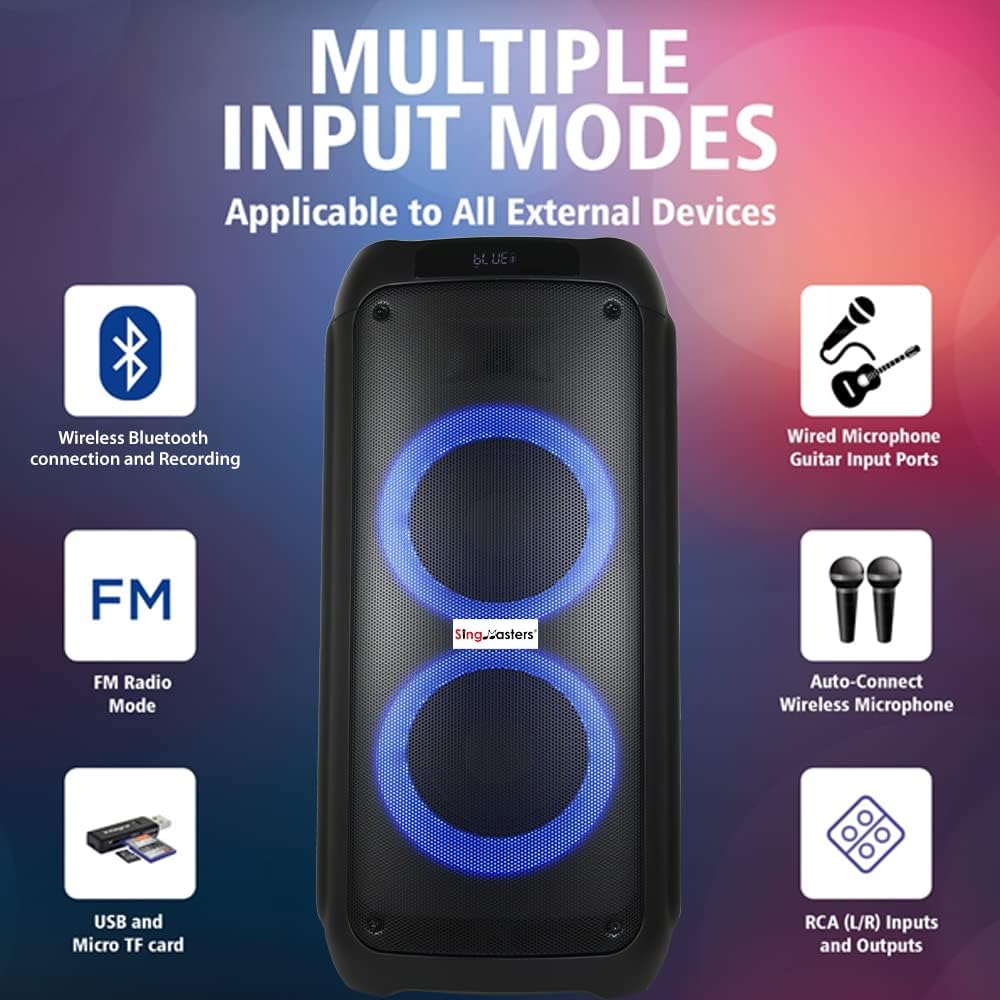
Figure 4.3: The Party Box P50 supports multiple audio input methods.
The Party Box P50 offers versatile connectivity options, including Wireless Bluetooth, Wired Microphone/Guitar Input, FM Radio, USB and Micro TF card playback, and RCA (L/R) Inputs and Outputs. It also features auto-connect for the included wireless microphones.
5. Setup
5.1. Charging the Unit
- Connect the charging cable to the DC IN port on the top panel of the Party Box P50.
- Plug the other end of the charging cable into a suitable power outlet.
- The charging indicator (if present) will illuminate. Allow the unit to fully charge before first use (approximately 4-6 hours).
- Unplug the unit once fully charged to preserve battery life.
5.2. Installing Batteries
- Wireless Microphones: Each wireless microphone requires batteries (type not specified, typically AA or AAA). Open the battery compartment (usually at the bottom or by unscrewing the handle) and insert the batteries, observing polarity (+/-).
- Remote Control: The remote control requires batteries (type not specified, typically AAA or button cell). Open the battery compartment on the back and insert the batteries, observing polarity.
5.3. Initial Power On
- Ensure the unit is charged or connected to power.
- Flip the OFF/ON switch on the top panel to the ON position.
- The unit will power on, and the display will light up.
6. Operating Instructions
6.1. Mode Selection
Press the MODE button on the control panel or remote control to cycle through available input modes: Bluetooth, FM Radio, AUX Input, USB, TF Card.
6.2. Bluetooth Connection
- Turn on the Party Box P50 and select Bluetooth mode using the MODE button. The display will show "BLUE" or a similar indicator, and you may hear an audible prompt.
- Enable Bluetooth on your smartphone, tablet, or other Bluetooth-enabled device.
- Search for available devices and select "SingMasters P50" (or similar name) from the list.
- Once connected, you will hear a confirmation sound. You can now play audio from your device through the Party Box P50.
6.3. Microphone Usage
- Ensure batteries are installed in the wireless microphones and they are powered on. They should automatically connect to the Party Box P50.
- Adjust the microphone volume using dedicated controls on the unit or remote (if available).
- Some units may have an Echo or Reverb control for microphone effects. Adjust to your preference.
- For wired microphones, connect them to the MIC IN port.
6.4. USB/TF Card Playback
- Insert a USB flash drive into the USB Port or a TF card into the TF Card Slot.
- The unit should automatically switch to USB or TF Card mode and begin playing compatible audio files (e.g., MP3).
- Use the Playback Controls (Previous, Play/Pause, Next) to navigate tracks.
6.5. AUX Input
- Connect one end of a 3.5mm audio cable (not included) to the AUX Input port on the Party Box P50.
- Connect the other end to the headphone jack or audio output of your external device (e.g., TV, computer, MP3 player).
- Select AUX mode using the MODE button. Audio from your external device will now play through the speaker.
6.6. FM Radio
- Select FM Radio mode using the MODE button.
- Press and hold the Play/Pause button to initiate an automatic scan for available FM stations. The unit will save found stations.
- Use the Previous/Next Track buttons to navigate between saved FM stations.
6.7. Recording Function
To record your performance (e.g., singing with the microphone over music playing from Bluetooth/USB/AUX):
- Ensure a USB flash drive or TF card is inserted into the unit.
- Start playing your desired background music.
- Press the REC button. The unit will begin recording audio, including microphone input and background music.
- Press the REC button again to stop recording. The recorded file will be saved to your USB drive or TF card.
6.8. LED Disco Lights
Press the LED button on the control panel or remote control to cycle through different LED light patterns or to turn the lights off.
7. Maintenance
7.1. Cleaning
- Always unplug the unit before cleaning.
- Use a soft, dry cloth to wipe the exterior surfaces of the speaker and microphones.
- Do not use abrasive cleaners, waxes, or solvents as they may damage the finish.
7.2. Storage
- Store the unit in a cool, dry place away from direct sunlight and extreme temperatures.
- If storing for an extended period, fully charge the battery every 3-6 months to maintain its health.
7.3. Battery Care
- Avoid fully discharging the battery frequently.
- Do not leave the unit plugged in for excessively long periods after it is fully charged.
- If the unit will not be used for a long time, remove batteries from the microphones and remote control to prevent leakage.
8. Troubleshooting
If you encounter issues with your Party Box P50, refer to the following common problems and solutions:
| Problem | Possible Cause | Solution |
|---|---|---|
| Unit does not power on. | Battery is depleted; Power switch is off; Charging cable is not connected properly. | Charge the unit; Ensure the power switch is in the ON position; Check charging cable connection. |
| No sound from speaker. | Volume is too low; Incorrect input mode selected; External device volume is low; Bluetooth not connected. | Increase master volume; Press MODE button to select correct input; Increase volume on connected device; Re-pair Bluetooth device. |
| Microphones not working. | Microphone batteries are low or incorrectly inserted; Microphones are off; Microphone volume is low. | Replace/reinsert microphone batteries; Turn on microphones; Increase microphone volume. |
| Bluetooth connection unstable. | Device is too far from speaker; Obstructions between devices; Interference from other devices. | Move device closer to speaker; Remove obstructions; Turn off other Bluetooth devices nearby. |
| USB/TF card not playing. | Incorrect file format; Card/drive not inserted correctly; Card/drive is corrupted. | Ensure files are MP3 format; Reinsert card/drive; Try a different card/drive. |
9. Specifications
| Feature | Detail |
|---|---|
| Model | PartyBox P50 |
| Power Source | Corded Electric, Rechargeable Battery |
| Connectivity Technology | Bluetooth, AUX, USB, TF Card, FM Radio |
| Output Wattage | 30W |
| Item Weight | 6 Kilograms |
| Product Dimensions (L x W x H) | 22.1 x 22.1 x 48.3 cm |
| Battery Type | Lithium Ion (included) |
| Microphones | 2 Wireless Dual Microphones |
| Special Features | Portable, Rechargeable, Wireless, Compact, DJ Disco Lights, TWS function |
| Recommended Uses | Karaoke parties, indoor/outdoor events, family gatherings |
| UPC | 600174324638 |
10. Warranty and Support
SingMasters products are manufactured to high-quality standards. For information regarding warranty coverage, please refer to the warranty card included with your purchase or visit the official SingMasters website. If you require technical assistance or have questions not covered in this manual, please contact SingMasters customer support through their official channels.