1. Introduction
Thank you for choosing the ZONKO 10.1-inch Android Tablet. This manual provides essential information on how to set up, operate, and maintain your device. Please read this manual thoroughly before using your tablet to ensure optimal performance and longevity.
2. Product Overview
2.1 Device Layout
The ZONKO 10.1-inch Android Tablet features a sleek design with intuitive controls. Familiarize yourself with the various ports, buttons, and cameras for seamless operation.

Figure 2.1: Front view of the ZONKO 10.1-inch Android Tablet, showcasing its display and slim bezels.
2.2 Key Features
- Display: 10.1-inch 1280x800 IPS HD Display for vibrant visuals.
- Performance: Quad-Core Processor for smooth multitasking.
- Memory & Storage: 2GB RAM + 32GB internal storage, expandable up to 128GB via microSD card.
- Connectivity: Supports 3G phone calls, Dual SIM cards, and 2.4G Wi-Fi.
- Cameras: 2MP front camera and 5MP rear camera.
- Battery: 6000mAh built-in rechargeable battery for extended use.
- Navigation: Built-in GPS for accurate location services.
- Operating System: Android 9 Pie.

Figure 2.2: Visual representation of the tablet's core features, including connectivity, memory, and display size.
3. Setup
3.1 Initial Charging
Before first use, fully charge your tablet. Connect the provided USB cable to the tablet's charging port and the other end to a power adapter. Plug the adapter into a wall outlet. The battery indicator on the screen will show charging status.
3.2 Inserting SIM and MicroSD Cards
Your tablet supports two SIM cards and one MicroSD card for expanded storage. Locate the card slot on the side of the tablet.
- Gently open the card slot cover.
- Insert the SIM cards (Nano-SIM or Micro-SIM, depending on your model) into the designated SIM1 and SIM2 slots with the gold contacts facing down.
- Insert the MicroSD card into the TF card slot until it clicks into place.
- Close the card slot cover securely.

Figure 3.1: Illustration of SIM and MicroSD card insertion into the tablet's dedicated slots.
3.3 Powering On/Off
- To Power On: Press and hold the Power button until the ZONKO logo appears.
- To Power Off: Press and hold the Power button until the power options menu appears, then select 'Power off'.
- To Restart: Press and hold the Power button until the power options menu appears, then select 'Restart'.
4. Operating Instructions
4.1 Basic Navigation
The tablet uses a capacitive touchscreen. Use the following gestures:
- Tap: To select an item or open an app.
- Tap & Hold: To access context menus or move icons.
- Swipe: To scroll through pages or lists.
- Pinch: To zoom in or out on images and web pages.
4.2 Network Connectivity
4.2.1 Wi-Fi Connection
- Go to Settings > Network & internet > Wi-Fi.
- Toggle Wi-Fi ON.
- Select your desired Wi-Fi network from the list.
- Enter the password if prompted, then tap Connect.
4.2.2 3G Phone Call & Mobile Data
With a valid SIM card inserted, your tablet can make phone calls and access mobile data.
- Phone Calls: Open the 'Phone' app, dial the number, and tap the call icon.
- Mobile Data: Go to Settings > Network & internet > Mobile network. Ensure 'Mobile data' is enabled.
4.3 Camera Usage
The tablet is equipped with a 2MP front camera and a 5MP rear camera. Open the 'Camera' app to capture photos and videos. You can switch between front and rear cameras using the icon on the screen.
4.4 GPS Navigation
The built-in GPS allows for location tracking and navigation. Use pre-installed map applications or download your preferred navigation apps from the Google Play Store.
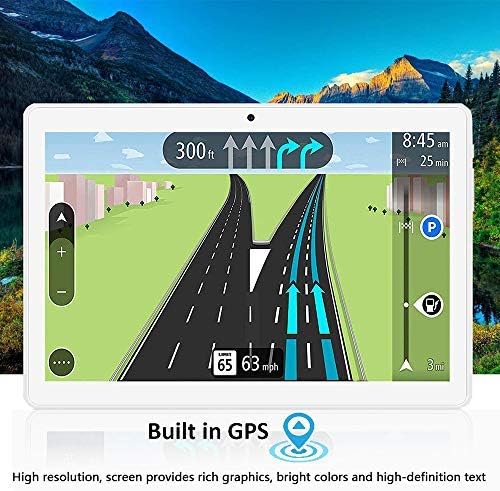
Figure 4.1: The tablet's screen showing a detailed GPS navigation interface.
4.5 Storage Management
Your tablet comes with 32GB of internal storage, expandable up to 128GB with a MicroSD card. To manage storage, go to Settings > Storage. You can view used space, free up space, and manage files.

Figure 4.2: The tablet's display illustrating its storage capacity and expandability for various media and applications.
4.6 Entertainment and Multimedia
The 10.1-inch IPS HD display is ideal for watching HD movies, playing games, and reading eBooks. The tablet supports various multimedia formats.
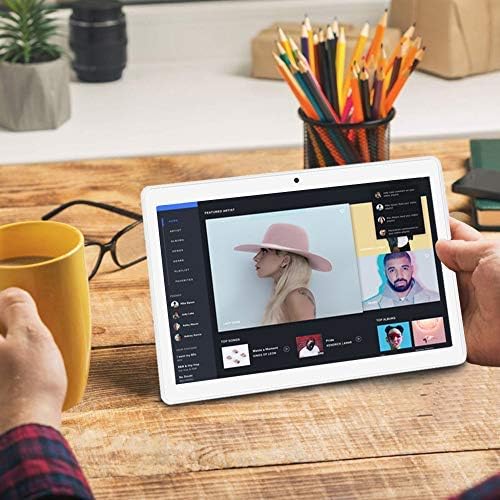
Figure 4.3: The tablet being used for multimedia consumption, specifically music streaming.

Figure 4.4: Examples of the tablet's versatile use for communication and entertainment.
5. Maintenance
5.1 Battery Care
The tablet is equipped with a 6000mAh battery, providing 6-8 hours of mixed-use. To maximize battery life:
- Avoid extreme temperatures.
- Do not let the battery drain completely before recharging regularly.
- Use the original charger or a certified compatible charger.

Figure 5.1: Visual representation of the tablet's 6000mAh battery capacity and estimated usage time.
5.2 Cleaning the Device
Use a soft, lint-free cloth to clean the screen and body of the tablet. Avoid using harsh chemicals or abrasive materials that could damage the surface.
5.3 Software Updates
Periodically check for system updates to ensure your tablet has the latest features and security patches. Go to Settings > System > System update.
6. Troubleshooting
If you encounter issues with your ZONKO tablet, try the following solutions:
- Tablet not turning on: Ensure the battery is charged. Connect to a power source and try again.
- Screen frozen: Press and hold the Power button for about 10-15 seconds to force a restart.
- Wi-Fi connection issues: Restart your tablet and Wi-Fi router. Ensure you are within range and have entered the correct password.
- Apps crashing: Clear the app's cache (Settings > Apps & notifications > App info > [App Name] > Storage & cache > Clear cache). If the problem persists, reinstall the app.
- Slow performance: Close unnecessary background apps, clear cache, or consider a factory reset (backup your data first).
7. Specifications
| Feature | Specification |
|---|---|
| Model Number | K115 |
| Operating System | Android 9 Pie |
| Screen Size | 10.1 Inches |
| Screen Resolution | 1280x800 IPS HD |
| Processor | 1.3 GHz Quad Core (MediaTek) |
| RAM | 2 GB SDRAM DDR3 |
| Internal Storage | 32 GB |
| Expandable Storage | Up to 128GB (MicroSD) |
| Rear Camera | 5 MP |
| Front Camera | 2 MP |
| Wireless Type | 802.11bgn (2.4G Wi-Fi) |
| Cellular Connectivity | 3G (Dual SIM support) |
| Battery Capacity | 6000mAh Lithium Polymer |
| Item Weight | 1.76 pounds |
| Product Dimensions | 9.69 x 6.65 x 0.2 inches |
| Color | Silver |
8. Warranty and Support
ZONKO products are designed for reliability and performance. For warranty information or technical support, please refer to the warranty card included with your purchase or visit the official ZONKO website. Keep your purchase receipt as proof of purchase for warranty claims.


