
djive DJ50002
djive Flowmate Tower One User Manual
Model: DJ50002
1. Product Overview
The djive Flowmate Tower One is an innovative 2-in-1 tower fan and air purifier designed to provide a comfortable and clean indoor environment. It features smart control options including the djive home app, Alexa, and Google Home voice commands, as well as an infrared remote control. Equipped with an integrated HEPA 12 filter, it effectively cleans the air by removing pollen and other particles, making it ideal for allergy sufferers. Its bladeless design ensures maximum safety for children and pets and simplifies cleaning.
The fan offers 9 speed levels and multiple operating modes, including a quiet sleep mode and a "Fresh" mode adjustable via the app. With an 80° oscillation function and a height of approximately 105 cm, it circulates air efficiently. Air is compressed through the HEPA 12 filter and then through thin aluminum columns, providing a noticeably cooler airflow. The LED display automatically turns off after 20 seconds, making it suitable for bedrooms, living rooms, offices, or camping.

Image: The djive Flowmate Tower One, a white tower fan with a sleek, modern design.
2. Safety Instructions
- Always ensure the device is placed on a stable, flat surface to prevent tipping.
- Do not insert fingers or objects into the air outlets or inlets. The bladeless design minimizes risk, but caution is still advised.
- Keep the device away from water and moisture. Do not operate with wet hands.
- Unplug the device before cleaning or performing any maintenance.
- Ensure the power cord is not damaged or pinched. Do not place heavy objects on the cord.
- This appliance is not intended for use by persons (including children) with reduced physical, sensory or mental capabilities, or lack of experience and knowledge, unless they have been given supervision or instruction concerning use of the appliance by a person responsible for their safety.
3. Setup
3.1 Unpacking and Placement
Carefully remove the Flowmate Tower One from its packaging. Place the unit on a firm, level surface in the desired location. Ensure there is adequate space around the unit for optimal airflow and oscillation.
3.2 Power Connection
Plug the power cord into a standard electrical outlet. The unit will enter standby mode.
3.3 Remote Control Setup
The remote control requires one CR2025 battery (not included). Open the battery compartment on the back of the remote, insert the battery with the correct polarity (+ up), and close the compartment.

Image: The djive Flowmate Tower One shown with its remote control and a smartphone displaying the djive home app.
3.4 HEPA Filter Installation/Check
The HEPA 12 filter is typically pre-installed. To check or replace, locate the filter compartment (usually at the base or rear of the unit). Open the cover and ensure the filter is correctly seated. Close the compartment securely.
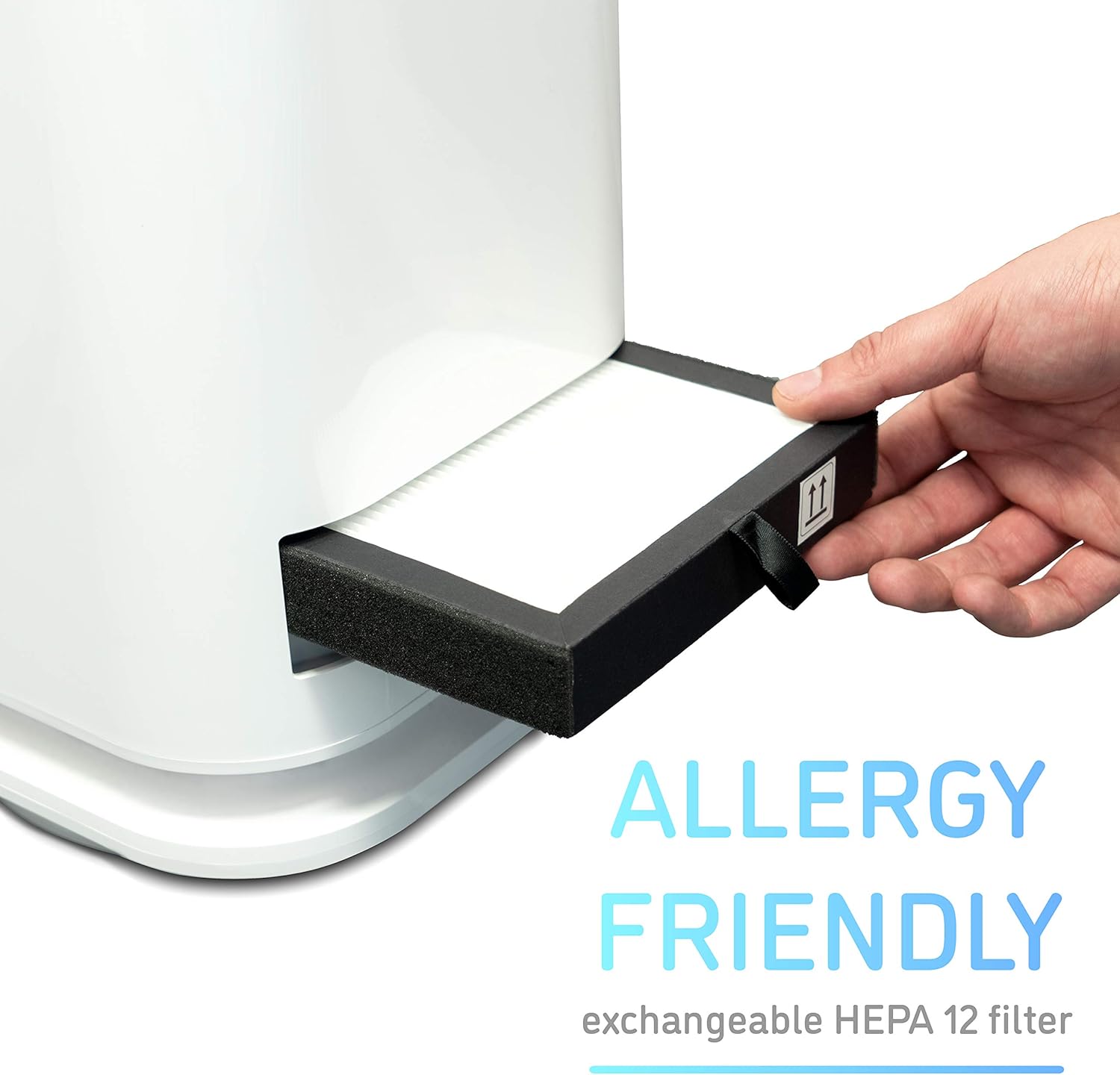
Image: A hand demonstrating the insertion of the HEPA 12 filter into the filter slot of the fan unit.
3.5 App and Wi-Fi Connection
- Download the "djive home" app from your smartphone's app store (iOS or Android).
- Register or log in to your djive home account.
- Ensure your smartphone is connected to a 2.4GHz Wi-Fi network. The Flowmate Tower One only operates on 2.4GHz. If you have a dual-band router, you may need to temporarily disable the 5GHz band or ensure your phone is specifically connected to the 2.4GHz SSID.
- In the app, select "Add Device" and follow the on-screen instructions to connect your Flowmate Tower One. This typically involves putting the fan into pairing mode (refer to the fan's display or manual for specific button presses) and entering your Wi-Fi password in the app.
- Once connected, you can link the djive home app with Alexa or Google Home through their respective apps for voice control.
4. Operating Instructions
4.1 Control Panel Operation
The Flowmate Tower One features a touch-sensitive control panel on the front of the unit.

Image: A finger interacting with the digital display and control button on the front of the fan.
- Power On/Off: Press the power button to turn the unit on or off.
- Speed Adjustment: Use the speed control buttons to cycle through 9 different fan speeds.
- Oscillation: Press the oscillation button to activate or deactivate the 80° oscillation function.
- Mode Selection: Cycle through available modes (e.g., Normal, Sleep, Max) using the mode button.
- The LED display will show the current speed or mode and will automatically dim after approximately 20 seconds.
4.2 Remote Control Operation
The included remote control provides convenient access to all functions from a distance.
- Power Button: Turns the unit on or off.
- Speed Buttons: Adjust fan speed up or down.
- Oscillation Button: Toggles 80° oscillation.
- Timer Button: Sets the auto-off timer.
- Mode Button: Cycles through operating modes.
4.3 App Control (djive home)
The djive home app offers comprehensive control and additional features.

Image: A smartphone screen showing the djive home app with controls for fan speed, power, and oscillation.
- Full Control: Power on/off, adjust speed (1-9), activate oscillation.
- Advanced Modes: Access specific modes like "Sleep" (for quiet operation), "Fresh" (variable wind speed), and "Strong Wind" (Max mode).
- Timer Function: Set precise auto-off timers.
- Scheduling: Create schedules for automatic operation.
- Status Monitoring: View current settings and status.
4.4 Voice Control (Alexa, Google Home)
Once linked with the djive home app, you can control your Flowmate Tower One using voice commands.
- "Alexa, turn on/off the fan."
- "Hey Google, set fan speed to 5."
- "Alexa, turn on oscillation for the fan."
- Refer to the Alexa or Google Home app for specific command syntax and device naming.

Image: The djive Flowmate Tower One in a room setting, illustrating its 80-degree oscillation capability.
4.5 Airflow Mechanism
The Flowmate Tower One draws air through its base, where it passes through the HEPA 12 filter. The purified air is then compressed and accelerated through the thin aluminum columns, creating a powerful yet smooth airflow that effectively cools the surrounding area.

Image: A diagram illustrating the internal airflow path within the djive Flowmate Tower One, showing air being drawn in and expelled.
5. Maintenance
5.1 Cleaning the Unit
Due to its bladeless design, the Flowmate Tower One is easy to clean. Use a soft, dry cloth to wipe down the exterior surfaces. For stubborn dirt, a slightly damp cloth can be used, followed by a dry cloth. Do not use abrasive cleaners or solvents.
5.2 HEPA Filter Replacement
The HEPA 12 filter should be replaced once a year to ensure optimal air purification performance. Replacement filters can be purchased from the official djive online store or authorized retailers. Refer to section 3.4 for filter access instructions.
6. Troubleshooting
| Problem | Possible Cause | Solution |
|---|---|---|
| Unit does not turn on. | No power supply; power cord not properly connected. | Ensure the power cord is securely plugged into a working outlet. Check the power switch. |
| Wi-Fi connection fails. | Incorrect Wi-Fi band (5GHz instead of 2.4GHz); incorrect password; fan not in pairing mode. | Ensure your router is set to 2.4GHz or your phone is connected to the 2.4GHz SSID. Double-check Wi-Fi password. Follow app instructions to put fan in pairing mode. |
| Remote control not working. | Battery depleted or incorrectly inserted; obstruction between remote and unit. | Replace the CR2025 battery. Ensure no obstacles are blocking the signal path. |
| Fan is noisy at higher speeds. | Normal operation at high settings; dirty filter. | Noise level increases with fan speed. For quieter operation, use lower speeds or Sleep mode. Check and clean/replace the HEPA filter. |
| Air purification seems ineffective. | Dirty or old HEPA filter. | Replace the HEPA 12 filter as recommended (annually). |
7. Specifications
| Feature | Detail |
|---|---|
| Brand | djive |
| Model Number | DJ50002 |
| Color | White |
| Dimensions (L x W x H) | 20.5 x 20.5 x 105 cm (approx. 8.1 x 8.1 x 41.3 inches) |
| Weight | 4.7 kg (approx. 10.4 lbs) |
| Power | 35 Watts |
| Voltage | 24 Volts |
| Material | Plastic |
| Number of Speeds | 9 |
| Noise Level (Max) | 56 dB |
| Oscillation | 80° |
| Filter Type | HEPA 12 (filters <99.5% of air particles) |
| Control Compatibility | iPhone, Android (djive home app), Alexa, Google Home, IR Remote Control |
| Special Features | Bladeless design, Sleep mode, Fresh mode, Timer function, LED display auto-off |
8. Warranty and Support
For warranty information, technical support, or to purchase replacement parts (such as HEPA filters), please contact djive customer service or visit their official website. Specific warranty terms may vary by region and retailer.
Please retain your proof of purchase for any warranty claims.
Related Documents - DJ50002
 |
Djive Flowmate ARC Quick Start Guide A quick guide to setting up and operating your Djive Flowmate ARC air purifier, including filter installation, power connection, app setup, display icons, general controls, and filter replacement. |
 |
Djive Pure 800 Air Purifier and Humidifier Manual User manual for the Djive Pure 800 professional air purifier and humidifier, covering setup, operation, maintenance, and troubleshooting. |