
Introduction
The LEXiBOOK Extreme Crosslander is an innovative remote control car designed for dynamic play. It features two distinct control modes: a traditional remote control and an intuitive gesture control bracelet. Experience lateral and diagonal movements with its drift function, and enjoy spectacular light effects from its luminous wheels. The car can perform 360-degree rotations and navigate various terrains by adjusting its position. With rechargeable batteries for both the car and the wrist control, and a 2.4 GHz frequency for stable connection, the Extreme Crosslander offers an engaging and versatile remote control experience.

Image: The LEXiBOOK Extreme Crosslander RC Car, showcasing its sleek design, the included remote control, and the gesture control bracelet.
Setup
What's in the Box
- LEXiBOOK Extreme Crosslander RC Car
- Remote Control
- Gesture Control Bracelet
- Micro-USB cables (for charging)
- Rechargeable batteries (for car and wrist control)
- User Manual (this document)

Image: The product packaging, displaying the Extreme Crosslander car, remote control, and gesture control bracelet, along with key features.
Battery Installation and Charging
- Car Battery: The car uses a rechargeable battery. Connect the provided Micro-USB cable to the car's charging port and to a suitable USB power source. Charging time is approximately 2.5-3 hours.
- Wrist Control Battery: The gesture control bracelet also uses a rechargeable battery. Connect its Micro-USB cable to a USB power source. Charging time is approximately 1 hour.
- Remote Control Batteries: The remote control requires 2 AA batteries (not included). Open the battery compartment on the back of the remote control, insert the batteries observing polarity (+/-), and close the compartment.
Ensure all rechargeable components are fully charged before first use for optimal performance. The car's battery life is approximately 20 minutes, and the wrist control's battery life is approximately 8 hours.
Operating Instructions
Control Modes
- Remote Control: Use the traditional remote control for precise movements. The 2.4 GHz frequency ensures optimized range and reduced interference.
- Gesture Control Bracelet: Wear the bracelet on your wrist. The integrated motion sensor detects the position of your hand, allowing the car to move forward, backward, or sideways based on your gestures.
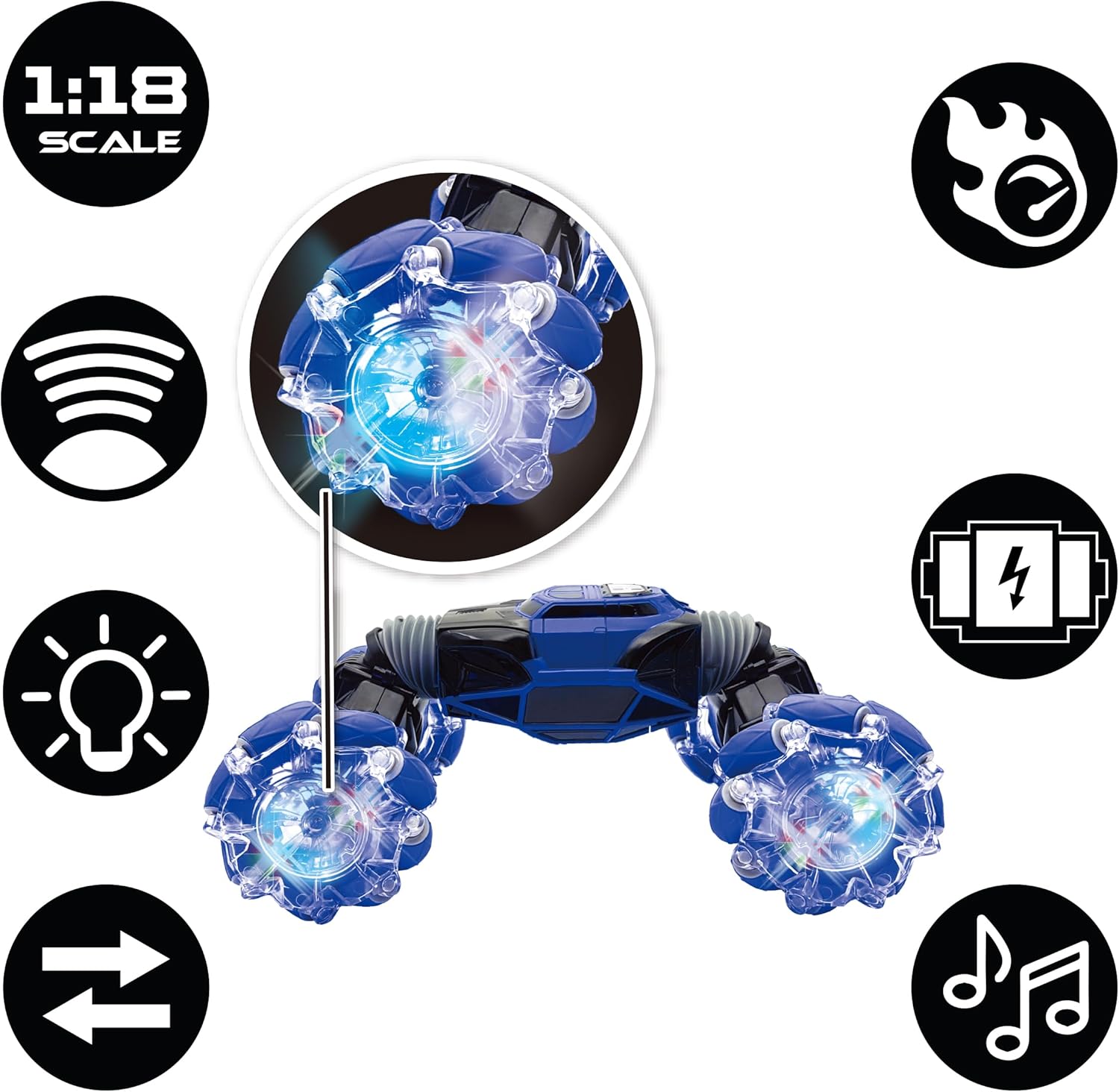
Image: A person using the traditional remote control to operate the Extreme Crosslander car on a paved surface.

Image: A hand wearing the gesture control bracelet, demonstrating its use to direct the Extreme Crosslander car.
Special Features
- Drift Function: Perform impressive lateral and diagonal movements.
- Demo Mode: Activate the demo mode for pre-programmed stunts and movements synchronized with music.
- Light Effects: The car features incredible light effects generated by its luminous wheels, enhancing visibility and visual appeal during operation.
- 360-Degree Rotation: The car is capable of rotating 360 degrees and moving in all directions, offering dynamic maneuverability.
- Adjustable Position: Select high or low position to navigate various obstacles and terrains at full speed.

Image: The Extreme Crosslander car highlighting its illuminated wheels and various feature icons, including speed, signal, light, and music.

Image: The Extreme Crosslander car shown in motion, illustrating its ability to perform a 360-degree spin.
Maintenance
- Cleaning: Use a soft, dry cloth to clean the car and controllers. Avoid using water or harsh chemicals, as this can damage electronic components.
- Battery Care:
- Always fully charge the car and wrist control batteries before use.
- Do not overcharge the batteries.
- If the product will not be used for an extended period, remove the AA batteries from the remote control and store the rechargeable components with a partial charge.
- Storage: Store the product in a cool, dry place away from direct sunlight and extreme temperatures.
Troubleshooting
| Problem | Possible Cause | Solution |
|---|---|---|
| Car does not respond to controls. | Low battery in car, remote, or wrist control; not paired correctly. | Ensure all batteries are fully charged. Check battery polarity in remote. Re-pair the car with its controller(s) according to the quick start guide (if applicable). |
| Short battery life. | Batteries not fully charged; old or worn-out batteries. | Ensure full charge before each use. Battery life for the car is approximately 20 minutes. Consider replacing AA batteries in the remote if performance degrades. |
| Car moves erratically or not as expected. | Interference; gesture control not calibrated; damaged components. | Operate in an open area away from other 2.4 GHz devices. Re-calibrate the gesture control bracelet if possible. Inspect for physical damage. |
Specifications
| Feature | Detail |
|---|---|
| Product Dimensions | 12.99 x 7.09 x 3.35 inches |
| Item Weight | 1.9 pounds |
| Model Number | RC50 |
| Manufacturer Recommended Age | 3 years and up |
| Batteries Required (Remote) | 2 AA batteries |
| Car Battery Life | Approx. 20 minutes |
| Wrist Control Battery Life | Approx. 8 hours |
| Max Speed | 12km/h |
| Frequency | 2.4 GHz |
| Manufacturer | Lexibook |
Warranty and Support
This product is designed for durability and performance. For specific warranty information, please refer to the documentation included with your purchase or contact LEXiBOOK customer support directly. General safety information indicates a recommended product lifespan of 2 years under normal use.
For technical assistance, troubleshooting beyond this manual, or inquiries regarding parts and service, please visit the official LEXiBOOK website or contact their customer service department. Contact information can typically be found on the product packaging or the brand's official online presence.
Note: Protection plans may be available from third-party providers at the point of purchase. These are separate from the manufacturer's warranty.