
realme RMX2001
Contents
Realme 6 RMX2001 Smartphone User Manual
Model: RMX2001
Introduction
The Realme 6 RMX2001 is a high-performance smartphone designed to provide a seamless and smooth user experience. It features a 90Hz Ultra Smooth Display, capable of producing 90 frames per second for a fluid visual experience. Powered by the Snapdragon 720G processor, built on an advanced 8nm process, it offers powerful and efficient performance, including a robust gaming experience with its Adreno 618 GPU. The device also incorporates a side-mounted fingerprint scanner for quick and secure unlocking, and supports Dolby Atmos and Hi-Res Audio for an immersive audio experience.
1. Setup
1.1 Package Contents
- Realme 6 RMX2001 Smartphone
- Power Adapter
- USB Cable
- SIM Ejector Tool
- Quick Start Guide
- Protective Case (may vary by region)
1.2 Inserting SIM Card and microSD Card
Locate the SIM card tray on the side of the device. Use the provided SIM ejector tool to open the tray. Carefully place your Nano-SIM card(s) and/or microSD card into the designated slots. Ensure the cards are correctly oriented as indicated on the tray. Gently push the tray back into the phone until it clicks into place.
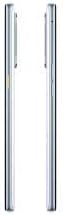
Figure 1.2.1: Side view of the Realme 6 RMX2001, illustrating the location of the SIM card tray and side buttons.
1.3 Initial Power On and Setup
Press and hold the power button (located on the side, integrated with the fingerprint scanner) until the Realme logo appears. Follow the on-screen prompts to complete the initial setup, including language selection, Wi-Fi connection, Google account sign-in, and security settings.

Figure 1.3.1: Front and back view of the Realme 6 RMX2001 in Comet White, showcasing the display and quad camera setup.
2. Operating
2.1 Display and Navigation
The Realme 6 features a 6.5-inch 90Hz Ultra Smooth Display. Navigate the interface using touch gestures: swipe to scroll, tap to select, pinch to zoom. The 90Hz refresh rate provides a noticeably smoother visual experience, especially during scrolling and gaming.

Figure 2.1.1: Front and back view of the Realme 6 RMX2001, emphasizing the full-screen display.
2.2 Side Fingerprint Scanner
The power button on the side of the device integrates a capacitive fingerprint scanner. To register your fingerprint, go to Settings > Fingerprint, Face & Passcode and follow the instructions. Once registered, a single press on the power button will unlock your phone instantly.
2.3 Camera Usage
The Realme 6 is equipped with a Quad Camera system. Open the Camera app from your home screen or app drawer. You can switch between different modes (e.g., Photo, Video, Portrait, Night) by swiping across the bottom of the viewfinder. Tap the shutter button to capture photos or start/stop video recording.
2.4 Audio Features
Experience enhanced audio with Dolby Atmos and Hi-Res Audio Quality. These features provide an immersive sound experience for music and movies. Adjust volume using the volume buttons on the side of the device.
3. Maintenance
3.1 Cleaning Your Device
Use a soft, lint-free cloth to clean the screen and body of your phone. Avoid using harsh chemicals or abrasive materials. For stubborn smudges, slightly dampen the cloth with water or a screen cleaner designed for electronics.
3.2 Software Updates
Regularly check for software updates to ensure optimal performance and security. Go to Settings > Software Update to check for and install available updates. Ensure your device has sufficient battery and a stable internet connection before updating.
3.3 Battery Care
To prolong battery life, avoid exposing the phone to extreme temperatures. It is recommended to keep the battery charge between 20% and 80% for daily use. Use only the original charger and cable provided with the device.
4. Troubleshooting
4.1 Device Not Powering On
- Ensure the battery is charged. Connect the phone to its charger and wait a few minutes before attempting to power on.
- Press and hold the power button for at least 10-15 seconds to perform a forced restart.
4.2 Screen Unresponsive
- Restart the device by holding the power button.
- If the screen remains unresponsive, try a forced restart as described above.
4.3 Connectivity Issues (Wi-Fi/Cellular)
- Toggle Wi-Fi or Cellular Data off and on from the Quick Settings panel.
- Restart your router for Wi-Fi issues.
- Ensure your SIM card is properly inserted and your mobile plan is active.
- Reset network settings: Settings > System > Reset options > Reset Wi-Fi, mobile & Bluetooth.
5. Specifications
| Feature | Detail |
|---|---|
| Model Name | Realme 6 |
| Model Number | RMX2001 |
| Display Size | 6.5 Inches |
| Display Resolution | 2400 x 1080 |
| Operating System | Android 10.0 |
| RAM | 4 GB (Note: Some product information may refer to 8GB RAM, please verify your specific model.) |
| Internal Storage | 128 GB |
| CPU Speed | 2.3 GHz |
| Battery Capacity | 4300 Milliamp Hours |
| Item Weight | 1.1 pounds |
| Product Dimensions | 6 x 4 x 4 inches |
| Connectivity | LTE, USB, GPS, Wireless |
| Color | Comet White |
6. Warranty Information
Please note that this specific international version of the Realme 6 RMX2001 is indicated to have No Warranty. For any potential service or repair needs, please contact your point of purchase or a local authorized service center, if available, for assistance.
7. Support
For further assistance, technical support, or detailed product information, please visit the official realme website or the realme store on Amazon:
Visit the realme Store on Amazon
Always refer to the official realme support channels for the most accurate and up-to-date information.
Ask a question about this manual
Ask about setup, troubleshooting, compatibility, parts, safety, or missing instructions. Manuals+ will review the question and use this page’s manual context to help answer it.