
UNITOPSCI Q3300
Contents
UNITOPSCI 7-inch Android Car Stereo User Manual
Model: Q3300
1. Introduction
Thank you for choosing the UNITOPSCI 7-inch Android Car Stereo. This manual provides detailed instructions for the installation, operation, and maintenance of your new car stereo system. Please read this manual thoroughly before use to ensure proper functionality and to maximize your experience.
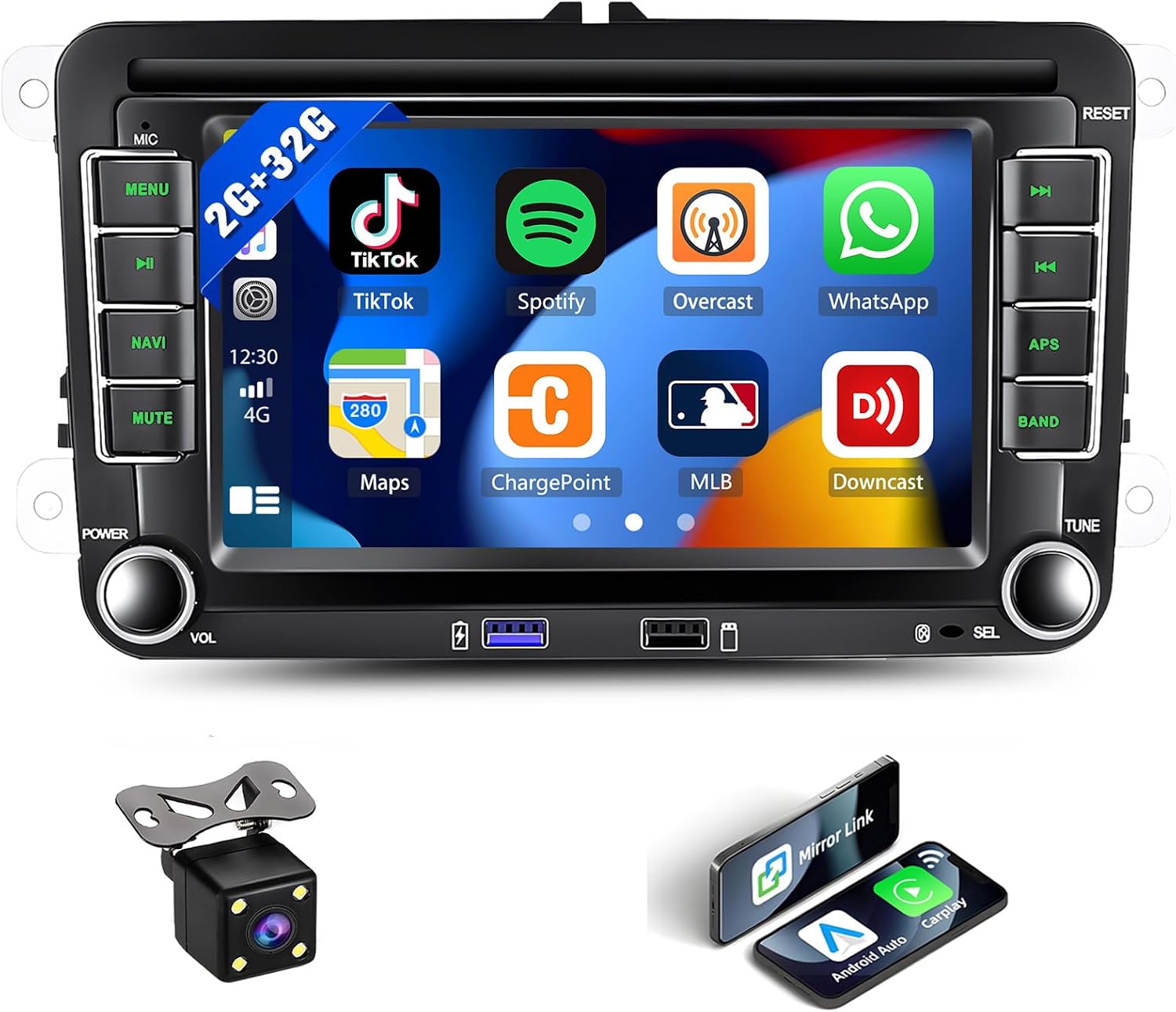
Figure 1.1: UNITOPSCI 7-inch Android Car Stereo with accessories.
This advanced car stereo features an Android 13 system, 2GB RAM, 32GB ROM, a 7-inch touchscreen, wireless Apple CarPlay and Android Auto, GPS navigation, Bluetooth, FM/RDS radio, phone mirror link, and supports a backup camera. It is designed for a seamless integration into compatible Volkswagen, Seat, and Skoda vehicles.
2. Safety Information
- Always operate the device safely and responsibly. Distracted driving can lead to accidents.
- Do not attempt to install or repair the unit yourself if you are not qualified. Improper installation can cause damage to the unit or your vehicle.
- Ensure all wiring is correctly connected to prevent short circuits or electrical hazards.
- Keep the unit away from water and excessive moisture.
- Do not block ventilation openings.
- Use only specified power sources and accessories.
3. Setup and Installation
3.1. Compatibility Check
This Android car stereo is designed to fit various Volkswagen, Skoda, and Seat models. Please verify the radio size (8.66 x 5.11 inches) against your car's center console before purchase. A CANBUS decoder is included for plug-and-play compatibility with most VW cars.

Figure 3.1: Compatible car models for the UNITOPSCI car stereo.
3.2. Package Contents
Ensure all items are present in the package:
- 1x Android Car Stereo
- 1x Backup Camera
- 1x CANBUS Decoder
- 1x GPS Antenna
- 2x Power Cords
- 1x RCA Cable
- 1x 6 PIN USB Cable
- 1x Rear Camera Input Cable
- 1x Radio Antenna
- 1x User Manual (this document)

Figure 3.2: Overview of the car stereo dimensions and included accessories.
3.3. Installation Overview
The installation process typically involves removing your existing car stereo, connecting the new unit using the provided wiring harnesses and CANBUS decoder, and then securing it in place. Professional installation is recommended if you are unfamiliar with car audio systems.

Figure 3.3: Visual comparison of the car dashboard before and after stereo installation.
3.4. Wiring Diagram
Refer to the following diagrams for proper wiring connections. The CANBUS decoder simplifies installation for compatible vehicles. If your car does not use a CANBUS, connect the ACC small black plug.

Figure 3.4: Main wiring diagram for the car stereo system.
For the backup camera connection, follow the specific wiring instructions below:

Figure 3.5: Rear view camera wiring diagram.
4. Operating Instructions
4.1. Basic Operation
The unit powers on with the vehicle's ignition. Use the physical buttons on the left and right sides of the screen for common functions like volume, menu, navigation, and radio band selection. The 7-inch touchscreen provides intuitive control over all Android features.
4.2. Wireless Apple CarPlay & Android Auto
Connect your smartphone wirelessly via Bluetooth/Wi-Fi or wired via USB to access Apple CarPlay or Android Auto. This allows you to use your phone's navigation, music, calls, and other apps directly on the stereo display.

Figure 4.1: Wireless Apple CarPlay and Android Auto functionality.
4.3. GPS Navigation & WiFi Hotspot
The built-in GPS module supports both online and offline navigation. Connect to a Wi-Fi hotspot (e.g., from your phone) to download maps, access online navigation, and enjoy other internet-based functions.

Figure 4.2: GPS Navigation and WiFi capabilities.
4.4. Bluetooth & FM/RDS Radio
Utilize Bluetooth for hands-free calling and wireless audio streaming. The integrated FM/RDS radio tuner provides access to local radio stations with clear digital stereo sound.

Figure 4.3: Bluetooth and FM/RDS Radio functions.
4.5. Phone Mirror Link & Split Screen
Mirror your Android or iOS phone screen onto the stereo's display for viewing navigation, videos, or other content. The split-screen function allows you to run two applications side-by-side for enhanced multitasking.

Figure 4.4: Phone Mirror Link and Split Screen features.
4.6. Steering Wheel Control (SWC)
The unit supports your original car's steering wheel control buttons, allowing you to conveniently manage functions like volume, track changes, and calls without taking your hands off the wheel.

Figure 4.5: Steering Wheel Control integration.
4.7. Audio Equalizer (EQ) & Colorful Backlight
Customize your audio experience with the built-in EQ, offering various sound effects and modes. The unit also features 7 colorful backlight options for the physical buttons, allowing you to match your car's interior lighting.

Figure 4.6: Audio EQ and Colorful Backlight features.
4.8. Rear View Camera
The included backup camera provides a clear reversing image on the stereo screen, enhancing parking safety. The display automatically switches to the camera view when the vehicle is in reverse.
Figure 4.7: Rear View Camera display and features.
5. Maintenance
- Cleaning the Screen: Use a soft, lint-free cloth to gently wipe the touchscreen. For stubborn smudges, slightly dampen the cloth with water or a screen cleaner designed for electronics. Avoid harsh chemicals or abrasive materials.
- General Cleaning: Keep the unit free from dust and debris. Use a soft brush or compressed air to clean around buttons and ports.
- Software Updates: Periodically check for software updates to ensure optimal performance and access to new features. Instructions for updates will typically be available through the system settings or the manufacturer's website.
- Avoid Extreme Temperatures: Do not expose the unit to extreme heat or cold, as this can affect its performance and lifespan.
6. Troubleshooting
| Problem | Possible Cause | Solution |
|---|---|---|
| Unit does not power on. | No power supply; incorrect wiring; blown fuse. | Check power connections; verify fuse in vehicle's fuse box; ensure ACC wire is connected if not using CANBUS. |
| No sound. | Volume too low; incorrect speaker wiring; audio settings. | Increase volume; check speaker connections; adjust EQ settings. |
| Bluetooth not connecting. | Bluetooth off on device/stereo; pairing issue. | Ensure Bluetooth is enabled on both devices; delete previous pairings and re-pair; restart both devices. |
| GPS signal weak/lost. | GPS antenna placement; environmental interference. | Ensure GPS antenna has a clear view of the sky; relocate antenna if necessary. |
| Rear camera not displaying. | Incorrect camera wiring; camera malfunction. | Check camera power and video signal connections; ensure reverse trigger wire is correctly connected. |
| Touchscreen unresponsive. | System crash; screen calibration issue. | Perform a soft reset (refer to system settings); if persistent, contact support. |
If the problem persists after attempting these solutions, please contact customer support for further assistance.
7. Specifications
| Feature | Detail |
|---|---|
| Model Number | Q3300 |
| Operating System | Android 13 |
| RAM | 2GB |
| ROM | 32GB |
| Display Size | 7 Inches |
| Display Resolution | 1024x600 |
| Connectivity | Bluetooth, Wi-Fi, USB |
| Power Output | 50W x 4 max |
| Product Dimensions | 8.66 x 2.05 x 5.12 inches |
| Item Weight | 2.67 pounds |
| Included Components | Android Car Stereo, Backup Camera, CANBUS, GPS Antenna, Power Cords, RCA Cable, 6 PIN USB, Rear Camera Input Cable, Radio Antenna, User Manual |
8. Warranty
The UNITOPSCI 7-inch Android Car Stereo comes with a 12-Month Free Replacement Warranty. This warranty covers manufacturing defects and ensures that you receive a replacement unit if issues arise within the specified period.
Please retain your proof of purchase for warranty claims. The warranty does not cover damage caused by improper installation, misuse, accidents, unauthorized repairs, or normal wear and tear.
9. Support
For any technical issues, questions, or support inquiries regarding your UNITOPSCI car stereo, please contact us through Amazon Seller Central. We aim to reply to all inquiries within 24 hours.
You can also refer to the official UNITOPSCI store on Amazon for additional resources and product information:
Visit the UNITOPSCI Store on Amazon
Thank you for your purchase and enjoy your UNITOPSCI car stereo!
Ask a question about this manual
Ask about setup, troubleshooting, compatibility, parts, safety, or missing instructions. Manuals+ will review the question and use this page’s manual context to help answer it.