Introduction
This user manual provides comprehensive instructions for the setup, operation, and maintenance of your ESCAM QF280 Wireless IP Surveillance Camera. Designed for outdoor use, this solar-powered camera offers advanced surveillance capabilities including infrared night vision and motion detection. Please read this manual thoroughly before installation and use to ensure optimal performance and safety.
Product Overview
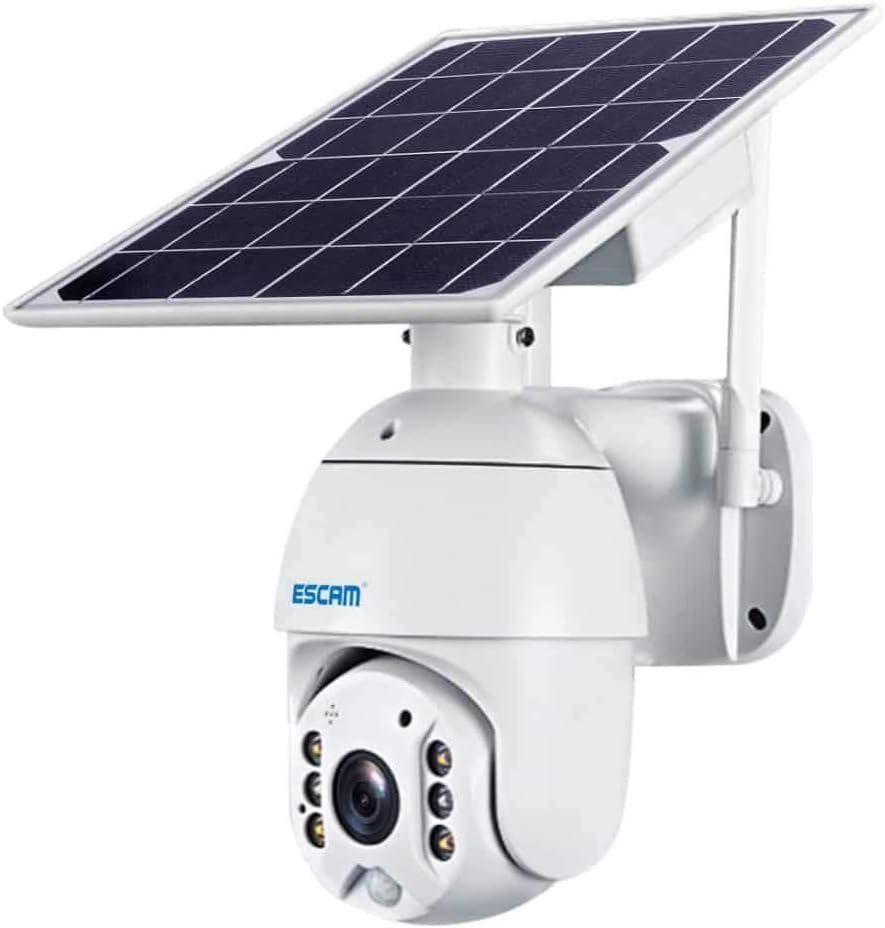
Image 1: The ESCAM QF280 camera unit, featuring a dome-shaped camera body mounted below an adjustable solar panel. The camera has multiple infrared LEDs and a motion sensor on its front face. An antenna is visible on the side, and the entire unit is white.
Key Features:
- Wireless Connectivity: Seamless integration into your network.
- Solar Powered: Equipped with an 8-watt solar panel for continuous operation.
- Infrared Night Vision: Provides clear surveillance in low-light conditions.
- Motion Detection: Alerts and records upon detecting movement.
- Outdoor Use: Durable design suitable for exterior environments.
- 90-Degree Viewing Angle: Wide coverage for effective monitoring.
- Dome Form Factor: Discreet and robust design.
Setup Guide
1. Unboxing and Initial Charge
Carefully remove all components from the packaging. Before initial use, ensure the camera's internal battery is fully charged. This can be done by exposing the solar panel to direct sunlight for at least 8 hours or by connecting it to a 5V USB power source (not included) if available.
2. Choosing a Location
Select an outdoor location with unobstructed sunlight exposure for the solar panel. The camera should be positioned to cover the desired surveillance area, ensuring a clear line of sight. Consider mounting height for optimal viewing angle and security.
3. Mounting the Camera
- Mark the drilling points on the wall or mounting surface using the provided mounting bracket as a template.
- Drill pilot holes and insert wall anchors if necessary.
- Secure the mounting bracket to the surface using the screws.
- Attach the camera unit to the mounting bracket, ensuring it is firmly in place.
- Adjust the angle of the solar panel to maximize sun exposure throughout the day.
4. Network Connection (Wireless)
The ESCAM QF280 connects wirelessly to your home network. Download the recommended mobile application (compatible with Android devices) from your device's app store. Follow the in-app instructions to add your camera, which typically involves scanning a QR code on the camera or entering its unique ID.
Ensure your Wi-Fi network is 2.4GHz, as 5GHz networks may not be supported by this device.
Operating Instructions
Live View
Open the mobile application and select your camera from the device list to access the live video feed. You can pan and tilt the camera (if supported by the specific model variant) directly from the app interface.
Motion Detection and Alerts
Configure motion detection sensitivity and alert settings within the mobile application. When motion is detected, the camera will begin recording and send a notification to your linked mobile device. Review recorded events in the app's playback section.
Night Vision
The camera automatically switches to infrared night vision mode in low-light conditions. This feature ensures continuous surveillance 24/7.
Storage
The camera supports local storage via a microSD card (not included) for recorded footage. Ensure a compatible card is inserted for continuous recording or event-triggered recording. Cloud storage options may also be available through the application, depending on service provider.
Maintenance
- Solar Panel Cleaning: Periodically clean the solar panel surface with a soft, damp cloth to remove dust, dirt, or debris. A clean panel ensures maximum charging efficiency.
- Lens Cleaning: Gently wipe the camera lens with a microfiber cloth to maintain clear image quality. Avoid abrasive materials.
- Firmware Updates: Check the mobile application regularly for firmware updates. Keeping the camera's firmware up-to-date ensures optimal performance, security, and access to new features.
- Battery Health: While solar-powered, extreme prolonged periods of low sunlight may affect battery charge. Monitor battery status via the app and consider temporary manual charging if necessary in such conditions.
Troubleshooting
| Problem | Possible Cause | Solution |
|---|---|---|
| Camera not connecting to Wi-Fi. | Incorrect Wi-Fi password; Camera too far from router; 5GHz Wi-Fi network. | Verify password; Move camera closer to router or use a Wi-Fi extender; Ensure you are connecting to a 2.4GHz network. |
| Poor image quality. | Dirty lens; Low light conditions (before night vision activates); Obstruction. | Clean the camera lens; Ensure adequate lighting or allow night vision to activate; Remove any obstructions from the camera's view. |
| Battery not charging. | Insufficient sunlight; Dirty solar panel; Damaged solar panel/cable. | Relocate camera to an area with more direct sunlight; Clean the solar panel; Contact support if panel/cable is damaged. |
| Motion detection not working. | Sensitivity too low; Detection zone not set correctly; Software glitch. | Adjust sensitivity in the app; Reconfigure detection zones; Restart the camera or app. |
Specifications
| Feature | Detail |
|---|---|
| Brand | ESCAM |
| Model | QF280 / SH-13619 |
| Power Source | Solar Powered |
| Solar Panel Power | 8 Watts |
| Light Source Type | LED |
| Special Features | Infrared Night Vision, Motion Detection |
| Connectivity Technology | Wireless |
| Usage Environment | Outdoor |
| Controller Type | Android (via mobile application) |
| Form Factor | Dome |
| Viewing Angle | 90 Degrees |
Support
For further assistance, technical support, or warranty inquiries, please refer to the contact information provided with your purchase or visit the official ESCAM website. Ensure you have your product model (QF280 / SH-13619) and purchase details ready when contacting support.
Note: Specific warranty terms and conditions may vary by region and retailer. Please consult your purchase documentation for details.


