1. Product Overview
The Toyomi TW 66 Mini Desk Tower Fan is a compact personal cooling device designed for use in various indoor environments such as bedrooms, home offices, and living rooms. It features a space-saving tower design, two speed settings, an oscillation function for wider air distribution, and a convenient timer.

Figure 1: Front view of the Toyomi TW 66 Mini Desk Tower Fan, showcasing its sleek black and silver design.
2. Safety Instructions
- Always ensure the fan is placed on a stable, flat surface to prevent tipping.
- Do not insert fingers or any objects through the fan grilles.
- Keep the fan away from water or other liquids. Do not operate in wet environments.
- Unplug the fan from the power outlet before cleaning or when not in use.
- Do not operate the fan with a damaged cord or plug. Contact qualified service personnel for repair.
- Ensure proper ventilation around the fan; do not block air intake or exhaust.
- This appliance is not intended for use by persons (including children) with reduced physical, sensory or mental capabilities, or lack of experience and knowledge, unless they have been given supervision or instruction concerning use of the appliance by a person responsible for their safety.
3. Setup
- Unpacking: Carefully remove the fan from its packaging. Retain packaging materials for future storage or transport.
- Placement: Place the fan on a firm, level surface. Ensure there is adequate space around the fan for optimal air circulation. Avoid placing it near curtains or other objects that could obstruct airflow or be drawn into the fan.
- Power Connection: Insert the power plug into a standard electrical outlet. Ensure the voltage matches the fan's requirements (refer to specifications).

Figure 2: Rear view of the fan, showing the power cord connection point.
4. Operating Instructions
The Toyomi TW 66 Mini Desk Tower Fan features a top-mounted control knob for easy operation. Refer to Figure 3 for control knob details.
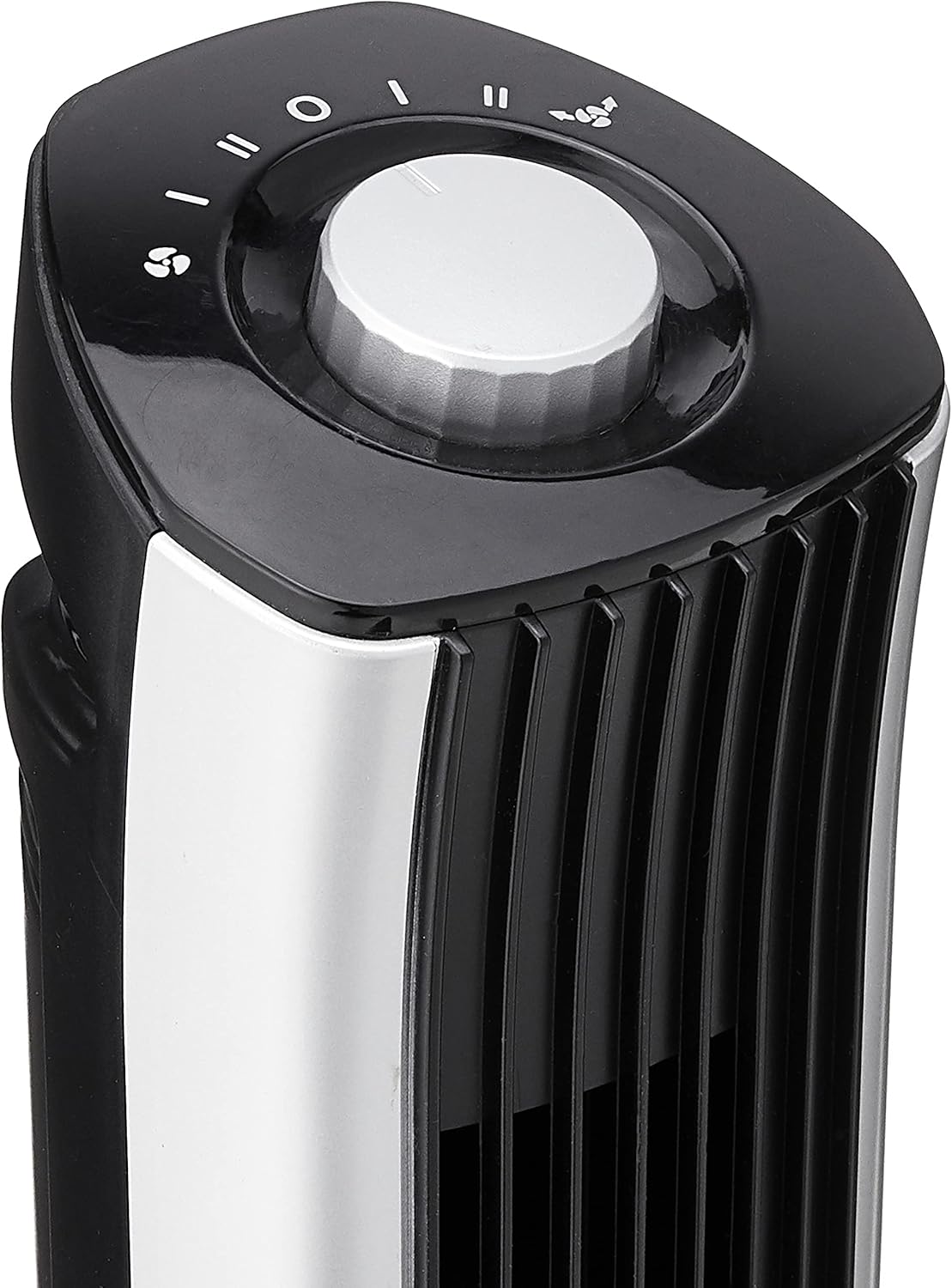
Figure 3: Top control panel with the rotary knob and function indicators.
- Power ON/OFF: Rotate the control knob clockwise from the "O" (OFF) position to select a speed setting. Rotate counter-clockwise back to "O" to turn off the fan.
- Speed Settings: The fan offers two speed levels.
- I: Low speed setting.
- II: High speed setting.
- Oscillation Function: To activate the 90-degree oscillation, rotate the knob to the oscillation symbol (often depicted as two arrows forming a circle or an oscillating fan icon). The fan will sweep from side to side, distributing air over a wider area. To stop oscillation, rotate the knob to a non-oscillation speed setting.
- Timer Function: The fan includes a 7.5-hour timer. Specific operation details for the timer are typically integrated with the control knob. Consult the markings on your specific unit for timer activation and adjustment.
5. Maintenance
Regular cleaning ensures optimal performance and extends the lifespan of your fan.
- Before Cleaning: Always unplug the fan from the power outlet before attempting any cleaning or maintenance.
- Exterior Cleaning: Wipe the exterior surfaces of the fan with a soft, damp cloth. Do not use abrasive cleaners, solvents, or harsh chemicals, as these may damage the finish.
- Air Intake/Outlet: Use a vacuum cleaner with a brush attachment to gently remove dust and debris from the air intake and outlet grilles. This helps maintain efficient airflow.
- Storage: If storing the fan for an extended period, clean it thoroughly, then place it back in its original packaging or cover it to protect it from dust. Store in a cool, dry place.
6. Troubleshooting
If you encounter issues with your fan, refer to the following common problems and solutions:
| Problem | Possible Cause | Solution |
|---|---|---|
| Fan does not turn on. | Not plugged in; power outlet not active; control knob in "OFF" position. | Ensure the power cord is securely plugged into a working outlet. Rotate the control knob to a speed setting (I or II). |
| Weak or no airflow. | Air intake/outlet blocked; fan grilles dusty. | Check for obstructions around the fan. Clean dust from grilles as described in the Maintenance section. |
| Fan makes unusual noise. | Fan not on a level surface; foreign object inside. | Place the fan on a stable, flat surface. Unplug the fan and carefully inspect for any foreign objects. Do not attempt to disassemble the fan. |
If the problem persists after attempting these solutions, please contact customer support.
7. Specifications
| Model | TW 66 |
| Brand | Toyomi |
| Form Factor | Tower |
| Color | Black |
| Material | Plastic |
| Power Source | Corded Electric |
| Special Features | Oscillating |
| Recommended Uses | Air Circulation, Cooling |
| Room Type | Bedroom, Home Office, Living Room |
| Included Components | 1 x Fan |
| Timer | Up to 7.5 Hours |
| Oscillation Angle | 90 Degrees |
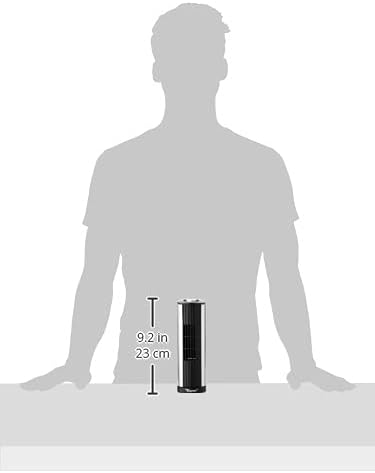
Figure 4: Approximate height of the fan, indicating its compact size.
8. Warranty and Support
This product is covered by a manufacturer's warranty. For specific warranty terms and conditions, please refer to the documentation included with your purchase or contact Toyomi customer support directly.
For technical assistance, troubleshooting beyond this manual, or to inquire about replacement parts, please visit the official Toyomi website or contact their customer service department.
Toyomi Official Website: www.toyomi.com.sg


