1. Introduction
This manual provides essential information for the safe and efficient operation of your DINGXUEMEI DXM STGU RD-806 Portable LED Projector. Please read this manual thoroughly before using the projector and retain it for future reference.
2. Safety Information
- Do not block the ventilation openings. Ensure adequate space around the projector for proper airflow.
- Avoid looking directly into the projector lens when the lamp is on, as it may cause eye damage.
- Do not place the projector on unstable surfaces.
- Keep the projector away from water or other liquids.
- Use only the power adapter supplied with the projector.
- Unplug the projector during lightning storms or when unused for long periods.
- Do not attempt to repair the projector yourself. Refer all servicing to qualified personnel.
3. Product Overview
3.1 Front and Side View
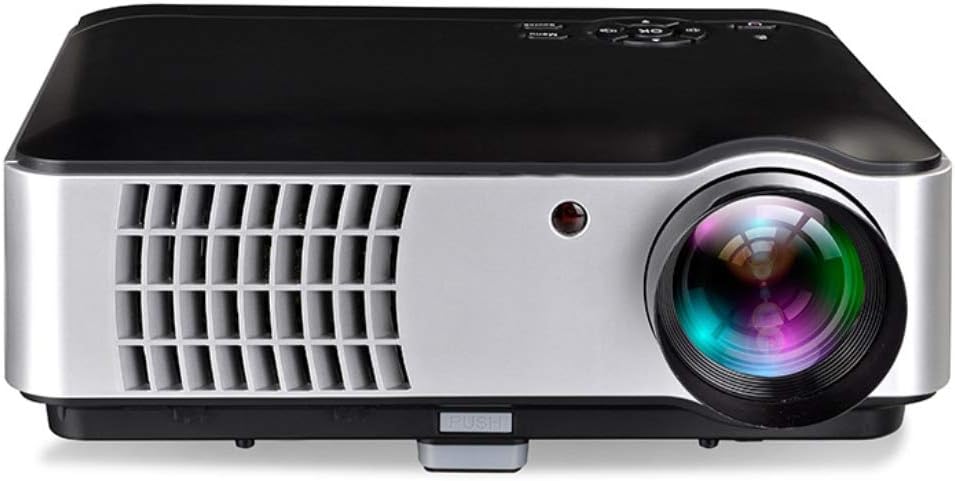
This image displays the front of the projector, highlighting the main projection lens and the infrared (IR) receiver for the remote control. The front also features ventilation grilles for cooling.

This image shows a side view of the projector, emphasizing the large ventilation grilles on the left side, crucial for heat dissipation. The focus lens adjustment is visible near the front.
3.2 Top Control Panel

The top view illustrates the integrated control panel, featuring a central navigation cluster with an 'OK' button, surrounded by directional keys. Additional buttons for 'Menu', 'Source', and 'Power' are also present.

This detailed diagram labels the functions of each button on the top control panel: Indicator Light, Power Key, Direction Operation Keys, Confirm (OK), Volume Down, Volume Up, Sources, and Menu.
3.3 Front and Back Panel with Ports

This comprehensive diagram provides a labeled overview of the projector's front and back panels. Key features on the front include the Focus Lens, Height Adjustment, IR Receiver, Dustproof Net (for cleaning), and Cooling System Ventilation. The back panel features the Power ON/OFF button, Keystone adjustment, Power Switch, two USB Inputs, two HDMI Signal Inputs, VGA Input, AV/Audio Input/Output, and TV Input.
4. Setup
4.1 Placement
Place the projector on a stable, flat surface. Ensure there is sufficient space around the projector for proper ventilation. The optimal projection distance allows for a screen size ranging from 50 to 200 inches.
4.2 Power Connection
- Connect the power cord to the projector's power input port.
- Plug the other end of the power cord into a standard electrical outlet (AC 100V-240V, 50/60Hz).
- Ensure the power switch on the back of the projector is in the 'ON' position.
4.3 Connecting External Devices

The projector supports a variety of input sources. Connect your desired device to the corresponding port on the back of the projector:
- HDMI: For laptops, gaming consoles (Xbox/PS), Blu-ray players, and set-top boxes. The projector has two HDMI inputs.
- VGA: For older desktop PCs or laptops.
- USB: For connecting USB drives or mobile hard disks to play media files directly. The projector has two USB inputs.
- AV: For devices with composite video and stereo audio output (e.g., older DVD players, some set-top boxes).
- TV (ATV/DTV): For connecting to antenna or cable TV signals.
- Stereo Earphone: For connecting external audio devices or headphones.
5. Operating Instructions
5.1 Power On/Off
- Power On: Press the 'Power' button on the top control panel or the remote control. The indicator light will illuminate.
- Power Off: Press the 'Power' button again. The projector will shut down.
5.2 Basic Controls
Use the buttons on the top control panel or the remote control to navigate the projector's functions:
- Direction Keys: Navigate through menus and options.
- OK / Confirm: Select an option or confirm a setting.
- Menu: Access the projector's main settings menu.
- Source: Select the input source (HDMI1, HDMI2, VGA, USB1, USB2, AV, TV).
- Volume Up/Down: Adjust the audio output level.
5.3 Adjusting Image
- Focus: Rotate the focus lens ring on the front of the projector until the image appears sharp and clear.
- Keystone: Use the keystone adjustment knob on the back of the projector to correct trapezoidal distortion if the projector is not perfectly perpendicular to the screen.
5.4 Input Source Selection
After connecting your device, press the 'Source' button on the control panel or remote control. Use the direction keys to select the correct input source (e.g., HDMI1, VGA, USB1) and press 'OK' to confirm.
6. Maintenance
6.1 Cleaning
- Dustproof Net: The projector features a dustproof net. It is recommended to clean this net once a month to ensure optimal cooling performance. Refer to the diagram in Section 3.3 for its location.
- Lens: Use a soft, lint-free cloth specifically designed for optical lenses to gently clean the projector lens. Do not use abrasive cleaners.
- Exterior: Wipe the projector's exterior with a soft, dry cloth.
6.2 Storage
When not in use for extended periods, store the projector in a cool, dry place, away from direct sunlight and extreme temperatures. Use the original packaging or a protective case to prevent dust accumulation and damage.
7. Troubleshooting
- No Power: Check if the power cord is securely connected and the power switch is ON. Try a different power outlet.
- No Image: Ensure the correct input source is selected. Check the connection cable between the projector and the source device.
- Blurry Image: Adjust the focus lens. If the image is trapezoidal, adjust the keystone correction.
- No Sound: Check the volume settings on both the projector and the source device. Ensure external speakers are properly connected if used.
- Overheating: Ensure ventilation openings are not blocked. Clean the dustproof net if necessary.
8. Specifications
| Feature | Specification |
|---|---|
| Model | RD-806 |
| Display Resolution | 1280 x 800 pixels |
| Brightness | 2800 lumens |
| Contrast Ratio | 1500:1 |
| Aspect Ratio | 4:3 & 16:9 |
| Projection Size | 50 - 200 inches |
| Light Source | LED |
| Connectivity Technology | HDMI (x2), USB (x2), VGA, AV, TV (ATV/DTV) |
| Output Terminal | Stereo earphone, RV power source |
| Power Supply | AC 100V-240V, 50/60Hz |
| Special Features | Built-in Speaker, Portable |
| Parcel Dimensions | 33 x 33 x 12 cm |
| Weight | 5.29 kg |
8.1 Image Technology

The projector incorporates Six Color Matrix Technology and a high-speed color wheel designed to restore true color and enhance image fidelity.

This image highlights the projector's ultra-high contrast ratio, which contributes to superior image quality with deeper blacks and brighter whites, making colors more vivid and details clearer.
9. Warranty and Support
For warranty information or technical support, please refer to the documentation provided at the time of purchase or contact your retailer. Keep your proof of purchase for warranty claims.


