1. Introduction
This manual provides essential instructions for the safe and effective operation of your AOPUTTRIVER AP-770D Digital Multimeter. Please read this manual thoroughly before use and retain it for future reference. This device is designed for accurate measurement of various electrical parameters in a wide range of applications.
Safety Information
- Always adhere to local and national safety codes.
- Do not use the meter if it appears damaged or if the insulation on the test leads is compromised.
- Ensure the correct function and range are selected before making measurements.
- Avoid making measurements on circuits with voltages exceeding the meter's rated limits.
- Replace batteries and fuses only with the specified type and rating.
2. Package Contents
Verify that all items listed below are present in your package:
- AOPUTTRIVER AP-770D Digital Multimeter
- Test Leads (Red and Black)
- K-Type Thermocouple (Temperature Probe)
- 9V Battery
- User Manual
- Carrying Pouch
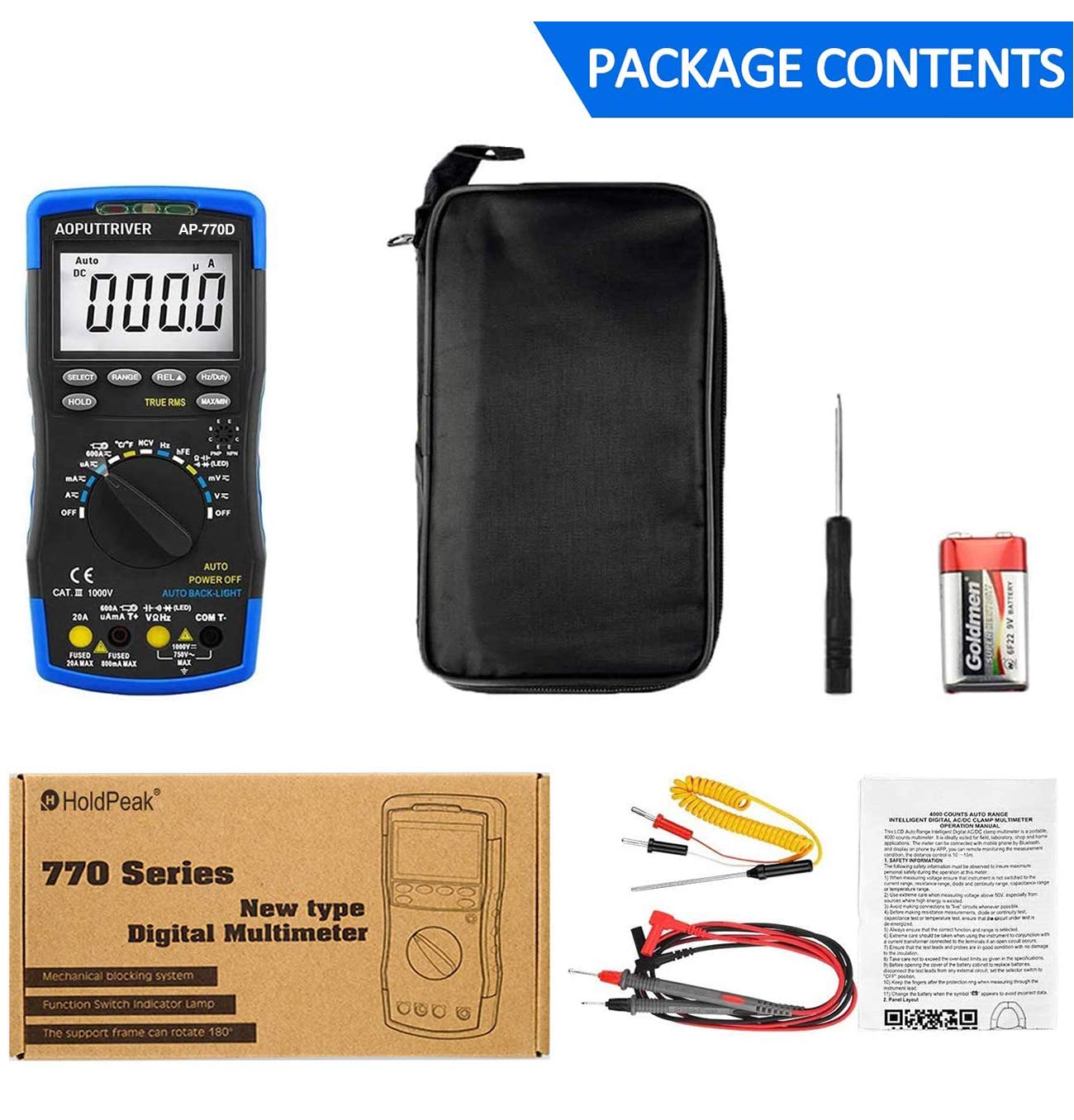
Figure 2.1: Contents of the AP-770D package, including the multimeter, test leads, temperature probe, battery, manual, and carrying pouch.
3. Product Overview
Familiarize yourself with the components of your AP-770D Digital Multimeter:

Figure 3.1: Front view of the AP-770D with key functions labeled.
- NCV Red Light: Indicates non-contact voltage detection.
- CDS Sensor: Light sensor for auto backlight.
- NCV Green Light: Indicates non-contact voltage detection.
- NCV Detection Area: Point for non-contact voltage sensing.
- Display: Large LCD for reading measurements.
- SELECT Key: Toggles between functions within a rotary switch position.
- HOLD Key: Freezes the current display reading.
- RANGE Key: Switches between auto-ranging and manual ranging.
- REL ▲ Key: Activates relative measurement mode.
- Hz/Duty Key: Selects frequency or duty cycle measurement.
- MAX/MIN Key: Records maximum and minimum readings.
- Transistor hFE Test Input Jack: For testing transistor gain.
- Rotary Switch: Selects the desired measurement function.
- VΩHz Input: Input terminal for voltage, resistance, frequency, capacitance, diode, and continuity measurements.
- COM Input: Common (negative) terminal for all measurements.
- 20A Input Jack: Input terminal for high AC/DC current measurements (up to 20A).
- µA mA T+ Input: Input terminal for microampere/milliampere current and temperature measurements.

Figure 3.2: Dimensions of the AP-770D and its 180° swivel stand.
4. Setup
4.1 Battery Installation
The AP-770D requires one 9V battery for operation. To install or replace the battery:
- Ensure the multimeter is powered off and test leads are disconnected.
- Locate the battery compartment cover on the back of the unit.
- Use a screwdriver to loosen the screw securing the battery cover.
- Remove the cover and insert the 9V battery, observing correct polarity.
- Replace the battery cover and tighten the screw.
4.2 Initial Power-On
Turn the rotary switch from the 'OFF' position to any desired measurement function. The display will illuminate. The meter features an auto backlight that activates in low-light conditions.
5. Operating Modes
The AP-770D offers a variety of measurement functions. Always ensure the correct function is selected and test leads are connected to the appropriate input jacks.
5.1 Voltage Measurement (AC/DC)
To measure voltage:
- Set the rotary switch to the 'V~' (AC Voltage) or 'V∓' (DC Voltage) position.
- Connect the red test lead to the 'VΩHz' input jack and the black test lead to the 'COM' input jack.
- Connect the test probes across the circuit or component to be measured.
- Read the voltage value on the display.
5.2 Current Measurement (AC/DC)
To measure current:
- Set the rotary switch to the appropriate current range (µA, mA, or A). Use the 'SELECT' button to toggle between AC and DC current if applicable.
- Connect the red test lead to the 'µA mA T+' or '20A' input jack (depending on expected current) and the black test lead to the 'COM' input jack.
- Connect the test probes in series with the circuit to be measured.
- Read the current value on the display.
5.3 Resistance Measurement
To measure resistance:
- Set the rotary switch to the 'Ω' (Resistance) position.
- Connect the red test lead to the 'VΩHz' input jack and the black test lead to the 'COM' input jack.
- Connect the test probes across the component to be measured. Ensure the circuit is de-energized.
- Read the resistance value on the display.
5.4 Capacitance Measurement
To measure capacitance:
- Set the rotary switch to the '––||––' (Capacitance) position.
- Connect the red test lead to the 'VΩHz' input jack and the black test lead to the 'COM' input jack.
- Connect the test probes across the capacitor. Ensure the capacitor is discharged before testing.
- Read the capacitance value on the display.
5.5 Frequency and Duty Cycle Measurement
To measure frequency or duty cycle:
- Set the rotary switch to the 'Hz' position.
- Connect the red test lead to the 'VΩHz' input jack and the black test lead to the 'COM' input jack.
- Connect the test probes across the signal source.
- Press the 'Hz/Duty' button to toggle between frequency and duty cycle readings.
5.6 Diode Test
To perform a diode test:
- Set the rotary switch to the '→|–' (Diode) position.
- Connect the red test lead to the 'VΩHz' input jack and the black test lead to the 'COM' input jack.
- Connect the red probe to the anode and the black probe to the cathode of the diode.
- A forward voltage drop will be displayed for a good diode. Reverse the probes; the display should show 'OL' (Open Loop).
5.7 Continuity Test
To perform a continuity test:
- Set the rotary switch to the '▪))' (Continuity) position.
- Connect the red test lead to the 'VΩHz' input jack and the black test lead to the 'COM' input jack.
- Connect the test probes across the circuit or component.
- If continuity exists (resistance below a certain threshold), the buzzer will sound.
5.8 Temperature Measurement
To measure temperature:
- Set the rotary switch to the '°C/°F' (Temperature) position.
- Connect the K-type thermocouple to the 'µA mA T+' and 'COM' input jacks, observing polarity.
- Place the thermocouple tip on or in the object whose temperature is to be measured.
- Read the temperature value on the display. Use the 'SELECT' button to switch between Celsius and Fahrenheit.

Figure 5.1: Measuring temperature of a liquid using the AP-770D's temperature probe.
5.9 Non-Contact Voltage (NCV) Detection
To detect AC voltage without contact:
- Set the rotary switch to the 'NCV' position.
- Move the NCV detection area (top of the meter) close to the conductor being tested.
- The NCV red and green lights will flash, and the buzzer will sound, indicating the presence of AC voltage. The intensity of the indication increases with stronger voltage.

Figure 5.2: Using the NCV function to detect live wires without direct contact.
5.10 hFE Test (Transistor Gain)
To test transistor hFE:
- Set the rotary switch to the 'hFE' position.
- Insert the transistor leads (Emitter, Base, Collector) into the corresponding holes in the 'Transistor hFE Test Input Jack'.
- Read the hFE value on the display.
6. Specifications
| Feature | Value |
|---|---|
| Display Count | 40,000 Counts |
| True RMS | Yes |
| Auto Range | Yes |
| NCV | Yes |
| AC/DC Voltage | Up to 1000V |
| AC/DC Current | Up to 20A |
| Resistance | Up to 60MΩ |
| Capacitance | Up to 60mF |
| Frequency | Up to 10MHz |
| Temperature | Yes (with K-type thermocouple) |
| Diode Test | Yes |
| Continuity Test | Yes (with buzzer) |
| hFE Test | Yes |
| Auto Backlight | Yes |
| Auto Power Off | Yes |
| Safety Standard | IEC-1010, CAT III 1000V |
| Power Source | 9V Battery |
| Dimensions | 20cm x 9cm x 4cm (approx.) |
| Weight | 350 Grams |
7. Maintenance
7.1 Cleaning
Wipe the meter's casing with a damp cloth and mild detergent. Do not use abrasives or solvents. Ensure the meter is completely dry before use.
7.2 Battery Replacement
When the battery symbol appears on the display, replace the 9V battery as described in Section 4.1.
7.3 Fuse Replacement
If the current measurement function fails, the fuse may need replacement. Refer to the full user manual for detailed instructions on fuse replacement. Always use fuses with the specified ratings (e.g., Fused 20A MAX, Fused 500mA MAX).

Figure 7.1: The mechanical blocking system helps prevent incorrect lead insertion, enhancing safety during use.
8. Troubleshooting
- No Display: Check battery installation and charge level. Replace battery if necessary.
- 'OL' on Display: Indicates an over-range condition or open circuit. Select a higher range or check connections.
- Incorrect Readings: Ensure correct function and range are selected. Verify test lead connections and integrity.
- Current Measurement Failure: Check the fuse. Replace if blown (refer to Section 7.3).
9. Warranty and Support
For warranty information or technical support, please refer to the contact details provided in your product packaging or visit the AOPUTTRIVER official website. Do not attempt to repair the device yourself, as this may void the warranty and pose a safety risk.


