
1. Introduction
Thank you for purchasing the Moukey MAMX2 6-Channel Ultra-Low Noise Stereo Line Mixer. This compact and versatile audio mixer is designed for sub-mixing various audio sources such as guitars, bass, and keyboards, making it ideal for small clubs, bars, or home studio setups. Please read this manual thoroughly before operation to ensure proper use and to maximize the performance and longevity of your device.

Figure 1: Moukey MAMX2 Audio Mixer
The Moukey MAMX2 is a compact 6-channel line mixer featuring individual volume controls for each input and a master output control. It is powered by a DC 5V USB connection, offering flexible power options.
2. Product Features
- Stereo/Mono Simple Switching: The mixer supports both stereo and mono audio signals. For stereo input/output, use 1/4-inch TRS stereo audio cables. For mono input/output, use 1/4-inch TS male-to-male connectors. Each channel features a dedicated switch for easy selection between mono and stereo modes.
- DC 5V Power Supply: The unit operates on a DC 5V power supply, allowing for versatile power sources such as USB wall adapters, power strips, or power banks. Ensure to use an external power supply with CE or UL certification to prevent noise and interference.
- Multi-functionality: Designed to mix multiple channels into a single track, this mixer is suitable for various instruments including keyboards, drum sets, guitars, and bass, or for creating sub-mixes in different audio setups.
- Ultra-Low Noise Operation: The MAMX2 is engineered to produce high sound quality with ultra-low noise operability, ensuring excellent audio performance and signal integrity even at high levels. It is distortion-free and easy to set up.
- Simple Control: Each of the six input channels has an independent volume control knob. There is also a single master output volume control. This allows for precise mixing and routing of various audio sources to a monitoring position or amplifier.

Figure 2: Stereo/Mono Input & Output Connections
This diagram illustrates the different types of 1/4-inch cables (TS for mono, TRS for stereo) used for connecting audio sources to the mixer's inputs and outputs.

Figure 3: Control Layout
The mixer features individual level controls for each input channel (Level 1-6) and a master output level control. Each input also has a dedicated mono/stereo switch.
3. Setup
3.1 Unpacking and Inspection
Carefully remove the mixer from its packaging. Inspect the unit for any signs of damage during transit. Ensure all components, including the mixer and USB power cable, are present.
3.2 Power Connection
The Moukey MAMX2 requires a DC 5V power supply. Connect the provided USB power cable to the DC 5V input port on the mixer.
- Connect the other end of the USB cable to a compatible power source such as a USB wall adapter (recommended), a power strip with a USB port, or a power bank.
- IMPORTANT: Use an external power supply with CE or UL certification. Avoid connecting directly to a computer's USB port for power, as this may introduce noise or undesirable interference.

Figure 4: Power Supply Options
The mixer can be powered via a power supply, power strip, or power bank using the DC 5V USB input.
3.3 Audio Connections
Connect your audio sources (guitars, keyboards, etc.) to the INPUT 1-6 jacks using 1/4-inch TS (mono) or TRS (stereo) cables as required.
- For stereo signals, use 1/4-inch TRS cables for both input and output. Press the corresponding channel's "Stereo" toggle key.
- For mono signals, use 1/4-inch TS cables for input and output. Ensure the corresponding channel's "Mono" toggle key is selected.
- Connect the OUTPUT jack to your amplifier, monitoring system, or recording device using an appropriate 1/4-inch cable.
4. Operating Instructions
4.1 Power On/Off
Once the DC 5V power is connected, the mixer will automatically power on. There is no dedicated power switch. The "Pow" indicator light will illuminate.
4.2 Adjusting Input Levels
Each input channel (INPUT 1-6) has an independent "LEVEL" control knob. Rotate these knobs clockwise to increase the volume of the respective input source and counter-clockwise to decrease it.
4.3 Stereo/Mono Switching
Above each input's level knob, there is a toggle switch labeled "Mono Stereo".
- Push the switch to the "Stereo" position when using 1/4-inch TRS cables for stereo input.
- Push the switch to the "Mono" position when using 1/4-inch TS cables for mono input. This will mix the mono signal to both left and right channels of the output.
4.4 Adjusting Master Output Level
The "OUTPUT" knob controls the overall volume of the mixed signal. Adjust this knob to set the desired output level for your amplifier or recording device.
Tip for Optimal Sound: To minimize noise, it is generally recommended to turn up the individual input level controls as high as possible without clipping, and then use the master output volume control to reduce the overall output to a reasonable listening level.
5. Maintenance
- Cleaning: Use a soft, dry cloth to clean the exterior of the mixer. Do not use liquid cleaners or aerosols.
- Storage: When not in use for extended periods, store the mixer in a cool, dry place away from direct sunlight and extreme temperatures.
- Handling: Handle the mixer with care. Avoid dropping or subjecting it to strong impacts, as this can damage internal components.
- Ventilation: Ensure the mixer has adequate ventilation to prevent overheating. Do not block any vents.

Figure 5: Durable Metal Enclosure
The mixer features a heavy-duty metal enclosure, providing durability and protection for its internal components.
6. Troubleshooting
| Problem | Possible Cause | Solution |
|---|---|---|
| No sound output |
|
|
| Background noise or hum |
|
|
| Distorted sound |
|
|
| Mono/Stereo switch seems reversed |
|
|
7. Specifications
| Feature | Detail |
|---|---|
| Model Number | MK0149 |
| Number of Channels | 6 |
| Power Source | Corded Electric (DC 5V via USB) |
| Voltage | 5 Volts |
| Connectivity Technology | USB |
| Product Dimensions (D x W x H) | 4.53" x 7.68" x 2.17" (11.5 cm x 19.5 cm x 5.5 cm) |
| Item Weight | 12.7 ounces (0.36 Kilograms) |
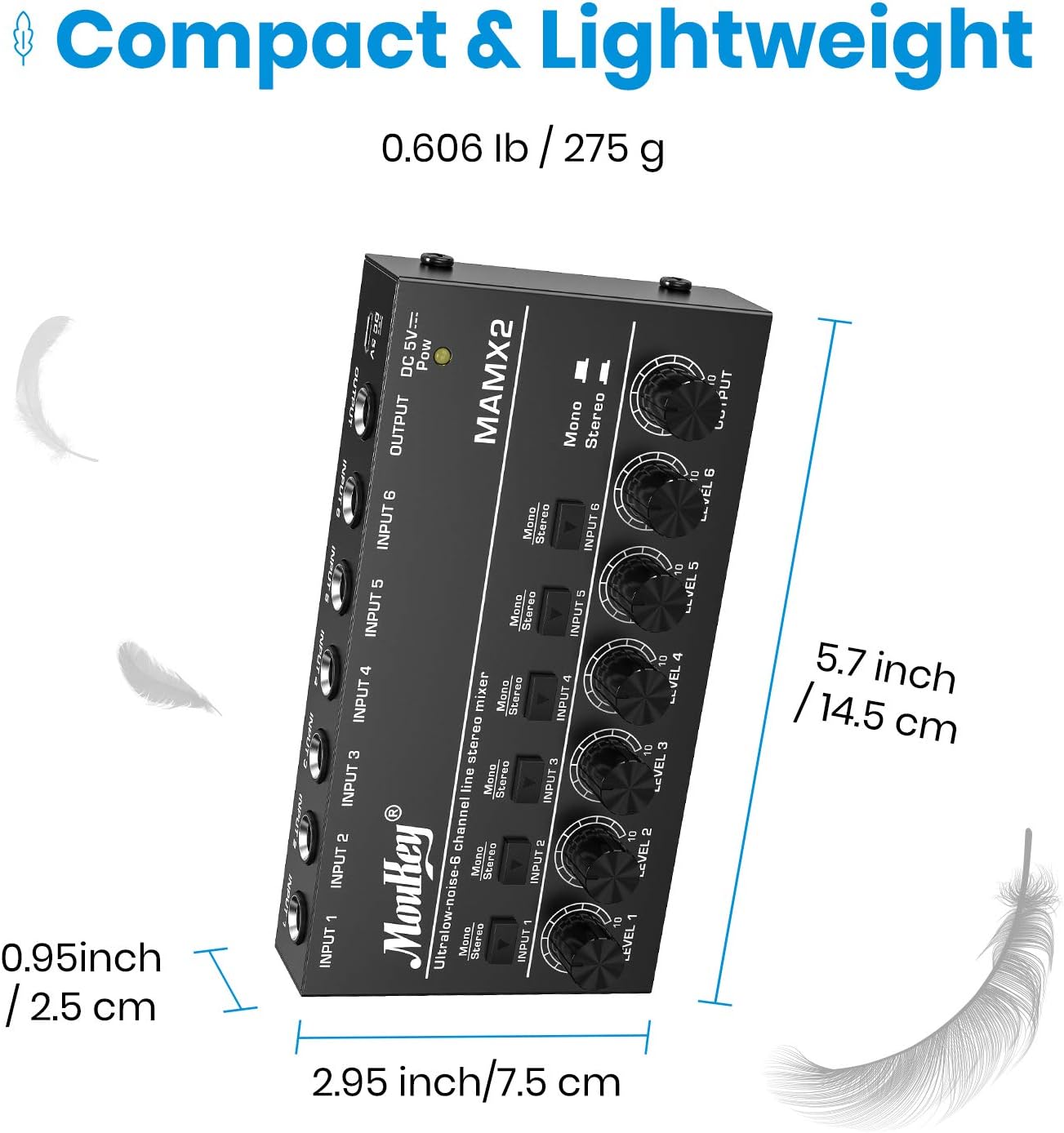
Figure 6: Compact and Lightweight Design
The Moukey MAMX2 is designed to be compact and lightweight, making it easy to transport and integrate into various setups.
8. Warranty and Support
Moukey products are designed for reliability and performance. For information regarding warranty coverage, returns, or technical support, please refer to the purchase platform or contact Moukey customer service directly.
Online Support: Visit the official Moukey website or the product page on the retailer's website for FAQs, updated manuals, and contact information.
Protection Plans: Extended protection plans may be available for purchase through the retailer. These plans offer additional coverage beyond the standard manufacturer's warranty.

