1. Product Overview
The Rowenta Nomad TN2307 is a rechargeable beard trimmer designed for precise and convenient grooming. It features high-quality stainless steel blades and an adjustable comb for various cutting lengths.

Image 1.1: Rowenta Nomad TN2307 Beard Trimmer, showing the main unit, adjustable comb, cleaning brush, oil bottle, and power adapter.
2. Package Contents
Ensure all items are present in the package:
- Rowenta Nomad TN2307 Beard Trimmer
- Adjustable Beard Comb (3-7mm)
- Power Adapter
- Cleaning Brush
- Lubricating Oil Bottle
- Instruction Manual (this document)
3. Setup and Charging
3.1 Initial Charge
- Before first use, fully charge the trimmer for approximately 8 hours.
- Connect the power adapter to the trimmer's charging port.
- Plug the adapter into a standard electrical outlet (240V).
- The charging indicator light (red LED) on the trimmer will illuminate during charging. It may not change color or turn off when fully charged, so rely on the recommended charging time.
A full charge provides approximately 60 minutes of cordless operation.
3.2 Attaching the Adjustable Comb
- Ensure the trimmer is turned off.
- Align the adjustable comb with the trimmer head.
- Gently slide the comb onto the trimmer head until it clicks into place.
- To remove, push the comb upwards and slide it off.

Image 3.1: Rowenta Nomad TN2307 with the adjustable comb guide attached, showing the length settings.
4. Operating Instructions
4.1 Powering On/Off
- To turn on, slide the ON/OFF switch upwards.
- To turn off, slide the ON/OFF switch downwards.
4.2 Adjusting Cutting Length
The adjustable comb allows for cutting lengths from 3mm to 7mm, in 1mm increments. To adjust the length:
- Ensure the trimmer is off.
- With the comb attached, slide the comb adjustment button up or down to select the desired length. The selected length (3, 4, 5, 6, or 7mm) will be indicated on the comb.
For a very short trim (0.5mm), remove the adjustable comb and use the trimmer directly against the skin.
4.3 Trimming Your Beard
- Ensure your beard is clean and dry before trimming.
- Start with a longer length setting if you are unsure, and gradually reduce it until you achieve the desired length.
- Hold the trimmer with the blades facing your beard.
- Move the trimmer against the direction of hair growth for an even cut.
- Use smooth, controlled strokes.
- For detailing and shaping, remove the comb and use the trimmer blades carefully.
5. Maintenance and Cleaning
Regular cleaning and maintenance ensure optimal performance and extend the life of your trimmer.
5.1 Cleaning the Blades
- Turn off the trimmer and disconnect it from the power adapter.
- Remove the adjustable comb.
- Use the provided cleaning brush to remove any hair clippings from the blades and the trimmer head.
- For thorough cleaning, the blade set can be detached. Refer to the diagram below for blade removal.
- After cleaning, reattach the blade set securely.
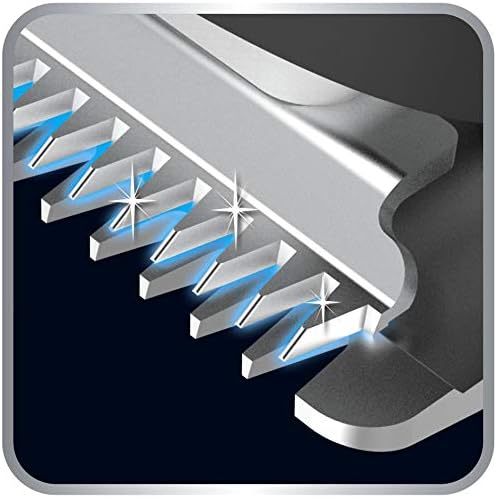
Image 5.1: Close-up view of the stainless steel blades, highlighting their design for effective trimming.
5.2 Lubricating the Blades
After every few uses, or if the trimmer's performance decreases, lubricate the blades:
- Ensure the blades are clean and dry.
- Apply one or two drops of the provided lubricating oil (or a suitable light machine oil) onto the blades.
- Turn on the trimmer for a few seconds to distribute the oil evenly.
- Wipe off any excess oil with a soft cloth.
5.3 Storage
Store the trimmer in a dry place, away from direct sunlight and extreme temperatures. Ensure it is turned off and disconnected from the power source before storing.
6. Troubleshooting
| Problem | Possible Cause | Solution |
|---|---|---|
| Trimmer does not turn on. | Battery is discharged. | Charge the trimmer for the recommended time (Section 3.1). |
| Poor cutting performance. | Blades are dirty or not lubricated. | Clean and lubricate the blades (Section 5.1, 5.2). |
| Trimmer pulls hair. | Blades are dull or clogged with hair. | Clean and lubricate blades. If problem persists, blades may need replacement. |
| Charging indicator light not on. | Power adapter not properly connected or faulty outlet. | Ensure adapter is securely connected to trimmer and outlet. Test outlet with another device. |
7. Technical Specifications
- Model: TN2307
- Brand: Rowenta
- Power Source: Rechargeable NiMH Battery
- Battery Autonomy: Up to 60 minutes
- Charging Time: Approximately 8 hours (initial charge)
- Blade Material: Stainless Steel
- Cutting Lengths: 0.5mm (without comb), 3mm to 7mm (with adjustable comb, 1mm increments)
- Input Voltage: 240V
- Dimensions (L x W x H): 150 x 25 x 35 mm
- Weight: 120 grams
8. Warranty and Support
This product is covered by a manufacturer's warranty. Please refer to the warranty card included in your package for specific terms and conditions. For technical support, spare parts, or service, please contact Rowenta customer service or visit the official Rowenta website.
Official Rowenta Website: www.rowenta.com


