
Introduction
This manual provides essential information for the safe and effective operation, maintenance, and troubleshooting of your Makita DVC660Z Twin 18V (36V) Li-ion LXT Brushless Backpack Vacuum Cleaner. Please read these instructions thoroughly before first use and retain them for future reference. The DVC660Z is designed for professional cleaning tasks, offering portability and powerful suction.

Image: A person using the Makita DVC660Z Backpack Vacuum Cleaner to clean a carpeted hallway. The vacuum unit is worn on the back, connected to a hose and floor nozzle.
Safety Instructions
Always observe basic safety precautions when using electrical appliances to reduce the risk of fire, electric shock, and personal injury.
- Ensure the vacuum is switched off and batteries are removed before performing any adjustments, changing accessories, or storing the unit.
- Use only genuine Makita 18V Li-ion LXT batteries and chargers. Use of non-genuine or incompatible batteries and chargers will invalidate the Makita guarantee and may cause damage or injury.
- Do not vacuum flammable or combustible liquids, hot ashes, or sharp objects.
- Do not operate the vacuum without the dust bag and HEPA filter properly installed.
- Keep hair, loose clothing, fingers, and all parts of the body away from openings and moving parts.
- Do not expose to rain or wet conditions. Store indoors.
- This appliance is not intended for use by persons (including children) with reduced physical, sensory or mental capabilities, or lack of experience and knowledge, unless they have been given supervision or instruction concerning use of the appliance by a person responsible for their safety.
Package Contents
Verify that all items are present upon unpacking:
- Makita DVC660Z Backpack Vacuum Cleaner Unit
- 1 x 32mm x 1m Hose
- 1 x Bent Pipe
- 1 x Telescopic Pipe
- 1 x Nozzle Assembly
- 1 x Flexible Rubber Nozzle
- 1 x Filter Bag Set
- 1 x Hose Band
Note: Batteries and charger are not included with the DVC660Z unit and must be purchased separately.
Setup
1. Battery Installation
- Open the battery cover on the vacuum unit.
- Insert two fully charged Makita 18V Li-ion LXT batteries into the battery slots, ensuring they click into place.
- Close the battery cover securely.
2. Filter Bag Installation
- Open the dust compartment cover.
- Insert a new filter bag, aligning the opening with the suction inlet. Ensure the bag is fully unfolded inside the compartment.
- Close the dust compartment cover firmly.
3. Hose and Pipe Assembly
- Attach the 32mm x 1m hose to the vacuum unit's suction port by twisting until secure.
- Connect the bent pipe to the free end of the hose.
- Attach the telescopic pipe to the bent pipe. Adjust the length of the telescopic pipe to a comfortable working height by pressing the release button and extending or retracting.
- Finally, attach the desired nozzle assembly (e.g., floor nozzle or flexible rubber nozzle) to the end of the telescopic pipe.
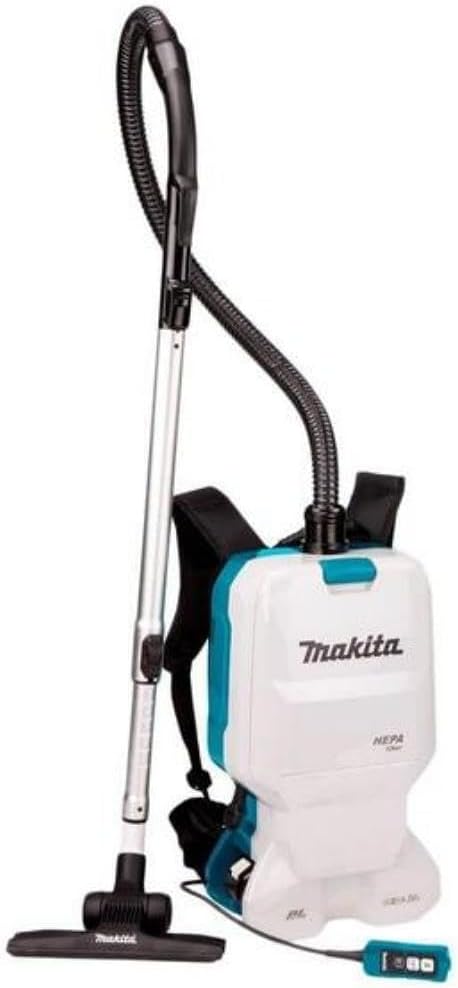
Image: The Makita DVC660Z Backpack Vacuum Cleaner unit displayed with its included accessories, such as the hose, telescopic pipe, bent pipe, and floor nozzle.
4. Wearing the Backpack
- Place the vacuum unit on your back, similar to a backpack.
- Adjust the shoulder straps and waist belt for a snug and comfortable fit. The waist belt helps distribute the weight.
- Clip the controller to the waist belt for easy access during operation.

Image: A close-up rear view of the Makita DVC660Z Backpack Vacuum Cleaner, showing the padded shoulder straps, waist belt, and the remote control unit clipped to the belt.
Operating Instructions
1. Power On/Off and Suction Control
- The vacuum is operated via the controller, which can be clipped to your waist belt.
- Press the ON/OFF button on the controller to start or stop the vacuum.
- Use the air volume selection button to cycle through three power settings: Maximum, High, and Normal. Select the appropriate power for the cleaning task.
- The vacuum features a mode memory function, which allows it to start in the last used power setting.
2. Using the LED Job Light
- The controller is equipped with an LED job light. Press the dedicated light button on the controller to illuminate darker areas, improving visibility during operation.
3. Effective Cleaning Techniques
- For general floor cleaning, use the nozzle assembly with the telescopic pipe.
- For hard-to-reach corners, crevices, or delicate surfaces, attach the flexible rubber nozzle directly to the bent pipe or telescopic pipe.
- Move the nozzle slowly and steadily over the surface to allow the vacuum to effectively pick up debris.

Image: A person operating the Makita DVC660Z Backpack Vacuum Cleaner in an office setting, demonstrating its portability and ease of use for floor cleaning.
Maintenance
Regular maintenance ensures optimal performance and extends the life of your vacuum cleaner.
1. Dust Bag Management
- The DVC660Z has a large 6-liter dust capacity (5.5-liter cloth dust bag capacity).
- Check the dust bag regularly. Replace or empty the cloth dust bag when it is full or when suction power decreases significantly.
- To empty the cloth dust bag, remove it from the unit, shake out the contents, and reinstall. Ensure it is properly sealed.
2. HEPA Filter Cleaning
- The HEPA filter captures very fine particles effectively. Periodically inspect the HEPA filter for dirt and debris.
- To clean, gently tap the filter to dislodge dust or use a soft brush. Do not wash the HEPA filter with water unless specified by Makita, as this can damage it.
- Replace the HEPA filter if it is damaged or if cleaning does not restore suction performance.
3. General Cleaning
- Wipe the exterior of the vacuum unit with a damp cloth. Do not use harsh chemicals or abrasive cleaners.
- Check the hose, pipes, and nozzles for blockages. Clear any obstructions to maintain optimal airflow.
Troubleshooting
| Problem | Possible Cause | Solution |
|---|---|---|
| Vacuum does not start. |
|
|
| Low suction power. |
|
|
| Vacuum stops during operation. |
|
|
Specifications
| Model Name | DVC660Z |
| Power Source | Battery Powered (Twin 18V Li-ion LXT) |
| Voltage | 36V (using two 18V batteries) |
| Motor Type | Brushless DC Motor |
| Dust Capacity | 6 Liters (5.5 Liters with cloth dust bag) |
| Filter Type | HEPA Filter |
| Maximum Sealed Suction | 11 kPa |
| Maximum Suction Power | 95 W |
| Hose Length | 1 Meter (32mm diameter) |
| Product Dimensions (L x W x H) | 11.69" x 6.85" x 20.59" |
| Item Weight | 14.74 pounds (without batteries) |
| Noise Level | 80 Decibels |
| Controller Type | Push Button (with LED job light) |
| Number of Power Levels | 3 (Maximum, High, Normal) |
Warranty and Support
Warranty Information
The Makita DVC660Z comes with a 1-year manufacturer warranty. An additional 2 years of warranty can be obtained by registering the product within 30 days of purchase. This guarantee is subject to specific conditions:
- The warranty does not apply if non-genuine or non-recommended parts or accessories are fitted to the tool.
- The use of non-genuine or compatible batteries and chargers with Makita tools will invalidate the Makita guarantee for the tools.
Please refer to the official Makita website or your purchase documentation for complete warranty terms and conditions.
Customer Support
For technical assistance, spare parts, or warranty claims, please contact Makita customer support or visit their official website. Ensure you have your product model number (DVC660Z) and proof of purchase available when seeking support.
Official Makita Website: www.makita.com


