
Introduction
This manual provides detailed instructions for the installation, operation, and maintenance of your Tiiwee X1 Home Alarm System. The system is designed to provide reliable security for your home, apartment, garage, or caravan by detecting unauthorized entry through doors and windows. It features a loud siren and is easily expandable with additional Tiiwee accessories.
Product Components Overview
The Tiiwee X1 Home Alarm System kit typically includes the following components:
- 1 x Tiiwee X1 Siren Unit
- 4 x Door/Window Sensors
- 2 x Remote Controls
- Mounting hardware (double-sided adhesive tape, screws)
- Batteries (AA for siren, AAA for sensors)
The X1 Siren Unit features a 120dB siren, a 4-zone light indicator, manual settings, lock/unlock buttons, and a low battery indicator.

Image: Tiiwee X1 Siren Unit with key features labeled.
Setup Instructions
1. Battery Installation
- X1 Siren Unit: Open the battery compartment on the back of the X1 siren. Insert 3 AA batteries, ensuring correct polarity. Close the compartment. The siren is designed for long battery life, up to 12 months.
- Door/Window Sensors: Each sensor requires 1 AAA battery. Open the sensor casing and insert the battery, observing polarity. Close the casing.
- Remote Controls: Remote controls come with pre-installed batteries.
2. Mounting Sensors
Door and window sensors consist of two parts: a main sensor unit and a magnetic contact. They should be mounted on a door/window frame and the moving part (door/window) respectively, ensuring they are aligned and close to each other (within 1 cm) when the door/window is closed.
- Adhesive Mounting: Clean the surface thoroughly. Apply the included double-sided adhesive tape to the back of both sensor parts. Press firmly onto the desired location.
- Screw Mounting: For a more permanent installation, use the provided screws to attach the sensor parts to the door/window frame.
3. Mounting the X1 Siren Unit
The X1 siren can be mounted using screws or used as a portable device.
- Screw Mounting: Use the provided screws to attach the siren to a wall or other suitable surface.
- Portable Use: The siren can be placed on a flat surface for flexible placement.
4. Zone Configuration (Optional)
The X1 system supports up to 4 zones, with 10 sensors per zone (total 40 sensors). Sensors are typically pre-paired to a default zone. Refer to the detailed pairing instructions for specific zone assignment if you are adding new sensors or customizing your setup.
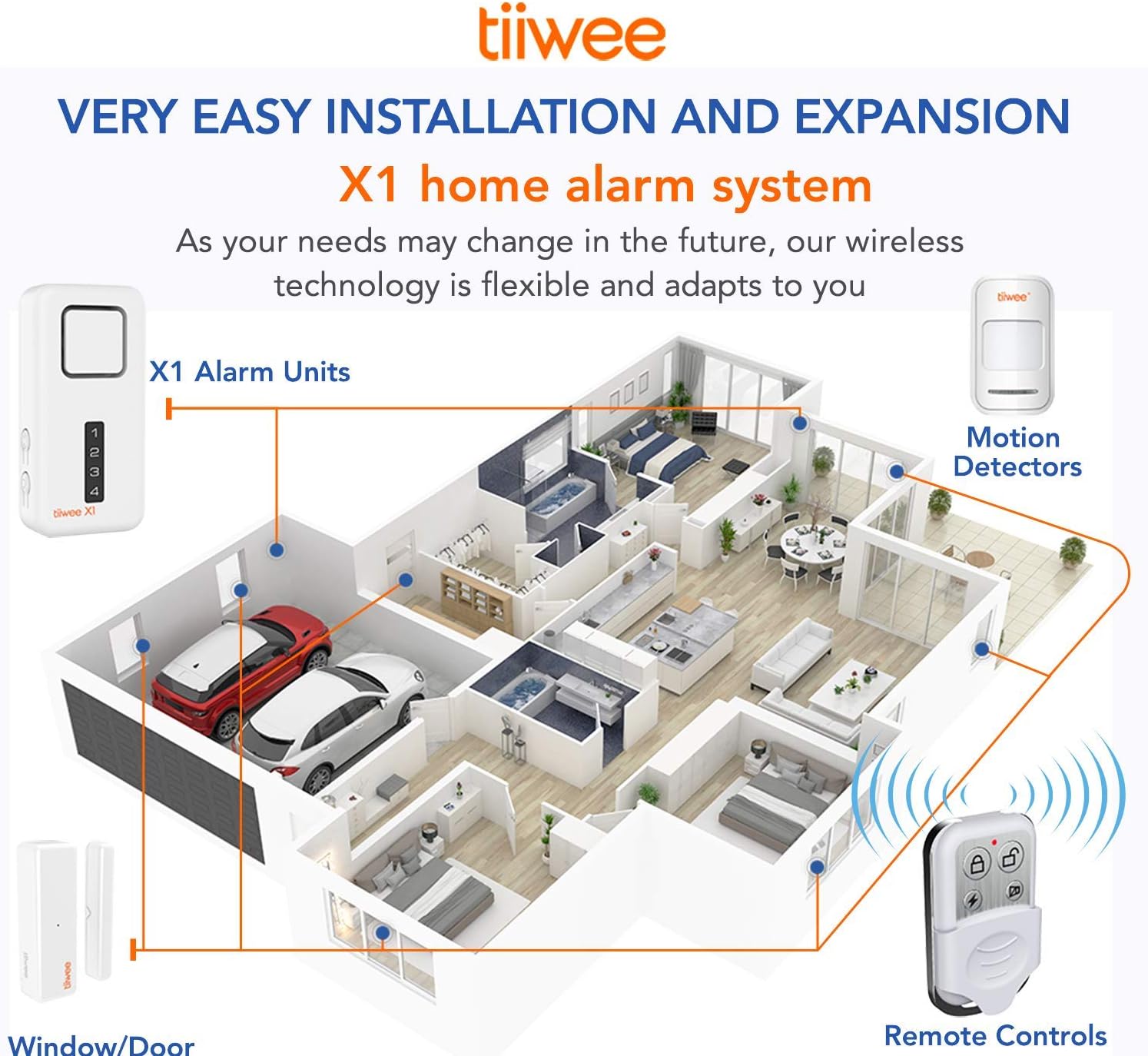
Image: Illustration of Tiiwee X1 system installation and expandability within a home environment.
Operating Instructions
Arming and Disarming the System
Use the remote control to arm and disarm the system. The wireless signal can pass through walls and doors, allowing control from outside your property.
- Arm: Press the Lock button on the remote control to arm the system. The X1 siren will emit a confirmation sound.
- Disarm: Press the Unlock button on the remote control to disarm the system. The X1 siren will emit a confirmation sound.
- Panic Button: Some remote controls may feature a panic button (often indicated by a lightning bolt or bell icon) which, when pressed, will immediately trigger the siren.
Siren Sound Selection and Volume
The X1 siren offers flexibility in its sound output:
- Siren Mode: The default alarm sound is a loud 120 dB siren.
- Chime Mode: The siren can also be set to a doorbell chime sound. This mode has 2 different volume levels, allowing you to adjust the X1 to your preferred volume. Refer to the detailed manual for instructions on switching between siren and chime modes and adjusting chime volume.
Zone Indicator
The X1 siren features a zone indicator light on its front panel. This indicator shows which zone triggered the alarm, helping you identify the point of entry.
Low Battery Indication
The X1 siren has a light indicator to check the system's status. A specific audible signal will alert you when the batteries are low, prompting replacement.
Expandability
The Tiiwee X1 system is designed to be expandable. You can add various compatible Tiiwee accessories to enhance your security setup.
- Additional Sensors: Integrate more door/window sensors for comprehensive coverage.
- Motion Detectors: Add Tiiwee indoor and outdoor PIR motion detectors.
- Additional Sirens: Connect more Tiiwee X1 sirens or an A3 outdoor siren for increased deterrence.
- Emergency Buttons: Integrate Tiiwee emergency buttons for immediate alarm activation.
- Extra Remote Controls: Add more remote controls for multiple users or access points.
Up to 40 sensors can be connected across 4 zones (10 sensors per zone). Refer to the accessory's specific manual for pairing instructions.

Image: Tiiwee X1 Alarm System compatibility with various accessories.
Maintenance
Battery Replacement
When the low battery indicator on the X1 siren activates, or if a sensor/remote control stops responding, replace the batteries promptly.
- X1 Siren: Replace with 3 new AA alkaline batteries.
- Door/Window Sensors: Replace with 1 new AAA alkaline battery per sensor.
- Remote Controls: Replace with the appropriate coin cell battery (refer to the remote control's specific instructions).
Ensure correct battery polarity during replacement. Dispose of old batteries responsibly.
Cleaning
Wipe the units with a soft, dry cloth. Do not use abrasive cleaners or solvents.
Troubleshooting
- System not arming/disarming:
- Check batteries in the remote control and X1 siren.
- Ensure you are within the wireless range (typically 2-3 floors, depending on building materials).
- Sensor not triggering alarm:
- Verify sensor battery.
- Check alignment of the two sensor parts; they must be within 1 cm when closed.
- Ensure the sensor is properly paired with the X1 siren.
- Siren not sounding or too quiet:
- Check X1 siren batteries.
- Ensure the siren is not set to chime mode if you expect a loud alarm. Adjust chime volume if in chime mode.
- False alarms:
- Ensure sensors are securely mounted and not easily dislodged.
- If using motion detectors (optional accessory), ensure they are placed away from heat sources or drafts that could cause false triggers.
Specifications
| Feature | Detail |
|---|---|
| Brand | tiiwee |
| Model Number | TWX1HAKXLV2 |
| Product Dimensions (L x W x H) | 11.4 x 5.6 x 2.5 cm |
| Weight | 720 grams (total kit) |
| Color | White |
| Power Source | Battery Powered |
| Siren Batteries | 3 x AA (included) |
| Sensor Batteries | 4 x AAA (included) |
| Battery Composition | Alkaline |
| Estimated Battery Life | Up to 12 months (siren) |
| Sound Level | 120 Decibels |
| Connectivity Technology | Wireless |
| Installation Method | Screw-in or Adhesive |
| Number of Zones | 4 |
| Max Sensors per Zone | 10 |
| Compatible Devices | Tiiwee Sensors, X1 and A3 (outdoor) sirens, remote controls |
| Alert Type | Contact-based (for door/window sensors); Motion-based (with optional PIR detectors) |

Image: Tiiwee Siren Model Comparison.
Warranty and Support
Tiiwee is committed to product quality and customer satisfaction. While specific warranty details are not provided in this manual, Tiiwee aims to provide prompt and friendly service for any product issues.
For technical assistance, troubleshooting beyond this manual, or inquiries regarding compatible accessories, please refer to the official Tiiwee website or contact their customer support directly.


