
Introduction
Thank you for choosing the YDBAO Smart Automatic Battery Charger. This manual provides essential information for the safe and efficient operation of your charger. Please read it thoroughly before use and keep it for future reference.
This intelligent battery charger is designed to automatically charge and maintain 12V/24V batteries, including Lithium, LiFePO4, and various Lead-Acid types (Calcium, GEL, AGM, Wet, EFB). It features an LCD display, multiple charging modes, and comprehensive safety protections.
Safety Instructions
WARNING: Read all safety warnings and instructions before using this product. Failure to follow the warnings and instructions may result in electric shock, fire, and/or serious injury.
- Always ensure proper ventilation during charging.
- Do not charge frozen batteries.
- Avoid sparks or flames near the battery during charging. Batteries can produce explosive gases.
- Wear eye protection and gloves when working with batteries.
- Keep the charger away from water, rain, or excessive moisture.
- Do not operate the charger if it has been damaged in any way.
- Ensure the charger is disconnected from the power outlet before making or breaking connections to the battery.
- This charger is for 12V/24V batteries only. Do not attempt to charge other voltage batteries.
- Keep out of reach of children.
Product Features
- Automatic 12V/24V Charging: Automatically detects battery voltage and adjusts charging.
- LCD Display: Shows charging voltage, current, battery charge level, and temperature.
- Multi-Battery Compatibility: Supports Lithium, LiFePO4, and most Lead-Acid batteries (Calcium, GEL, AGM, Wet, EFB).
- Multiple Charging Modes: Dedicated modes for Lithium, Lead-Acid, Motorcycle (LiFePO4), and a Repair mode.
- Automatic Stop: Charging ceases automatically when the battery is fully charged.
- Smart Temperature Compensation: Automatically adjusts charging voltage based on ambient temperature (Winter mode below 10°C, Summer mode above 28°C).
- Battery Repair Function: High and low-frequency pulse technology to repair and activate old, long-unused, damaged, or sulfated batteries.
- Intelligent Cooling Fan: Facilitates heat dissipation during the charging process for stable performance and extended lifespan.
- Automatic Memory Function: Recalls the last used charging mode upon reconnection.
- Comprehensive Safety Protections: Includes overvoltage, reverse polarity, short circuit, overcurrent, overheat, and low voltage protection.

This image shows the YDBAO Smart Battery Charger's front panel, highlighting its LCD display and safety features including protection against overcharge, short circuits, reverse connections, and overheating.

The image illustrates the versatility of the YDBAO Smart Battery Charger, compatible with various battery types and suitable for a wide range of vehicles such as cars, motorcycles, ATVs, and more.
Package Contents
- 1 x YDBAO Smart Automatic Battery Charger
- 1 x User Manual

This image displays the YDBAO Smart Battery Charger along with its included accessories and the user manual, all within its product packaging.
Setup and Connection
Follow these steps to safely connect the battery charger to your battery:
- Step 1: Connect Battery Clamps
Connect the black clamp to the battery's negative (-) terminal.
Connect the red clamp to the battery's positive (+) terminal.
Ensure a secure connection to prevent sparks.
- Step 2: Connect to Power Outlet
After connecting the clamps to the battery, plug the charger's power cord into a standard 100-240V AC power outlet.
The charger will automatically detect the battery type and voltage, and begin the charging process. The LCD screen will display relevant information.

This visual guide shows the two main steps for connecting the battery charger: first, attach the black clamp to the battery's negative terminal and the red clamp to the positive terminal, then plug the charger into a power outlet.
Operating Instructions
Mode Selection
The charger features a touch-sensitive button labeled "MODE" to cycle through different charging programs. Press the button to select the appropriate mode for your battery type:
- Lithium Battery Mode: For 12V/24V Lithium batteries.
- Lead-Acid Battery Mode: For 12V/24V Lead-Acid batteries (Calcium, GEL, AGM, Wet, EFB).
- Motorcycle and LiFePO4 Battery Mode: Specifically for 12V/24V Motorcycle batteries and LiFePO4 batteries.
- Repair Mode: For reconditioning old or damaged batteries.
The charger has an automatic memory function and will default to the last used mode when reconnected.
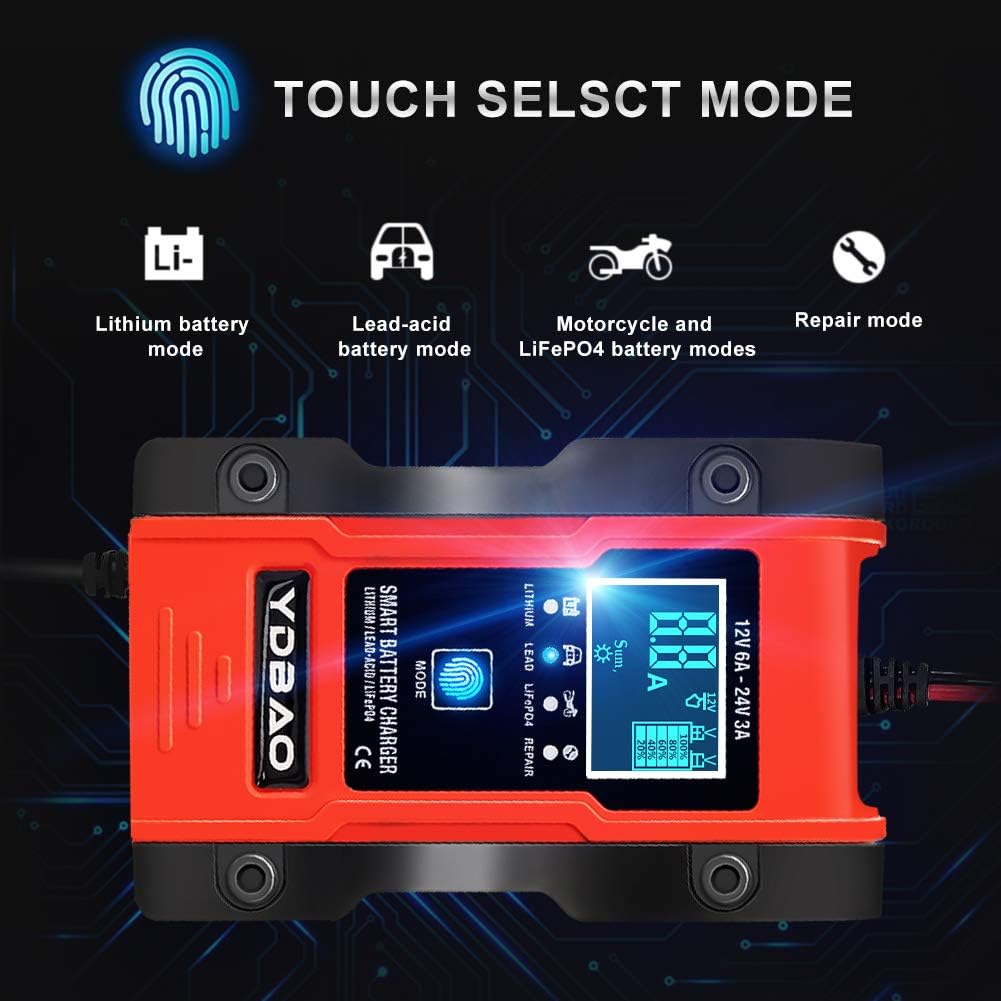
This image demonstrates the touch interface for selecting different charging modes on the YDBAO Smart Battery Charger, including options for Lithium, Lead-Acid, Motorcycle/LiFePO4 batteries, and a repair mode.
LCD Display Information
The intelligent LCD screen provides real-time charging status and battery information:
- Temperature: Displays the ambient temperature, which influences automatic temperature compensation.
- Electric Current: Shows the current charging amperage.
- Voltage: Indicates the battery's current voltage.
- Electric Quantity: Shows the battery's charge level (e.g., 20%, 40%, 60%, 80%, 100%). "FUL" indicates a full charge.
- Mode Indicators: Icons for selected battery type (Lithium, Lead-Acid, LiFePO4) and repair function.
- Protection Icons: Visual indicators for active safety protections (e.g., overcharge, short circuit, reverse connection, overheat).
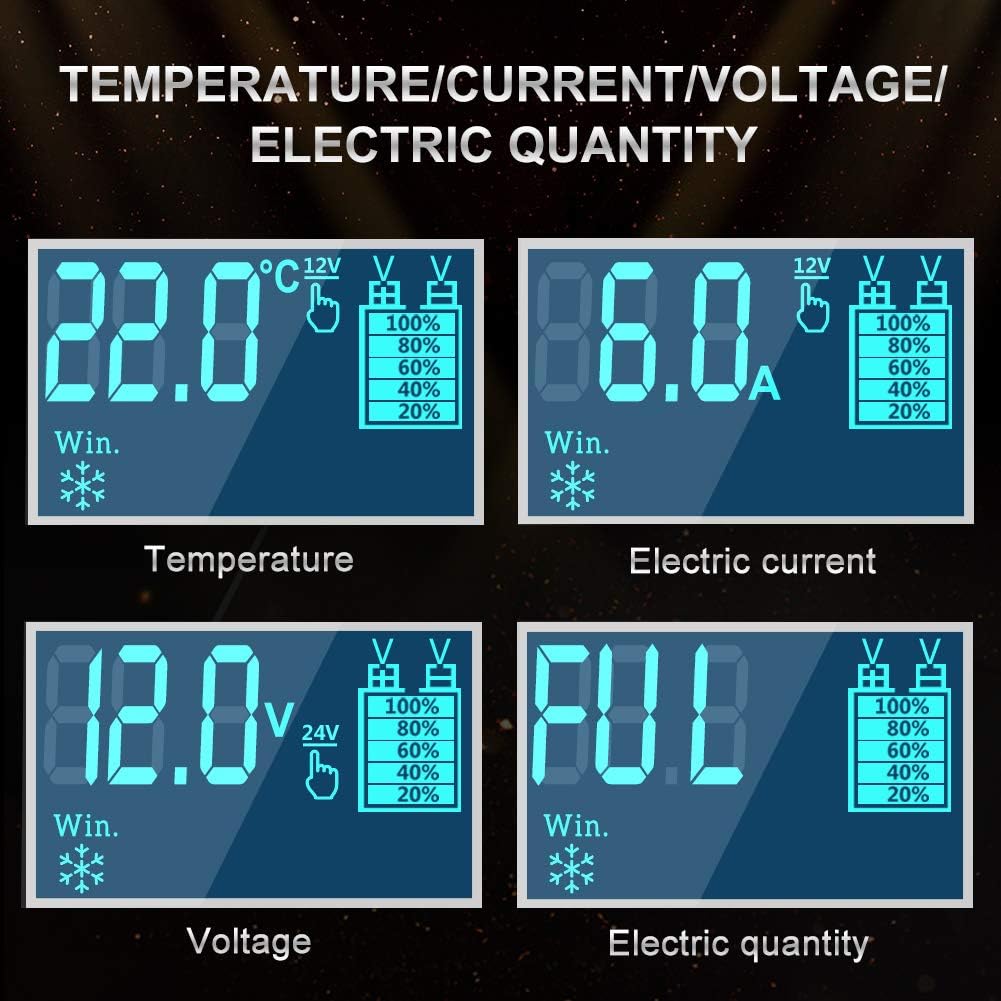
A close-up of the charger's LCD screen, displaying real-time information such as temperature, charging current, battery voltage, and indicating when the battery is fully charged ('FUL').
Automatic Charging Process
Once connected and a mode is selected, the charger will automatically manage the charging process. It will stop charging when the battery reaches full capacity to prevent overcharging.
The charger automatically detects external temperature. Below 10°C, it activates "Winter Mode" for optimized cold-weather charging. Above 28°C, it activates "Summer Mode" for hot-weather charging. This ensures the appropriate charging voltage is applied without manual adjustment.
Maintenance and Repair
Battery Repair Function
The charger includes a repair function utilizing high and low-frequency pulse technology. This can help to recondition and activate old batteries, batteries that have been unused for extended periods, damaged batteries, or sulfated batteries. To use this function, select the "Repair Mode" via the MODE button.
Note: The repair function may not restore severely damaged batteries.
Cooling Fan
The integrated cooling fan operates automatically to dissipate heat generated during the charging process. Ensure the fan vents are not obstructed to maintain optimal performance and prolong the charger's lifespan.

The image highlights the integrated cooling fan of the YDBAO Smart Battery Charger, designed to efficiently dissipate heat and ensure stable operation during the charging process.
Troubleshooting
| Problem | Possible Cause | Solution |
|---|---|---|
| Charger does not turn on. | No power from outlet; loose connection; charger fault. | Check power outlet and connections. Ensure power cord is fully inserted. Try a different outlet. If problem persists, contact support. |
| Charger not charging battery. | Incorrect mode selected; poor clamp connection; battery severely discharged or damaged; reverse polarity. | Verify correct mode for battery type. Ensure clamps are securely connected to the correct terminals. Check for reverse polarity indicator on display. If battery is severely discharged, it may take longer to initiate charging or may be beyond repair. |
| Charger displays an error code or protection icon. | Indicates a safety protection has been activated (e.g., short circuit, overheat, reverse polarity). | Disconnect the charger from power and battery. Inspect connections for short circuits or reverse polarity. Allow charger to cool if overheat protection is active. Reconnect carefully. |
| Battery not fully charged after extended time. | Battery capacity too large for charger; battery is old or damaged; incorrect mode. | Ensure the charger's output current is sufficient for your battery's capacity. Try the "Repair Mode" if the battery is old. Verify the correct charging mode is selected. |
If you encounter issues not listed here or if problems persist, please contact YDBAO customer support.
Specifications
| Feature | Detail |
|---|---|
| Brand | YDBAO |
| Model Number | MQZ9102HBIT |
| Input Voltage | 100-240 V AC, 50-60 Hz |
| Output Voltage | 12 V / 24 V DC |
| Output Current | 6 A / 3 A |
| Compatible Battery Types | Lithium, Lead-Acid (Calcium, GEL, AGM, Wet, EFB), LiFePO4 |
| Color | Dark Red |
| UPC | 750226268684 |

The image provides a visual representation of the YDBAO Smart Battery Charger's dimensions (15.1 cm x 10 cm) and the lengths of its power cable (108 cm) and battery clamp cables (61 cm).
Warranty and Support
YDBAO is committed to providing high-quality products. For warranty information, technical support, or any questions regarding your Smart Automatic Battery Charger, please refer to the contact information provided with your purchase or visit the official YDBAO website.
Please retain your proof of purchase for warranty claims.