
Introduction
The LAIWEN PXLW-401 is a Bluetooth earbud hearing amplifier designed to assist individuals with hearing needs. It features advanced digital programming for high-quality sound, Bluetooth 5.0 for stable connections, and intuitive touch controls. Its lightweight, ergonomic design ensures comfort for extended use.
This manual provides detailed instructions on how to set up, operate, and maintain your LAIWEN PXLW-401 hearing amplifier to ensure optimal performance and longevity.
Safety Information
- Always consult a medical professional before using any hearing assistance device.
- Keep the device and its components out of reach of children and pets to prevent accidental ingestion.
- Avoid exposing the device to extreme temperatures, direct sunlight, or moisture beyond its IPX7 rating.
- Do not attempt to disassemble or modify the device, as this may void the warranty and cause damage.
- Use only the provided charging cable and adapter to prevent damage to the battery and device.
- If you experience discomfort or pain, discontinue use and consult a medical professional.
Package Contents
Please check the package for the following items:
- LAIWEN PXLW-401 Bluetooth Hearing Amplifiers (Left and Right)
- Portable Charging Case
- USB Type-C Charging Cable
- Multiple Sizes of Earplugs (3 pairs included)
- User Manual
Product Overview
The LAIWEN PXLW-401 consists of two wireless earbuds and a compact charging case. Each earbud features a touch control panel and an in-ear design for comfortable wear.

Image: A senior woman wearing the LAIWEN PXLW-401 hearing amplifiers, smiling while interacting with a younger woman. The image highlights the discreet and comfortable design of the earbuds.
The charging case not only protects the earbuds but also provides multiple charges, extending their usage time significantly.
Setup
1. Charging the Device
Before first use, fully charge the hearing amplifiers and the charging case.
- Place both hearing amplifiers into their respective slots in the charging case. Ensure they are correctly seated.
- Connect the USB Type-C charging cable to the charging port on the case and plug the other end into a power source.
- The indicator lights on the case will show the charging status. A full charge for the earbuds takes approximately 1 hour, providing up to 5 hours of continuous use. The charging case provides an additional 4 full charges, extending total standby time to 25 hours.

Image: The LAIWEN PXLW-401 earbuds inside their open charging case, illustrating the charging process and battery life calculation (5 hours + 20 hours = 25 hours total with case).
2. Selecting Earplugs and Fitting
Choose the earplug size that provides the most comfortable and secure fit. A proper fit is crucial for optimal sound quality and to prevent whistling.
- Gently attach the selected earplug to the nozzle of the hearing amplifier.
- Insert the amplifier into your ear canal, rotating slightly until it feels snug and comfortable.
- Test different sizes to find the best seal.
3. Bluetooth Pairing
The LAIWEN PXLW-401 uses Bluetooth 5.0 for a stable connection with your smartphone or other Bluetooth-enabled devices.
- Ensure the hearing amplifiers are charged and removed from the charging case. They will automatically enter pairing mode.
- On your smartphone, go to the Bluetooth settings.
- Search for available devices and select "PX-401" from the list to connect.
- Once connected, you will hear a confirmation tone, and the device will be ready for use. The connection range is up to 33 feet (10 meters).
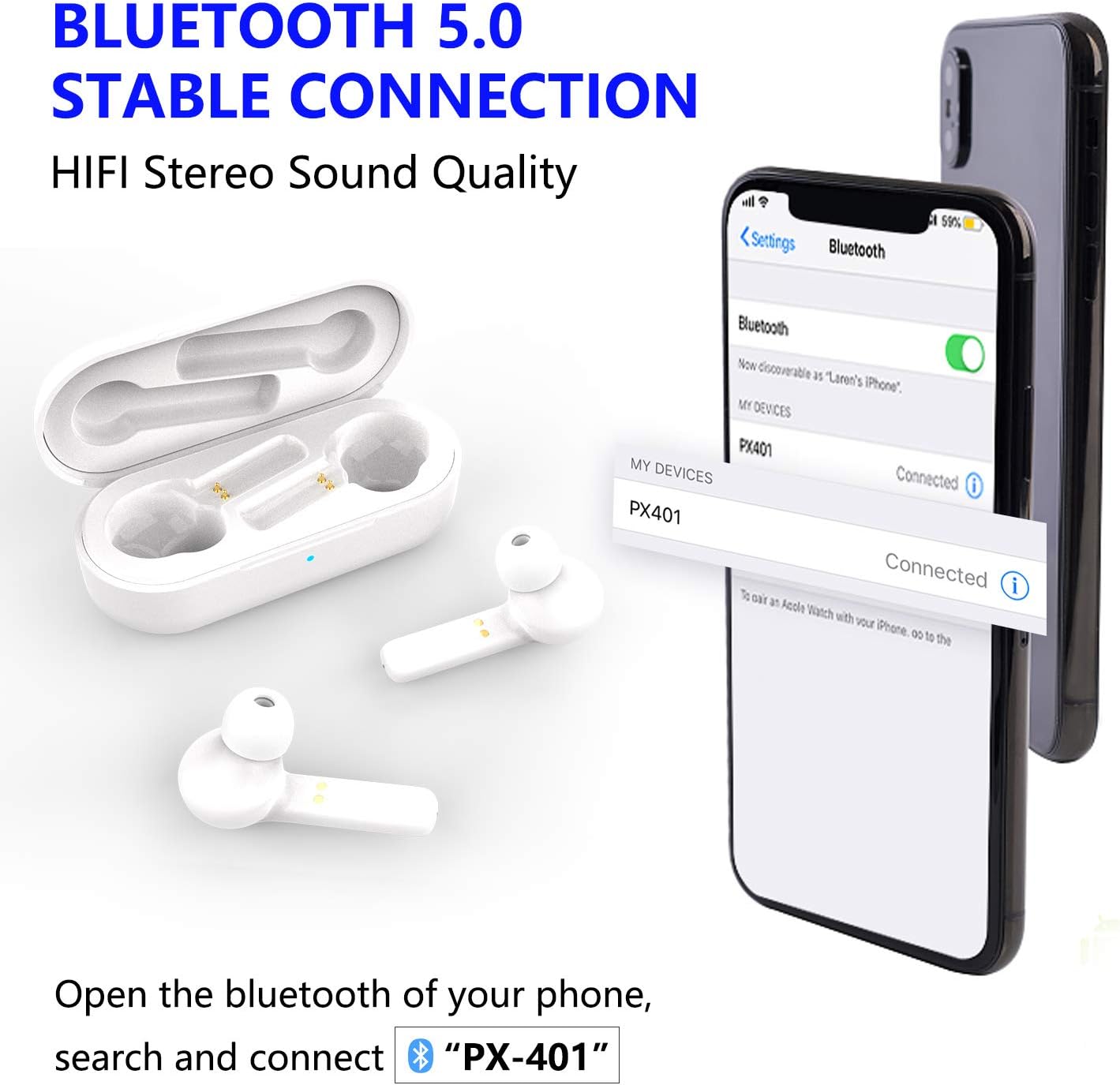
Image: The LAIWEN PXLW-401 earbuds and charging case next to a smartphone displaying its Bluetooth settings, showing "PX-401" as a discoverable and connected device.
Operating Instructions
1. Power On/Off
- Power On: The amplifiers automatically turn on and enter hearing aid mode when taken out of the charging case.
- Power Off: Place the amplifiers back into the charging case. They will automatically power off and begin charging.
2. Touch Controls
The LAIWEN PXLW-401 features intuitive touch controls on each earbud for easy management of audio and calls.

Image: A close-up of the LAIWEN PXLW-401 earbud, highlighting the touch control area with various icons representing functions like calls, music playback, volume, and voice assistant (SIRI).
| Action | Function (Left Earbud) | Function (Right Earbud) |
|---|---|---|
| One Click (L/R) | Play/Pause Music, Answer/Hang up Call | Play/Pause Music, Answer/Hang up Call |
| Double-click (L) | Previous Song | N/A |
| Double-click (R) | N/A | Next Song |
| Press and Hold for 2s (L) | Volume Decrease (-), Reject Call | N/A |
| Press and Hold for 2s (R) | N/A | Volume Increase (+), Reject Call |
The device automatically switches between hearing amplification and streaming audio (music/calls) when connected via Bluetooth.
3. Volume Adjustment (Hearing Mode)
In hearing amplification mode, you can adjust the volume to your desired intensity. The device offers 3 volume adjustment levels.
- Use the touch controls as described above (Press and Hold L for Volume -, Press and Hold R for Volume +) to cycle through the available volume levels.
Maintenance
1. Cleaning
- Regularly clean the earplugs and the surface of the hearing amplifiers with a soft, dry cloth.
- Remove earwax buildup from the earplugs and sound outlets using the provided cleaning tool or a small brush.
- Do not use harsh chemicals, abrasive cleaners, or immerse the device in water (beyond its IPX7 rating for splashes).
2. Storage
- When not in use, always store the hearing amplifiers in their charging case to protect them from dust, moisture, and physical damage.
- Store the device in a cool, dry place, away from direct sunlight and extreme temperatures.
3. Battery Care
- To prolong battery life, avoid fully discharging the batteries frequently.
- If storing the device for an extended period, charge it to approximately 50% every few months.
Troubleshooting
If you encounter any issues with your LAIWEN PXLW-401, please refer to the following common solutions:
| Problem | Possible Cause | Solution |
|---|---|---|
| No sound or weak sound | Low battery, earwax blockage, incorrect volume setting, improper fit. | Charge the device. Clean earplugs and sound outlets. Adjust volume. Ensure proper fit. |
| Whistling or feedback | Improper fit, earplug too small, earwax in ear canal. | Try a larger earplug size for a better seal. Reinsert the amplifier. Consult a doctor for earwax removal if necessary. |
| Cannot pair with Bluetooth device | Amplifiers not in pairing mode, Bluetooth off on phone, device too far. | Ensure amplifiers are out of the case. Turn Bluetooth on your phone. Keep devices within 33ft. Forget "PX-401" on your phone and re-pair. |
| Device not charging | Loose cable connection, faulty cable/adapter, dirty charging contacts. | Check cable connection. Try a different USB port or adapter. Clean charging contacts on earbuds and case. |
Specifications
| Brand | LAIWEN |
| Model | PXLW-401 |
| Color | Pxlw-401 (White) |
| Power Source | Battery Powered |
| Special Features | Cordless, Rechargeable |
| Fit Type | In-Ear |
| Control Type | Touchpad Control |
| Bluetooth Version | 5.0 |
| Earbud Battery Life | Up to 5 hours (single charge) |
| Total Battery Life (with case) | Up to 25 hours |
| Charging Time | Approx. 1 hour (earbuds) |
| Item Weight | 0.14 Ounces (approx. 4g per amplifier) |
| Battery Weight | 0.1 Grams |
| Lithium Battery Weight | 0.05 Grams |
| Battery Cell Composition | Lithium Ion |
| Water Resistance | IPX7 (Resistant to light rain, accidental splashes, sweat) |

Image: A LAIWEN PXLW-401 earbud shown with water droplets, illustrating its IPX7 waterproof rating, indicating resistance to light rain, accidental splashes, and sweat.
Warranty and Support
LAIWEN is committed to providing a quality product and excellent customer experience.
- Warranty: Your LAIWEN PXLW-401 product includes a One Year Warranty Guarantee.
- Money Back Guarantee: We offer a 90 Days Money Back Guarantee.
- Support: For any quality-related issues, replacements, or refunds, please contact LAIWEN customer support. Refer to your purchase documentation for contact details.