
BIOS 335FC
BIOS Living Digital Pedometer 335FC User Manual
Model: 335FC
1. Introduction
Thank you for choosing the BIOS Living Digital Pedometer 335FC. This compact and smart device is designed to help you maintain a healthy and active lifestyle by accurately tracking your daily physical activity.
It counts your steps walked, distance traveled, and calories burned, all displayed on a large, easy-to-read LCD screen. The pedometer is designed for convenience, easily clipping to your belt or waistband, and offers both 12/24 hour time formats and imperial/metric unit options.
2. Safety Information
- Keep the device away from water and excessive moisture.
- Do not expose the pedometer to extreme temperatures (hot or cold).
- Avoid dropping or subjecting the device to strong impacts.
- Do not attempt to disassemble or repair the pedometer yourself. Refer to qualified service personnel.
- Keep batteries out of reach of children. If swallowed, seek immediate medical attention.
- Dispose of batteries and the device according to local regulations.
3. Product Overview
Familiarize yourself with the components of your BIOS Living Digital Pedometer 335FC.

Figure 3.1: Front View of Pedometer
This image shows the front of the BIOS Living Digital Pedometer 335FC. It features a prominent LCD screen displaying "23 STEP" and three buttons below it: "RESET", "SET", and "MODE". The device is white with a blue accent around the screen, and "BIOS living" is printed at the top.
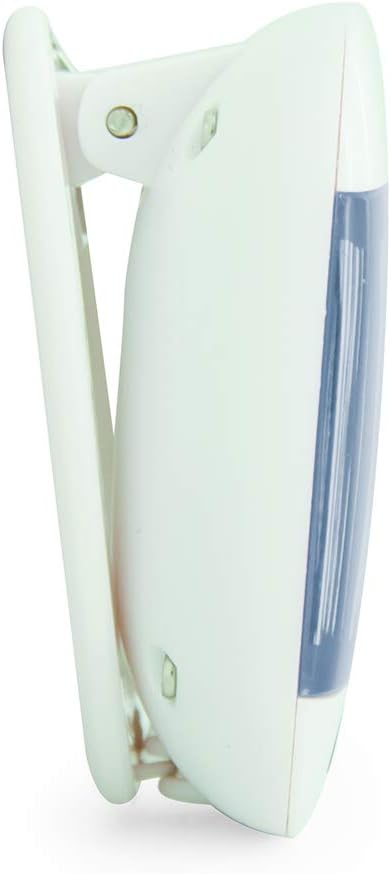
Figure 3.2: Side View with Belt Clip
This image displays a side profile of the BIOS Living Digital Pedometer 335FC. It highlights the integrated white clip mechanism designed for attaching the pedometer to clothing, such as a belt or waistband. The blue accent on the front is visible from this angle.

Figure 3.3: Back View with Battery Compartment
This image shows the back of the BIOS Living Digital Pedometer 335FC. It clearly displays the battery compartment cover, which can be opened to insert or replace the battery. The back is white with some regulatory markings and the brand "HAPTIME" embossed.
Key Components:
- LCD Display: Large screen for easy viewing of steps, distance, calories, and time.
- RESET Button: Used to clear current readings or reset settings.
- SET Button: Used to confirm settings or enter setting mode.
- MODE Button: Used to cycle through different display modes (Steps, Distance, Calories, Time).
- Belt Clip: Integrated clip for secure attachment to clothing.
- Battery Compartment: Located on the back for battery installation.
4. Setup
4.1 Battery Installation
Your pedometer comes with a battery. Follow these steps to install it:
- Locate the battery compartment on the back of the pedometer (refer to Figure 3.3).
- Using a small screwdriver or coin, gently open the battery compartment cover.
- Insert the provided battery, ensuring the correct polarity (+/-) as indicated inside the compartment.
- Replace the battery compartment cover and secure it.
4.2 Initial Settings (Time & Units)
After battery installation, the device may prompt you to set the time and units. If not, press and hold the SET button to enter setting mode.
- Time Format: The display will flash "12H" or "24H". Use the MODE button to toggle between 12-hour and 24-hour formats. Press SET to confirm.
- Set Time: The hour digit will flash. Use the MODE button to adjust the hour. Press SET to confirm. Repeat for minutes.
- Unit System: The display will flash "KM" (metric) or "MI" (imperial). Use the MODE button to select your preferred unit system. Press SET to confirm.
- Stride Length (for distance accuracy): If prompted, enter your average stride length. This can be estimated by walking 10 steps and dividing the total distance by 10. Use MODE to adjust and SET to confirm.
- Weight (for calorie accuracy): If prompted, enter your weight. Use MODE to adjust and SET to confirm.
The pedometer is now ready for use.
5. Operating Instructions
5.1 Wearing the Pedometer
For accurate readings, clip the pedometer securely to your belt or waistband, preferably near your hip. Ensure it is positioned vertically.
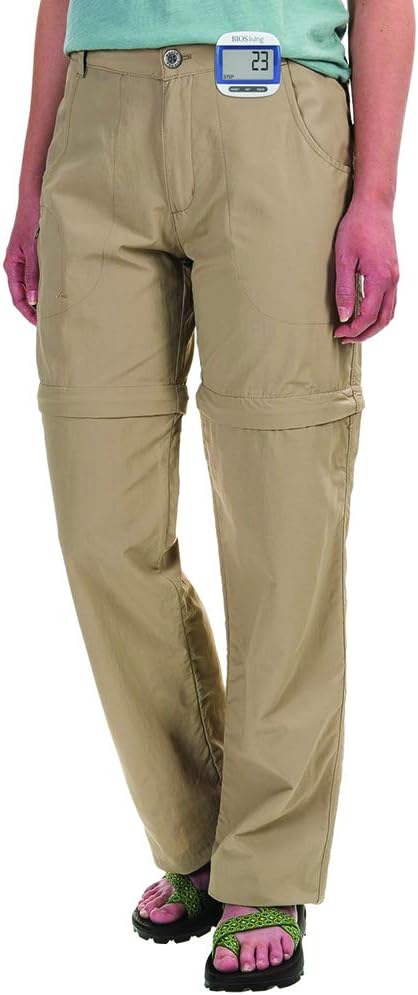
Figure 5.1: Correct Pedometer Placement
This image shows a person wearing the BIOS Living Digital Pedometer 335FC. The pedometer is clipped to the waistband of their khaki pants, positioned on the side of their hip, demonstrating the recommended placement for accurate step counting.
5.2 Display Modes
Press the MODE button to cycle through the following display modes:
- Steps: Displays the total number of steps taken.
- Distance: Displays the total distance traveled (in KM or MI).
- Calories: Displays the estimated calories burned (in KCAL).
- Time: Displays the current time.

Figure 5.2: Time Display Mode
This image shows the BIOS Living Digital Pedometer 335FC displaying the time. The large LCD screen shows "2:34 P", indicating 2:34 PM. A small clock icon is visible on the bottom left of the display.

Figure 5.3: Distance Display Mode
This image shows the BIOS Living Digital Pedometer 335FC displaying distance. The screen shows "1.25" with "DIST" and "KM" below it, indicating a distance of 1.25 kilometers.

Figure 5.4: Calories Display Mode
This image shows the BIOS Living Digital Pedometer 335FC displaying calories burned. The screen shows "4.87" with "KCAL" below it, indicating 4.87 kilocalories.
5.3 Resetting Data
To reset your daily steps, distance, and calorie count to zero, press and hold the RESET button until the display clears. This is typically done at the start of a new day or activity.
6. Maintenance
6.1 Cleaning
Wipe the pedometer with a soft, dry cloth. Do not use abrasive cleaners or immerse the device in water.
6.2 Battery Replacement
When the display becomes dim or the device stops responding, it's time to replace the battery. Follow the battery installation steps in Section 4.1.
7. Troubleshooting
| Problem | Possible Cause | Solution |
|---|---|---|
| Display is blank or dim. | Low or dead battery. | Replace the battery (see Section 6.2). |
| Inaccurate step count. | Incorrect placement of pedometer; irregular walking motion; incorrect stride length setting. | Ensure pedometer is clipped securely and vertically to your belt/waistband. Walk naturally. Re-enter stride length in settings (Section 4.2). |
| Buttons are unresponsive. | Battery issue; temporary software glitch. | Replace battery. If problem persists, try removing and reinserting the battery to perform a hard reset. |
| Cannot change settings. | Not in setting mode. | Press and hold the SET button to enter setting mode. |
8. Specifications
| Feature | Detail |
|---|---|
| Model Number | 335FC |
| Color | Blue |
| Material | Plastic |
| Dimensions (L x W x H) | Approx. 5 x 2 x 2 cm |
| Weight | Approx. 31.81 g |
| Display | Large LCD |
| Functions | Steps, Distance, Calories, Time |
| Time Format | 12/24 Hour selectable |
| Units | Imperial/Metric selectable |
| Battery Included | Yes |
| Battery Life | 24 Hours (Note: This might refer to continuous operation or a specific test condition, typical pedometer battery life is much longer) |
| UPC | 057475335632 |
9. Warranty and Support
This BIOS Living Digital Pedometer 335FC is covered by a manufacturer's warranty against defects in materials and workmanship. Please refer to the warranty card included with your purchase for specific terms and conditions, including the warranty period and how to make a claim.
For technical support, troubleshooting assistance, or warranty inquiries, please contact BIOS Living customer service. Contact information can typically be found on the product packaging or the manufacturer's official website.
Please retain your proof of purchase for warranty purposes.
Related documents335FC

Ask a question about this manual
Ask about setup, troubleshooting, compatibility, parts, safety, or missing instructions. Manuals+ will review the question and use this page’s manual context to help answer it.