1. Product Overview
The Barrina T8 4FT LED Shop Light is an integrated lighting fixture designed for various indoor applications such as garages, workshops, and utility rooms. This 40W fixture provides 5500 lumens of bright 6500K daylight-equivalent light, ensuring efficient illumination. Its V-shaped design with reflectors enhances light distribution and protects eyes. The lights are linkable, allowing up to six fixtures to be connected in series for extended coverage.

Image 1.1: Barrina 4FT T8 LED Shop Light with power cord and switch.
2. Safety Information
- Always disconnect power before installation, maintenance, or cleaning.
- Ensure the power supply voltage matches the fixture's requirements (120 Volts).
- Do not install in wet locations. This product is for indoor use only.
- Handle the fixture with care to avoid damage to the LED chips or housing.
- Consult a qualified electrician if you are unsure about wiring or installation procedures.
- Do not modify the fixture or its components.
- Keep away from flammable materials.
3. What's in the Box
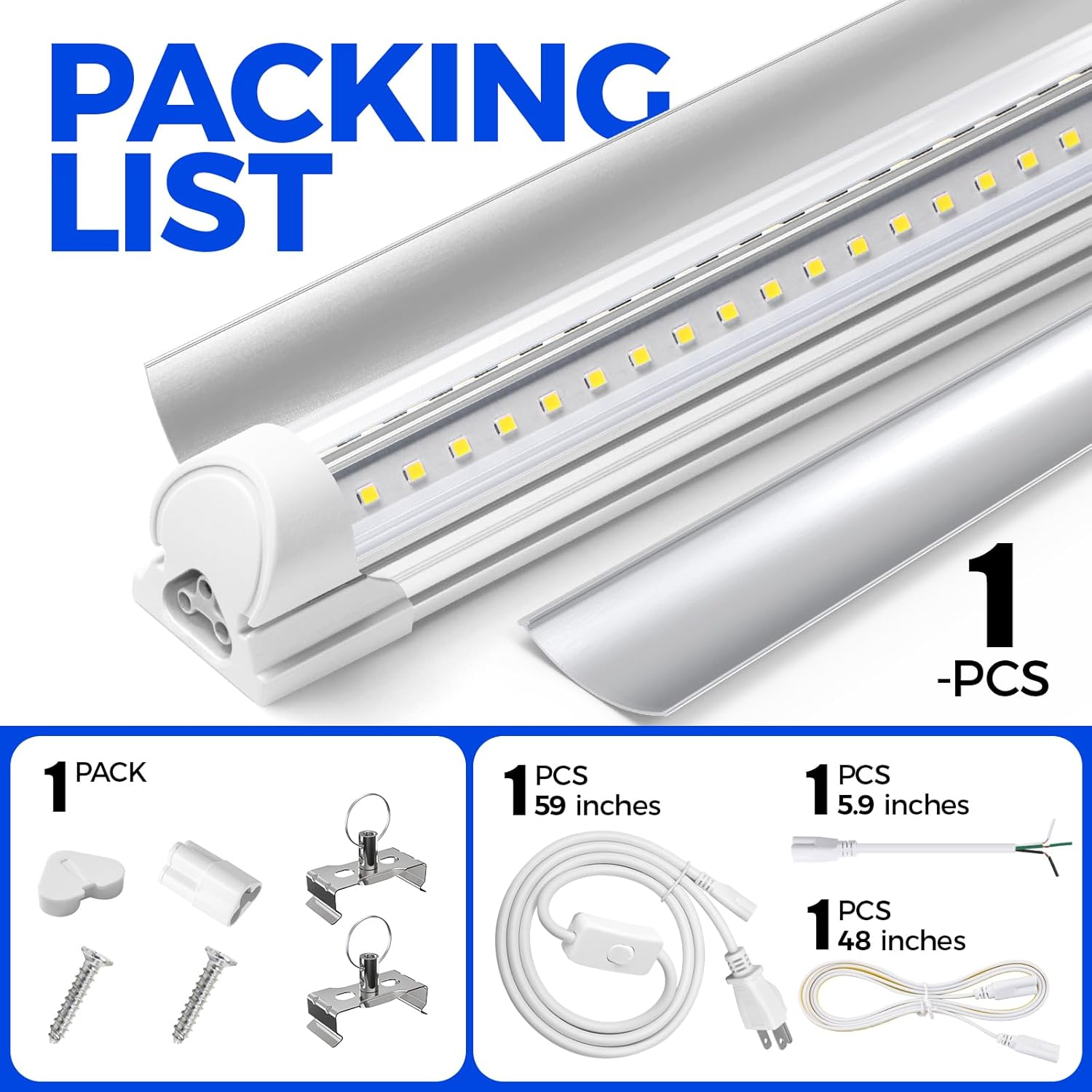
Image 3.1: Visual representation of included components.
Each Barrina T8 4FT LED Shop Light package includes the following components:
- Barrina T8 LED Light Fixture x1
- Reflector x2
- Power Cord with ON/OFF Switch x1 (59 inches)
- Hardwiring Cable x1 (5.9 inches)
- Connecting Cable x1 (48 inches)
- Small Connector x1
- Accessories Package x1 (includes mounting clips, screws, wall anchors)
- Installation Manual x1
4. Setup and Installation
The Barrina LED Shop Light offers flexible installation options, including ceiling mounting and pendant hanging. Ensure power is disconnected before beginning installation.
4.1 Mounting the Fixture
- Step 1: Attach Mounting Clips. Screw the provided mounting clips to the desired wall or ceiling surface. Use appropriate screws and wall anchors for your surface type. Two clips are typically sufficient per fixture.
- Step 2: Secure LED Fixture. Push and secure the LED fixture into the attached clips until it clicks into place.

Image 4.1: Visual guide for mounting the fixture.
4.2 Electrical Connection Methods
There are two primary ways to connect the light fixture to power:
- Plug-in Installation: Use the provided power cord with an ON/OFF switch. Simply plug the cord into the fixture and then into a standard 120V AC outlet.
- Hardwired Installation: For a permanent setup, use the hardwiring cable. This requires connecting the fixture directly to your electrical system. Consult a qualified electrician for hardwired installations to ensure compliance with local electrical codes.

Image 4.2: Hardwire and Plug-in connection options.
4.3 Linking Multiple Fixtures
You can link up to 6 Barrina LED Shop Lights in a series using the provided connecting cables or small connectors. This allows for continuous lighting across a larger area from a single power source.
- Using Connecting Cable: Connect the male end of the connecting cable to the female port of one fixture and the female end to the male port of the next fixture.
- Using Small Connector: For a seamless, direct connection between two fixtures, use the small connector to join them end-to-end.
- Important Note: If connecting new and old products, ensure to use the new male-female connector cables. The second generation is designed for enhanced safety.
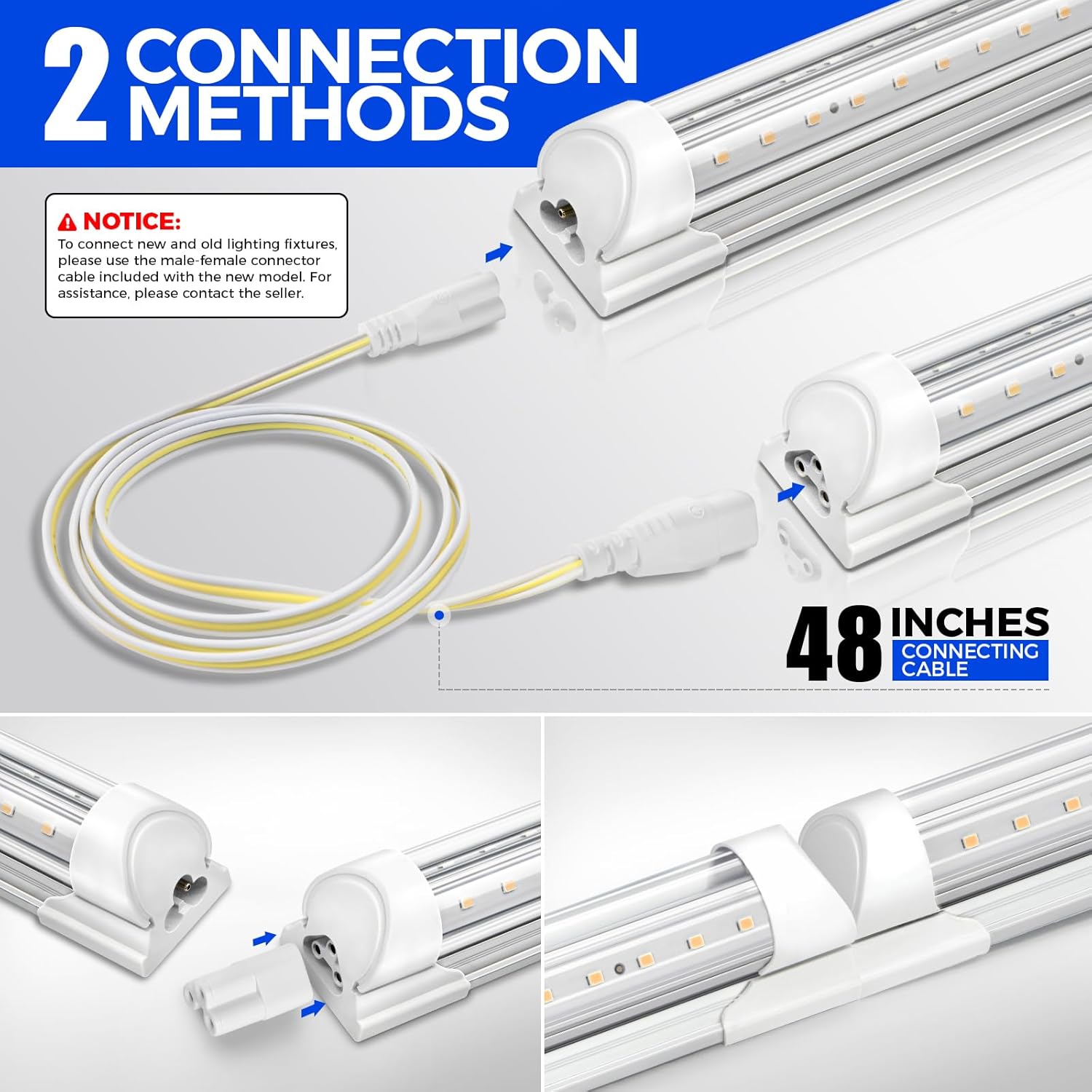
Image 4.3: Connecting multiple fixtures in series.
Video 4.1: Demonstrates the installation and linking process for Barrina 4FT T8 LED Shop Lights.
5. Operating Instructions
Once installed and connected to a power source:
- If using the plug-in power cord, use the integrated ON/OFF switch to control the light.
- For hardwired installations, control the light using the wall switch connected to the circuit.
6. Maintenance
Minimal maintenance is required for your Barrina LED Shop Light.
- Cleaning: Ensure the power is off before cleaning. Wipe the fixture with a soft, dry, or slightly damp cloth. Do not use harsh chemicals or abrasive cleaners.
- Inspection: Periodically check the mounting clips and electrical connections to ensure they are secure.
- LED lights are designed for long life and do not require bulb replacement.
7. Troubleshooting
| Problem | Possible Cause | Solution |
|---|---|---|
| Light does not turn on. | No power supply; loose connection; faulty switch. | Check if the power cord is securely plugged in. Verify the power outlet is functional. Ensure the ON/OFF switch (if applicable) is in the 'ON' position. Check circuit breaker. |
| Light flickers. | Loose connection; incompatible dimmer (not designed for dimming); power fluctuations. | Check all electrical connections. Ensure the fixture is not connected to an incompatible dimmer switch. If power fluctuations are suspected, consult an electrician. |
| Reduced brightness. | Dust accumulation; aging LEDs. | Clean the fixture with a soft cloth. While LEDs have a long lifespan, gradual degradation over many years is normal. |
| Only some linked lights are working. | Faulty connecting cable or small connector; loose connection between fixtures. | Check the connections between each linked fixture. Test connecting cables individually if possible. |
8. Specifications
| Feature | Detail |
|---|---|
| Brand | Barrina |
| Model Number | INWT504014650Dc |
| Light Type | LED Shop Light, T8 Integrated |
| Length | 4FT (47.1 inches) |
| Wattage | 40 Watts |
| Brightness | 5500 Lumens |
| Color Temperature | 6500 Kelvin (Super Bright White) |
| Beam Angle | 270-degree (V-shaped design) |
| Material | Aluminum |
| Voltage | 120 Volts |
| Indoor/Outdoor Usage | Indoor |
| Installation Type | Plug In / Hardwire |
| Linkable | Up to 6 lights in series |
| Certification | ETL Listed |
| Item Weight | 1.95 pounds |
| Product Dimensions | 47.1"L x 1.3"W x 1.38"H |

Image 8.1: Key specifications including dimensions and brightness.
9. Warranty and Support
Barrina products come with a limited warranty. For specific warranty details, claims, or technical support, please refer to the warranty information provided in your product packaging or contact Barrina customer service directly.
You can visit the official Barrina Store for more information and support: Barrina Store on Amazon.