
Pipishell PIMF9
Pipishell Full Motion TV Wall Mount User Manual
Model: PIMF9 | Brand: Pipishell
1. Introduction
This manual provides detailed instructions for the safe and proper installation, operation, and maintenance of your Pipishell Full Motion TV Wall Mount (Model PIMF9). Please read this manual thoroughly before beginning installation to ensure correct setup and to prevent damage or injury. This mount is designed for most 26-60 inch flat and curved TVs weighing up to 77 lbs, with VESA patterns up to 400x400mm.
2. Safety Information
Your safety is paramount. Please observe the following safety guidelines:
- Ensure the mounting surface can safely support the combined weight of the mount and the TV.
- Do not exceed the maximum weight capacity of 77 lbs (35 kg).
- Verify your TV's VESA pattern is compatible (100x100mm to 400x400mm).
- Always use a stud finder to locate wood studs or ensure concrete/brick walls are suitable for mounting. Do not install on drywall alone.
- Follow all installation steps precisely. If unsure, consult a qualified professional.
- Keep children and pets away during installation.
- Regularly check all connections and fasteners for tightness.
- If you have any questions or concerns, contact Pipishell customer support.
3. Package Contents
Please check that all parts are included before beginning installation. If any parts are missing or damaged, do not proceed with installation and contact customer support.
- TV Wall Mount Assembly (Wall Plate and Articulating Arm)
- TV Brackets (2 pieces)
- Hardware Kit (various screws, washers, spacers for TV and wall mounting)
- Bubble Level
- Cable Ties (Velcro)
- Instruction Manual

Figure 3.1: Complete package contents of the Pipishell Full Motion TV Wall Mount.
4. Setup and Installation
4.1 Pre-Installation Checks
Before mounting, confirm your TV and wall are compatible with the mount.
- TV Size & Weight: Fits most 26-60 inch TVs, up to 77 lbs.
- VESA Compatibility: Supports VESA patterns from 100x100mm to 400x400mm. Measure the horizontal and vertical distance between the mounting holes on the back of your TV.
- Wall Type: Suitable for wood studs, concrete, and brick walls. DO NOT install on drywall alone.

Figure 4.1: VESA compatibility and maximum load capacity.
4.2 Attaching TV Brackets to TV
Carefully place your TV face down on a soft, clean surface to prevent scratches. Attach the two vertical TV brackets to the back of your TV using the appropriate screws, washers, and spacers from the hardware kit. Ensure the brackets are centered and securely fastened.
Video 4.1: Step-by-step guide on attaching the TV brackets to your television, demonstrating both flat and curved TV applications.
4.3 Mounting Wall Plate
Determine the desired height for your TV. Use a stud finder to locate the center of a wood stud for wood stud installation, or mark drill points for concrete/brick walls. Drill pilot holes and securely attach the wall plate using the provided lag bolts and washers.

Figure 4.2: Wall plate installation on a single wood stud.
4.4 Hanging the TV
With assistance, carefully lift the TV with the attached brackets and hook them onto the wall plate. Ensure the TV is securely seated on the mount. Tighten the security screws on the bottom of the TV brackets to prevent accidental dislodgement.
4.5 Post-Installation Adjustments
The mount allows for various adjustments to achieve optimal viewing angles.
- Height Adjustment: The TV brackets offer 3 levels of height adjustment after installation.
- Tilt: Adjust the tilt angle from +5° to -15° to reduce glare.
- Swivel: Swivel the TV up to +/-90° for flexible viewing from different positions.
- Extension: Extend the arm out up to 19.51 inches or retract it back to 3.53 inches from the wall.
- Leveling: Post-installation leveling of +/-3° allows for perfect TV placement.
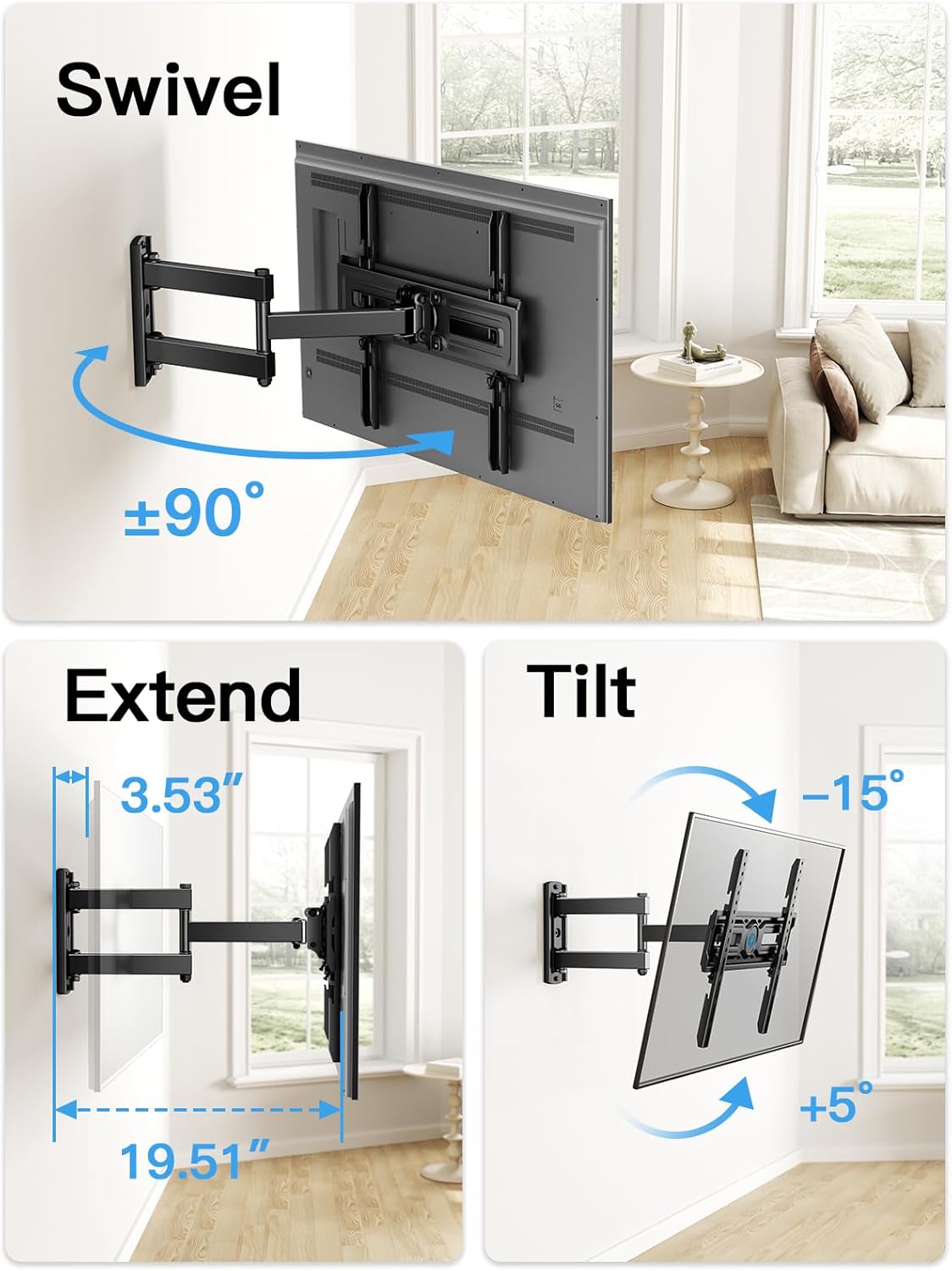
Figure 4.3: Full motion capabilities: Swivel, Extend, and Tilt.
5. Operating the Mount
Once installed, the Pipishell Full Motion TV Wall Mount provides versatile positioning for your television. Gently push or pull the TV to extend or retract the arm. Rotate the TV screen to achieve the desired swivel angle. Use the tilt adjustment knobs or levers (if applicable) to set the vertical viewing angle.
Always move the TV smoothly and avoid sudden jerks to prevent undue stress on the mount or wall.
6. Maintenance
Regular maintenance ensures the longevity and safe operation of your TV mount.
- Cleaning: Wipe the mount with a soft, dry cloth. Avoid abrasive cleaners or solvents.
- Inspection: Periodically check all screws, bolts, and connections to ensure they are tight and secure. Re-tighten if necessary.
- Movement: If the articulating arm becomes stiff, a small amount of silicone-based lubricant can be applied to the pivot points, avoiding contact with the TV or wall.
7. Troubleshooting
| Problem | Possible Cause | Solution |
|---|---|---|
| TV not level after installation. | Wall plate not perfectly level, or TV slightly off-center. | Use the post-installation leveling feature (±3°) to adjust the TV. Recheck wall plate level if necessary. |
| Mount feels loose or wobbly. | Loose fasteners, incorrect wall anchors, or insufficient wall support. | Immediately remove TV. Re-tighten all screws and lag bolts. Ensure proper wall type and stud location. If wall is damaged, consult a professional. |
| TV does not fit the mount. | Incorrect VESA pattern or TV weight exceeds capacity. | Verify your TV's VESA pattern and weight against the mount's specifications (100x100mm to 400x400mm, max 77 lbs). |
| Arm movement is stiff. | Lack of lubrication or dust accumulation. | Apply a small amount of silicone-based lubricant to the articulating joints. Clean any dust or debris. |
8. Specifications
| Feature | Detail |
|---|---|
| Brand | Pipishell |
| Model Number | PIMF9 |
| Item Weight | 6.2 pounds |
| Product Dimensions | 17.56 x 10.43 x 3.7 inches |
| Color | Black |
| Mounting Type | Wall Mount |
| Movement Type | Articulating, Swivel |
| Material | Alloy Steel |
| Maximum Compatible TV Size | 60 Inches |
| Minimum Compatible TV Size | 26 Inches |
| Maximum Load Capacity | 77 lbs (35 kg) |
| VESA Compatibility | 100x100mm to 400x400mm |
| Tilt Angle | +5° / -15° |
| Swivel Angle | +/-90° |
| Extension from Wall | 3.53" to 19.51" |
| Post-Installation Leveling | +/-3° |
9. Warranty and Customer Support
Pipishell is committed to providing high-quality products and excellent customer service. This product comes with a standard manufacturer's warranty. For specific warranty details, please refer to the product packaging or contact Pipishell customer support.
If you encounter any issues during installation or operation, or have any questions, please do not hesitate to contact our friendly US-based customer support team. Contact information can typically be found on the product packaging or the official Pipishell website.
Online Resources:
Related documentsPIMF9


Ask a question about this manual
Ask about setup, troubleshooting, compatibility, parts, safety, or missing instructions. Manuals+ will review the question and use this page’s manual context to help answer it.