
GODOX OPEN DRAWER 500R
GODOX LC500R RGB LED Light Stick User Manual
Model: OPEN DRAWER 500R | Brand: GODOX
1. Introduction
The GODOX LC500R RGB LED Light Stick is a versatile and portable lighting solution designed for photography and videography. It offers adjustable color temperature (CCT mode), full RGB color control, and a variety of built-in lighting effects. Its lightweight design and flexible mounting options make it suitable for various creative applications. This manual provides essential information for the safe and effective use of your LC500R light stick.
2. Safety Information
Please read and understand all safety precautions before using the GODOX LC500R. Improper use may result in damage to the product, personal injury, or property damage.
- Do not expose the device to rain or moisture.
- Do not disassemble or modify the light stick. Repairs should only be performed by authorized service personnel.
- Keep out of reach of children.
- Avoid direct eye exposure to the light, especially at high brightness settings.
- Ensure proper ventilation during operation to prevent overheating.
- Use only the specified AC charger for charging the built-in battery.
- Do not operate the light stick near flammable gases or liquids.
- If the light stick is dropped or damaged, discontinue use and contact support.
3. Product Overview
3.1 Components
The GODOX LC500R package typically includes the following items:
- 1 x Godox LC500R RGB Light Stick
- 1 x Two-Way Barndoors
- 1 x AC Charger
- 1 x Carry Bag

Figure 3.1: Godox LC500R Light Stick and Accessories.
This image displays the main components of the Godox LC500R package, including the light stick itself, the detachable two-way barndoors, the power adapter for charging, and a protective carry bag for transport.
3.2 Key Features
- Adjustable Color Temperature (CCT Mode): Precisely adjust color temperature from 2500K (warm) to 8500K (cool).
- Accurate Color Rendition: High CRI rating of 96 and TLCI of 98 ensure natural and vibrant color reproduction.
- Full Color (RGB Mode): Offers 360 selectable colors with full control of hue and saturation.
- Dimmable Output: Brightness is adjustable from 0% to 100%.
- 14 FX Lighting Effects: Includes 39 various presets for creative film and photography applications (e.g., RGB Cycle, Flash, Laser, Lightning, Broken Bulb, TV, Candle, Fire, Firework, Police Car, Fire Truck, Ambulance, SOS, Music).
- Creative Music Mode: Built-in microphone allows the light to change color and brightness in sync with music beats.
- Barndoors Included: Two-way barndoors allow for shaping and directing the light spread.
- Flexible Light Placement: Lightweight design for handheld use and features a 1/4-20 nut for mounting on tripods, tilter brackets, or light stands.
4. Setup
4.1 Charging the Battery
Before first use, fully charge the built-in Lithium-Ion battery. Connect the provided AC charger to the charging port on the light stick and plug it into a power outlet. The charging indicator will show the charging status. Ensure the charger is securely connected.
4.2 Attaching Barndoors
The two-way barndoors can be easily attached to the head of the light stick. Align the barndoors with the grooves on the light stick and slide them into place until they click securely. These can be adjusted to control the light beam.
4.3 Mounting Options
The LC500R is designed for flexible placement:
- Handheld: The ergonomic design allows for comfortable handheld operation.
- Tripod/Stand Mounting: Utilize the 1/4-20 threaded nut at the base of the light stick to attach it to a tripod, light stand, or tilter bracket for stable positioning.

Figure 4.1: Flexible Light Placement and Mounting Thread.
This image illustrates the handheld usability of the LC500R and highlights the 1/4-20 threaded mount at the bottom, enabling attachment to various photographic supports like tripods or light stands.
5. Operating Instructions
5.1 Power On/Off
Press and hold the power button located on the handle to turn the light stick on or off.
5.2 Mode Selection
The LC500R features several operating modes: CCT Mode, RGB Mode, and FX Lighting Effects Mode. Use the mode button on the control panel to cycle through these modes.
5.3 CCT Mode (Color Temperature)
In CCT mode, you can adjust the color temperature from 2500K (warm tungsten light) to 8500K (cool daylight). Use the adjustment dial or buttons to fine-tune the temperature. The display will show the current Kelvin value.

Figure 5.1: CCT Mode Operation.
This image visually demonstrates the range of color temperatures available in CCT mode, from a warm 2500K to a cool 8500K, illustrating how the light can adapt to different ambient lighting conditions or creative needs.
5.4 RGB Mode (Full Color)
Switch to RGB mode to access 360 different colors. You can adjust the Hue (H) and Saturation (S) parameters to achieve your desired color. The brightness can also be adjusted from 0% to 100% in this mode.

Figure 5.2: RGB Mode Capabilities.
This image showcases the extensive color palette available in RGB mode, with several LC500R units emitting different hues, demonstrating the light's ability to create vibrant and dramatic lighting effects for various content creation scenarios.
5.5 FX Lighting Effects Mode
The LC500R includes 14 categories of special effects with 39 variations. Select the FX mode and then browse through the available effects such as Flash, Lightning, Fire, Police Car, SOS, and Music. Each effect has specific parameters that can be adjusted.
- Music Mode: When in Music mode, the built-in microphone detects audio, and the light will dynamically change color and brightness according to the rhythm of the music.
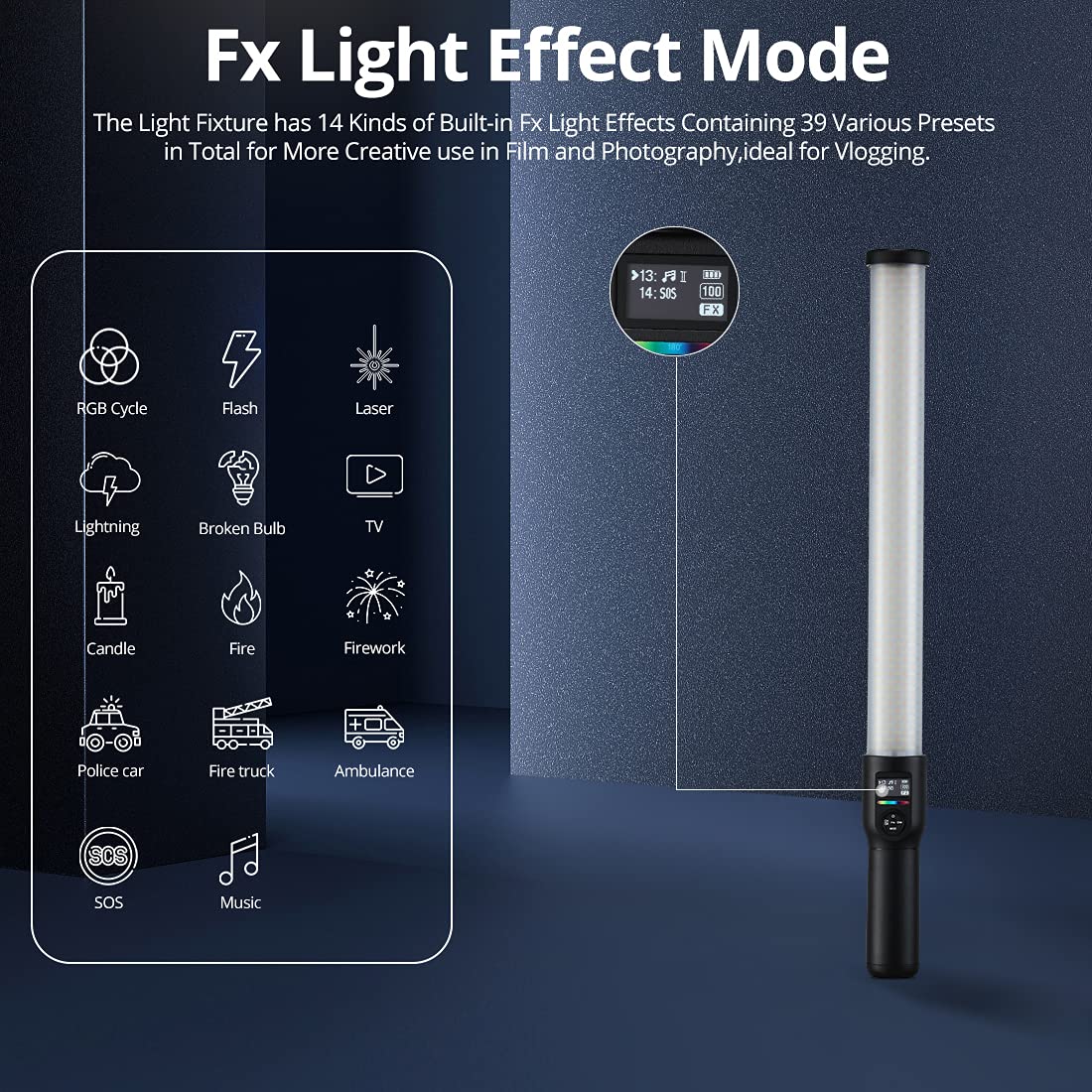
Figure 5.3: FX Light Effect Mode Interface.
This image provides a clear view of the LC500R's display, illustrating the selection interface for its 14 built-in FX lighting effects, which include options like RGB Cycle, Flash, Laser, and various emergency vehicle lights, designed to enhance creative visual storytelling.
6. Maintenance
Proper maintenance ensures the longevity and optimal performance of your GODOX LC500R.
- Cleaning: Use a soft, dry cloth to clean the light stick. For stubborn marks, a slightly damp cloth can be used, followed by a dry cloth. Do not use harsh chemicals or abrasive cleaners.
- Storage: When not in use, store the light stick in its carry bag in a cool, dry place, away from direct sunlight and extreme temperatures.
- Battery Care: If storing for extended periods, charge the battery to approximately 50% every three months to maintain battery health.
7. Troubleshooting
If you encounter issues with your GODOX LC500R, refer to the following common problems and solutions:
| Problem | Possible Cause | Solution |
|---|---|---|
| Light does not turn on. | Battery is depleted; Power button not pressed correctly; Device malfunction. | Charge the battery fully. Ensure the power button is pressed and held until the device powers on. If the issue persists, contact customer support. |
| Light output is dim or inconsistent. | Low battery; Brightness setting too low; Overheating. | Recharge the battery. Increase the brightness setting. Allow the unit to cool down if it feels hot. |
| Charger not working. | Charger not properly connected; Faulty charger or power outlet. | Ensure the charger is securely plugged into both the light stick and a working power outlet. Try a different outlet. If the charger is damaged, replace it with an official GODOX charger. |
| Remote control not responding. | Remote battery depleted; Remote not paired; Obstruction between remote and light. | Replace remote batteries. Ensure the remote is within range and line of sight. Refer to the remote's manual for pairing instructions if applicable. |
8. Specifications
| Parameter | Detail |
|---|---|
| Brand | GODOX |
| Model | OPEN DRAWER 500R |
| Product Dimensions | 9 x 13 x 72 cm |
| Item Weight | 2 kg |
| Color Temperature Range | 2500K - 8500K |
| CRI | 96 |
| TLCI | 98 |
| RGB Hue | 360° Full Color |
| Dimming Range | 0% - 100% |
| FX Lighting Effects | 14 categories, 39 presets |
| Battery Type | Built-in Lithium Ion |
| Mounting | 1/4-20" Thread |
| Hardware Interface | Bluetooth |
9. Warranty and Support
For warranty information and technical support, please contact the authorized distributor in your region. For customers in India, support is provided by:
Nikita Distributors
Flat No.1B, Green Terrace Condominium, Plot No.410/2,
Near Vidyut Nagar, Lane No.5, Koregaon Park, Pune-411001, MH, India.
Email: sale@imaginext.co.in
Phone: 18002668571
Please retain your proof of purchase for warranty claims.
Ask a question about this manual
Ask about setup, troubleshooting, compatibility, parts, safety, or missing instructions. Manuals+ will review the question and use this page’s manual context to help answer it.