
1. Introduction
This manual provides essential information for the safe and effective use of your Sky-Watcher DOB GOTO14 WiFi Dobsonian Telescope. Please read it thoroughly before assembly and operation. The Sky-Watcher DOB GOTO14 WiFi Dobsonian Telescope features an integrated WiFi module, allowing control via a dedicated application on a smartphone or tablet device. Its collapsible optical tube design and detachable base facilitate compact transport. A dual-speed focuser is standard. The hand controller includes multi-language firmware, supporting various display languages.
2. Safety Precautions
- Never look directly at the sun through the telescope or its finder scope without a professionally made solar filter. Permanent and irreversible eye damage may result.
- Do not leave the telescope unsupervised, especially when children or inexperienced adults are present.
- Handle optical components with care to avoid scratches or damage.
- Ensure the telescope is placed on a stable, level surface to prevent tipping.
- Keep electronic components dry and away from extreme temperatures.
3. Package Contents
Verify that all components are present before beginning assembly:
- Optical Tube Assembly (OTA)
- Dobsonian Mount Base (disassemblable)
- 8x50 Finder Scope
- Eyepiece SP10mm
- Eyepiece SP26mm
- Hand Controller
- Power Cable
- User Manual (this document)
4. Setup and Assembly
Follow these steps to assemble your telescope:
- Unpacking: Carefully remove all components from their packaging. Retain the packaging for future transport or storage.
- Mount Base Assembly: Assemble the Dobsonian mount base according to the diagrams provided. Ensure all screws are tightened securely.
- Optical Tube Placement: Gently place the Optical Tube Assembly (OTA) onto the mount base. Secure it using the provided clamps or fasteners.
- Finder Scope Attachment: Attach the 8x50 finder scope to its bracket on the OTA. Align the finder scope with the main telescope by pointing the main telescope at a distant object and adjusting the finder scope's alignment screws until the object is centered in both the finder and the main eyepiece.
- Eyepiece Insertion: Insert the desired eyepiece (SP10mm or SP26mm) into the focuser.
- Power Connection: Connect the power cable to the telescope's power input and to a suitable power source.
- Collapsible Tube Extension: Extend the collapsible optical tube to its full observation length (1510mm) by gently pulling the upper section upwards until it locks into place.
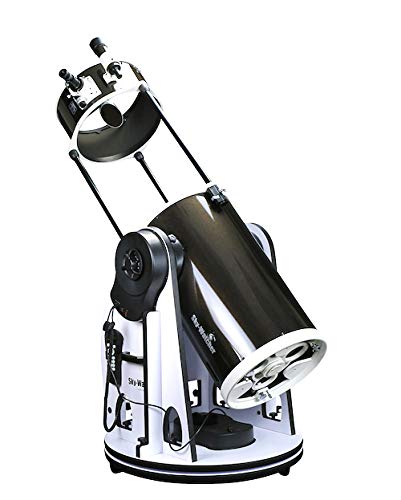
Figure 4.1: Fully assembled Sky-Watcher DOB GOTO14 WiFi Dobsonian Telescope.
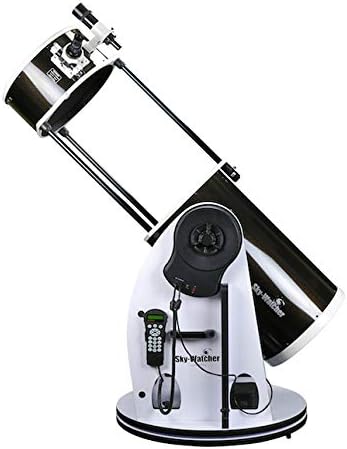
Figure 4.2: Detail of the mount base and control panel with hand controller connected.
5. Operating the Telescope
5.1 Initial Alignment and GoTo System
- Power On: Turn on the telescope using the main power switch.
- Hand Controller Setup: The hand controller will prompt you for initial setup, including date, time, and location. Ensure these are accurate for precise GoTo functionality. The multi-language firmware allows for display in various languages.
- Star Alignment: Follow the on-screen instructions on the hand controller to perform a star alignment. This typically involves pointing the telescope at one or more bright stars.
- Object Selection: Once aligned, use the hand controller to select celestial objects from its database. The telescope will automatically slew to the chosen object.
5.2 WiFi Control (SynScan App)
The integrated WiFi module allows for wireless control via a dedicated application (SynScan App) on your smartphone or tablet.
- Download App: Download and install the SynScan App from your device's app store.
- Connect to WiFi: Power on the telescope. On your smartphone/tablet, connect to the WiFi network broadcast by the telescope (e.g., "SynScan_WiFi_XXXX").
- Launch App: Open the SynScan App. It should automatically detect and connect to the telescope.
- Control: Use the app interface to perform alignment, select objects, and control the telescope's movement.
5.3 Focuser Operation
The telescope is equipped with a dual-speed focuser for precise focusing. Use the coarse adjustment knob for large changes and the fine adjustment knob for critical focusing, especially at high magnifications.
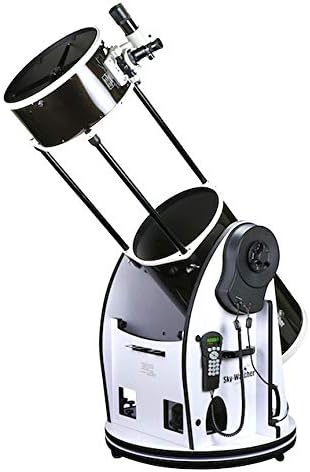
Figure 5.1: The optical tube in its collapsed state for compact transport.
6. Maintenance and Care
- Optical Cleaning: Dust on the primary mirror or eyepieces should be removed with a soft brush or compressed air. For stubborn smudges, use a specialized optical cleaning solution and a microfiber cloth designed for optics. Avoid touching optical surfaces with bare hands.
- Mechanical Parts: Keep the mount and moving parts free of dust and debris. Do not over-tighten any screws or knobs.
- Storage: When not in use, store the telescope in a dry, dust-free environment. Collapse the optical tube and disassemble the base if necessary for compact storage. Use dust caps for the optical tube and eyepieces.
- Battery Care: If using external power, ensure the power source is appropriate for the telescope's requirements.
7. Troubleshooting
7.1 Common Issues and Solutions
- No Power: Check all power connections. Ensure the power source is functional and provides the correct voltage.
- GoTo System Not Accurate: Re-check your date, time, and location settings. Perform a new star alignment with bright, easily identifiable stars. Ensure the mount is level.
- WiFi Connection Issues: Ensure the telescope is powered on and broadcasting its WiFi signal. Disconnect and reconnect your smart device to the telescope's WiFi network. Restart the SynScan App.
- Fuzzy Images: Adjust the focuser carefully. Ensure the finder scope is properly aligned. Check for dew on the optics; use a dew shield if necessary. Allow the telescope to equalize to ambient temperature.
- Telescope Not Moving: Check for any physical obstructions. Ensure the clutches (if applicable) are engaged for motorized movement. Verify power supply.
8. Specifications
| Feature | Specification |
|---|---|
| Model Number | BKDOB14(S)GOTO |
| Optical Design | Dobsonian Reflector |
| Aperture | 355 mm (14 inches) |
| Focal Length | 1600 mm |
| Focal Ratio | f/4.5 |
| Limiting Stellar Magnitude | 14.9 |
| Optical Tube Diameter | 500 mm |
| Optical Tube Length (Observation) | 1510 mm |
| Optical Tube Length (Storage) | 970 mm |
| Optical Tube Weight | 25.3 kg |
| Mount Type | Altazimuth Dobsonian (GoTo) |
| Mount Weight | 46.3 kg |
| Focuser | Dual-Speed Focuser |
| Finder Scope | 8x50 |
| Eyepieces Included | SP10mm, SP26mm |
| Control System | SynScan GoTo Hand Controller, Integrated WiFi for App Control |
| Manufacturer Model Number | SW1310040012W |
| ASIN | B08B4M2J8Q |
9. Warranty Information
This product is covered by a manufacturer's warranty. Please refer to the warranty card included with your purchase or visit the official Sky-Watcher website for detailed terms and conditions. Keep your proof of purchase for warranty claims.
10. Customer Support
For technical assistance, troubleshooting, or spare parts, please contact your local Sky-Watcher dealer or distributor. You can also find support resources, FAQs, and software updates on the official Sky-Watcher website.
Website: www.skywatcher.com


