
Ceenwes Ceenwes
Ceenwes Professional Hair Clippers User Manual
Model: Ceenwes
Product Overview
The Ceenwes Professional Hair Clippers are designed for efficient and precise hair cutting, offering both cordless and corded operation. This versatile grooming kit features a sharp titanium blade combined with a ceramic movable blade for smooth performance, an LED power display for battery monitoring, and IPX7 waterproofing for easy cleaning. Its low vibration and quiet design make it suitable for all ages, including children.
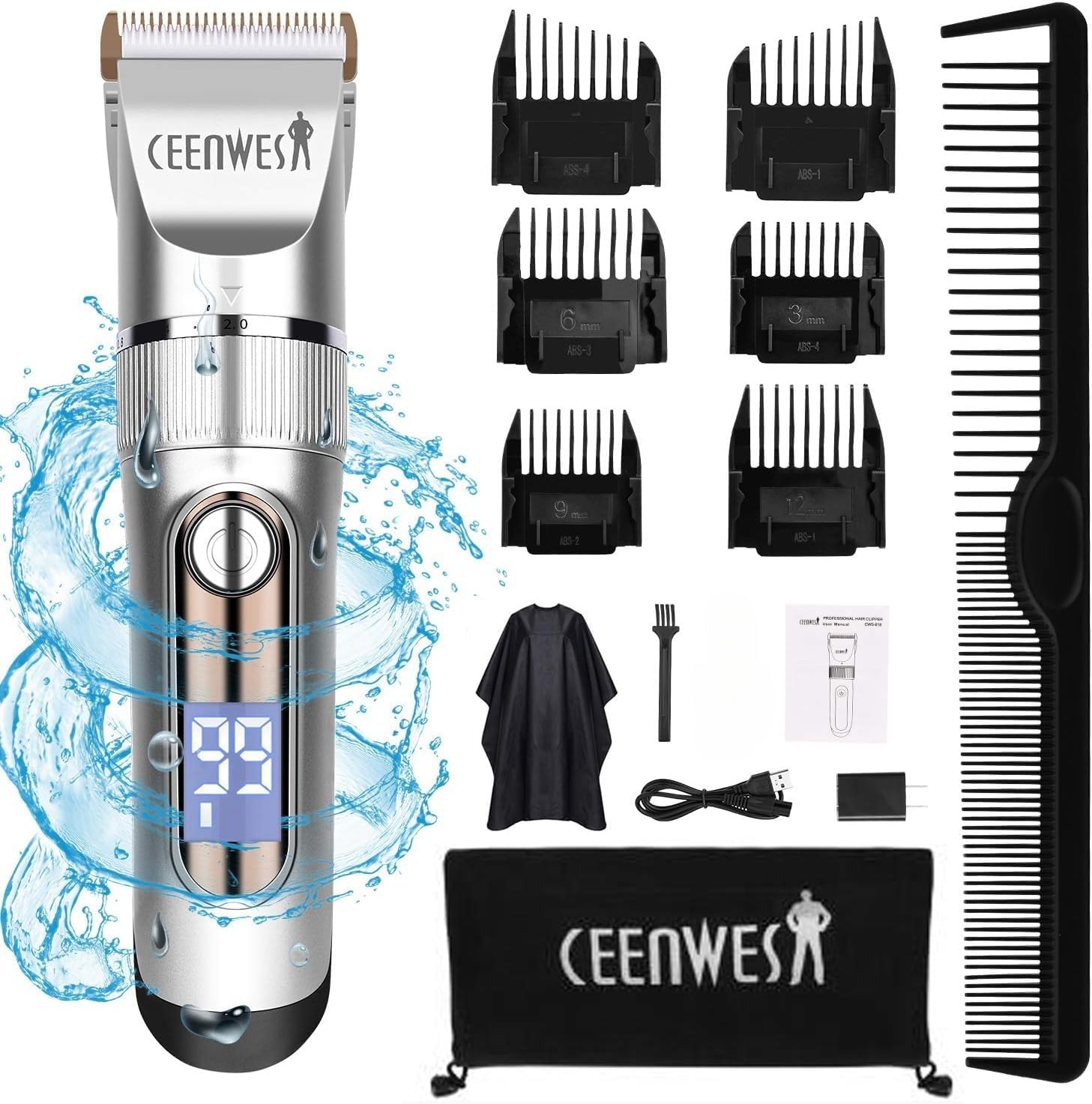
Image: Overview of the Ceenwes Professional Hair Clippers and its complete set of accessories, including guide combs, charging cable, oil, cleaning brush, hairdressing cape, and travel bag.
What's Included
Your Ceenwes Professional Hair Clippers kit comes with the following components:
- 1 x Hair Clipper
- 6 x Limit Guide Comb (3mm, 6mm, 9mm, 12mm, Left Oblique, Right Oblique)
- 1 x Hair Comb
- 1 x USB Charging Cable
- 1 x Adapter
- 1 x Oil Bottle
- 1 x Clean Brush
- 1 x Hairdressing Cape
- 1 x Travel Bag
- 1 x User Manual (this document)

Image: Close-up view of the six included guide combs (3mm, 6mm, 9mm, 12mm, left oblique, right oblique) and the hairdressing cape, highlighting their role as haircut helpers.
Setup
- Initial Charge: Before first use, fully charge the hair clipper. Connect the USB charging cable to the clipper and an adapter, then plug it into a power outlet. The LED display will indicate the battery percentage. A full charge takes approximately 4-5 hours and provides up to 3 hours of run-time.
- Blade Adjustment: The fine-tuning knob on the clipper allows for five levels of length adjustment from 0.8mm to 2.0mm. Rotate the knob to select your desired base cutting length.
- Attach Guide Comb: Select the appropriate guide comb (3mm, 6mm, 9mm, 12mm, left oblique, or right oblique) for your desired hair length. Align the comb with the clipper blade and push firmly until it clicks into place.

Image: The hair clipper being charged via USB, with an emphasis on the LED battery power display and the adjustable blade setting for precise length control.
Operating Instructions
- Power On/Off: Press the power button to turn the clipper on or off. The LED display will illuminate, showing the current battery level.
- Adjusting Speed: The clipper features a two-speed power adjustment. Tap the power button to switch between levels. The first level is suitable for adults and hard, coarse hair, while the second level is ideal for babies and soft hair, ensuring low vibration and quiet operation (approximately 50 dB).
- Hair Cutting:
- Ensure the hair is clean and dry before cutting.
- Start with a longer guide comb if unsure of the desired length, and gradually switch to shorter combs if needed.
- Hold the clipper flat against the head and move it slowly against the direction of hair growth.
- Use the left and right oblique combs for precise trimming around the ears.

Image: Illustration demonstrating the two-speed power adjustment feature, indicating one level for adults with coarse hair and a second, quieter level for babies and soft hair.

Image: Depiction of the clipper's low vibration and low noise operation, with sleeping babies to emphasize its quiet performance (Noise Level < 60Db).
Maintenance
- Cleaning the Blades: The hair trimmer is IPX7 waterproof, allowing for fast and easy cleaning. Simply rinse the blades under running water for hygienic cleaning. The cutter head is also removable for thorough cleaning.
- Oiling the Blades: After cleaning and drying, apply a few drops of the included oil to the blades to maintain their sharpness and ensure smooth operation.
- Storage: Store the clipper and its accessories in the provided travel bag to protect them from dust and damage.
Troubleshooting
If you encounter any issues with your Ceenwes Professional Hair Clippers, please refer to the following common solutions:
- Clipper Not Turning On:
- Ensure the battery is sufficiently charged. Connect the clipper to the charger and check the LED display.
- Verify that the power button is pressed firmly.
- Reduced Cutting Performance:
- Clean the blades thoroughly to remove any trapped hair or debris.
- Apply lubricating oil to the blades as part of regular maintenance.
- Check if the blade is properly aligned and secured.
- Unusual Noise or Vibration:
- Ensure the blade and guide comb are correctly attached.
- Clean and oil the blades.
- If the issue persists, contact customer support.
Specifications
| Brand | Ceenwes |
| Model Number | Ceenwes |
| Power Source | Battery Powered (Cordless/Cord) |
| Battery Type | 1500mAh Lithium Ion Battery |
| Charging Time | 4-5 hours |
| Run Time | Up to 3 hours |
| Blade Material | Titanium fixed blade with Ceramic movable blade |
| Adjustable Blade Length | 0.8mm - 2.0mm (5 levels) |
| Guide Combs Included | 6 (3mm, 6mm, 9mm, 12mm, Left Oblique, Right Oblique) |
| Waterproof Rating | IPX7 |
| Noise Level | Approximately 50 dB (Low Noise) |
| Voltage | 100-240V (Worldwide Voltage) |
Warranty and Support
For warranty information or technical support, please refer to the contact details provided with your product packaging or visit the official Ceenwes website. Keep your purchase receipt as proof of purchase for any warranty claims.
Legal Disclaimer: Statements regarding dietary supplements have not been evaluated by the FDA and are not intended to diagnose, treat, cure, or prevent any disease or health condition. This product is for personal grooming use only.
Ask a question about this manual
Ask about setup, troubleshooting, compatibility, parts, safety, or missing instructions. Manuals+ will review the question and use this page’s manual context to help answer it.