
Introduction
The Vornado UH200 Ultrasonic Humidifier is designed to provide fan-assisted whole-room humidification, ensuring even moisture distribution in spaces up to 900 sq ft. This manual provides essential information for the safe and efficient operation and maintenance of your humidifier.

Image: The Vornado UH200 Ultrasonic Humidifier, showcasing its sleek white and gray design with a transparent water tank.
Important Safety Instructions
Please read all instructions before using this humidifier. Failure to follow these instructions may result in electric shock, fire, or serious injury.
- Always unplug the humidifier before cleaning, filling, or moving.
- Do not operate any humidifier with a damaged cord or plug.
- Do not place the humidifier near heat sources such as stoves, radiators, or heaters.
- Ensure the humidifier is placed on a firm, level surface.
- Do not allow children to operate the humidifier without supervision.
- Use only clean, cool tap water in the tank.
Setup
Unpacking and Placement
Remove all packaging materials. Place the humidifier on a dry, level surface in the room where humidification is desired. For optimal whole-room humidification, ensure the unit is not obstructed.
Filling the Water Tank
- Ensure the humidifier is unplugged.
- Grasp the water tank handle and lift vertically to remove it from the base. Do not twist.
- Unscrew the cap at the bottom of the tank.
- Fill the tank with cool, clean tap water.
- Securely screw the cap back onto the tank.
- Place the filled tank back onto the humidifier base, ensuring it seats properly.

Image: The SimpleTank system, showing how easily the tank can be removed and refilled by lifting it vertically.
Power Connection
Plug the power cord into a standard electrical outlet. The unit is designed to meet U.S. voltage requirements.
Video: An introduction to Vornado, highlighting the brand's commitment to comfort and design. This video provides an overview of the brand's philosophy.
Operating Instructions
Control Panel and Remote
The UH200 features a touch-sensitive control panel and comes with a remote control for convenient operation. The remote control can be stored in a dedicated slot on the unit.

Image: The illuminated control panel of the UH200, showing buttons for power, humidity adjustment, fan speed, timer, and display brightness.

Image: The remote control for the UH200, featuring a display and buttons mirroring the main control panel for convenient adjustments.
Power On/Off
Press the Power Button () on the control panel or remote to turn the unit on or off.
Setting Desired Humidity
Use the Plus (+) or Minus (-) buttons to adjust the desired humidity level. The built-in humidistat will automatically maintain levels between 40-60% or continuous operation. Adjustments are made in 5% increments.
Fan Speed Control
Press the Fan Speed Button () to cycle through three settings: High, Low, and Auto. Auto mode adjusts the fan speed based on the room's humidity needs.

Image: A visual representation of Vornado's Vortex Action, illustrating how the humidifier circulates moisture evenly throughout a room up to 900 sq ft.
Display Brightness and Lock
- Press the Brightness Button () to adjust the display brightness.
- Press and hold the Lock Button () for 3 seconds to lock or unlock the control panel, preventing accidental changes.
Timer Function
Use the Timer Button () to set an operating duration for the humidifier.
Maintenance
Cleaning the Water Tank
The SimpleTank system is designed for easy cleaning. Regularly clean the water tank to prevent mineral buildup and ensure optimal performance. Refer to the detailed cleaning instructions in the full owner's guide for best practices.
Mineral Filter
The UH200 uses a mineral filter. Replace the filter as recommended in the owner's guide to maintain mist quality and prevent mineral dust.
Troubleshooting
If your Vornado UH200 is not operating as expected, please consult the following common issues:
- No Mist Output: Check if the water tank is properly seated and filled. Ensure the unit is powered on and the desired humidity level is set above the current room humidity.
- Unit Not Turning On: Verify the power cord is securely plugged into a working outlet. Check if the control panel lock is engaged.
- Unusual Noise: Ensure the unit is on a stable, level surface. Check for any obstructions in the fan or water tank area.
- White Dust: This indicates hard water. Consider using distilled water or replacing the mineral filter.
For more detailed troubleshooting, please refer to the complete owner's guide or contact Vornado customer support.
Specifications
| Feature | Detail |
|---|---|
| Brand | Vornado |
| Model Name | UH200 |
| Model Number | HU1-0069-43 |
| Capacity | 1.75 Gallons |
| Floor Area Coverage | 900 Square Feet |
| Operation Mode | Ultrasonic |
| Control Method | Remote |
| Fan Settings | High, Low, Auto |
| Dimensions (D x W x H) | 8.5"D x 16.4"W x 18.4"H |
| Item Weight | 10 Pounds |
| Power Source | Corded Electric |
| Included Components | Remote Control, UH200, Owner's Guide |
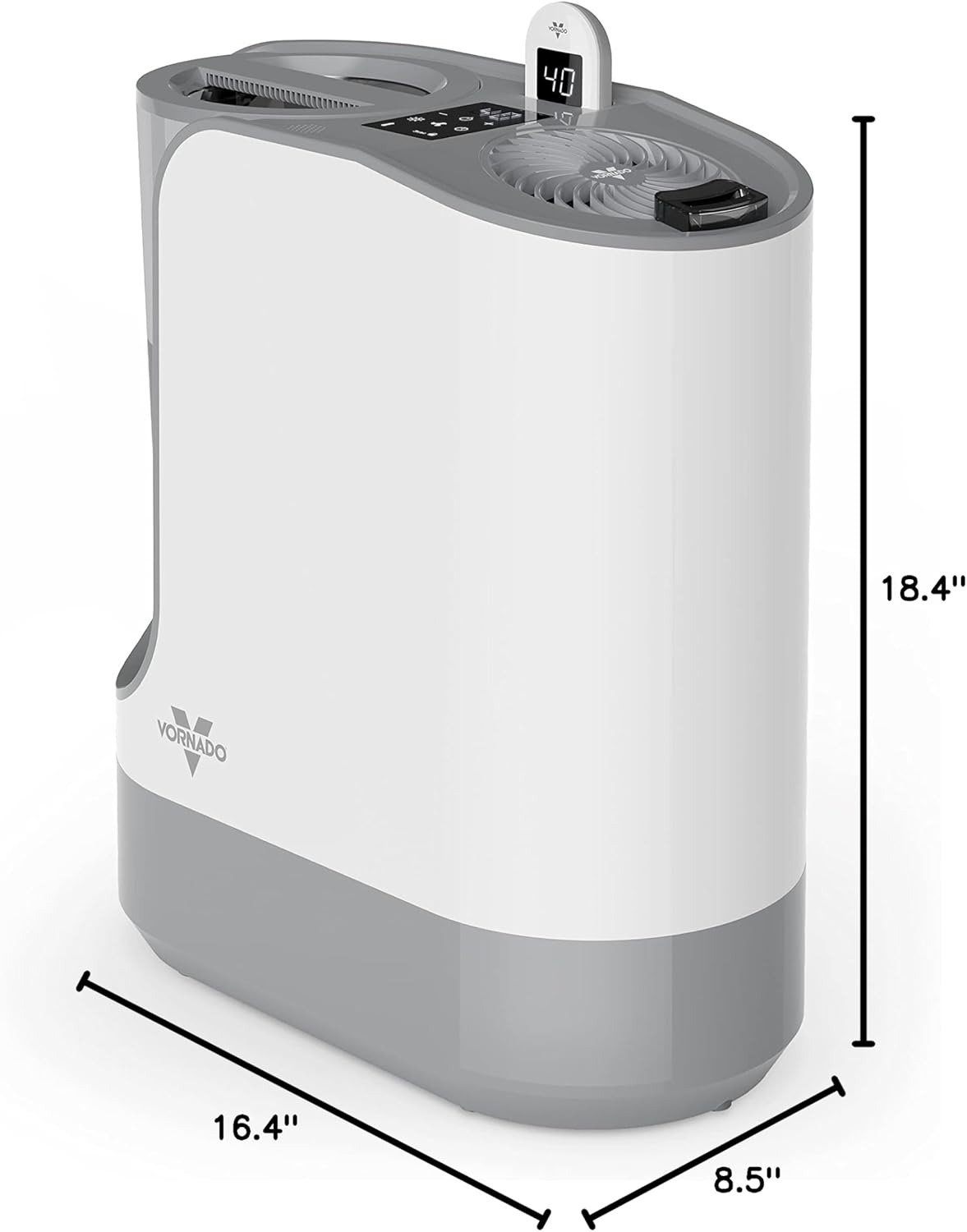
Image: A diagram illustrating the dimensions of the Vornado UH200 humidifier: 8.5 inches deep, 16.4 inches wide, and 18.4 inches high.
Warranty
The Vornado UH200 Ultrasonic Humidifier is backed by a 5-year manufacturer's warranty. This warranty covers defects in materials and workmanship under normal household use. Please retain your proof of purchase for warranty claims.
Support
For product support, questions, or warranty inquiries, please contact Vornado customer service. Our products are designed and supported in Andover, KS, USA.
Visit the official Vornado website for additional resources and contact information: Vornado Store on Amazon


