
1. Introduction
Thank you for choosing the Lepro WL4000 Solar Motion Sensor Wall Light. This product is designed to provide efficient and reliable outdoor illumination using solar power. Featuring adjustable heads and a motion-activated sensor, it enhances security and convenience for various outdoor spaces.
2. Safety Information
- Read all instructions before installation and use.
- Do not disassemble, repair, or modify the product. This may cause electric shock, fire, or damage.
- Ensure the solar panel is exposed to direct sunlight for optimal charging. Avoid shaded areas.
- Keep the product away from fire or high temperatures.
- This product is IP65 waterproof, suitable for outdoor use, but do not immerse it in water.
- Dispose of batteries according to local regulations. Do not incinerate.
3. Package Contents
Verify that all components are present in the package:
- Solar Light (2 units)
- Wall Plug (4 units)
- Mounting Screws (4 units)
- Wall Bracket (2 units)
- Instruction Manual (1 unit)
Image: Contents of the product package, showing two solar lights, mounting hardware, and the user manual.
4. Product Overview
4.1 Features
- Solar-Powered Efficiency: Charges during the day using sunlight for nighttime illumination.
- Adjustable 3-Head Design: Three independently adjustable panels provide a wide 270° lighting angle.
- Motion-Activated Sensor: Automatically activates when motion is detected within a 16-26 feet range.
- IP65 Waterproof Rating: Designed to withstand various outdoor weather conditions.
- Flexible Installation: Includes a 16-foot connecting cable for optimal solar panel placement.
4.2 Components

Image: Detailed view of the solar light components, including the solar panel, motion sensor, and three adjustable LED light heads with their dimensions.
- Solar Panel: Converts sunlight into electrical energy to charge the internal battery.
- LED Light Heads (3): Provide bright illumination and can be adjusted to direct light.
- Motion Sensor: Detects movement to activate the lights automatically.
- On/Off Switch: Located on the unit for manual control.
5. Setup and Installation
Follow these steps to properly set up and install your solar motion sensor wall light:
- Choose an Installation Location: Select a location that receives direct sunlight for at least 6-8 hours daily to ensure optimal charging of the solar panel. The recommended installation height is 1.5-3.5 meters (5-12 feet).
- Mount the Wall Bracket: Use the provided mounting screws and wall plugs to securely fix the wall bracket to your desired surface.
- Activate the Light: Locate the ON/OFF switch on the underside of the solar light unit. Slide the switch to the 'ON' position.
- Attach the Solar Light: Carefully slide the solar light unit onto the fixed wall bracket until it clicks securely into place.
- Adjust Light Heads: Adjust the three light heads and the solar panel to your preferred angles to maximize light coverage and solar exposure. The light heads offer a 270° wide lighting angle.
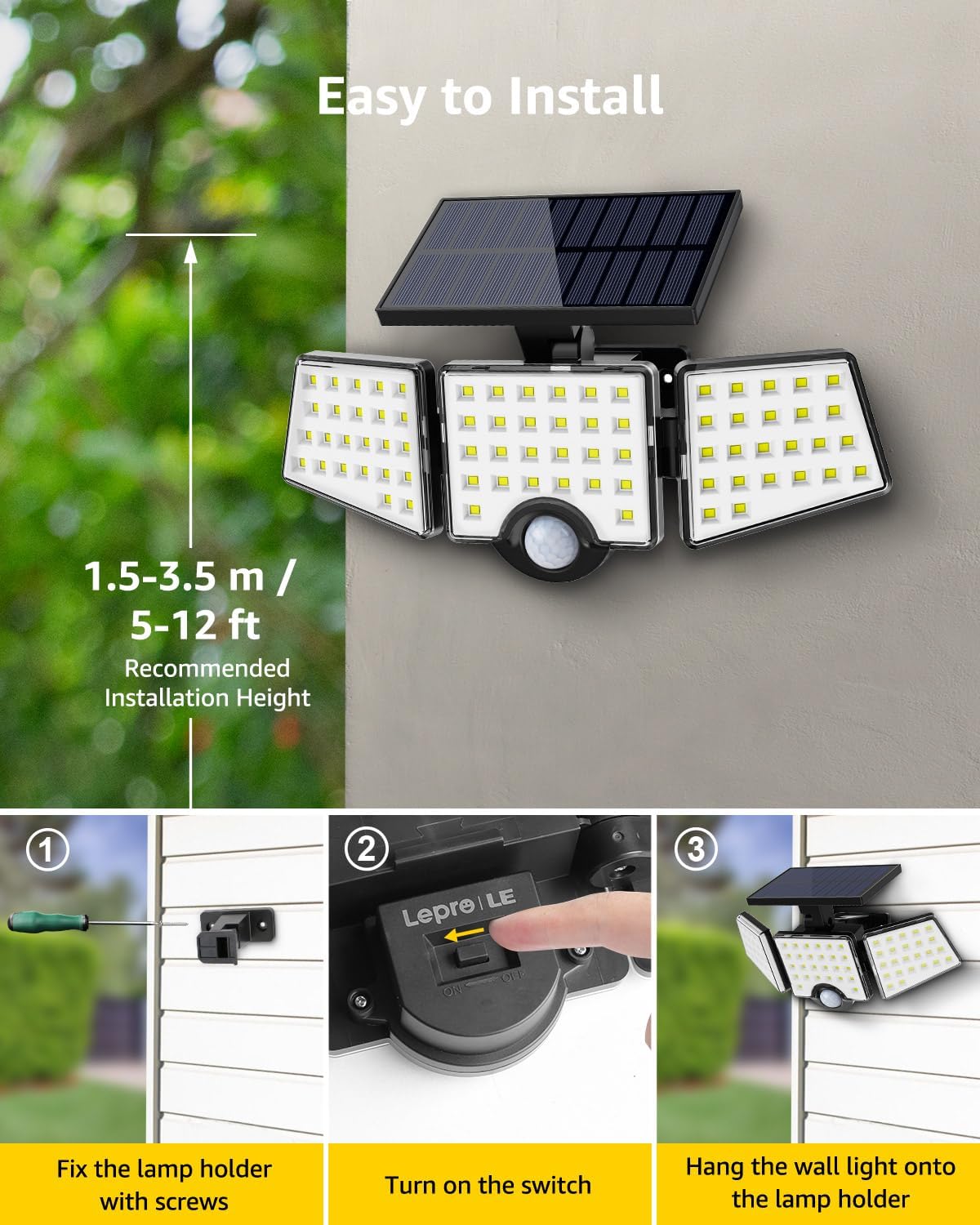
Image: Visual guide for installation, illustrating the steps of securing the bracket, activating the light, and attaching it to the wall.
6. Operating Instructions
The Lepro WL4000 Solar Motion Sensor Wall Light operates automatically once installed and activated:
- Daytime Operation: The solar panel charges the internal lithium-ion battery during daylight hours. The light will remain off.
- Nighttime Operation: At dusk, the light will enter standby mode. When motion is detected within its 16-26 feet range, the light will automatically turn on at full brightness.
- Auto-Off Function: The light will remain on as long as motion is detected. After approximately 20 seconds of no detected motion, the light will automatically turn off to conserve battery power.

Image: Visual representation of the light's operational cycle: charging in daylight, activating with motion at night, and automatically turning off.
7. Maintenance
To ensure the longevity and optimal performance of your solar light, follow these maintenance tips:
- Clean the Solar Panel: Regularly wipe the solar panel with a soft, damp cloth to remove dust, dirt, or debris. A clean panel ensures efficient charging.
- Inspect for Damage: Periodically check the light unit and wiring for any signs of damage. If damage is found, contact customer support.
- Clear Obstructions: Ensure no new obstructions (e.g., growing branches, new structures) are blocking direct sunlight from reaching the solar panel.
8. Troubleshooting
If your solar light is not functioning as expected, refer to the following common issues and solutions:
| Problem | Possible Cause | Solution |
|---|---|---|
| Light does not turn on at night. | Insufficient solar charge. | Ensure the solar panel is in direct sunlight for 6-8 hours daily. Clean the solar panel. |
| Light is dim or stays on for a short period. | Low battery charge. | Allow the light to charge for a full day in direct sunlight. |
| Motion sensor is not detecting movement. | Sensor is obstructed or dirty. | Clear any obstructions from the sensor. Wipe the sensor clean. Ensure the light is installed within the recommended height and detection range. |
| Light turns on during the day. | Light sensor malfunction or external light interference. | Ensure the solar panel is not covered or in a dark area during the day. If the problem persists, contact customer support. |
9. Specifications
| Brand | Lepro |
| Model Number | 640003-DW |
| Color | Black, White |
| Material | Acrylonitrile Butadiene Styrene, Polycarbonate |
| Light Fixture Form | Floodlight |
| Product Dimensions | 11.1"L x 4.65"W x 5.87"H |
| Indoor/Outdoor Usage | Outdoor |
| Power Source | Solar Powered |
| Special Feature | Motion Sensor, Waterproof |
| Light Source Type | LED |
| Number of Light Sources | 3 |
| Voltage | 3.7 Volts (DC) |
| Light Color | White |
| Item Weight | 1.1 Pounds |
| Wattage | 14 watts |
| Switch Type | Motion Sensor |
| Water Resistance Level | IP65 Waterproof |
| Brightness | 1000 Lumen |
| Batteries | 1 Lithium Ion battery required (included) |
10. Warranty and Support
For warranty information or technical support, please refer to the contact details provided with your purchase documentation or visit the official Lepro website. Keep your purchase receipt as proof of purchase.