
1. Introduction
This manual provides detailed instructions for the installation, operation, and maintenance of your ATOTO S8G2094MS-A 9-inch Android Double Din Car Stereo. Please read this manual thoroughly before using the product to ensure proper functionality and safety. Keep this manual for future reference.

Image 1.1: ATOTO S8G2094MS-A Car Stereo with rearview camera.
2. Product Features
The ATOTO S8G2094MS-A is an advanced Android car stereo designed to enhance your in-car experience with a range of features:
- Powerful Android System: Features an Android OS with a Cortex Octa-Core 1.8GHz processor and custom ATOTO AICE UI 11.0 based on Android Q (10.0) for smooth operation.
- 9-Inch QLED Touchscreen: A 1280x720 HD QLED display with a 178° viewing angle, supporting six touch gestures for multitasking and split-screen functionality.
- Multiple Internet Connectivity: Offers 4G LTE (Micro SIM slot), Wi-Fi hotspot, Bluetooth tethering, and USB tethering for versatile internet access.
- Wireless CarPlay & Android Auto: Seamless integration with iOS and Android smartphones for navigation, calls, messages, and music.
- Dual Bluetooth Connection: Allows simultaneous connection of a phone for hands-free calls and other Bluetooth devices.
- Enhanced Sound Quality: Built-in amplifier (Peak 4x45W, RMS 4x24W) and a 32-Band EQ with 9 presets. Includes Speed Compensated Volume Control (SCVC).
- HD Rear-View Camera: Supports 720P AHD rear-view capabilities and Live Rear View (LRV) feature. Includes an AC-HD01LR HD 720P rear-view camera.
- AI Chat Functionality: Dedicated DriveChat app powered by ChatGPT for diverse AI interactions.
- GPS Tracking: Pre-installed TrackHU app for real-time vehicle tracking, geofencing, and alerts.

Image 2.1: High-definition QLED touchscreen display.

Image 2.2: Internet access options for the S8G2094MS-A.
3. Setup and Installation
The ATOTO S8G2094MS-A is a standard double DIN car stereo. Installation requires careful wiring and potentially additional accessories depending on your vehicle.
3.1. Package Contents
Verify that all components are present in the package:
- ATOTO S8G2094MS-A Head Unit
- HD 720P Rear-view Camera (AC-HD01LR)
- Power Cable
- Rear Camera Input Cable
- RCA Connector
- 4G LTE Antenna
- GPS Antenna
- USB External Storage Cable
- USB Phone Link Cable
- Front Recording Camera Cable
- External Microphone
- Double-DIN Brackets
- Mounting Brackets
- Screen Protector (1 pack)
- Mounting Screws
- Adaptive Cage
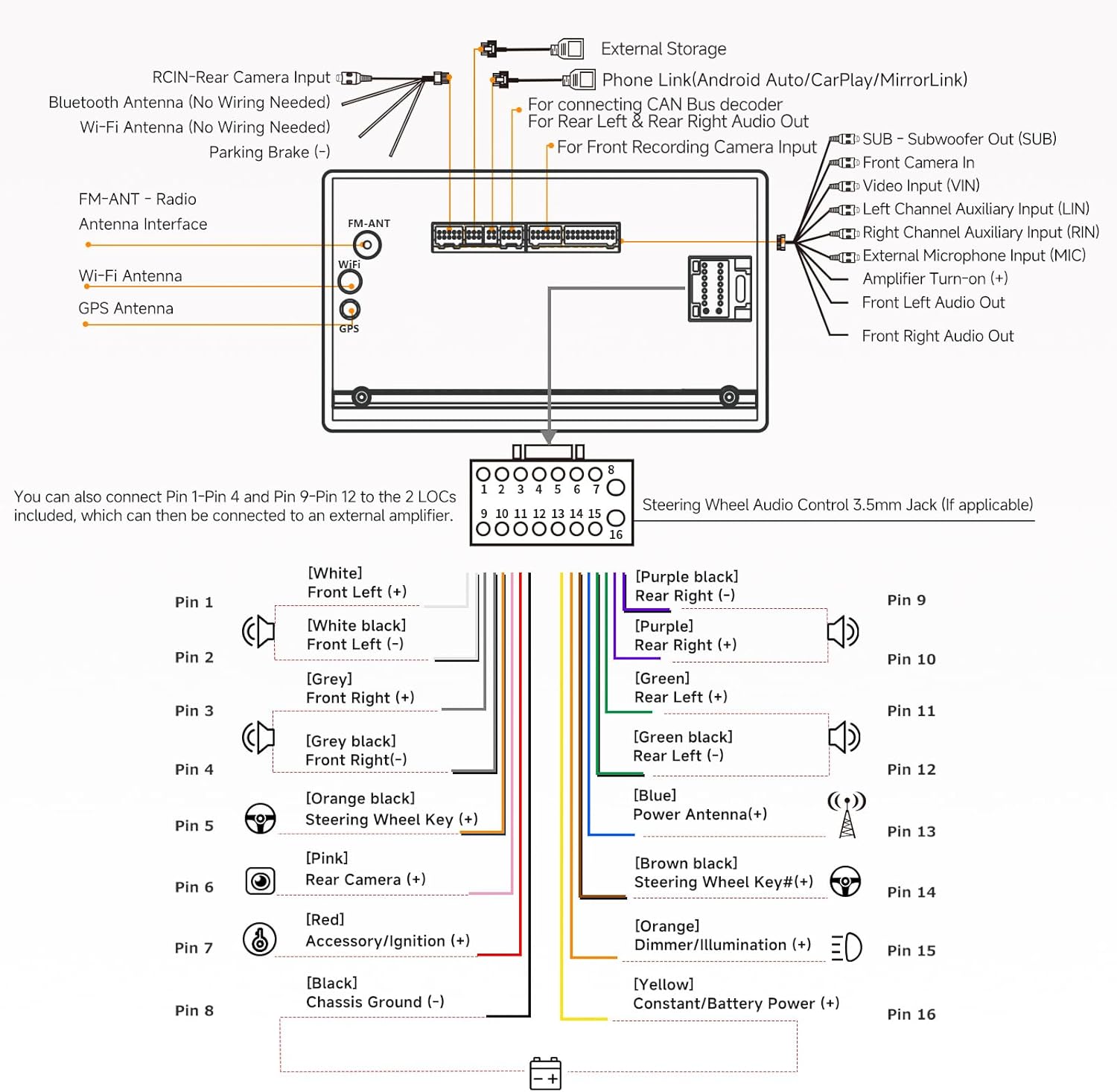
Image 3.1: Product dimensions and included accessories.
3.2. Wiring Diagram
Refer to the following diagram for proper wiring connections. Professional installation is recommended.

Image 3.2: Main wiring connections.
3.3. Vehicle Fit
The S8G2094MS-A is designed for ISO Standard Double DIN openings. For a seamless installation, additional vehicle-specific accessories (dash frame kit, wiring harness, radio antenna adapter, data interface) may be required and are the buyer's responsibility. Utilize the ATOTO SBV (Search By Vehicle) tool for compatible parts.
4. Operating Instructions
4.1. Initial Power-On and System Boot
The system features a fast boot-up time, allowing access within 2 seconds of starting the vehicle.
4.2. Touchscreen Operation
The 9-inch QLED touchscreen supports multi-touch gestures for intuitive control. Six touch gestures provide quick access to multitasking and split-screen functions.

Image 4.1: Touchscreen gesture examples.
4.3. Split Screen Display
Run two applications simultaneously, such as a navigation map and a music player, by utilizing the split-screen feature.
4.4. Digital Photo Frame
Display memorable photos from a specified gallery folder on the S8's HD screen with a tap or hand gesture.
5. Connectivity
5.1. Wireless CarPlay & Android Auto
Connect your iOS or Android smartphone via USB or wirelessly to access CarPlay or Android Auto. This allows for phone calls, music access, messaging, and navigation directly from the S8 unit. For wired connections, use the original USB cable provided with your phone.

Image 5.1: Smartphone integration options.
5.2. Dual Bluetooth
The S8 features two Bluetooth modules:
- Bluetooth 1 (BT1 5.0): Supports HFP/HSP/A2DP/AVRCP/PBAP protocols for hands-free calls (with noise cancellation) and audio streaming.
- Bluetooth 2 (BT2 4.1): Used for Bluetooth tethering internet, connecting to Bluetooth gamepads, OBD2 scanners, TPMS, etc.
The system allows up to 3 devices to be connected simultaneously (one for audio, two for data communication). It also supports waking up your phone's voice assistant (Siri, Google Assistant) via Bluetooth.
5.3. USB Connectivity
Two USB interfaces are available for data communication, including reading USB drives (unlimited external storage), optional USB devices, and connecting phones for Mirror casting/CarbitLink or Phone Integration.
6. Audio and Sound
The S8G2094MS-A is equipped with advanced audio processing capabilities:
- Digital Signal Processor (DSP): Allows for precise equalization, signal delay, bass boost, and bass filter settings.
- Equalizer (EQ): Features 9 preset EQ modes and 32 adjustable frequency bands (16 for front, 16 for rear).
- Built-in Amplifier: Max 4*45W BTL Amplifier with RMS 4*24W.
- Speed Compensated Volume Control (SCVC): Automatically adjusts the volume based on vehicle speed to compensate for road noise.

Image 6.1: Digital Signal Processor features.

Image 6.2: Audio adjustment interface.
7. Camera Systems
7.1. Rear-View Camera (AC-HD01LR)
The included AC-HD01LR HD 720P rear-view camera provides a display with parking guidelines and a 140° wide viewing angle for safe parking maneuvers.
7.2. Live Rear View (LRV)
The LRV feature allows you to access the rearview even when the vehicle is moving forward. This helps to overcome obstructions from passengers, headrests, and vehicle pillars, providing an unimpeded view of the lanes behind and traditional blind spots.

Image 7.1: Rear-view camera functionalities.
8. Internet Access
The ATOTO S8G2094MS-A offers four methods for internet access:
- Wi-Fi Hotspot: Connect to your phone's hotspot for internet access. This is a quick and easy method.
- Bluetooth Tethering: Connect to your phone's hotspot via Bluetooth. This method has lower power consumption compared to Wi-Fi, preserving phone battery life. Suitable for online maps or streaming music.
- USB Network Tethering: Share your phone's data with the S8 via a USB connection. This can help save or slightly increase your phone's battery level. Requires the CarbitLink application to run in the background.
- Built-in 4G Cellular Modem: The unit includes a Micro SIM card slot for direct 4G LTE connectivity. A SIM card with a data plan is not included. Ensure your carrier supports the following frequency bands: 2G (GSM 850, 900, 1900); 3G WCDMA (B1, B2, B4, B5, B8); 4G LTE (B1, B2, B4, B5, B7, B8, B12, B13, B17, B19, B25, B26, B38, B41).
9. GPS and Navigation
The S8G2094MS-A features built-in GPS with an external antenna. Google Maps is pre-installed, and other navigation apps are available from the Google Play Store.
9.1. TrackHU App
The exclusive ATOTO TrackHU app provides GPS tracking functionalities:
- Real-time vehicle tracking on a user-friendly map.
- Customizable alerts and geofence settings.
- Access to analytics, past data, speed, and distance.
- 24-hour security and remote car locating.
10. AI and Smart Features
10.1. DriveChat
DriveChat is an exclusive application powered by ChatGPT, enabling diverse deep AI interactions. It can execute instructions, provide specialized advice, and switch between chatbots for various professional interactions.
11. Optional Accessories
The ATOTO S8G2094MS-A is compatible with various optional accessories (sold separately) to expand its functionality:
- ATOTO CA-AEC01/AEC02 Compact 4 Channel Car Amplifiers
- ATOTO AC-44P2 1080P On-dash DVR Camera
- ATOTO AC-44F8 Steering Wheel Remote
- ATOTO AC-4450 Bluetooth OBD II Scanner / Code Reader
- ATOTO AC-HD02LR HD Rear-view Camera
- ATOTO AC-UTP1 USB TPMS (Tire Pressure Monitoring Sensor)
- ATOTO Video Output Adaptors (AC-AHV68: USB to HDMI; AC-AHV48: USB to RCA)
- ATOTO AC-HAV50 HDMI to AHD Video Converter
- ATOTO CS-101SW 10" Slim Amplified Subwoofer
- ATOTO CS-651DC 6.5in Coaxial 2-way Car Speakers
12. Troubleshooting
If you encounter issues with your ATOTO S8G2094MS-A, consider the following general troubleshooting steps:
- System Reset: A system reset can resolve many software-related issues. Refer to the device settings for the reset option.
- Firmware Updates: Ensure your device's firmware is up to date. Over-the-air (OTA) updates are available when connected to the internet.
- Connectivity Issues: For Wi-Fi or Bluetooth problems, try unpairing and re-pairing devices, or restarting the unit and your phone. For 4G LTE, verify SIM card insertion and data plan activation.
- Audio Problems: Check all wiring connections, speaker impedance, and audio settings (EQ, DSP).
- Installation Review: If issues persist after initial installation, re-verify all wiring connections according to the diagram in Section 3.2.
For persistent problems, contact ATOTO customer support for assistance.
13. Specifications
| Feature | Specification |
|---|---|
| Model Number | S8G2094MS-A |
| Operating System | ATOTO AICE UI 11.0 (based on Android Q 10.0) |
| Processor | UIS 7862 ARM Cortex Octa-Core CPU, 1.8GHz |
| RAM / ROM | 4GB / 32GB |
| Display Size | 9 Inches |
| Display Type | 1280x720 QLED Touchscreen, 178° Viewing Angle |
| Internet Connectivity | 4G LTE (Micro SIM), Wi-Fi, Bluetooth Tethering, USB Tethering |
| Bluetooth | Dual Bluetooth (BT1 5.0, BT2 4.1) |
| Amplifier Output | Max 4*45W, RMS 4*24W |
| Audio Output Mode | Stereo (4.1 Surround Sound Channel Configuration) |
| Rear-View Camera Input | 720P AHD (AC-HD01LR included) |
| Item Weight | 4.84 pounds |
| Package Dimensions | 11.54 x 9.61 x 4.41 inches |
14. Warranty and Support
Your ATOTO S8G2094MS-A comes with a 12-month product care from the date of purchase. You can extend this by an additional 6 months by registering your product. Details for registration are typically found in the product packaging or on the ATOTO website.
For any questions, technical assistance, or warranty claims, please contact the ATOTO customer care team. Contact information is provided in the product box and on the official ATOTO website. The customer care team responds around the clock during workdays.
An online manual in different languages may also be available; refer to your product packaging for details on how to access it.