
1. Introduction
This manual provides essential information for the safe and efficient operation of your CREATE SILKAIR CONNECT 24L Portable Air Conditioner. Please read it thoroughly before use and retain it for future reference.
Key Features:
- 3-in-1 Functionality: Operates as an air conditioner, fan, and dehumidifier. Control via LED Digital Soft Touch screen or remote control.
- Room Coverage: Effectively cools, ventilates, and dehumidifies rooms up to 14m² with its Temp Cooling auto-evaporative system.
- Wi-Fi Connectivity: Remote control via smartphone app. Compatible with Alexa and Google Home for smart climate control.
- Sleep Mode: Adjusts temperature and operating time, reducing sound and energy consumption for comfortable sleep.
- Included Extraction Kit: Suitable for sliding and guillotine windows. Expels hot air and prevents its return. No complex installation required.
2. Safety Information
Always follow basic safety precautions when using electrical appliances to reduce the risk of fire, electric shock, and injury.
- Ensure the unit is placed on a stable, level surface.
- Do not operate the unit with a damaged cord or plug.
- Keep the air intake and exhaust vents clear of obstructions.
- Do not insert objects into the air vents.
- Unplug the unit before cleaning or maintenance.
- This appliance is not intended for use by persons (including children) with reduced physical, sensory or mental capabilities, or lack of experience and knowledge, unless they have been given supervision or instruction concerning use of the appliance by a person responsible for their safety.
3. Product Overview
Familiarize yourself with the components and controls of your portable air conditioner.

Figure 1: Front view of the CREATE SILKAIR CONNECT 24L Portable Air Conditioner with a smartphone displaying its control app.

Figure 2: Top control panel with digital display and touch buttons for various functions.
4. Setup & Installation
The CREATE SILKAIR CONNECT 24L is designed for easy setup. Follow these steps for proper installation.
4.1 Connecting the Exhaust Hose

Figure 3: Attach the exhaust hose securely to the designated port on the back of the unit.
4.2 Window Kit Installation
The included window kit is designed for sliding and guillotine windows to efficiently expel hot air.
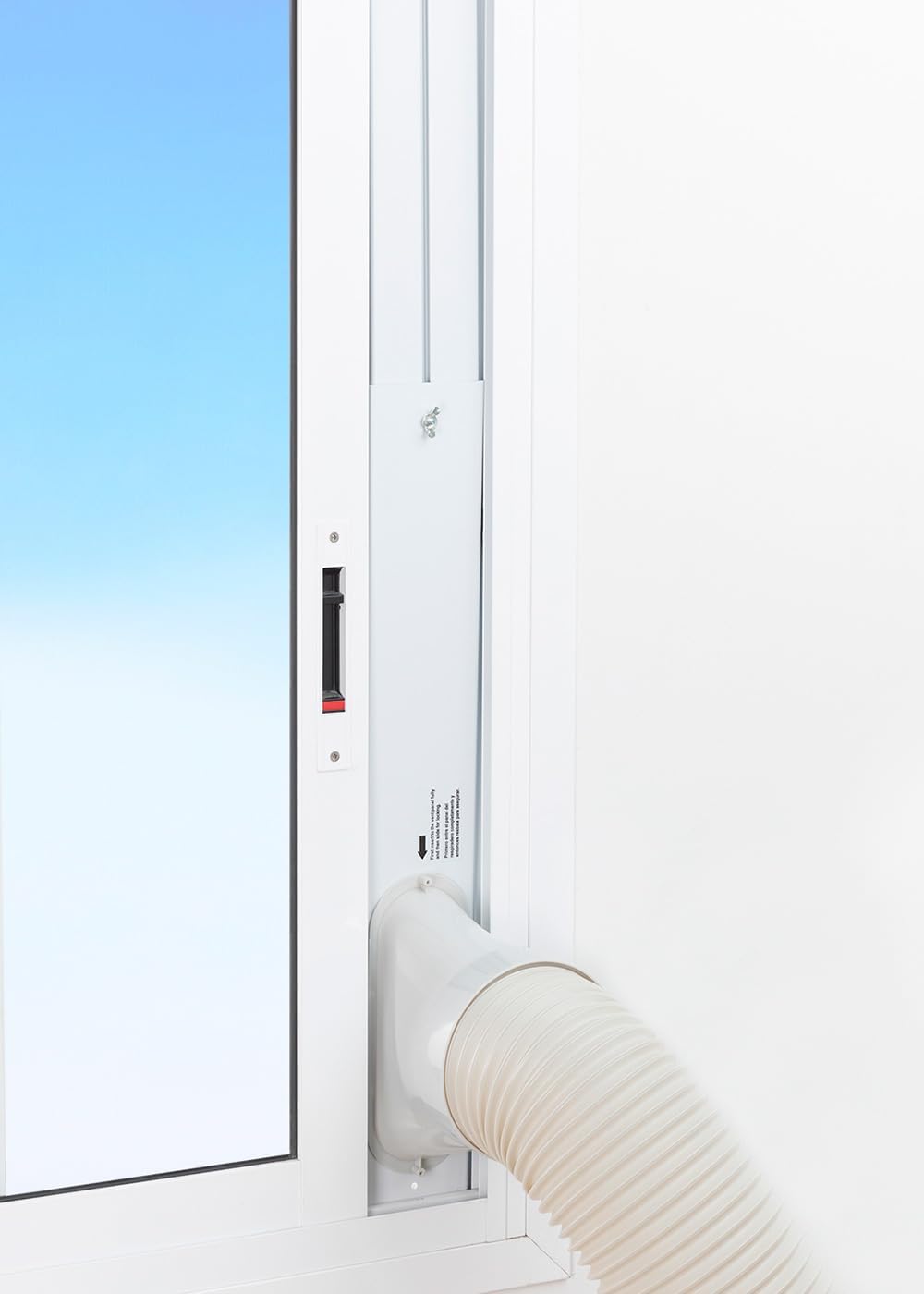
Figure 4: Insert the window kit into the window opening and adjust its length to fit. Connect the exhaust hose to the opening in the window kit.
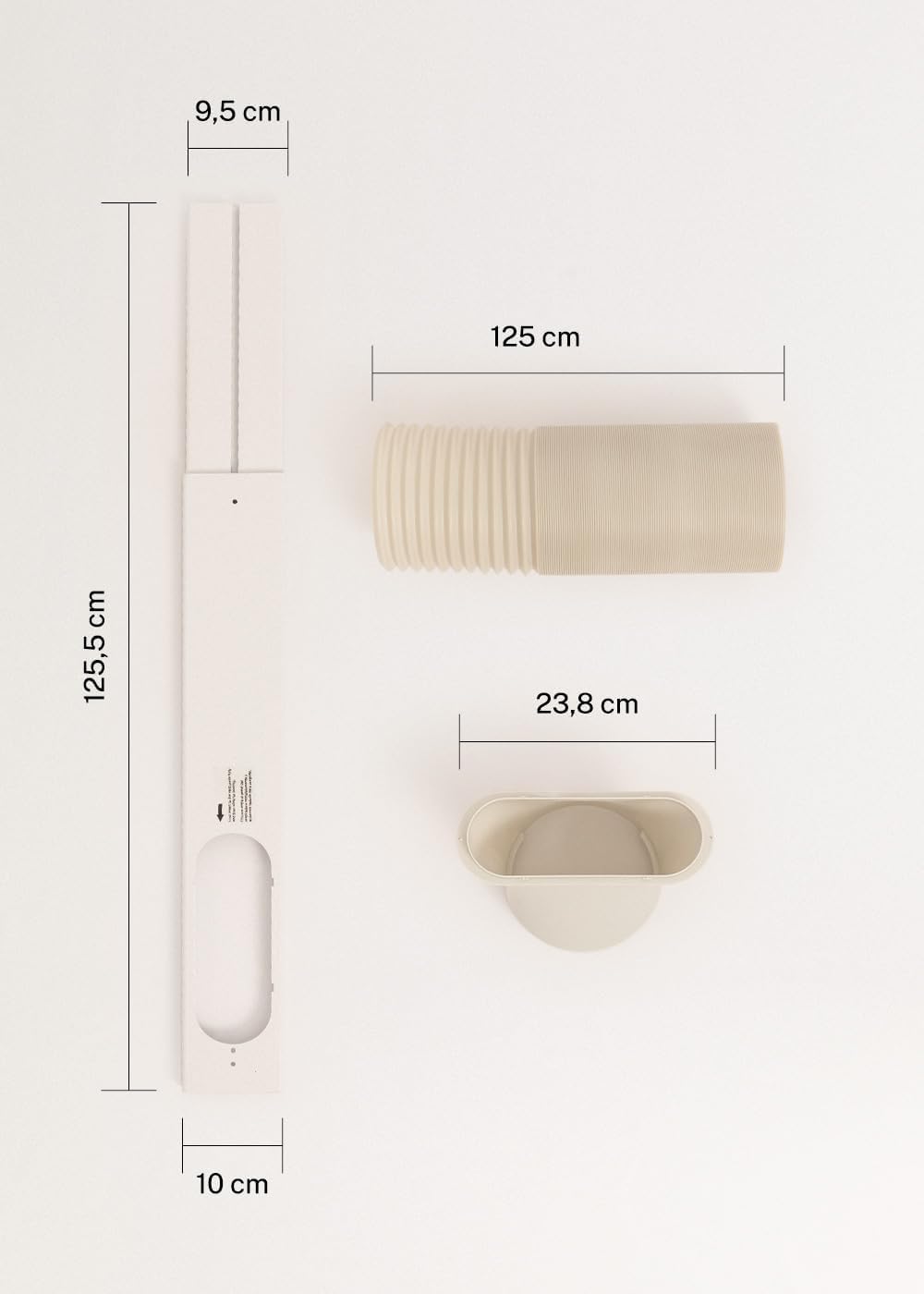
Figure 5: Dimensions of the window kit components for proper fitting.
5. Operating Instructions
Your CREATE SILKAIR CONNECT 24L offers multiple operating modes for optimal comfort.
5.1 Control Panel and Remote Control
Use the intuitive LED Digital Soft Touch panel on top of the unit or the provided remote control to manage settings.
5.2 Operating Modes
- Cool Mode: Provides powerful cooling for your room. Adjust temperature and fan speed as desired.
- Fan Mode: Circulates air without cooling. Choose from multiple fan speeds.
- Dehumidify Mode: Reduces humidity in the air, ideal for damp environments.
- Sleep Mode: Optimizes settings for quiet operation and energy efficiency during sleep, gradually adjusting temperature.
5.3 Wi-Fi and App Control
Connect your air conditioner to your home Wi-Fi network to control it remotely via the dedicated smartphone app. This allows you to adjust settings, set schedules, and monitor the unit from anywhere. The unit is compatible with Alexa and Google Home for voice control.

Figure 6: Remote control of the unit via a smartphone application.
6. Maintenance
Regular maintenance ensures optimal performance and longevity of your air conditioner.
6.1 Cleaning the Air Filter
The air filter should be cleaned regularly (e.g., every two weeks) to prevent dust buildup and maintain efficiency.
- Unplug the unit from the power outlet.
- Locate the air filter cover on the side or back of the unit.
- Gently remove the filter.
- Wash the filter with warm, soapy water. Rinse thoroughly and allow it to air dry completely before reinserting.

Figure 7: Removing the air filter for cleaning.
6.2 Storage
When storing the unit for an extended period, ensure it is clean and dry. Drain any accumulated water and store it in a cool, dry place.
7. Troubleshooting
Refer to this section for solutions to common issues.
| Problem | Possible Cause | Solution |
|---|---|---|
| Unit does not turn on | No power, power cord not plugged in, fuse blown. | Check power connection, reset circuit breaker, replace fuse. |
| Insufficient cooling | Dirty air filter, blocked air intake/exhaust, room too large, windows/doors open. | Clean filter, clear obstructions, ensure proper room size, close windows/doors. |
| Unit is noisy | Unit not level, fan obstruction. | Place on a level surface, check for obstructions in fan. |
| Water leakage | Drain plug not properly sealed, unit tilted. | Ensure drain plug is secure, place unit on a level surface. |
8. Specifications
Technical details of the CREATE SILKAIR CONNECT 24L Portable Air Conditioner.
| Feature | Detail |
|---|---|
| Manufacturer | CREATE |
| Model Number | 64274_125919 |
| Product Dimensions | 35.5 x 36.5 x 71.3 cm |
| Product Weight | 27.4 kg |
| Cooling Capacity | 9000 BTU |
| Dehumidification Capacity | 24 Liters/day |
| Special Feature | Touch Screen, Portable |
| Energy Efficiency (SEER) | 5 |
| Color | White |
| Voltage | 240 Volts |
| Noise Level | 65 Decibels |
| Power Source | Electricity (Type F, 230 V, 50 Hz) |
| First Available | June 10, 2020 |

Figure 8: Energy Label (Class A). For more details, visit EPREL Database.

Figure 9: Product Data Sheet.
9. Warranty & Support
For warranty information and customer support, please refer to the documentation included with your product or visit the official CREATE website. Keep your proof of purchase for warranty claims.