
1. Important Safety Instructions
Read all safety warnings and instructions before operating this electric screwdriver. Failure to follow the warnings and instructions may result in electric shock, fire, and/or serious injury.
- Work Area Safety: Keep your work area clean and well-lit. Cluttered or dark areas invite accidents. Do not operate power tools in explosive atmospheres, such as in the presence of flammable liquids, gases, or dust.
- Electrical Safety: Avoid body contact with earthed or grounded surfaces such as pipes, radiators, ranges, and refrigerators. There is an increased risk of electric shock if your body is earthed or grounded. Do not expose power tools to rain or wet conditions. Water entering a power tool will increase the risk of electric shock.
- Personal Safety: Stay alert, watch what you are doing, and use common sense when operating a power tool. Do not use a power tool while you are tired or under the influence of drugs, alcohol, or medication. A moment of inattention while operating power tools may result in serious personal injury. Use personal protective equipment. Always wear eye protection.
- Tool Use and Care: Do not force the power tool. Use the correct power tool for your application. The correct power tool will do the job better and safer at the rate for which it was designed. Disconnect the plug from the power source and/or remove the battery pack from the power tool before making any adjustments, changing accessories, or storing power tools.
- Battery Pack Use and Care: Recharge only with the charger specified by the manufacturer. A charger that is suitable for one type of battery pack may create a risk of fire when used with another battery pack. Use power tools only with specifically designated battery packs. Use of any other battery packs may create a risk of injury and fire.
2. Product Overview
The JENABOM 47-in-1 Cordless Electric Screwdriver is a versatile tool designed for light DIY tasks, furniture assembly, and appliance repair. It features a 3.6V Li-ion battery, adjustable handle, and an integrated LED work light.
2.1 Key Features
- Cordless Design: Allows for flexible use in various locations without power cord restrictions.
- Adjustable Handle: The handle can be adjusted from a straight (180°) to a pistol grip (120°) configuration for improved ergonomics and access in tight spaces.
- Forward/Reverse Button: Easily switch between tightening and loosening screws.
- Integrated LED Work Light: Automatically illuminates the work area for better visibility in dark or confined spaces.
- Rechargeable Battery: Equipped with a 3.6V Li-ion 1300mAh battery, rechargeable via Micro-USB.
- Comprehensive Accessory Set: Includes 47 pieces, such as various screwdriver bits, hex sockets, drill bits, and extension shafts.
2.2 Product Components
Familiarize yourself with the main parts of your electric screwdriver:

Image 1: Main components of the JENABOM Cordless Electric Screwdriver. Key parts include the durable chuck for bit insertion, LED headlamp for illumination, rotary switch for handle adjustment, positive and negative switch for direction control, the main switch button for operation, the ergonomic handle, and a pilot lamp indicating status.
2.3 Included Accessories
The JENABOM 47-in-1 set comes with a variety of accessories to suit different tasks:
- 1 x Electric Screwdriver
- 28 x CR-V Screwdriver Bits (various types and sizes)
- 8 x Hex Socket Wrenches (5-12mm)
- 4 x Long Screwdriver Bits
- 2 x HSS Drill Bits
- 1 x Flexible Extension Shaft
- 1 x Magnetic Bit Holder
- 1 x USB Charging Cable
- 1 x Portable Storage Case

Image 2: Overview of the 47-piece accessory set. This image displays the portable toolbox, various HSS drill bits, hex sockets, a magnetic bit holder, a flexible extension shaft for hard-to-reach areas, different lengths of screwdriver bits (50mm and 25mm), and the USB charging cable.
3. Setup
3.1 Charging the Battery
The screwdriver is equipped with a durable, rechargeable 3.6V Li-ion battery. Before first use, and whenever the battery is low, charge the tool.
- Locate the Micro-USB charging port on the screwdriver.
- Connect the provided USB charging cable to the screwdriver and to a compatible USB power source (e.g., computer, USB wall adapter, power bank).
- The pilot lamp will indicate charging status.
- Charge time should not exceed 5 hours to prevent battery damage.

Image 3: Charging the screwdriver via USB. The image illustrates connecting the Micro-USB cable to the screwdriver and a laptop, highlighting the 1300 mAh battery capacity and the recommended 3-5 hour charging duration.
3.2 Installing Screwdriver Bits/Accessories
To install a bit or accessory:
- Ensure the screwdriver is turned off and the forward/reverse switch is in the neutral (locked) position.
- Insert the desired screwdriver bit, drill bit, or extension shaft firmly into the chuck until it clicks into place.
- To remove, pull the bit straight out from the chuck.
3.3 Adjusting the Handle Position
The screwdriver handle can be adjusted for different working angles:
- Locate the rotary switch on the top of the screwdriver.
- Press and hold the rotary switch.
- Adjust the handle to either the 120° pistol grip or 180° straight position.
- Release the rotary switch to lock the handle in place.

Image 4: Adjustable handle positions. The screwdriver can be configured as a compact pistol grip or a longer straight tool, offering flexibility for various tasks and tight spaces.
4. Operating Instructions
4.1 Forward/Reverse Operation
The forward/reverse switch controls the rotation direction of the bit:
- To drive screws in (forward mode), push the F/R switch to the left.
- To remove screws (reverse mode), push the F/R switch to the right.
- For safety, set the switch to the center position to lock the trigger when not in use.
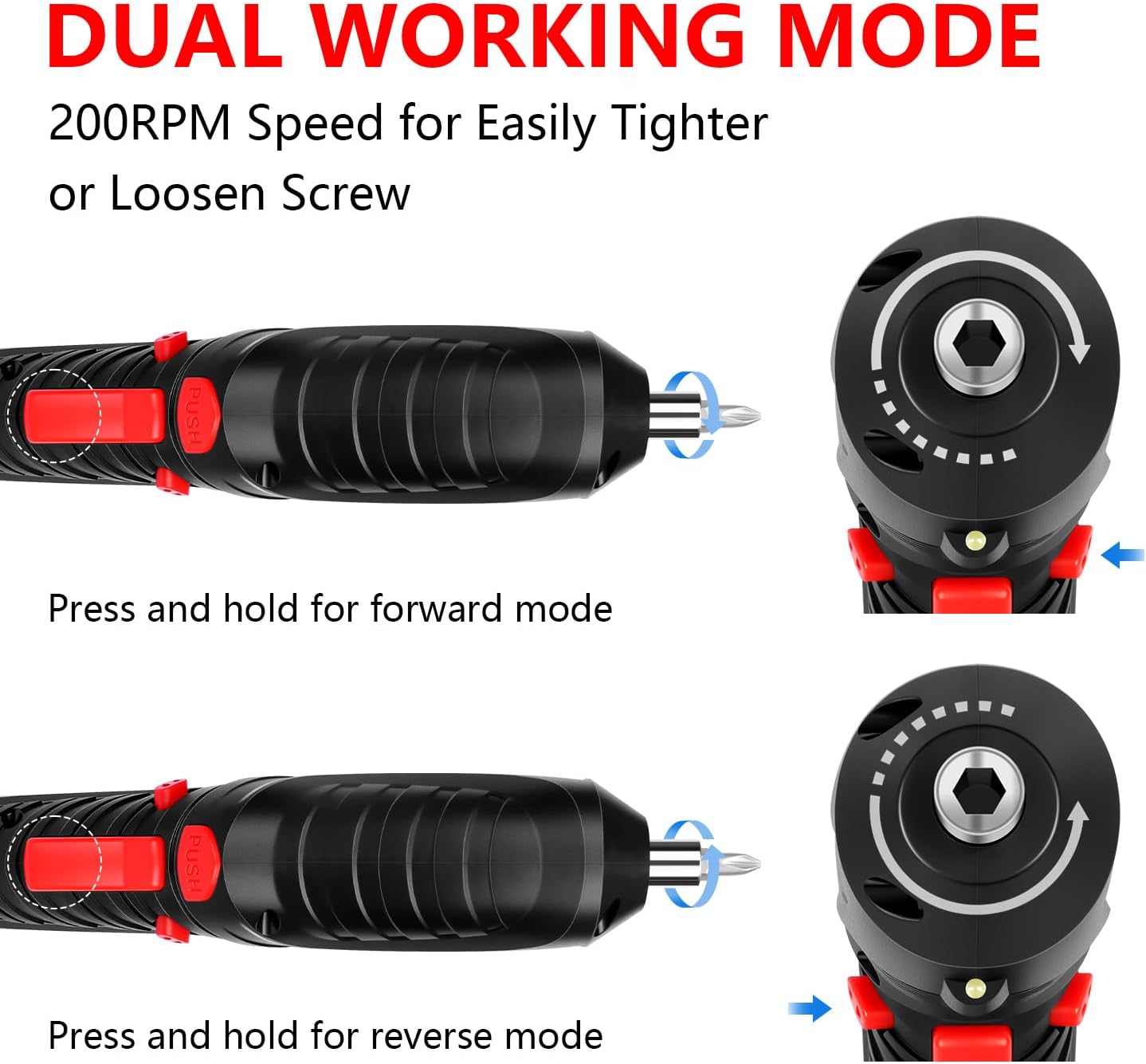
Image 5: Dual working mode. This diagram demonstrates how to engage forward mode for tightening screws and reverse mode for loosening them by adjusting the F/R switch. The screwdriver operates at 200 RPM for efficient fastening.
4.2 Powering On/Off
To operate the screwdriver:
- Ensure a bit is securely installed and the F/R switch is set to the desired direction (forward or reverse).
- Press the main switch button (trigger) on the handle to start the motor.
- Release the switch button to stop the motor.
4.3 LED Work Light
The screwdriver features an automatic LED work light:
- The bright LED headlight automatically turns on when the main switch button is pressed.
- This provides illumination for your work area, making it easier and safer to work in dark or confined spaces.

Image 6: LED work light in action. The image demonstrates the screwdriver's LED light effectively illuminating a screw inside a dark cabinet, enhancing visibility and precision during operation.
4.4 Applications
This electric screwdriver is suitable for a variety of light-duty tasks:
- Assembling flat-pack furniture.
- Tightening or loosening screws in household appliances.
- Light drilling into wood, plastic, or soft metals with appropriate drill bits.
- General household repairs and DIY projects.

Image 7: Versatile use for light DIY needs. This collage illustrates the screwdriver's adaptability for different tasks, such as assembling furniture, reaching into awkward angles with the flexible extension shaft, and general fastening.
5. Maintenance
5.1 Cleaning
Regular cleaning helps maintain the tool's performance and longevity:
- Always disconnect the tool from any charging source before cleaning.
- Wipe the tool's exterior with a soft, damp cloth. Do not use harsh chemicals or abrasive cleaners.
- Keep ventilation openings clear of dust and debris. Use compressed air if necessary.
5.2 Storage
Proper storage protects your tool and accessories:
- Store the electric screwdriver and all accessories in the provided portable storage case.
- Store the tool in a dry, cool place, away from direct sunlight and moisture.
- Keep out of reach of children.
6. Troubleshooting
If you encounter issues with your JENABOM electric screwdriver, refer to the following common problems and solutions:
| Problem | Possible Cause | Solution |
|---|---|---|
| Screwdriver does not turn on. | Battery is depleted. F/R switch is in neutral (locked) position. | Charge the battery for up to 5 hours. Ensure the F/R switch is set to forward or reverse. |
| Lack of power/torque. | Battery is low. Attempting to drive into too hard a material. | Recharge the battery. This tool is designed for light-duty tasks; do not force it for heavy-duty applications. |
| Bit falls out of chuck. | Bit not fully inserted. Incorrect bit type for chuck. | Ensure the bit is pushed firmly into the chuck until it locks. Use only hex shank bits compatible with the chuck. |
| LED light not working. | Battery is completely dead. Faulty LED. | Charge the battery. If the issue persists after charging, contact customer support. |
7. Specifications
| Feature | Specification |
|---|---|
| Brand | JENABOM |
| Model Number | TY-0101 |
| Voltage | 3.6 Volts (DC) |
| Battery Type | Lithium-ion |
| Battery Capacity | 1300 mAh |
| Max Torque | 3.5 Newton-meters (Nm) |
| No-Load Speed | 250 rpm |
| Max Power | 4 Watt |
| Charging Time | 3-5 hours (Micro-USB) |
| Dimensions (L x W x H) | 21.6 x 27.6 x 6.5 cm (packaged) |
| Weight | 1.02 Kilograms (packaged) |
| Special Features | Portable, Rechargeable, Cordless, LED Work Light, Adjustable Handle |
8. Warranty and Support
For warranty information or technical support, please refer to the documentation provided with your purchase or contact the seller/manufacturer directly. Keep your proof of purchase for any warranty claims.