
1. Introduction
This manual provides comprehensive instructions for the NKF RMT-B115A replacement remote control. This remote is designed to function as a direct replacement for the original remote controls of various Sony Blu-ray DVD Player models, offering full functionality without the need for programming.
2. Product Features
- Direct Replacement: Functions identically to the original remote control.
- No Programming Required: Ready to use immediately after battery installation.
- Full Access: Provides access to all original remote control functions.
3. Compatibility
The NKF RMT-B115A remote control is compatible with the following Sony Blu-ray DVD Player models:
- BDP-S480
- BDP-S2100
- BDP-S280
- BDP-S580
- BDP-S380
4. Package Contents
- 1 x NKF RMT-B115A Replacement Remote Control
- Note: Batteries are not included and must be purchased separately.
5. Setup
5.1 Battery Installation
- Locate the battery compartment on the back of the remote control.
- Slide the battery cover downwards to open the compartment.
- Insert two (2) AAA alkaline batteries, ensuring correct polarity (+ and -) as indicated inside the compartment.
- Slide the battery cover back into place until it clicks securely.

Once batteries are installed, the remote control is ready for use with your compatible Sony Blu-ray DVD Player.
6. Operating Instructions
To operate your Sony Blu-ray DVD Player using the NKF RMT-B115A remote control:
- Ensure the Blu-ray DVD player is powered on and within line of sight of the remote control.
- Point the remote control directly at the infrared sensor on your Blu-ray DVD player.
- Press the desired function button (e.g., Power, Play, Stop, Menu, Volume, Navigation buttons) to control your device.
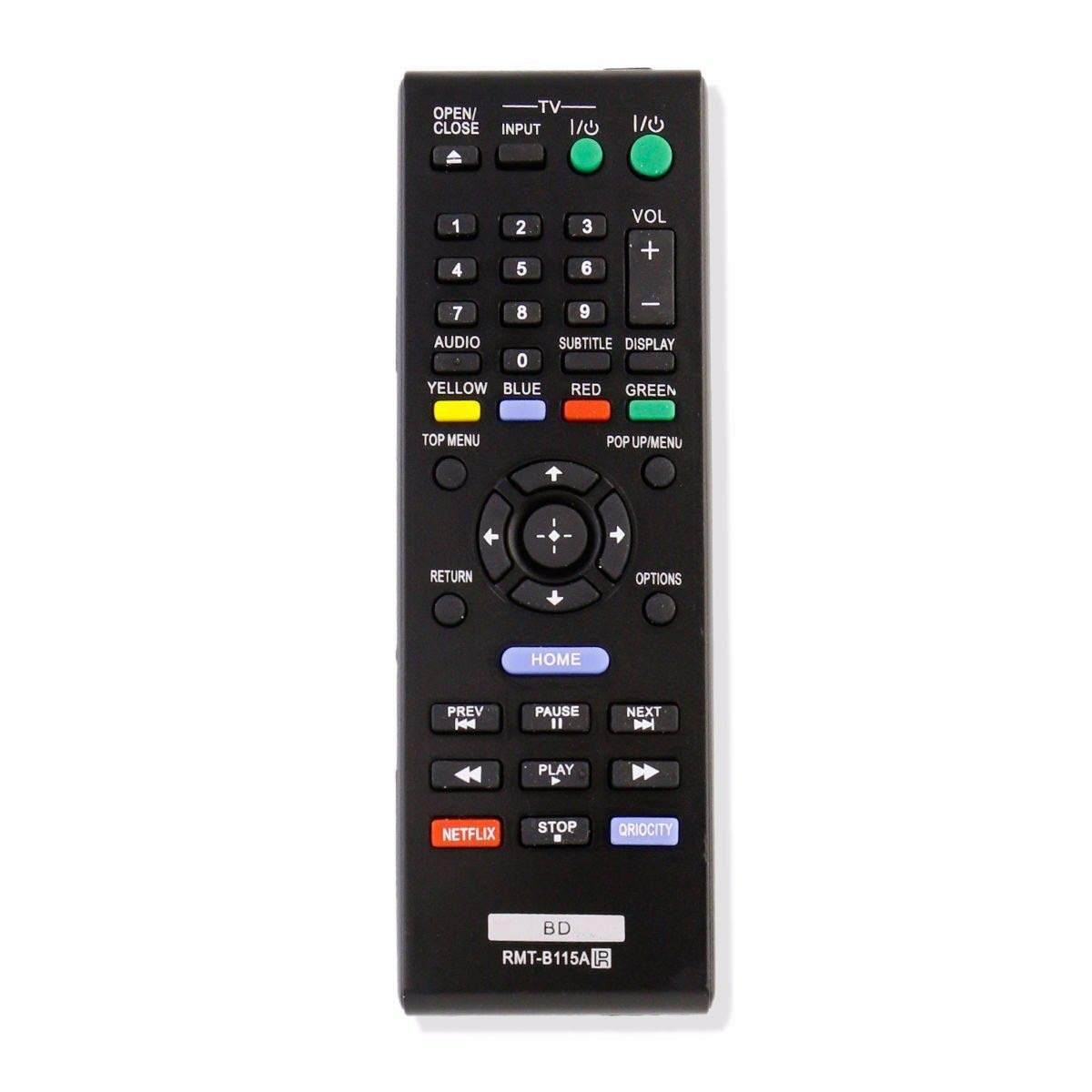
The buttons on this remote control correspond to the functions of your original Sony Blu-ray DVD Player remote. Refer to your player's manual for specific button functionalities if needed.
7. Troubleshooting
- Remote not responding:
- Check if the batteries are inserted with correct polarity (+/-).
- Replace the batteries with new AAA alkaline batteries if they are low or depleted.
- Ensure there is a clear line of sight between the remote control and the Blu-ray DVD player's infrared sensor. Remove any obstructions.
- Confirm the remote is compatible with your specific Sony Blu-ray DVD Player model.
- Limited operating range:
- Replace the batteries. Weak batteries can reduce the remote's effective range.
- Ensure no strong light sources (e.g., direct sunlight, fluorescent lights) are interfering with the infrared signal.
8. Specifications
| Brand | NKF |
| Model | RMT-B115A |
| Connectivity Technology | Infrared |
| Compatible Devices | Sony Blu-ray DVD Players (BDP-S480, BDP-S2100, BDP-S280, BDP-S580, BDP-S380) |
| Power Source | 2 x AAA Batteries (not included) |
| Maximum Range | 10 Meters |
| Button Quantity | 42 |
| Color | Black |
9. Maintenance
- Cleaning: Clean the remote control with a soft, dry cloth. Do not use liquid cleaners, solvents, or abrasive materials, as these can damage the surface or internal components.
- Storage: Avoid exposing the remote to extreme temperatures, high humidity, or direct sunlight. Store it in a cool, dry place when not in use.
- Battery Care: If the remote control will not be used for an extended period (e.g., one month or more), remove the batteries to prevent potential leakage and damage to the device.
10. Warranty and Support
This product is covered by a standard return policy, typically allowing returns or replacements within 30 days of purchase. For any issues, questions, or support regarding your NKF RMT-B115A remote control, please contact the seller directly through the platform where the purchase was made. Provide your order details for faster assistance.