
1. Important Safety Information
Please read all instructions carefully before using the Mi Electric Shaver S500. Keep this manual for future reference.
- Avoid contact with eyes.
- Do not use on irritated or broken skin.
- Keep out of reach of children.
- Do not use while charging or near water.
- Always unplug the shaver and allow it to cool before cleaning.
- Always follow the instructions provided with the product.
2. Product Overview
The Mi Electric Shaver S500 is designed for efficient and comfortable shaving. Familiarize yourself with its main components.

Figure 2.1: Front view of the Mi Electric Shaver S500, showing the rotary shaving head and digital display.
Components:
- Rotary Shaving Head: Features three floating blades for a close shave.
- Power Button: Turns the shaver on/off and activates travel lock.
- Digital Display: Shows battery percentage, travel lock indicator, and cleaning reminder.
- Charging Port: USB-C port located at the bottom for charging.

Figure 2.2: Internal structure of the shaver head, highlighting the three rotary blades.
3. Setup and Charging
3.1 Initial Charge
Before first use, fully charge the shaver. The digital display will show the battery percentage.
- Locate the USB-C charging port at the bottom of the shaver.
- Connect the provided USB-C cable to the shaver and a compatible USB power adapter (not included).
- The display will show the charging progress. A full charge typically takes approximately 1.5 hours.
- Once fully charged, disconnect the shaver from the power source.
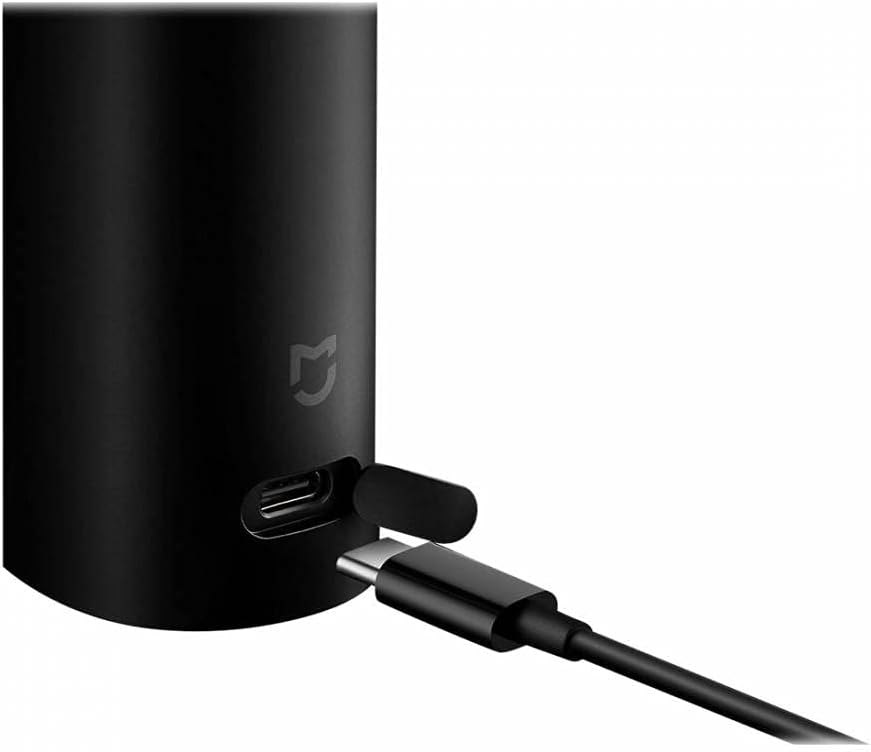
Figure 3.1: Connecting the USB-C charging cable to the shaver.
3.2 Travel Lock
To prevent accidental activation during travel, the shaver features a travel lock.
- To activate: Press and hold the power button for 3 seconds. A lock icon will appear on the display.
- To deactivate: Press and hold the power button for 3 seconds again. The lock icon will disappear.

Figure 3.2: Shaver display indicating travel lock activation.
4. Operating the Shaver
4.1 Shaving Techniques
For optimal results, follow these guidelines:
- Dry Shaving: Ensure your face is clean and dry. Move the shaver in small, circular motions against the direction of hair growth. Apply gentle pressure.
- Wet Shaving: The shaver is IPX7 waterproof and can be used with shaving foam or gel. Apply foam/gel to your face, then shave in circular motions. Rinse the shaver head under running water during and after shaving.

Figure 4.1: The shaver is designed for both wet and dry shaving.
4.2 Power On/Off
- Press the power button once to turn the shaver on.
- Press the power button again to turn the shaver off.
5. Maintenance and Cleaning
Regular cleaning ensures optimal performance and extends the life of your shaver.
5.1 Daily Cleaning
- After each use, turn off the shaver.
- Open the shaving head by gently pulling it upwards.
- Rinse the shaving head and the hair chamber under running water to remove hair clippings and residue.
- Shake off excess water and allow the head to air dry before closing.
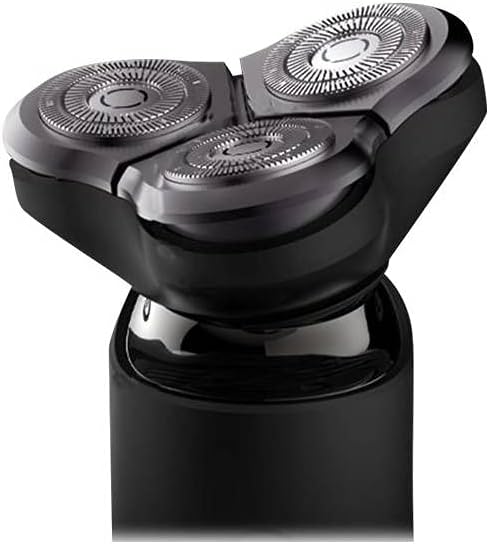
Figure 5.1: Detachable shaving head for easy cleaning.
5.2 Deep Cleaning (Monthly)
For a more thorough clean, disassemble the blade assembly.
- Remove the shaving head as described in daily cleaning.
- Carefully remove each rotary blade and its corresponding guard.
- Clean all parts with the provided cleaning brush or rinse thoroughly under water.
- Ensure all parts are completely dry before reassembling.

Figure 5.2: Individual rotary blade for detailed cleaning.
5.3 Blade Replacement
For optimal shaving performance, it is recommended to replace the shaving blades every 12 months, or sooner if you notice a decrease in shaving efficiency.
- Replacement heads can be purchased from authorized XIAOMI retailers.
- Follow the instructions provided with the replacement head for installation.
6. Troubleshooting
If you encounter issues with your Mi Electric Shaver S500, refer to the following common solutions:
| Problem | Possible Cause | Solution |
|---|---|---|
| Shaver does not turn on. | Battery is depleted or travel lock is active. | Charge the shaver. Deactivate travel lock by pressing and holding the power button for 3 seconds. |
| Poor shaving performance. | Blades are dull or shaving head is clogged with hair. | Clean the shaving head thoroughly. Consider replacing the shaving blades if they are old. |
| Shaver stops during use. | Battery is low. | Recharge the shaver. |
7. Specifications
| Feature | Detail |
|---|---|
| Model Name | S500 |
| Item Model Number | XIMISHAVS500 |
| Brand | XIAOMI |
| Power Source | Battery Powered |
| Battery Type | 1 CR2 battery required (internal) |
| Charging Port | USB-C |
| Product Dimensions | 6.1 x 2.48 x 2.44 inches |
| Item Weight | 1.76 ounces |
| Included Components | Charger (cable) |
8. Warranty and Support
For warranty information or technical support, please refer to the warranty card included with your product or visit the official XIAOMI website. Keep your purchase receipt as proof of purchase.
XIAOMI Official Website: www.mi.com


