
Introduction
This manual provides essential instructions for the Garmin Fenix 6 Pro Solar Multisport GPS Watch, model 010-02410-10. It covers setup, operation, maintenance, and troubleshooting to ensure optimal performance and user experience. Please read this manual thoroughly before using your device.
What's in the Box
- Garmin Fenix 6 Pro Solar Watch
- Charging/Data Cable
- Documentation (this manual)

Device Overview
The Garmin Fenix 6 Pro Solar watch features a Power Glass solar charging lens, advanced training features, and comprehensive health monitoring. It is designed for multisport activities and outdoor navigation.

Key Features:
- Solar Charging Capabilities
- Multisport GPS Tracking
- Advanced Training Metrics (VO2 Max, Training Load)
- Wrist-Based Heart Rate and Pulse Ox Sensing
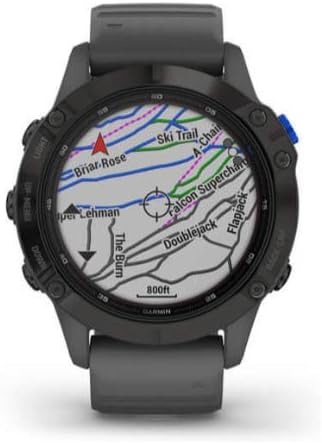
- Preloaded Topographical Maps
- Smart Notifications and Garmin Pay
Setup
1. Initial Charging
Before first use, connect the watch to a power source using the provided charging/data cable. Ensure the watch is fully charged for optimal performance.
2. Powering On and Pairing
Press and hold the LIGHT button (top left) to power on the watch. Follow the on-screen instructions to select your language and pair the device with your smartphone via the Garmin Connect app. The Garmin Connect app is available for download on your smartphone's app store.
3. Software Updates
Regularly check for software updates via the Garmin Connect app or Garmin Express on your computer to ensure your watch has the latest features and improvements. Keeping your software updated is crucial for device stability and access to new functionalities.
Operating Instructions
Button Functions
| Button | Function (Short Press) | Function (Long Press) |
|---|---|---|
| LIGHT | Turn backlight on/off | Power on/off, control menu |
| UP/MENU | Scroll through widgets/data screens | View menu options |
| DOWN | Scroll through widgets/data screens | Control music |
| START/STOP | Select option, start/stop activity | View activity list |
| BACK/LAP | Return to previous screen, record lap | View watch face |
Solar Charging
The Power Glass lens charges the watch battery using sunlight. Exposing the watch to direct sunlight extends battery life. Monitor solar intensity through the dedicated widget on your watch face.

Activity Tracking
To track an activity, press the START/STOP button. Select an activity from the list (e.g., Run, Bike, Swim). Wait for GPS acquisition (if applicable), then press START/STOP again to begin recording. Press START/STOP to pause or stop the activity, then choose to save or discard it.


Navigation
The watch includes preloaded topographical maps. Access navigation features through the activity menu or dedicated navigation widgets. Use the UP/MENU and DOWN buttons to scroll through map views and zoom levels. The watch can also provide turn-by-turn directions on preloaded courses.

Smart Features
- Smart Notifications: Receive alerts for calls, texts, and app notifications directly on your watch when paired with your compatible smartphone.
- Garmin Pay: Make contactless payments at participating locations. Set up your cards securely within the Garmin Connect app.
- Music Control: Control music playback from your paired smartphone or store up to 2000 songs directly on the watch for phone-free listening with Bluetooth headphones.
Maintenance
Cleaning the Device
Regularly clean the watch and strap with a damp cloth. Avoid harsh chemicals or abrasive materials that could damage the device. Rinse the watch with fresh water after exposure to chlorine, saltwater, or sweat to prevent corrosion and buildup.
Battery Care
To prolong battery life, avoid exposing the watch to extreme temperatures (hot or cold). Store the device in a cool, dry place when not in use for extended periods. Fully charge the battery before long-term storage to maintain its health.
Software Updates
Ensure your device software is up to date. Connect the watch to your computer using the USB cable and use Garmin Express, or update wirelessly via the Garmin Connect app. Updates often include performance improvements, bug fixes, and new features.
Troubleshooting
Device Not Responding
If the device stops responding, press and hold the LIGHT button for 15 seconds to force a restart. If the issue persists, ensure the battery is charged and try charging it for at least 30 minutes.
GPS Signal Acquisition Issues
Ensure you are in an open area with a clear view of the sky, away from tall buildings or dense foliage. Remain stationary for a few minutes while the watch acquires satellite signals. Verify that GPS is enabled for your activity profile in the watch settings.
Inaccurate Heart Rate Readings
Ensure the watch is worn snugly above your wrist bone, not too tight or too loose. Clean the optical heart rate sensor on the back of the device. Environmental factors, skin conditions, and certain movements can affect accuracy. For best results during intense activities, consider using a compatible chest strap heart rate monitor.
Battery Draining Quickly
High GPS usage, frequent backlight activation, continuous Pulse Ox monitoring, and extensive use of music playback can significantly reduce battery life. Adjust power manager settings, disable unnecessary features, and reduce backlight brightness to extend battery life. Ensure solar charging opportunities are maximized.
Specifications
| Feature | Detail |
|---|---|
| Model Number | 010-02410-10 |
| Dimensions | 0.59 x 2.52 x 2.01 inches |
| Weight | 1.36 ounces |
| Display Size | 1.3 Inches |
| Battery Type | Lithium Polymer (included) |
| Connectivity | USB, Wireless |
| Water Resistance | Yes (Tested to U.S. military standards for thermal, shock and water resistance) |
| GPS Support | GPS, GLONASS, Galileo |
Warranty and Support
Garmin provides a limited warranty for this product. For detailed warranty information, please refer to the documentation included in the box or visit the official Garmin website. For technical support, product registration, or additional resources, visit garmin.com/support.