
1. Introduction
This manual provides essential instructions for the safe operation, setup, maintenance, and troubleshooting of your DEWALT 20-Volt MAX Lithium-Ion Cordless 1/4 inch Impact Driver, model DCF885. Please read this manual thoroughly before using the tool to ensure proper function and to prevent injury.
2. General Safety Instructions
Always follow basic safety precautions when using power tools to reduce the risk of fire, electric shock, and personal injury.
- Work Area Safety: Keep the work area clean and well-lit. Cluttered or dark areas invite accidents. Do not operate power tools in explosive atmospheres, such as in the presence of flammable liquids, gases, or dust.
- Electrical Safety: Avoid body contact with earthed or grounded surfaces such as pipes, radiators, ranges, and refrigerators. There is an increased risk of electric shock if your body is earthed or grounded.
- Personal Safety: Always wear eye protection. Use safety glasses, goggles, or a face shield. Wear hearing protection when operating power tools for extended periods. Dress properly; do not wear loose clothing or jewelry. Keep hair, clothing, and gloves away from moving parts.
- Tool Use and Care: Do not force the power tool. Use the correct power tool for your application. It will do the job better and safer at the rate for which it was designed. Disconnect the battery pack from the power tool before making any adjustments, changing accessories, or storing power tools.
- Battery Tool Use and Care: Recharge only with the charger specified by the manufacturer. A charger that is suitable for one type of battery pack may create a risk of fire when used with another battery pack. Use power tools only with specifically designated battery packs.
3. Product Components
Familiarize yourself with the parts of your DEWALT Impact Driver:
- 1/4 inch Hex Chuck: For quick and easy bit changes.
- Trigger Switch: Activates the tool and controls speed.
- Forward/Reverse Selector: Changes the direction of rotation.
- LED Work Light: Illuminates the work area.
- Belt Hook: For convenient temporary storage.
- Battery Interface: Connects to DEWALT 20V MAX Lithium-Ion battery packs (battery sold separately).
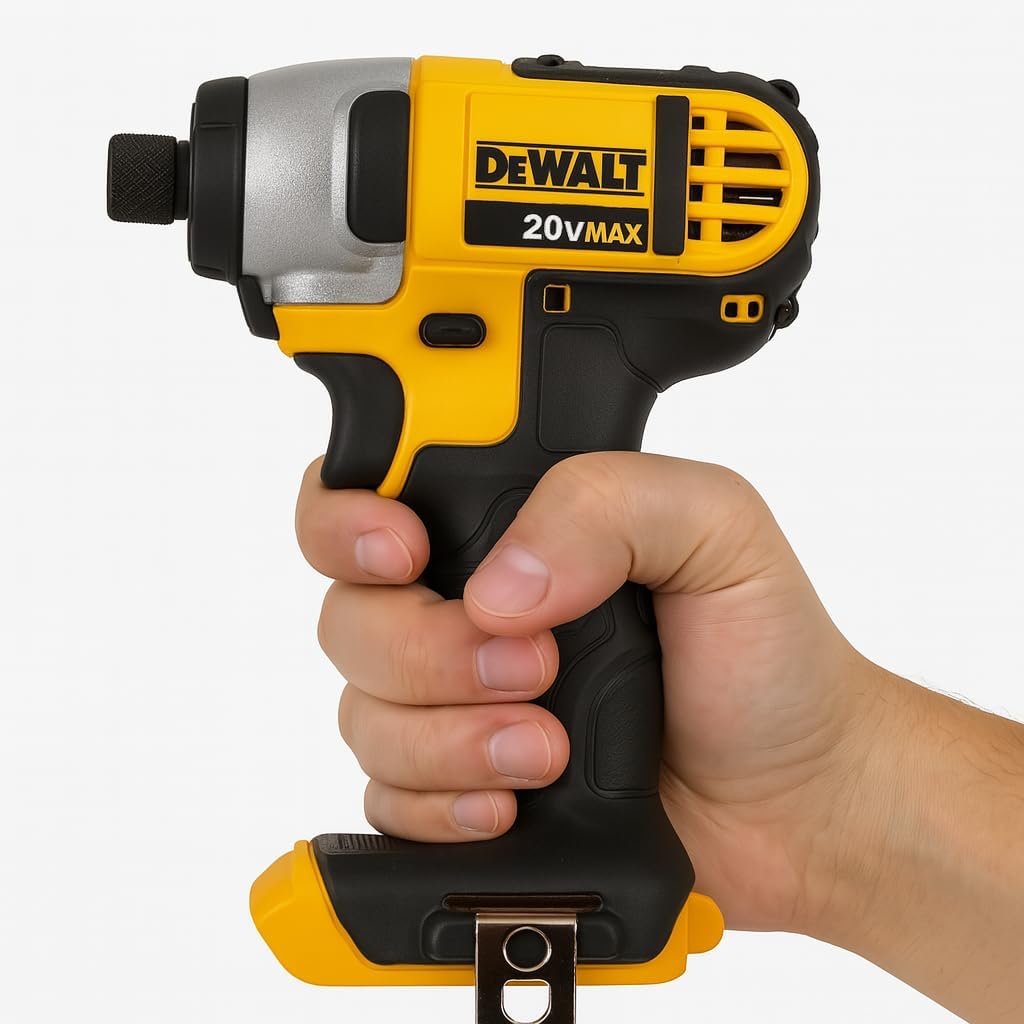
Figure 3.1: The DEWALT DCF885 Impact Driver shown held in a user's hand, illustrating its compact design and ergonomic grip. This image highlights the tool's overall appearance and how it is typically handled during operation.

Figure 3.2: A diagram of the DEWALT DCF885 Impact Driver with key features labeled, including the LED work light and the 117 ft-lbs maximum torque. The diagram also indicates the tool's compact length of 5-1/2 inches, providing a clear overview of its design and capabilities.
4. Setup
4.1 Battery Installation (Battery Sold Separately)
- Ensure the impact driver is turned off and the forward/reverse selector is in the center (lock) position.
- Align the battery pack with the tool's battery port.
- Slide the battery pack into the tool until it clicks securely into place.
- To remove the battery, press the release button on the battery pack and slide it out of the tool.
4.2 Bit Insertion and Removal
- Insertion: Pull the chuck collar forward. Insert the 1/4 inch hex accessory bit fully into the chuck. Release the collar. The bit should be securely held.
- Removal: Pull the chuck collar forward. The bit will spring out.
5. Operating Instructions
5.1 Powering On/Off and Speed Control
To turn the tool on, depress the trigger switch. To turn the tool off, release the trigger switch. The tool's speed is controlled by the amount of trigger depression; pressing further increases speed.
5.2 Forward/Reverse Operation
The forward/reverse selector is located above the trigger. Push the selector to the left for forward rotation (driving fasteners) and to the right for reverse rotation (removing fasteners). For safety, place the selector in the center position to lock the trigger when the tool is not in use or when changing accessories.
5.3 LED Work Light
The integrated LED work light automatically illuminates when the trigger is depressed, providing visibility in dimly lit work areas. It remains on for approximately 20 seconds after the trigger is released.

Figure 5.1: The DEWALT DCF885 Impact Driver being used to drive a fastener into a metal stud. This image demonstrates the tool's application in construction or assembly tasks, highlighting its compact size for working in confined spaces.
6. Maintenance
Regular maintenance ensures optimal performance and extends the life of your tool.
- Cleaning: Keep the tool's ventilation slots clean to prevent overheating. Use a soft brush or dry cloth to remove dust and debris. Do not use water or chemical cleaners.
- Lubrication: This tool is factory lubricated and requires no additional lubrication.
- Storage: Store the tool in a dry, secure location out of reach of children. Remove the battery pack before storage.
- Inspections: Periodically inspect the tool for damaged parts, loose screws, or worn electrical cords (if applicable to charger). Have any damaged parts repaired by an authorized service center before further use.
7. Troubleshooting
If you encounter issues with your impact driver, refer to the following common problems and solutions:
| Problem | Possible Cause | Solution |
|---|---|---|
| Tool does not start | Battery pack not installed correctly or discharged. Trigger lock engaged. | Ensure battery pack is fully inserted. Charge battery pack. Disengage trigger lock by moving forward/reverse selector to left or right. |
| Reduced power or speed | Battery pack is low on charge. | Recharge the battery pack. |
| Bit falls out of chuck | Chuck collar not fully released after insertion. Incorrect bit type. | Ensure chuck collar snaps back into place. Use only 1/4 inch hex shank bits. |
| Tool overheats | Ventilation slots blocked. Continuous heavy use. | Clean ventilation slots. Allow tool to cool down during prolonged heavy use. |
If the problem persists after attempting these solutions, contact DEWALT customer service or an authorized service center.
8. Specifications
Key technical specifications for the DEWALT DCF885 Impact Driver:
| Feature | Specification |
|---|---|
| Brand | DEWALT |
| Model Number | DCF885 |
| Power Source | Battery Powered (20V MAX Lithium-Ion) |
| Voltage | 20 Volts |
| Maximum Rotational Speed | 2800 RPM |
| Maximum Torque | 117 Foot Pounds (1400 Inch Pounds) |
| Chuck Size | 1/4 inch Hex |
| Item Weight | 2 Pounds |
| Product Dimensions | 8"L x 6"W x 3"H |
| Special Features | Cordless, Compact, Lightweight, LED Work Light |
9. Warranty and Support
DEWALT provides a limited warranty for its products. For specific warranty terms and conditions applicable to your DCF885 Impact Driver, please refer to the warranty card included with your purchase or visit the official DEWALT website. Keep your proof of purchase for warranty claims.
For technical assistance, service, or to locate an authorized service center, please contact DEWALT customer support through their official website or the contact information provided in your product packaging.


