Introduction
This manual provides detailed instructions for the setup, operation, and maintenance of your AKLOT AKP-1 61-Key Portable Electronic Piano Keyboard. Please read this manual thoroughly before using the product to ensure proper function and longevity.
Package Contents
- AKLOT AKP-1 61-Key Electronic Piano Keyboard
- Power Adapter
- Music Stand
- User Manual (this document)
Note: Batteries (6 x AA) are not included.
Product Overview
Front Panel Controls

Image: Close-up view of the AKLOT AKP-1 electronic piano keyboard's control panel, showing various buttons, a display screen, and a volume knob. This panel allows users to select tones, rhythms, demo songs, and access teaching functions.
The front panel features a digital display, an infinite volume adjustment knob, and various buttons for selecting tones, rhythms, demo songs, and activating teaching modes. Specific functions include:
- Tone/Rhythm Selection: Buttons to browse and select from 300 available instrument sounds and 300 accompaniment rhythms.
- Demo Songs: Access to 40 built-in demonstration songs.
- Teaching Functions: Buttons to engage the 3-step intelligent teaching system.
- Volume Control: An infinite adjustment knob for precise volume levels.
- Light On/Off: Button to activate or deactivate the lighted key function.
- Recording & Playback: Controls for recording and playing back performances.
- Metronome: Button to activate the metronome function.
- Other Functions: Sustain, Tremolo, Single/Multi-finger Chord, Keyboard Percussion, Synchronization, Insertion, Stop, Programming, Dual Keyboard.
Rear Panel Interfaces

Image: Close-up view of the rear panel interfaces of the AKLOT AKP-1 electronic piano keyboard. Labels indicate ports for Micro SD, USB, USB to Host, Sustain, Mic, Aux, Phones, and 9V DC power input.
The rear panel provides connectivity options:
- Micro SD Port: For external memory.
- USB Port: For connecting USB devices.
- USB to Host Port: For connecting to a computer, phone, or iPad for app usage and MIDI communication.
- Sustain Pedal Port: 6.35mm socket for connecting an external sustain pedal.
- Mic Input: For microphone connection.
- AUX Input: For connecting external audio sources.
- Phones Output: 3.5mm jack for headphones.
- DC 9V Input: For connecting the power adapter.
Setup
- Power Connection:
- Using Power Adapter: Connect the included power adapter to the DC 9V input port on the rear panel and plug it into a standard electrical outlet.
- Using Batteries: Open the battery compartment on the underside of the keyboard and insert 6 AA batteries (not included), ensuring correct polarity.
- Music Stand Installation: Insert the included music stand into the designated slots on the top panel of the keyboard.
- Optional Connections:
- Headphones: For private practice, connect 3.5mm headphones to the "Phones" jack.
- Sustain Pedal: Connect a 6.35mm sustain pedal (sold separately) to the "Sustain" port.
- External Devices: Use the USB to Host port to connect to a computer, phone, or iPad for MIDI functionality or app integration.
- Power On: Press the power button to turn on the keyboard.
Operating Instructions
Basic Functions
- Volume Adjustment: Rotate the infinite volume knob on the front panel to increase or decrease the overall sound level.
- Tone Selection: Use the "Tone" buttons to cycle through the 300 available instrument sounds. The selected tone will be displayed on the screen.
- Rhythm Selection: Use the "Rhythm" buttons to select from 300 accompaniment rhythms.
- Demo Songs: Press the "Demo" button to play one of the 40 built-in demonstration songs.
Lighted Keyboard Function
The AKP-1 features lighted keys to assist with learning. When enabled, keys will light up to guide your playing.
- Activation: Press the "Light On/Off" button to toggle the lighted key function.
- Demo Mode: In demo mode, the lighted keys will automatically follow the main melody.
- Teaching Mode: During teaching lessons, the lights will indicate the correct keys to play, providing visual guidance.
3-Step Intelligent Teaching System

Image: Diagram illustrating the three teaching modes of the AKLOT AKP-1 keyboard: Single Course, Synchronized Course, and Concert Course, with descriptions of each mode's functionality.
The keyboard offers three teaching modes to facilitate learning:
- Single Course: The keyboard will play the main melody in time with any keypresses, even incorrect ones. The beat point will flash on the LCD display to indicate the tempo.
- Synchronized Course: You must play the correct tone according to the LCD display. The melody will repeat until the correct key is pressed.
- Concert Course: You can play the main melody with automatic accompaniment. The accompaniment will always play at a normal speed, even if you press an incorrect key.
Advanced Functions
- Sustain & Tremolo: Activate these effects using their dedicated buttons to add depth and vibrato to your sound.
- Chord Modes: Select between single-finger and multi-finger chord modes for simplified accompaniment.
- Keyboard Percussion: Access a full 61-key percussion set for rhythmic accompaniment.
- Recording & Playback: Use the "Record" button to capture your performance and "Playback" to listen.
- Metronome: Use the metronome to practice with a steady tempo.
- Dual Keyboard: This function allows splitting the keyboard into two identical ranges, useful for duets or teacher-student practice.
Maintenance
- Cleaning: Use a soft, dry cloth to wipe the surface of the keyboard. Avoid using abrasive cleaners or solvents.
- Storage: Store the keyboard in a cool, dry place away from direct sunlight and extreme temperatures.
- Power Off: Always turn off the keyboard when not in use to conserve power and prevent damage.
- Battery Care: If using batteries, remove them if the keyboard will not be used for an long period to prevent leakage.
Troubleshooting
| Problem | Possible Cause | Solution |
|---|---|---|
| No sound from keyboard. |
|
|
| Keys are not lighting up. | Lighted key function is off. | Press the "Light On/Off" button to activate the function. |
| Keyboard not responding to external device (computer/app). | Incorrect cable connection or software settings. |
|
Specifications
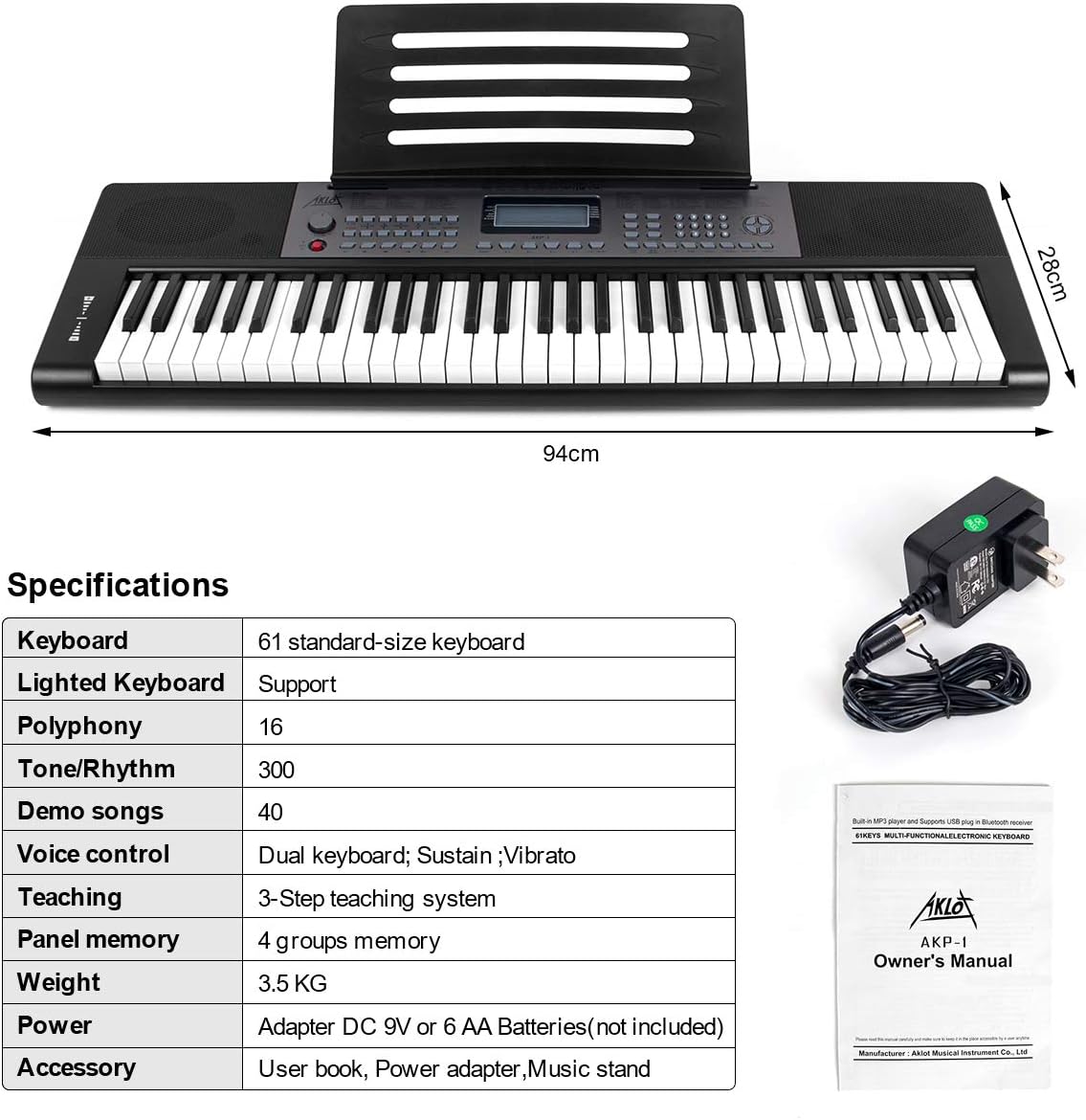
Image: A table detailing the specifications of the AKLOT AKP-1 keyboard, including keyboard type, lighted keys support, polyphony, tone/rhythm count, demo songs, voice control, teaching system, panel memory, weight, power, and accessories.
| Feature | Detail |
|---|---|
| Model | AKP-1 |
| Keyboard Type | 61 standard-size keys |
| Lighted Keys | Supported |
| Polyphony | 16-note |
| Tones | 300 |
| Rhythms | 300 |
| Demo Songs | 40 |
| Voice Control | Dual keyboard, Sustain, Vibrato |
| Teaching System | 3-Step intelligent teaching system |
| Panel Memory | 4 groups |
| Weight | 3.5 kg (approx. 7.7 lbs) |
| Power Source | DC 9V Adapter or 6 AA Batteries (not included) |
| Connectivity | MIDI USB, Auxiliary |
| Headphones Jack | 3.5mm |
| Material | Plastic |
| Dimensions (L x W) | Approx. 94 cm x 28 cm |
| Included Accessories | User Manual, Power Adapter, Music Stand |
Support
For any questions or assistance regarding your AKLOT AKP-1 keyboard, please refer to the contact information provided with your purchase or visit the official AKLOT website.


