
Introduction
The Douk Audio U3 Mini is a compact Class A stereo headphone amplifier designed to enhance your audio experience. It features an innovative circuit design, operating at a high voltage of 26V for excellent noise performance and a wide frequency range. Utilizing a classic TI-NE5532 op-amp and a 1300mA Class A output transistor, it delivers warm, delicate, and full sound with ultra-low distortion. Its plug-and-play design allows for easy op-amp upgrades, offering customization for audiophiles. This amplifier is suitable for driving most high-impedance headphones, providing increased power, improved soundstage, and enhanced detail for both home and office desktop audio systems.
Safety Information
- Ensure the power adapter voltage is within the specified DC 5-20V range. Using an incorrect voltage can damage the device.
- Use a high-quality power adapter, preferably above 5W, to ensure stable performance and minimize potential noise.
- Do not expose the device to water, moisture, or extreme temperatures.
- Avoid disassembling the unit unless performing an op-amp upgrade, and always disconnect power before doing so.
- Keep the device away from strong magnetic fields to prevent interference.
- Clean the device with a soft, dry cloth. Do not use liquid cleaners or solvents.
Package Contents
Please check the package for the following items:
- 1x Douk Audio U3 Headphone Amplifier
- 1x 6.35mm to 3.5mm Headphone Adapter
- 1x DC 5V Power Adapter (Note: A higher quality power adapter, up to 20V, is recommended for optimal performance, but not always included.)

Product Overview
The Douk Audio U3 Mini features a compact and robust design with a gold-colored front panel and a black aluminum chassis.
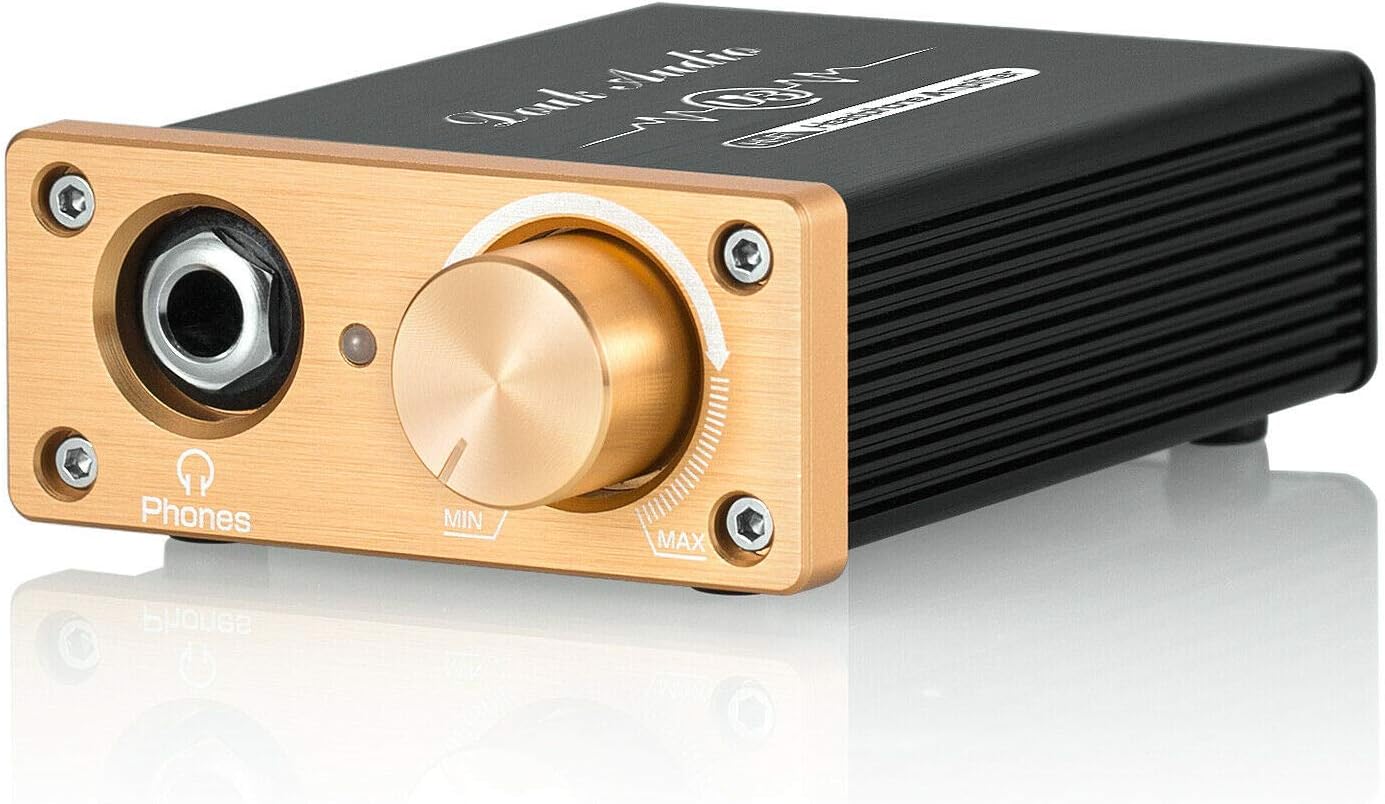
Front Panel
- 6.35mm Headphone Output: Connect your headphones here.
- Volume Control Knob: Adjusts the output volume.

Rear Panel
- DC 5V-20V Input: Power input for the amplifier.
- RCA L/R Input: Stereo audio input from your source device.
- Power Switch: Turns the amplifier on or off.

Setup
-
Connect Power: Connect the provided DC 5V power adapter (or a higher quality 5-20V adapter) to the DC 5V-20V input port on the rear panel. Ensure the power adapter is suitable for audio equipment to minimize noise.

Connect the power adapter to the DC 5V-20V input. -
Connect Audio Source: Use an RCA cable to connect your audio source (e.g., PC, DAC, CD player) to the RCA L/R input ports on the rear panel.

Connect your audio source to the RCA L/R input ports. -
Connect Headphones: Plug your headphones into the 6.35mm headphone output jack on the front panel. If your headphones have a 3.5mm jack, use the included 6.35mm to 3.5mm adapter.

Connect your headphones to the 6.35mm output jack. 
The U3 Mini is capable of driving a wide range of headphones, including high-impedance models.
Operating Instructions
-
Power On/Off: Flip the power switch on the rear panel to the "ON" position to turn on the amplifier. The indicator light on the front panel will illuminate. Flip it to "OFF" to power down.
Locate the power switch on the rear panel to turn the unit on or off. -
Adjust Volume: Rotate the volume control knob on the front panel clockwise to increase the volume and counter-clockwise to decrease it. Start with a low volume and gradually increase to a comfortable listening level.
The gold volume knob on the front panel controls the headphone output level. -
Op-Amp Replacement (Advanced Users): The Douk Audio U3 Mini features a pluggable op-amp socket, allowing advanced users to replace the stock TI-NE5532 op-amp with compatible alternatives for sound customization. Ensure the device is powered off and unplugged before attempting any internal modifications. Refer to specialized audio forums or guides for compatible op-amp models and replacement procedures.

Internal view highlighting the pluggable TI-NE5532 op-amp for customization.
Maintenance
- Cleaning: Use a soft, dry, lint-free cloth to clean the exterior of the amplifier. Do not use abrasive cleaners, waxes, or solvents.
- Storage: When not in use for extended periods, store the amplifier in a cool, dry place away from direct sunlight and dust.
- Ventilation: Ensure the amplifier has adequate ventilation. Do not block the side fins or place it in an enclosed space that could lead to overheating.
Troubleshooting
| Problem | Possible Cause | Solution |
|---|---|---|
| No sound | Power not connected; Amplifier off; Volume too low; Audio source not playing; Cables loose or faulty. | Check power connection and switch; Increase volume; Ensure audio source is playing; Reconnect or replace audio cables. |
| Distorted sound | Volume too high (amplifier or source); Low quality power adapter; Faulty audio cables; Incorrect op-amp installation (if replaced). | Reduce volume on amplifier and source; Use a higher quality power adapter (e.g., 12V 1A or higher); Replace audio cables; Re-check op-amp installation. |
| Humming or buzzing noise | Ground loop issue; Poor quality power adapter; Interference from other electronic devices; Faulty audio cables. | Use a high-quality, stable power supply (e.g., 12V 1A or higher); Try a different power outlet; Move amplifier away from other electronics; Replace audio cables; Consider a ground loop isolator if the issue persists. |
| Low volume output | Volume too low on amplifier or source; Headphones have very high impedance; Power adapter not providing enough current/voltage. | Increase volume on both amplifier and source; Ensure a power adapter with sufficient current (e.g., 1A or more) and voltage (up to 20V) is used. |
Specifications
| Feature | Detail |
|---|---|
| Brand | Nobsound |
| Model | XZ-U3-DE |
| Dimensions | 15.5 x 15.1 x 5.2 cm (approx. 6.1 x 5.9 x 2.0 inches) |
| Weight | 330 grams (approx. 0.73 lbs) |
| Input Voltage | DC 5-20V |
| Internal Working Voltage | 26V (via built-in voltage boost circuit) |
| Output Current | 1300mA (Class A) |
| Material | Plastic and Metal |
| Installation Type | Freestanding |
Warranty and Support
For warranty information, please refer to the specific terms and conditions provided at the time of purchase or contact your retailer. Nobsound products typically come with a standard manufacturer's warranty against defects in materials and workmanship.
For technical support, troubleshooting assistance, or inquiries about your Douk Audio U3 Mini Headphone Amplifier, please visit the official Nobsound store or contact their customer service directly. You can often find support resources and contact information on the brand's official website or through the platform where you purchased the product.
Nobsound Store: Visit Nobsound Store on Amazon