
1. Introduction
The LISEN Adjustable Tablet Stand LE785 is engineered to provide a stable and ergonomic viewing experience for a wide range of devices. Its robust construction and versatile adjustable features ensure your tablet or smartphone is securely held at the optimal height and angle, promoting comfortable use for various activities such as online lessons, video calls, work, or entertainment.

Image 1: LISEN Adjustable Tablet Stand LE785 with a tablet, highlighting its adjustable height and stability.
2. Package Contents
Please verify that all components are present in your package:
- Weighted Base
- Adjustable Support Rod
- Device Holder Clip

Image 2: Exploded view of the LISEN tablet stand components.
3. Setup Instructions
Follow these steps to assemble your LISEN Adjustable Tablet Stand:
- Attach the Support Rod to the Base: Screw the bottom end of the adjustable support rod clockwise into the threaded hole on the weighted base until it is firm and secure.
- Attach the Device Holder: Screw the device holder clip clockwise onto the ball joint at the top of the support rod. Ensure it is tightly fastened.
- Verify Stability: Double-check all connections to ensure they are securely tightened before placing any device on the stand.
4. Operating Instructions
4.1. Adjusting Height
To adjust the height of the stand:
- Gently twist the golden ring located on the support rod counter-clockwise to loosen it.
- Extend or retract the upper part of the rod to your desired viewing height.
- Twist the golden ring clockwise to tighten and lock the rod in place.

Image 3: Demonstrating the height adjustment of the stand.
4.2. Adjusting Angle and Rotation
The device holder offers flexible angle adjustment and 360-degree rotation:
- Angle Adjustment: The arm connecting the device holder to the main rod is flexible. Gently bend this arm to position your device at the most comfortable viewing angle.
- 360° Rotation: The device holder can be rotated 360 degrees, allowing you to switch between portrait and landscape orientations effortlessly.

Image 4: Illustrating angle and rotation capabilities.
4.3. Device Placement
To place your device on the stand:
- Grasp the device holder clip and gently pull apart the elastic silica metal arms.
- Carefully insert your tablet or phone between the arms, ensuring it is centered.
- Release the arms slowly, allowing the thick silicone pads to securely grip your device.
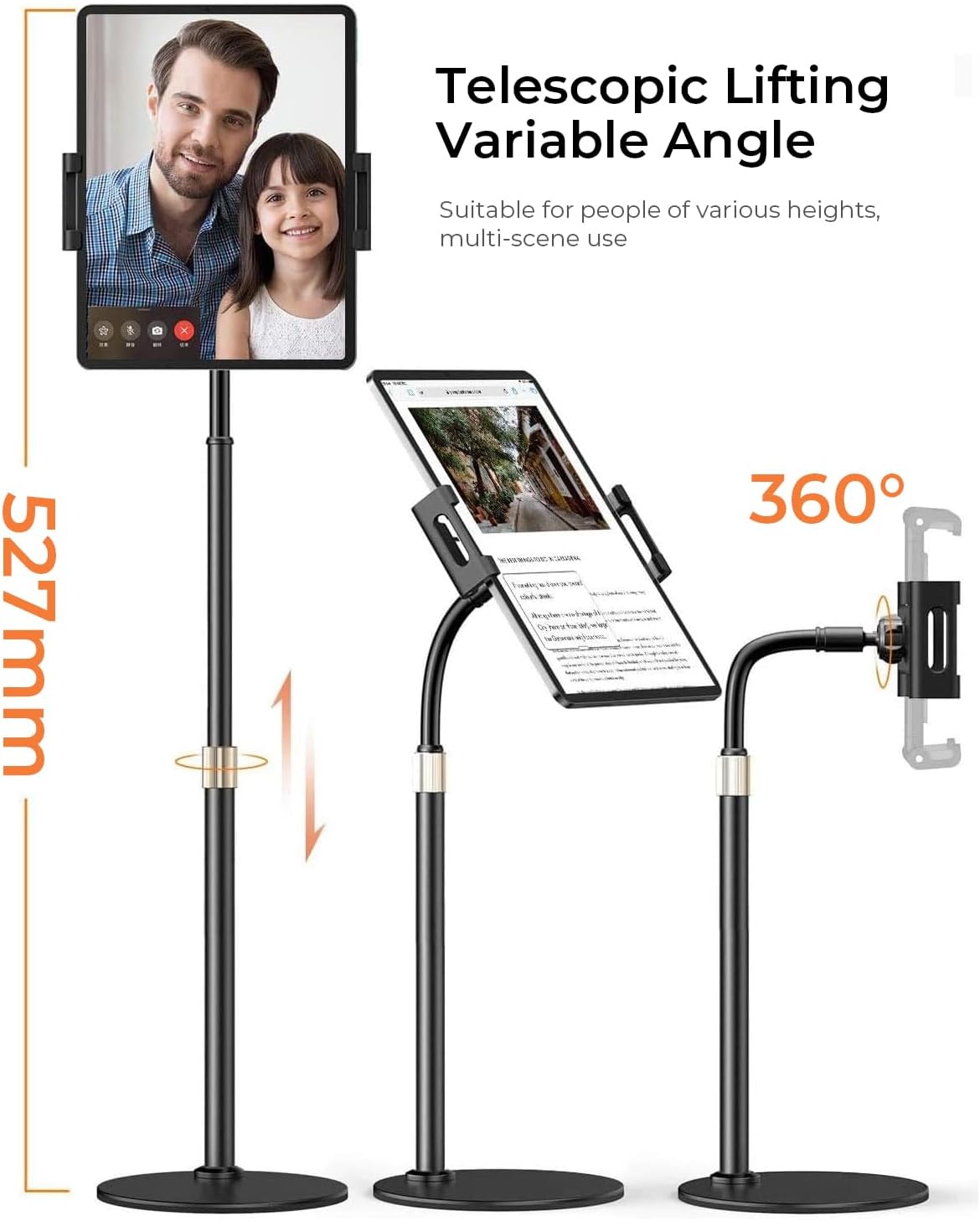
Image 5: Close-up of the device holder clip with silicone protection.
4.4. Video Demonstration
Video 1: A detailed demonstration of the LISEN Rotatable Tablet Stand, showcasing its features and ease of use.
5. Compatibility
The LISEN Adjustable Tablet Stand is designed for broad compatibility:
- Device Size: Compatible with devices ranging from 4.7 inches to 15.6 inches. This includes popular models such as iPad Pro 12.9"/9.7"/11", iPad Air 9.7"/10.5", iPad 9.7"/10.2", iPad Mini 7.9", iPhone 12 Pro Max, Surface Pro series, Samsung Galaxy Tab, Lenovo Tab, Fire HD series, Kindle, Kindle Paperwhite, Kindle Oasis, and Nintendo Switch.
- Case Friendly: The elastic silica metal clip and thick silicone pads accommodate devices with most protective cases, eliminating the need to remove your case during use.

Image 6: Visual representation of universal device compatibility.
6. Maintenance
To ensure the longevity and optimal performance of your LISEN Tablet Stand:
- Cleaning: Wipe the stand with a soft, dry cloth. Avoid using abrasive cleaners or harsh chemicals that could damage the finish.
- Tightening: Periodically check all screws and adjustable connections to ensure they remain tight. Re-tighten if any looseness is detected.
- Storage: When not in use, store the stand in a cool, dry place away from direct sunlight or extreme temperatures.
7. Troubleshooting
If you encounter any issues with your LISEN Tablet Stand, please refer to the following common solutions:
- Stand Instability:
- Ensure the weighted base is placed on a flat, stable surface.
- Verify that the support rod and device holder are securely tightened.
- For heavier devices, ensure the device is centered over the base to maintain balance.
- Device Not Fitting Securely:
- Gently pull the elastic clip arms further apart to accommodate your device.
- Check if any bulky accessories (e.g., pop sockets) on your device are preventing proper seating. Some accessories may need to be removed for optimal fit.
8. Specifications
| Brand | LISEN |
| Model Number | LE785 |
| Color | Black |
| Material | Metal |
| Compatible Devices | Tablets (4.7"-15.6"), various phone models (iPad Pro, iPad Air, iPad Mini, iPhone 12 Pro Max, Surface Pro, Samsung Galaxy Tab, Lenovo Tab, Fire HD, Kindle, Nintendo Switch) |
| Mounting Type | Desktop, Tabletop |
| Special Features | 360 Degree Rotation, Adjustable Height, Flexible Arm, Ergonomic |
| Item Weight | 1.83 Pounds |
9. Warranty and Support
LISEN is committed to providing high-quality products and excellent customer service. This item comes with a 100% satisfied worry-free Customer Service. If you encounter any usage problems or have questions regarding your LISEN Tablet Stand, please do not hesitate to contact LISEN customer support directly. We are dedicated to providing the most sincere service and assistance.
