
Introduction
Thank you for choosing the TESSAN TS-102-C-SP Surge Protector Flat Extension Cord. This product is designed to provide convenient power distribution and surge protection for your electronic devices. Featuring multiple AC outlets and USB ports, including a USB-C port, it is suitable for various environments such as home, office, and dorm rooms. Please read this manual thoroughly before use to ensure safe and optimal operation.
Product Overview
The TESSAN TS-102-C-SP is a versatile power solution with a compact design. It includes:
- 4 AC Outlets: Provides power for standard electronic devices.
- 3 USB Ports: Includes 1 USB-C port (3A max) and 2 USB-A ports (2.4A max each) for charging mobile devices.
- 900 Joules Surge Protection: Safeguards connected electronics from power surges.
- Overload Protection: Automatically shuts off power during overloads to protect devices.
- 5-Foot Flat Extension Cord: Allows for flexible placement and fits easily behind furniture.
- 45-Degree Right Angle Flat Plug: Designed to prevent blocking adjacent outlets.
- Mountable Design: Features 2 wall mount holes for secure installation.
- Anti-Slip Rubber Feet: Ensures stability on flat surfaces.
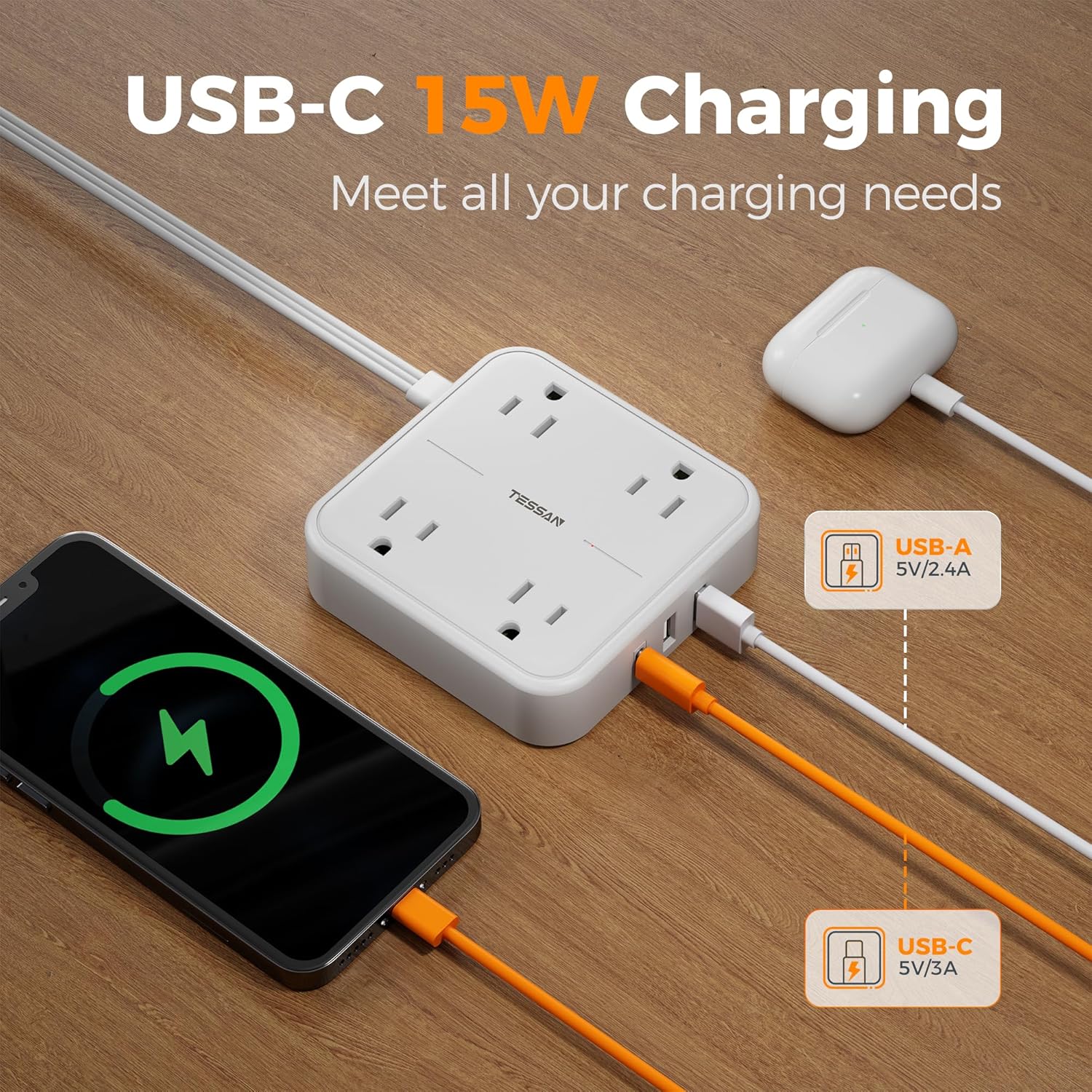
Image: Top view of the TESSAN surge protector showing 4 AC outlets and the TESSAN logo.

Image: Side view of the TESSAN surge protector highlighting the 1 USB-C and 2 USB-A charging ports.
Setup
- Unpack: Carefully remove the surge protector from its packaging.
- Placement: Choose a suitable location for the surge protector. Its flat design allows it to be placed behind furniture or in tight spaces. Ensure the location is dry and away from heat sources.
- Plug In: Insert the flat plug of the extension cord into a standard 3-prong wall outlet. The 45-degree right-angle design helps keep the plug flush with the wall.
- Power On: Locate the On/Off switch on the side of the unit and press it to the "On" position. A blue indicator light will illuminate to confirm power is active.
- Mounting (Optional): If desired, use the two mounting holes on the back of the unit to secure it to a workbench, wall, or under a counter. Ensure appropriate screws (not included) are used for the mounting surface.

Image: The TESSAN surge protector's 5-foot flat extension cord plugged into a wall outlet, demonstrating its reach and low-profile design.

Image: A close-up view of the TESSAN flat plug, illustrating its slim profile for space-saving.
Operating Instructions
Once the surge protector is plugged in and powered on, you can connect your devices:
- AC Devices: Plug your electronic devices (e.g., laptops, lamps, small fans) into any of the 4 AC outlets. The wide-spaced design accommodates larger power adapters without blocking adjacent outlets.
- USB Devices: Connect your USB-powered devices (e.g., cell phones, tablets, earphones) to the 2 USB-A ports or the 1 USB-C port. The USB-C port provides up to 3A charging, while USB-A ports provide up to 2.4A.
- Power Indicator: A blue LED light indicates that the surge protector is receiving power and actively protecting your devices.
- Overload Protection: In case of an overload, the surge protector will automatically shut off power to protect connected devices. If this occurs, unplug some devices, then reset the power switch.

Image: The TESSAN surge protector actively protecting and powering multiple devices, including a laptop and phone, with a visual representation of 900J surge protection.

Image: A detailed view of the overload protection switch, indicating its function in safeguarding connected devices.
Safety Information
To ensure safe operation and prevent damage to the product or connected devices, please observe the following:
- Do not exceed the maximum power rating of 1250W.
- Do not use in wet environments or near water.
- This product is for indoor use only.
- Do not disassemble or modify the surge protector.
- Keep out of reach of children.
- Ensure all plugs are fully inserted into the outlets.
- Avoid running the cord under carpets or in high-traffic areas where it could be damaged.
Maintenance
The TESSAN TS-102-C-SP requires minimal maintenance. To ensure longevity and proper function:
- Keep the unit clean and free from dust. Use a dry, soft cloth for cleaning.
- Avoid exposing the unit to extreme temperatures.
- Regularly inspect the cord and plug for any signs of damage. If damaged, discontinue use and replace the unit.
Troubleshooting
| Problem | Possible Cause | Solution |
|---|---|---|
| No power to devices. | Unit is off, wall outlet is not working, or overload protection activated. | Ensure the On/Off switch is on. Test the wall outlet with another device. If overload protection activated, unplug some devices and reset the switch. |
| USB devices not charging. | USB cable is faulty, device is not compatible, or unit is overloaded. | Try a different USB cable. Ensure your device is compatible with USB charging. Check for overload and reset if necessary. |
| Unit feels warm. | Normal operation, or excessive load. | A slight warmth is normal. If it feels excessively hot, unplug devices and reduce the load. Ensure proper ventilation. |
Specifications
| Brand | TESSAN |
| Model Number | TS-102-C-SP |
| Total Power Outlets | 4 AC Outlets |
| Total USB Ports | 3 (1 USB-C, 2 USB-A) |
| USB-C Output | 5V/3A Max |
| USB-A Output | 5V/2.4A Max per port |
| Total DC Output | 15W |
| Voltage | 125 Volts |
| Maximum Current | 10 Amps |
| Surge Protection Rating | 900 Joules |
| Cord Length | 5 Feet |
| Plug Type | Type B - 3 pin (North American) |
| Enclosure Material | Polycarbonate |
| UPC | 739750147214 |
Warranty and Support
For warranty information and customer support, please refer to the official TESSAN website or contact their customer service directly. Keep your purchase receipt for warranty claims.
Manufacturer: Zhuhai Tessan Power Technology Co., Ltd.
Additional Resources
Product Videos
Video: A compact power strip that keeps everything charged, demonstrating its utility.
Video: Perfect and small TESSAN power strip with 3 USB Ports, showcasing its compact size and charging capabilities.