
Beurer HR 2000
Contents
Beurer HR 2000 Precision Cordless Nose, Ear & Eyebrow Trimmer
Model: 58000
1. Introduction
The Beurer HR 2000 Precision Trimmer is a versatile personal grooming device designed for precise and gentle removal of unwanted hair. It is ideal for trimming hair in the nose and ears, and for shaping eyebrows. This manual provides essential information for the safe and effective use, maintenance, and troubleshooting of your device.
2. Safety Information
- Read this instruction manual completely and carefully before using the device.
- Keep this manual for future reference and make it accessible to other users.
- The device is splash-proof (IPX4), meaning it is protected against splashing water from all directions. Do not immerse the device in water.
- This device is intended for personal use only.
- Do not use the device on irritated skin, open wounds, or if you have skin conditions.
- Keep the device out of reach of children.
- Use only the specified battery type (1 x 1.5 V AA). Ensure correct polarity when inserting the battery.
- Do not attempt to repair the device yourself. Contact authorized service personnel for repairs.
3. Product Overview and Components
The Beurer HR 2000 Precision Trimmer comes with several components to facilitate its use and maintenance.

Figure 3.1: Beurer HR 2000 Precision Trimmer
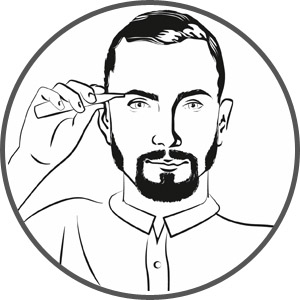
Figure 3.2: High-quality vertical stainless steel blade for precise trimming.

Figure 3.3: Comb attachment for adjusting trimming length to 3mm or 6mm.

Figure 3.4: Included accessories: protective cap, cleaning brush, and storage bag.
Package Contents:
- 1x Beurer HR 2000 Precision Trimmer
- 1x Comb Attachment (3/6 mm)
- 1x Protective Cap
- 1x Storage Bag
- 1x Cleaning Brush
- 1x AA Battery (1.5 V)
4. Setup
4.1 Inserting the Battery
- Twist the lower part of the trimmer body counter-clockwise to open the battery compartment.
- Insert one 1.5 V AA battery, ensuring the correct polarity (+/-) as indicated inside the compartment.
- Twist the lower part of the trimmer body clockwise to securely close the battery compartment.
4.2 Attaching the Comb Attachment
- Ensure the trimmer is turned off.
- Align the comb attachment with the trimmer head.
- Gently push the comb attachment onto the trimmer head until it clicks into place. The comb attachment offers two trimming lengths: 3mm and 6mm. Select the desired length by adjusting the comb's position.
- To remove, gently pull the comb attachment away from the trimmer head.
5. Operating Instructions
The Beurer HR 2000 is designed for precise and skin-friendly hair removal. Always ensure your skin is clean and dry before use.
5.1 Turning On/Off
- To turn on the trimmer, slide the power switch upwards.
- To turn off the trimmer, slide the power switch downwards.
5.2 Trimming Nose Hair
- Gently insert the trimmer head into your nostril.
- Move the trimmer in a circular motion to trim unwanted hair.
- Do not insert the trimmer too deeply into the nostril.
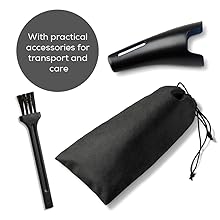
Figure 5.1: Trimming nose hair.
5.3 Trimming Ear Hair
- Carefully insert the trimmer head into the outer ear canal.
- Move the trimmer gently to remove unwanted hair.
- Do not insert the trimmer too deeply into the ear canal.

Figure 5.2: Trimming ear hair.
5.4 Shaping Eyebrows
- Attach the comb attachment (3mm or 6mm) for desired length.
- Gently comb your eyebrows in the direction of hair growth.
- Move the trimmer against the direction of hair growth to trim.
- For precise shaping, use the trimmer without the comb attachment for individual hairs.
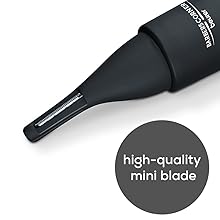
Figure 5.3: Shaping eyebrows with the trimmer.
6. Maintenance and Cleaning
Regular cleaning ensures optimal performance and extends the lifespan of your trimmer.
- Turn off the trimmer after each use.
- Remove the trimmer head by twisting it counter-clockwise.
- Use the included cleaning brush to remove any loose hairs from the blade and the trimmer body.
- Since the device is splash-proof (IPX4), you can rinse the trimmer head under running water. Ensure the main body with the battery compartment does not get wet.
- Allow all parts to air dry completely before reassembling or storing.
- Replace the protective cap on the trimmer head when not in use to protect the blade.
7. Troubleshooting
If you encounter issues with your Beurer HR 2000, refer to the following common problems and solutions:
| Problem | Possible Cause | Solution |
|---|---|---|
| Trimmer does not turn on. | Battery is dead or incorrectly inserted. | Check battery polarity. Replace with a new 1.5 V AA battery. |
| Trimmer performance is poor / not cutting effectively. | Blade is clogged with hair or dull. | Clean the blade thoroughly with the cleaning brush. If performance does not improve, the blade may need replacement (contact customer support). |
| Device makes unusual noise. | Internal component issue or foreign object. | Turn off the device immediately. Do not attempt to open or repair. Contact customer support. |
| Comb attachment does not stay on. | Attachment not properly aligned or damaged. | Ensure the attachment is correctly aligned and pushed firmly until it clicks. Inspect for damage. |
If the problem persists after trying these solutions, please contact Beurer customer support.
8. Specifications
| Feature | Detail |
|---|---|
| Model Name | HR 2000 |
| Item Model Number | 58000 |
| Power Source | 1 x 1.5 V AA Battery (included) |
| Blade Material | High-quality Vertical Stainless Steel |
| Product Dimensions (L x W x H) | 16 x 2.8 x 2.8 cm |
| Item Weight | 60 g |
| Water Resistance | Splash-proof (IPX4) |
| Included Components | Precision Trimmer, Comb Attachment (3/6 mm), Protective Cap, Storage Bag, Cleaning Brush, AA Battery |
| Country of Origin | Germany |
9. Warranty and Support
9.1 Warranty Information
The Beurer HR 2000 Precision Trimmer comes with a 3-year warranty. Please retain your proof of purchase for warranty claims. The warranty covers defects in material and workmanship under normal use. It does not cover damage resulting from misuse, accidents, unauthorized repairs, or normal wear and tear.
9.2 Customer Support
For any questions, support, or warranty claims, please contact Beurer customer service:
- Importer (India): Beurer India Pvt Ltd
Address: 523-524, JMD Megapolis, Sector - 48, Gurugram, Haryana-122018
Email: support@beurerindia.com
Phone: 01244477111 - Manufacturer (Germany): Beurer GmbH
Address: Soflinger Str. 218, 89077 Ulm, Germany
Email: info@beurer.com
Phone: +49 (731) 3989-0
Ask a question about this manual
Ask about setup, troubleshooting, compatibility, parts, safety, or missing instructions. Manuals+ will review the question and use this page’s manual context to help answer it.